Design MCP Tools for AI Agents: What They Actually Do
Compare design tools for AI agents across creation, editing, brand controls, and export, including Figma, Canva, Adobe, Claude, and Moda.
 Anvisha Pai, Co-founder & CEO, Moda
A design MCP server lets Claude, Codex, Cursor, or another compatible agent call a design product through structured tools. The important question is not whether a vendor says “MCP.” It is what the agent can actually read, create, edit, and export after you connect it.
The current options are more capable, and more different, than a simple ranking suggests. Figma is strongest when native Figma structure and an existing design system matter. Canva brings its large template and asset ecosystem into agent workflows. Adobe exposes specialist image, vector, video, and template operations. Claude Design combines a conversational canvas with its own design systems. Moda focuses on agent-created, editable design assets across decks, documents, social posts, diagrams, and websites.
What MCP changes, and what it does not

The Model Context Protocol is a standard way for an AI client to discover and call tools. An MCP server can expose operations such as “read this frame,” “create a deck,” “replace this image,” or “export this canvas.” It does not guarantee that every connected design product supports the same operations.
Keep four access methods separate when evaluating a workflow:
- MCP: the agent discovers named tools and calls them using a standard protocol.
- API: code sends structured requests to a service. An agent can write that code, but the API is not automatically an MCP server.
- CLI: the agent runs commands in a terminal. This works well for repeatable developer workflows, but requires local setup and authentication.
- Browser or UI automation: the agent clicks through the same interface a person uses. It can reach products without a suitable API, but it is usually slower and more sensitive to interface changes.
A product may offer more than one path. For example, Claude Design is a built-in Claude product on the web and desktop, but Claude Code can also connect to it through MCP. Adobe offers interactive connectors as well as MCP endpoints for particular workflows. Describe the path you are actually using instead of treating every integration as interchangeable.
How we evaluated the tools
This comparison is based on current first-party documentation and the published tool surfaces. We did not run paid generations or score visual quality. For each product, we checked:
- Whether the integration is first-party and officially documented
- What an agent can read from existing designs or libraries
- Whether it can create native, editable design content
- Whether it supports targeted edits instead of only whole-output regeneration
- How brand kits, variables, components, or design systems enter the workflow
- What export or handoff options are documented
- Which plans, permissions, clients, or product boundaries affect access
Design MCP tools at a glance
| Product | What an agent can do | Best fit | Important boundary |
| Figma MCP | Inspect and write native Figma objects, variables, styles, components, slides, and FigJam content | Product design, design systems, design-to-code | Write access needs a Full seat and edit permission; some tools support only selected clients |
| Canva MCP | Generate and edit designs, search libraries, use brand assets and templates, comment, resize, and export | Template-led visual communication and teams already using Canva | Brand-template and autofill tools depend on plan |
| Adobe connectors and MCP | Run image, vector, template, video, and creative-production operations | Specialist media editing and Adobe-centered workflows | Capabilities and supported clients vary by connector and account |
| Claude Design | Create and refine designs, prototypes, slides, and microsites on a conversational canvas | Teams already working in Claude that want one integrated design environment | Beta product; shared Claude usage limits and basic simultaneous editing |
| Moda MCP | Read canvases and tokens; create, edit, remix, rebrand, and export multi-format design work | Agent-led creation of editable branded assets across several formats | Requires a Moda workspace; it is not a substitute for Figma component systems or Adobe specialist editing |
Figma MCP: native canvas work and design-to-code
Figma’s official MCP server is the strongest option when the source of truth is already a Figma file or design system. It can extract design context for implementation, connect Figma components to code, create FigJam diagrams, and write native content back to Figma.
The current tool catalog includes a general-purpose `use_figma` tool that can create, inspect, edit, and delete objects in Figma Design, FigJam, and Figma Slides. It can work with frames, components, variants, variables, styles, text, images, auto layout, slide content, and diagram objects. That directly contradicts the older idea that Figma MCP is only a read layer.
Use Figma MCP when an agent needs to extend an established component system, fix auto layout, map designs to code through Code Connect, or create structured UI inside a file your designers already maintain. A Full seat is required for write workflows, and modifying an existing file also requires edit permission. Some remote tools and code-to-canvas flows are limited to supported clients.
Canva MCP: templates, brand assets, and broad design operations
Canva now provides a first-party remote MCP server. It is not an unofficial, read-only community integration. The documented surface includes design generation and targeted editing, library and folder search, asset uploads, brand-kit and template access, comments, resizing, and export to formats such as PDF, PNG, JPG, PPTX, and MP4.
Plan availability varies by tool. Brand-template search and creation require Pro or above, while autofill tools are Enterprise-only. Many asset, comment, search, and export operations are available more broadly. Check the specific operation instead of labeling Canva MCP as either fully open or entirely paywalled.
Choose Canva MCP when your organization already relies on Canva templates, its media library, and familiar editing environment. Its template ecosystem and broad asset catalog are real advantages. For highly custom product UI or a code-connected component system, Figma is usually a more natural source of truth.
Adobe: specialist creative operations through connectors and MCP
Adobe for Creativity exposes tools from Photoshop, Lightroom, Illustrator, Firefly, Premiere, Express, InDesign, and Adobe Stock through Claude. Documented workflows include portrait retouching, background replacement, template-based design, vector work, and video resizing. Results can continue into Adobe applications when more precise control is needed.
Adobe’s Run-Workflow MCP is a separate path for discovering and executing repeatable Firefly Creative Production workflows from Claude Code, Claude Desktop, or Cursor. It can chain actions, process batches, composite images into templates, and run video-format conversions.
For agents working inside the desktop video editor, our Voyager team's Premiere Pro MCP setup guide covers local bridge options and installation. That is a separate setup decision from connecting to Adobe's cloud workflows.
Adobe is the best fit in this list for specialist photo, vector, video, and production workflows. It is not one universal connector with identical capabilities everywhere. The available tools depend on the connector, client, Adobe account, and workflow service. Some tasks can start without signing in; higher limits, storage continuity, and additional tools can require an Adobe account or paid access.
Claude Design: a built-in design product with an MCP path
Claude Design is not a flat-image generator. It has a conversational canvas for designs, interactive prototypes, presentations, and microsites. Users can request broad changes in chat, attach comments to specific elements, and directly drag, resize, and align items on the canvas. Claude Code can connect to the same system through the Claude Design MCP server.
Organizations can create persistent design systems from codebases, slide decks, documents, prototypes, screenshots, logos, color palettes, and typography references. Published systems can apply across team projects. Claude Design supports HTML bundles, PPTX, and PDF export, plus handoff to Claude Code and several partner products.
Choose Claude Design when your team already works heavily in Claude and wants design, prototyping, and implementation context in one environment. The product is still in beta. Anthropic documents intermittent comment issues, basic multi-person editing, web and desktop availability only, and usage that draws from the same allowance as other Claude work.
Moda MCP: multi-format creation and editable design tasks
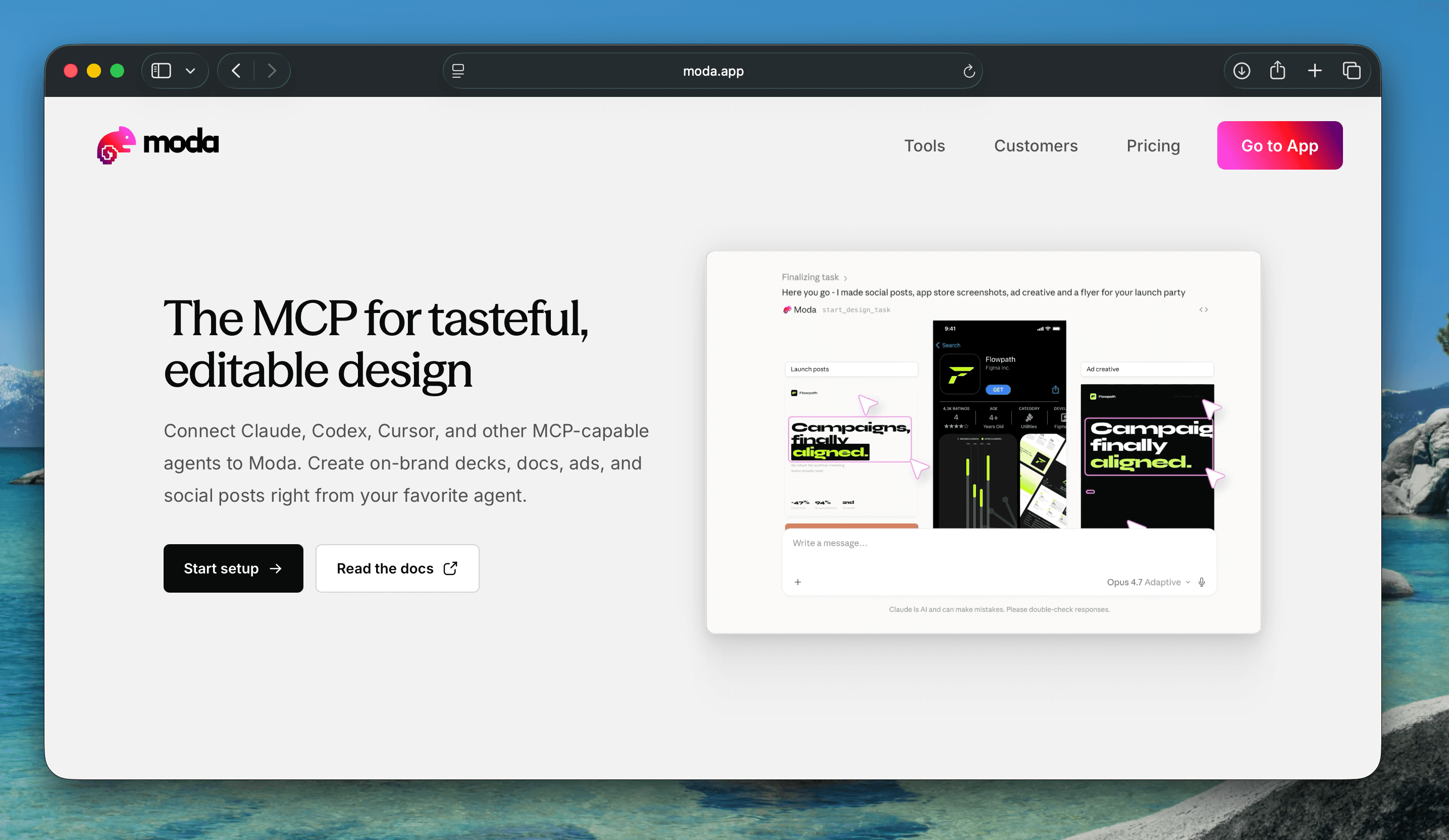
Moda’s MCP server is designed for coding agents that need to create and revise finished visual assets. Its tools can inspect a Moda canvas as semantic structure, read design tokens, create brand kits from a website, create or edit a canvas, remix or rebrand existing work, search canvases, attach source files, and export PNG, JPEG, PDF, or PPTX.
The main write operation runs an asynchronous design task. An agent supplies a prompt, format, optional brand kit, source attachments, and either a new or existing canvas. It can continue a prior conversation for iterative changes or target a canvas for an in-place edit. The result remains editable in Moda rather than ending only as a downloaded image.
Moda is a good fit for decks, social graphics, carousels, PDFs, diagrams, UI mockups, and related campaign assets that need to share a brand. It is not the strongest choice for every job. Figma has deeper native component and design-to-code workflows. Adobe has more mature specialist photo, video, and vector tooling. Canva has a much larger template and stock-asset ecosystem. Moda also requires authentication for private work, and design tasks consume the workspace’s plan limits and credits.
How to choose a design tool for your agent
Start with the object you need to preserve
If you need to preserve a Figma component system, use Figma MCP. If you need to preserve a Canva brand template, use Canva MCP. If the important source is a Photoshop, Illustrator, or video workflow, use the relevant Adobe connector. If you need an editable multi-format design and want the agent to operate the whole creation process, compare Claude Design and Moda.
Check the actual write tools
A server that can read a design is not necessarily allowed to change it. A server that can generate a new design may not be able to edit an existing one. Inspect the tool list for targeted writes, required permissions, supported clients, and plan restrictions. For consequential edits, keep a recoverable copy or use a remix workflow rather than modifying the only source.
Use browser automation only when it adds something
Browser automation is useful for gathering references, capturing screenshots, or reaching a workflow that has no suitable programmatic interface. It should not be mistaken for the product’s supported agent API. If a first-party MCP, API, or CLI exposes the needed operation, that structured route is usually easier to repeat and verify.
Run one end-to-end test
Before adopting a workflow, ask the agent to read real source material, create one representative asset, make two targeted edits, and export it to the destination your team uses. Verify editability, fonts, image quality, permissions, and whether the agent changed anything you did not request. Product documentation establishes available controls, not the quality of a particular output.
The practical answer
There is no universal “best design MCP.” Figma is the clearest fit for product design systems and design-to-code. Canva is strong for template-led brand content. Adobe is strongest for specialized media operations. Claude Design offers a capable built-in design environment for Claude users. Moda is built for agents creating and iterating on editable, branded assets across several formats.
Pick the product whose native object model matches the work you need to preserve. Then confirm that its agent surface exposes the exact read, write, and export operations your workflow requires. If you want a concrete example of an agent working with editable design, see how Moda’s MCP setup works.

Real editable visuals. Real canvas. Full control.
Fly through design work