6 Best Docling Alternatives for Document Parsing
Compare six Docling alternatives for hosted parsing, extraction, RAG, document ETL, and local control, including results from the same PDF test.
 Anvisha Pai, Co-founder & CEO, Moda
The best Docling alternative depends on what you are trying to stop operating yourself. Choose Reducto for a fast hosted parser with detailed layout output, Extend for extraction plus evaluation and review workflows, LlamaParse for configurable parsing aimed at RAG, or Unstructured when connectors and document ETL matter as much as the parser. Mistral OCR is a narrower API building block. Datalab is worth evaluating when document conversion and deployment options are central.
You may not need an alternative at all. Docling is compelling precisely because it can run locally and produces an inspectable document representation. If local execution, code-level control, and broad file support are requirements, switching to a managed API may exchange one kind of work for another rather than remove it.
We tested Docling 2.126.0 locally and ran the same four synthetic PDFs through Reducto r-1, Extend Performance, and LlamaParse Agentic. We also ran Unstructured 0.27.5 locally. This article combines those results with current official documentation, checked September 6, 2026.
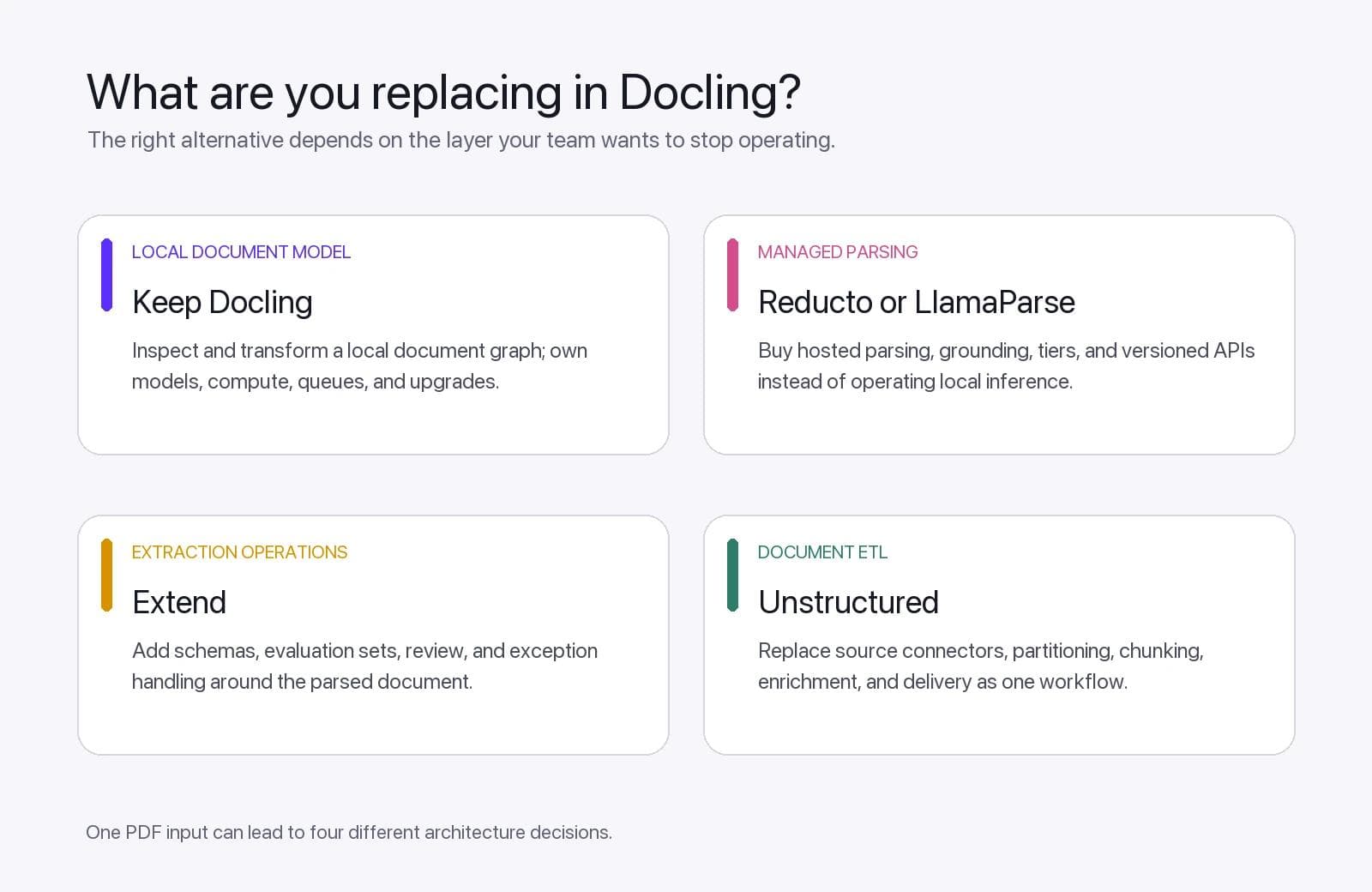
Docling alternatives at a glance
| Option | Best reason to evaluate it | What changes from Docling |
|---|---|---|
| Reducto | Hosted parsing with strong layout handling and source grounding | You buy an API instead of operating the parser and models locally |
| Extend | Parsing plus evaluation, schema extraction, and review workflows | Quality operations move into a managed platform |
| LlamaParse | Configurable hosted parsing for RAG and mixed document types | Parsing tiers, versions, and usage billing replace local model operation |
| Unstructured | Local partitioning or managed pipelines with connectors and delivery | The center of gravity moves toward document ETL and chunking |
| Mistral OCR | A direct OCR and document-understanding component | Your application owns more of the workflow around the model API |
| Datalab | Conversion-oriented APIs and commercial deployment routes | Output conversion and deployment packaging become the purchase |
These products are not interchangeable. A hosted parser, a schema extractor, a connector platform, and a local document library can all accept a PDF while replacing different parts of your system.
What you are replacing when you replace Docling
Docling's document converter turns supported inputs into a DoclingDocument. That representation can preserve document hierarchy, tables, pictures, page information, and other elements before you export Markdown, HTML, JSON, text, or chunks.
Its supported-format list includes PDF, Office documents, OpenDocument files, HTML, Markdown, images, audio, video, email, and several structured XML formats. That breadth is useful, but format acceptance is only the beginning of the decision.
Before comparing alternatives, decide which part of Docling you want to replace:
- Local parsing: detecting layout, text, tables, pictures, and reading order on your infrastructure.
- The document model: retaining an inspectable representation that downstream code can traverse and serialize.
- OCR and visual understanding: recognizing scans, handwriting, charts, equations, and figures.
- RAG preparation: generating Markdown, chunks, page references, and retrieval-ready metadata.
- Schema extraction: turning a document into a validated invoice, contract, resume, or other business object.
- Document operations: connectors, queues, retries, review, monitoring, and delivery into another system.
A tool can be better for one layer and irrelevant to another. Reducto may remove local model operations without replacing Docling's in-process Python objects. Unstructured Pipelines may replace an ingestion system rather than only the parser. Mistral OCR may improve document understanding while leaving you to build validation and review.
What happened in our eight-page parser test
We built four synthetic PDFs with known content:
- A two-page digital report with a table, footnote, hyperlink text, formula, and labeled two-column reading order.
- A three-page table fixture with wrapped labels, blanks, negative values, European number formatting, and 46 transactions crossing a page boundary.
- Two low-resolution scanned invoices with light skew, line items, totals, addresses, and a handwritten-style approval.
- A mixed page with checkboxes, comparison symbols, a formula, chart labels and values, a caption, and a footer.
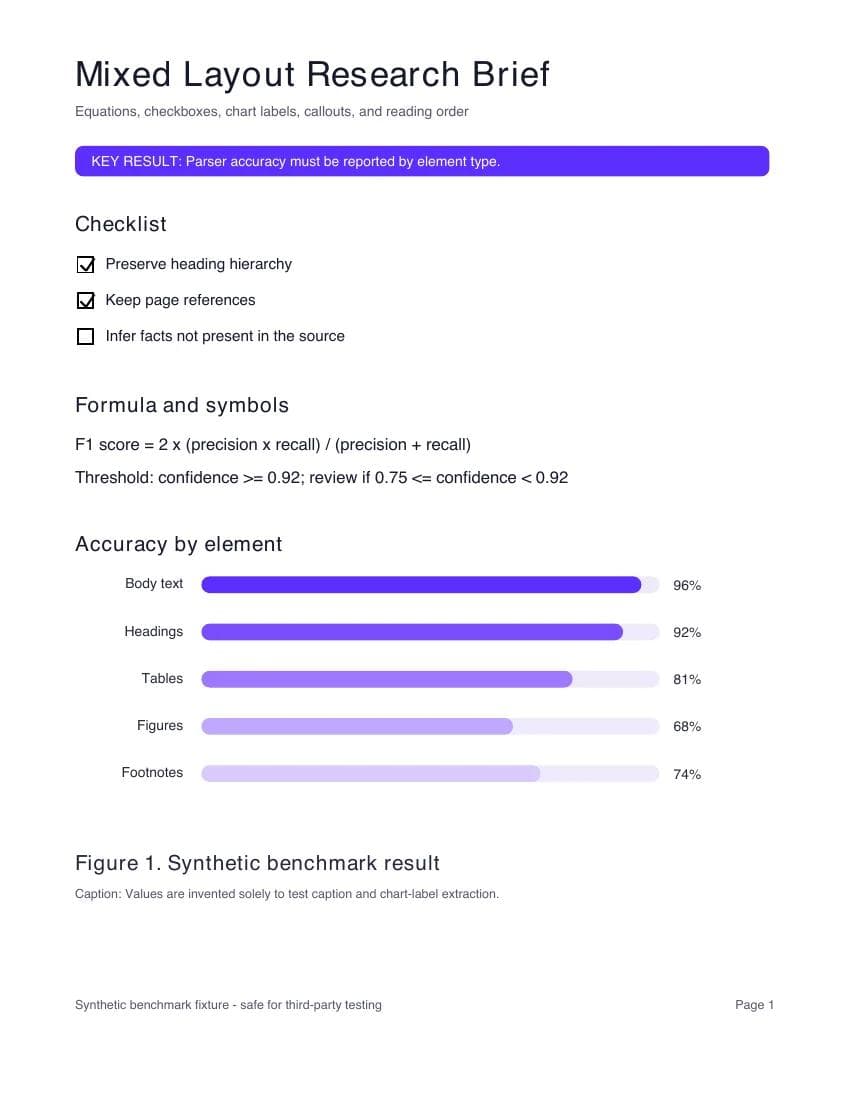
The evaluator checked 175 literal ground-truth items across eight pages, including every transaction ID and selected invoice fields. It allowed harmless differences in HTML, Markdown, spaces, and mathematical notation. That makes the test useful for detecting missing content, but it is not a general accuracy benchmark.
Download the benchmark pack to inspect the synthetic PDFs, sanitized outputs, scoring scripts, fixed-schema extraction results, and the public NIST extension.
| Tested configuration | Digital report | Tables | Scanned invoices | Mixed layout | Macro average |
|---|---|---|---|---|---|
| Reducto r-1 | 100% | 100% | 100% | 100% | 100% |
| Extend Performance | 100% | 100% | 100% | 100% | 100% |
| LlamaParse Agentic | 100% | 100% | 100% | 90.9% | 97.7% |
| Unstructured 0.27.5 auto, local | 100% | 96.9% | 96.4% | 100% | 98.3% |
| Docling 2.126.0 defaults, local | 100% | 100% | 64.3% | 50.0% | 78.6% |
Docling's default run was exact on the digital report and table fixtures. It struggled with the intentionally low-resolution scanned invoices and did not recover most of the bar chart labels and values. We did not tune its OCR pipeline, table options, models, or accelerator settings. This result describes one default configuration, not Docling's ceiling.
Unstructured's automatic local strategy retained more of those two fixtures, but it still missed one tested invoice line total and three literal table labels. All five systems preserved the labeled two-column reading order. Every system preserved all 46 transaction IDs exactly once.
The hosted systems differed more in representation and wall time than in core fact recall. Reducto summarized the chart in prose. Extend returned a typed figure with label-value lines and a generated caption. LlamaParse turned it into an HTML table. LlamaParse also omitted the deliberately generic footer and page number, which can be helpful boilerplate removal for RAG rather than an error.
The timing chart below shows one synchronous run per file, including upload and processing. It is not a production latency estimate.
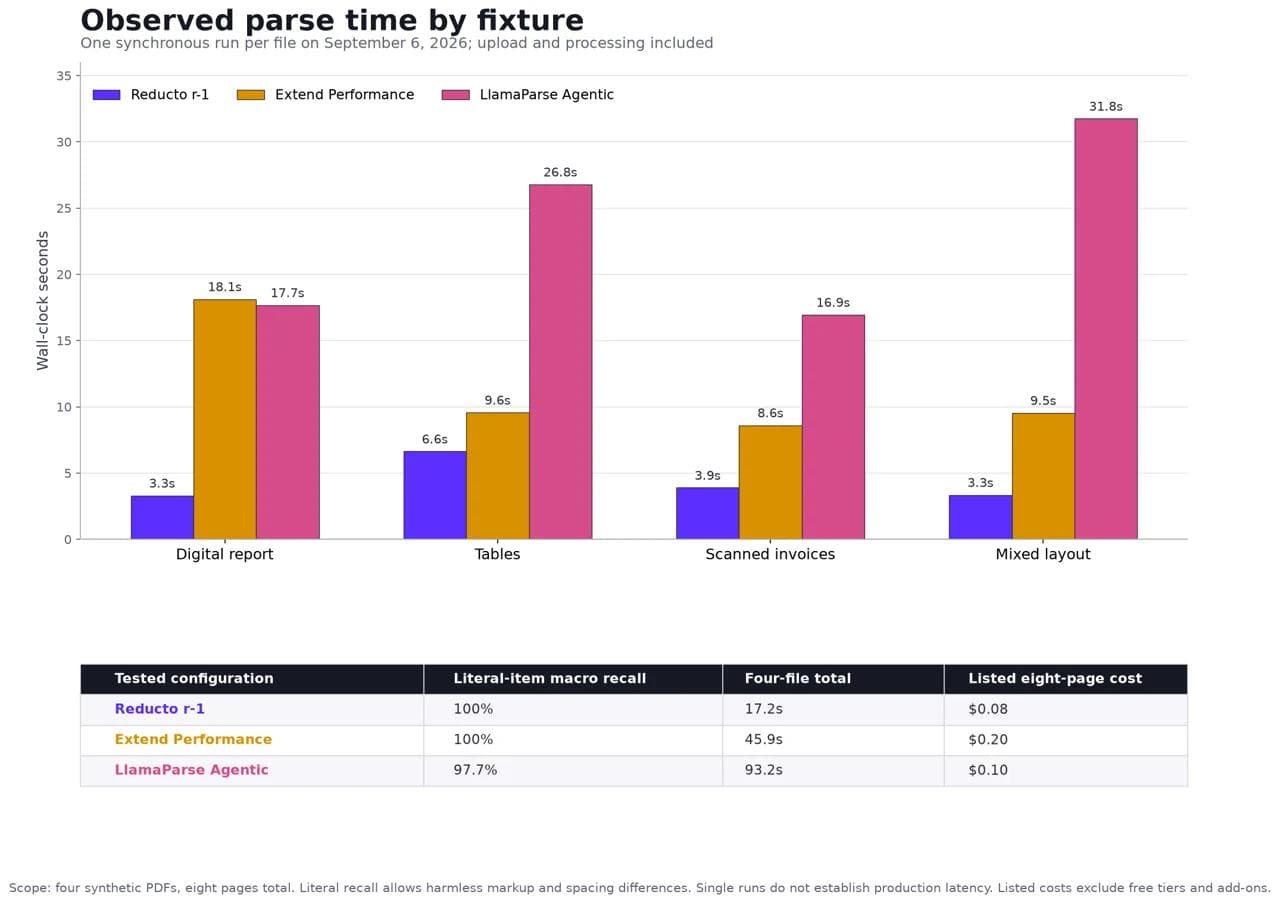
We deliberately excluded local timings from that chart. The first Docling and Unstructured processes initialized or downloaded models, and every fixture launched a fresh Python process. Comparing that startup cost directly with a warm hosted service would be misleading.
A 48-page public document changed the picture
The synthetic set deliberately stresses individual features, but it is still only eight pages. We therefore added the complete 48-page NIST Artificial Intelligence Risk Management Framework 1.0, which contains a table of contents, figures, footers, nested headings, and four long category-and-subcategory tables.
Before running the parsers, we selected 40 literal items spanning the title, section hierarchy, table titles, and specific continuations inside the GOVERN, MAP, MEASURE, and MANAGE tables.
| Tested configuration | Targeted items retained | One-run wall time |
|---|---|---|
| Reducto r-1 | 40 of 40 | 9.876 seconds |
| Extend Performance | 40 of 40 | 34.775 seconds |
| LlamaParse Agentic | 40 of 40 | 140.146 seconds |
| Docling 2.126.0 defaults, local | 40 of 40 | 101.152 seconds |
| Unstructured 0.27.5 auto, local | 36 of 40 | 111.024 seconds |
Docling's unchanged default recovered all 40 targeted items on this longer born-digital report. That result matters because the same defaults were weak on the tiny low-resolution scans and visual bar chart. “How accurate is Docling?” is not one question. It depends on whether the workload is a structured digital report, a noisy scan, or visual content whose values are encoded spatially.
Unstructured's four misses were continuations inside the GOVERN and MEASURE tables. Its reconstructed MEASURE table joined some categories to the wrong amount of subcategory text. This targeted check is not a full-document accuracy score, but it exposes a failure that the eight-page count did not.
The wall times remain single observations with different infrastructure. They should not be used as a general speed ranking. The useful conclusion is that adding a different document class changed which weaknesses appeared.
1. Reducto: for a managed parser with layout controls
Reducto Parse returns structured chunks, blocks, page-relative bounding boxes, and confidence information. Its current r-1 parser handles text, tables, figures, layout, formatting, and grounding in a full-page model.
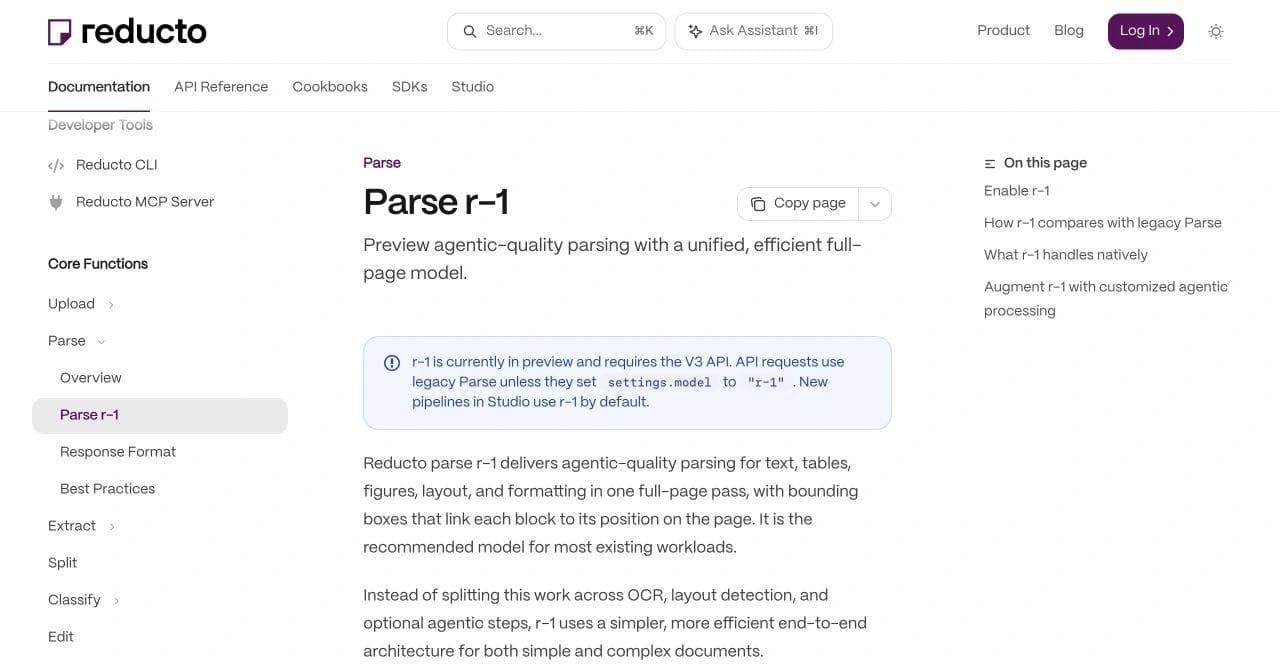
One easy mistake matters for an evaluation: r-1 is currently in preview and must be selected explicitly in V3 API requests. Reducto's Studio uses r-1 by default for new pipelines, while an API request that omits the model setting uses legacy Parse. Carry the tested model into production before comparing output, timing, or cost.
In our small test, Reducto r-1 recovered every literal item and completed the four synchronous runs in 17.2 seconds total. Its listed eight-page parsing cost was approximately $0.08 using Reducto's September rate. Those observations do not establish production throughput or a general accuracy lead.
Choose Reducto over Docling when you want a managed parsing API, detailed source grounding, and less local model operation. Keep Docling when in-process control, offline operation, or an inspectable local document representation is the actual requirement.
2. Extend: for extraction quality operations
Extend Parse produces Markdown chunks and typed layout-aware blocks. Extend also surrounds extraction with evaluation sets and a Review Agent, which can report issues and score results.
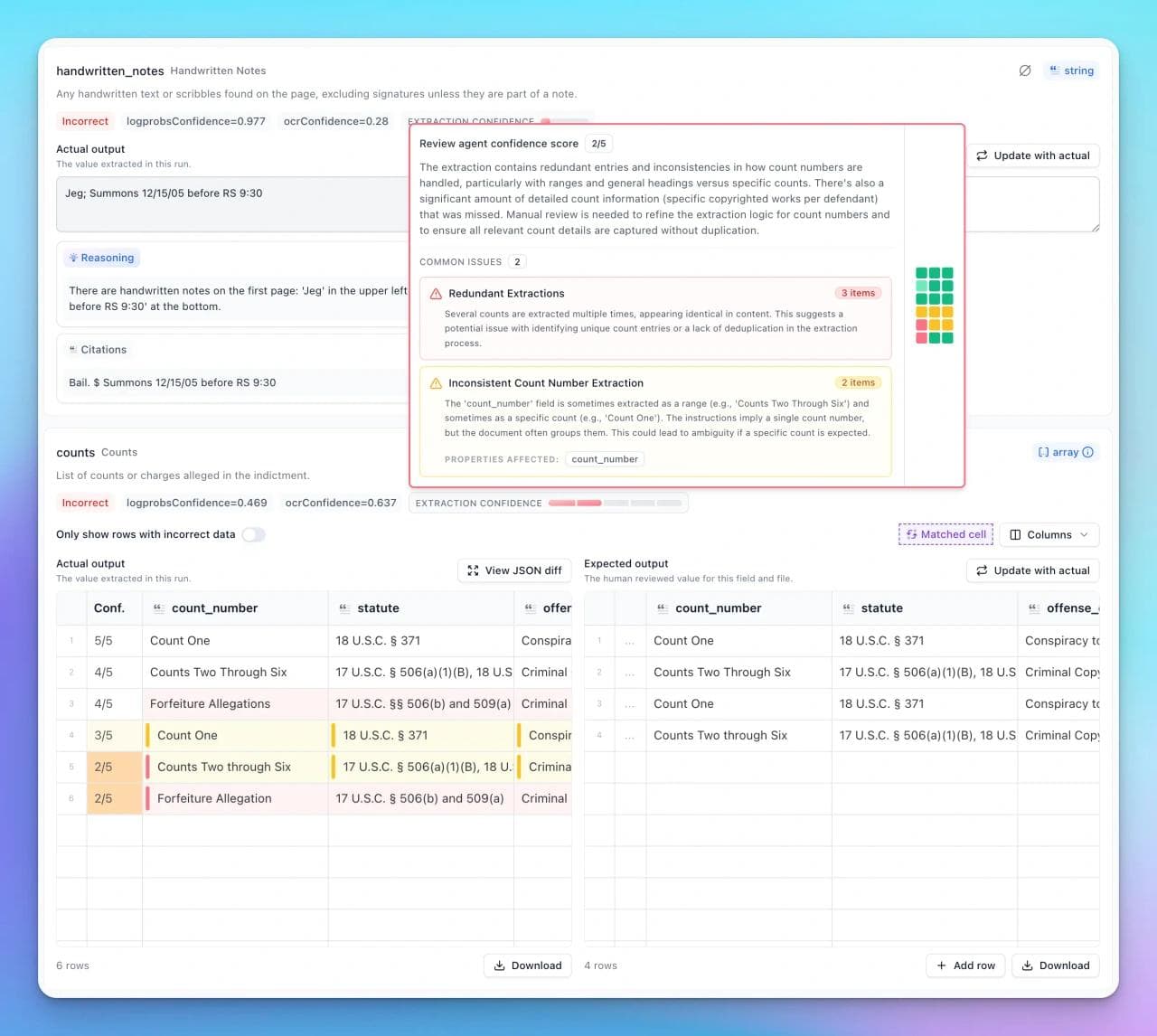
That operating loop is Extend's strongest distinction from Docling. A team can retain reviewed examples, test processor changes, and route questionable extraction results. The important metric is not whether a review score exists. It is how many wrong results pass your chosen threshold and how much human work the remaining queue requires.
Extend Performance recovered every tested literal item in our parser fixture. The four synchronous calls took 45.9 seconds and returned 16 total credits. At the listed pay-as-you-go credit price and Performance Parse rate, that parser component was approximately $0.20 for eight pages. Schema extraction, review, storage, and other work were not included.
Choose Extend over Docling when schema extraction and a managed evaluation-review loop matter more than operating the parser locally. Do not compare Extend's complete extraction workflow with the cost of a bare local parse.
3. LlamaParse: for configurable hosted RAG parsing
LlamaParse exposes Fast, Cost Effective, Agentic, and Agentic Plus tiers, along with version pinning and output controls. Its configuration documentation includes concrete options for presentations and spreadsheets, such as speaker notes, off-slide content, chart data, formulas, and multiple tables in one sheet.
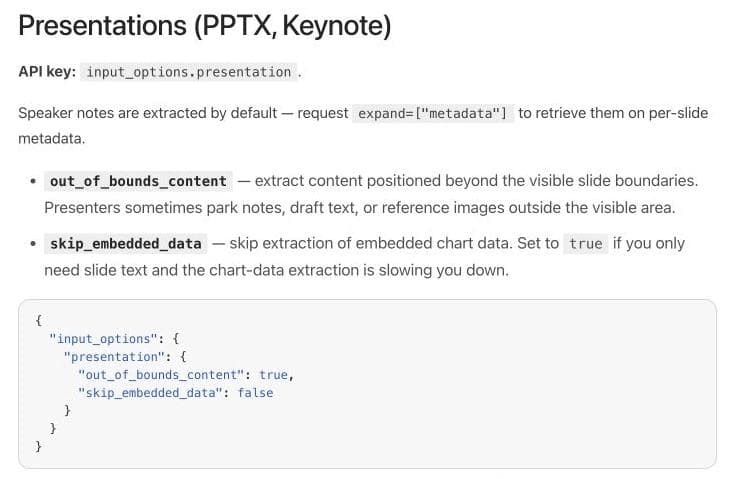
The Agentic tier recovered all tested report, table, and scanned-invoice items. On the mixed-layout page, it kept the substantive content but omitted the generic footer and page number, producing 97.7% macro literal recall. The four single runs took 93.2 seconds total. Listed parsing cost was approximately $0.10 for eight Agentic pages under LlamaParse's credit schedule.
Choose LlamaParse over Docling when a hosted, configurable parse-to-RAG path and LlamaIndex ecosystem fit matter more than local operation. Keep tier and version fixed during evaluation because latest is useful for exploration but weak for reproducing a long-lived benchmark.
4. Unstructured: for document ETL and deployment choices
Unstructured is two decisions. Its open-source partitioning library can run locally and emit typed document elements. Its managed Pipelines add connectors, transformation, chunking, enrichment, embedding, and delivery.
Our local test used Unstructured 0.27.5 with partition_pdf(strategy="auto", infer_table_structure=True). It achieved 98.3% macro literal recall on the same fixtures. The first process took 55.8 seconds while models initialized; the later fresh-process runs took 13.7, 8.4, and 6.2 seconds. These are startup observations, not a tuned persistent-service benchmark.
We did not test Unstructured's hosted service, so we make no claim about its hosted quality or latency here.
Choose Unstructured over Docling when source connectors, document ETL, chunking, and delivery are the larger job. Compare the open-source library and hosted platform separately. Local package names do not guarantee identical models or behavior in the service.
5. Mistral OCR: for a model API inside your application
Mistral's document AI and OCR can return document content, tables, images, and structured annotations. It is useful when you want a direct model API and are prepared to own intake, retries, schema validation, review, storage, and downstream delivery.
That narrower scope is both the advantage and the tradeoff. You avoid adopting a complete document platform, but your application must supply the quality system around the model.
Choose Mistral OCR over Docling when managed document understanding matters and your team already has the surrounding pipeline. Keep Docling when local processing and an inspectable document graph are more important than a hosted model endpoint.
We did not run Mistral in this benchmark. Its presence in the shortlist comes from product scope, not an inferred score.
6. Datalab and Marker: for conversion and deployment options
Datalab Convert produces Markdown, HTML, JSON, and chunks. Datalab also documents a commercial on-premises route. The hosted service, Marker project, models, licenses, and support terms should be checked separately rather than treated as one interchangeable package.
Datalab is a useful alternative when conversion output or commercial deployment packaging is the main requirement. Docling may still be a better foundation when you want to manipulate a broad local document representation in Python.
We did not run Datalab or Marker in this benchmark. Test the exact processor and deployment route you plan to operate before comparing cost or quality.
When you should stay with Docling
Switching is not automatically progress. Stay with Docling when:
- documents must remain local or offline;
- you need to inspect and extend the document representation in-process;
- broad input and output format support matters more than a hosted extraction workflow;
- your team can operate the dependencies, models, capacity, upgrades, and exception handling;
- the tuned pipeline performs well on your real acceptance set.
Docling's advanced PDF options expose OCR, table structure, image scale, heading recovery, accelerators, and model choices. Our default-run misses are a reason to tune and retest those settings, not proof that tuning cannot work.
More Docling processing was not automatically better
We tried two obvious responses to the weak scanned-invoice result: force full-page OCR at a higher image scale, then try Docling's Granite-Docling VLM pipeline. Both performed worse on this machine and fixture.
| Docling 2.126.0 configuration | Invoice items retained | Fresh-process wall time |
|---|---|---|
DocumentConverter defaults | 18 of 28 (64.3%) | 6.459 seconds |
| Full-page RapidOCR, scale 4, accurate tables and chart extraction enabled | 17 of 28 (60.7%) | 70.127 seconds |
| Granite-Docling-258M VLM defaults | 8 of 28 (28.6%) | 443.338 seconds |
The forced OCR pass introduced additional character errors in dates, SKUs, tax, and totals. The VLM output changed NS-2026-017 to 30-30-017, lost most line-item values, and inserted a long sequence of numbers that did not represent the invoice.
This is not evidence that those configurations are generally inferior. The VLM pipeline could not use MLX in our environment and fell back to Transformers on the local machine. The full-page run also enabled several changes together, so it does not isolate one causal setting. It is evidence for a narrower operational lesson: do not turn on every expensive processing option and assume quality went up.
Start from one named baseline, change one setting at a time, and score the exact failure class that motivated the change. Retain runtime and hardware details alongside the output. A configuration that sounds more advanced can be slower and less accurate on a particular document.
A proof-of-concept that produces a real answer
Run a small acceptance pack before migrating a corpus.
- Choose representative files. Include the worst scan, longest table, hardest layout, and most important native Office format you actually receive.
- Write the output contract first. Decide whether you need Markdown, typed elements, page boxes, images, formulas, citations, chunks, or a business schema.
- Create ground truth independently. Do not copy a parser's first output and call it expected data.
- Pin the configuration. Record package version, model, tier, options, hardware, and hosted region where relevant.
- Keep raw results. Count missing, duplicated, altered, and invented items separately.
- Measure the whole workflow. Include upload, parsing, retries, extraction, review, storage, and delivery.
- Rerun one changed schema or parser version. A tool is maintainable only if the team can detect regressions after the demo.
The practical choice is the system that preserves your required information and exposes failures your team can act on. A higher score on somebody else's PDF set is not a substitute for that contract.
Frequently asked questions
What is the best Docling alternative?
Reducto is a strong first evaluation for managed layout-aware parsing, Extend for extraction evaluation and review, LlamaParse for hosted RAG parsing, and Unstructured for document ETL. The best choice depends on which Docling layer you are replacing.
Is Docling free and open source?
The Docling codebase is available under the MIT license. Check the licenses and terms of optional models and remote services separately. Operating it also carries compute, engineering, and maintenance costs even without per-page API pricing.
Is Unstructured better than Docling?
Neither is universally better. Docling emphasizes a local document representation and conversion pipeline. Unstructured offers a local partitioning library and a broader managed ingestion and delivery platform. Test the exact package or service you intend to deploy.
Can Docling parse scanned PDFs?
Yes, Docling provides OCR pipeline options for scanned documents. Its performance depends on the selected OCR engine, models, image quality, language, and configuration. Our untuned default run struggled on deliberately low-resolution scans.
Does a hosted parser produce better results than a local parser?
Not necessarily. In our small test, the three hosted quality-oriented configurations had higher literal recall than Docling's defaults, while local Unstructured was close to them. The configurations were not equivalent, and a tuned local pipeline could produce different results.
How should I compare document parsers?
Use a representative file set with independent ground truth. Score missing and altered content by element type, preserve raw outputs, pin versions and settings, and measure the complete workflow including validation and review.

Real editable visuals. Real canvas. Full control.
Fly through design work