How to Repurpose Content With AI: A Step-by-Step Workflow
Learn how to turn an article, report, deck, or transcript into useful visual assets with AI, using a tested workflow, exact prompts, and real Moda screenshots.
 Anvisha Pai, Co-founder & CEO, Moda
AI content repurposing means turning one useful source into new assets for different channels or jobs. The source might be an article, report, presentation, webinar transcript, podcast transcript, video transcript, or existing design. The outputs might be social posts, carousels, slides, documents, or short videos.
The hard part is not generating more material. It is making each new asset useful on its own without losing the facts, qualifications, and point of view that made the source worth repurposing.
This guide gives you a workflow you can follow in Moda. It includes the exact prompt from a real run, product screenshots, the first output, the one repair we needed, and the exports we checked.
The short version: choose one substantive source, write down what must remain true, give every output a distinct reader job, generate one format at a time, review it at its intended size, repair specific problems, and inspect the exported file.
The AI content repurposing workflow
The complete process has seven steps:
- Choose a source with enough substance.
- Decide which new assets are worth making.
- Write a source brief with the facts that cannot change.
- Give one format a specific audience and job.
- Generate the editable asset in Moda.
- Review and repair the result.
- Export and inspect the final file.
Run the process once for each format. Do not ask for ten deliverables in one vague prompt. Separate tasks make it easier to judge each result, repair one problem, and know which instructions worked.
Step 1: Choose content worth repurposing
Start with a complete source, not a topic or a title. Strong sources contain information the AI should preserve rather than invent.
A source is usually worth repurposing when it contains at least three of these:
- A clear claim or point of view
- Original data, research, or examples
- A process someone can follow
- A decision the reader needs to make
- Caveats that change how the advice should be used
Good source types include:
| Source | What to give Moda | Good visual derivatives |
|---|---|---|
| Published article or public report | The URL and any facts that need exact treatment | Carousel, presentation, infographic, checklist |
| PDF, document, or private report | Upload the file and identify the relevant section | Executive summary, slides, one-page brief, social graphics |
| Existing presentation | Import the deck and state what the new audience needs | Carousel, leave-behind, social post, motion recap |
| Webinar, podcast, interview, or video | Attach a transcript or notes with timestamps | Quote cards, key-takeaway deck, carousel, short motion post |
| Existing visual asset | Import or attach the file and explain what may change | New aspect ratios, campaign variants, animation, platform versions |
Do not begin with “make ten social posts about creative testing.” Begin with the actual source. Repurposing can amplify substance, but it cannot create trustworthy substance that was never supplied.
For our worked example, we used Creative Testing for Static Ads. It contains a clear thesis, original ad-library observations, a practical testing method, and limits on what the evidence can prove.
Step 2: Choose outputs by reader job
Do not treat repurposing as resizing. Pick each derivative because it helps a particular reader do something.
We mapped four outputs from the source:
| Format | Audience | Reader job |
|---|---|---|
| LinkedIn carousel | Performance marketer browsing the feed | Learn the method in five self-contained panels |
| Presentation | Marketing lead and team | Discuss the evidence and agree on a test plan |
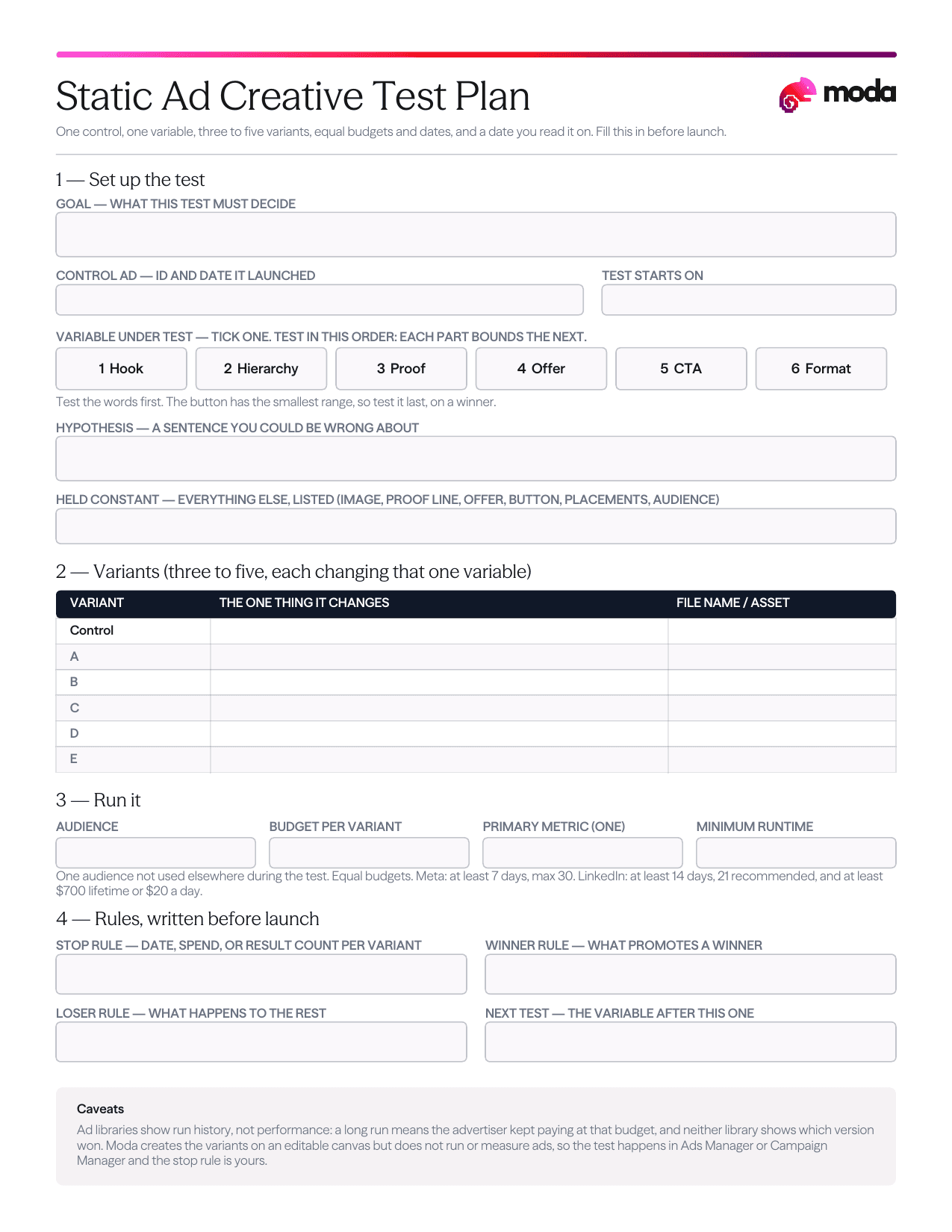
| One-page document | Person preparing the test | Fill in the decisions required before launch |
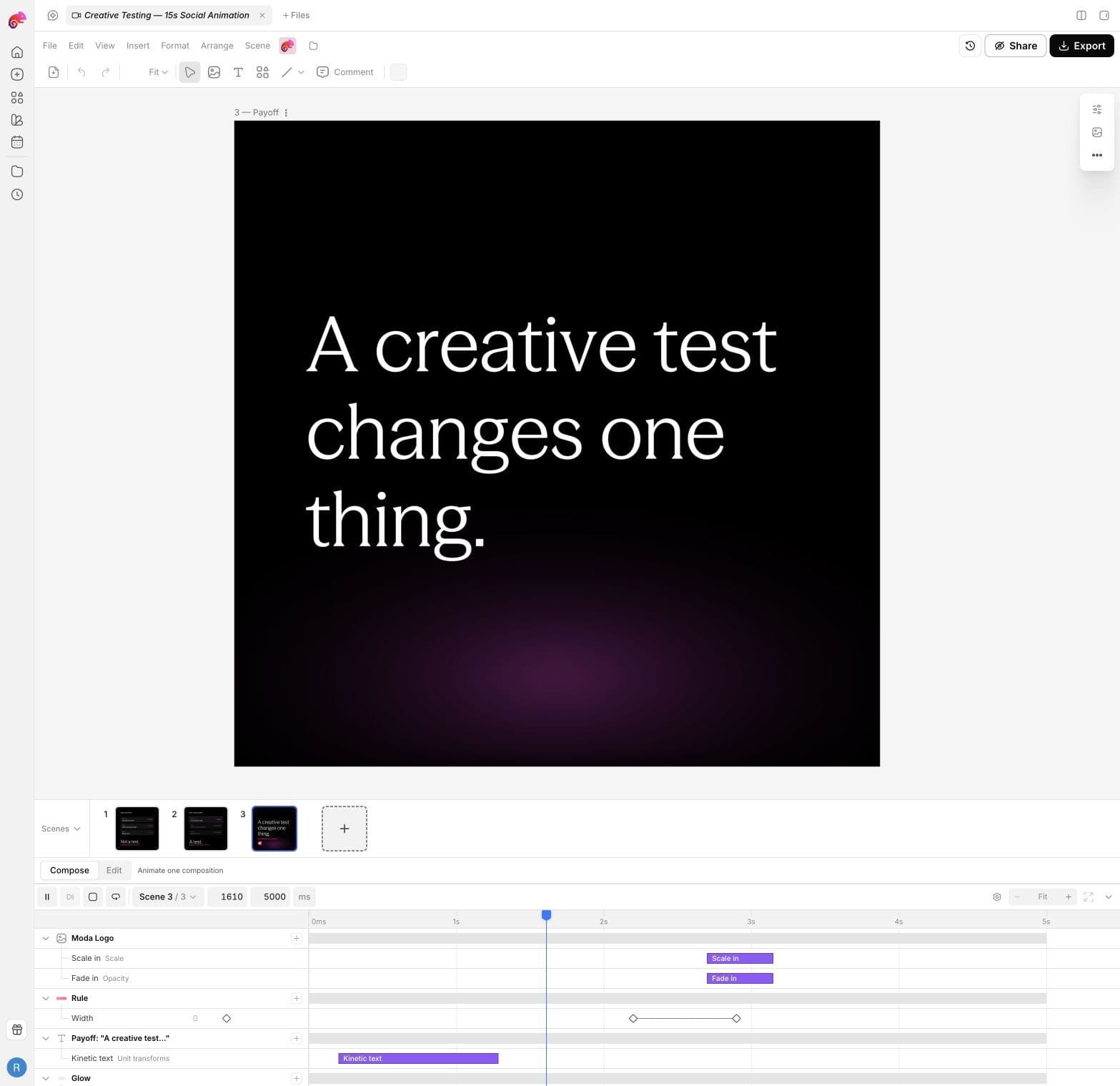
| Animated social post | Marketer encountering the idea for the first time | Understand one rule in 15 seconds |
This is the most important planning step. If every row says “summarize the source,” the result will be the same summary at four dimensions.
You also do not need to create every possible derivative. Choose formats your audience uses and that the source can support. A detailed report may justify a deck and infographic. A sharp 30-second product demonstration may support a short clip and carousel, but not a ten-page guide.
Step 3: Write a source brief
A source brief is the small set of facts, definitions, and caveats that the output cannot contradict. Write it before prompting so accuracy is inspectable.
Our source brief said:
- A real creative test changes one variable.
- A test needs a variable, a hypothesis, and a stop rule.
- The public sample included 1,402 Meta cards and 240 LinkedIn cards.
- Public ad libraries show run history, not conversion results.
- Moda can create variants, but it does not run or measure ads.
The source brief is not another summary. It is a set of guardrails. Include exact units, dates, quotes, names, and limitations when they matter.
Not every derivative needs every fact. The presentation needed the evidence. The 15-second animation only needed the one-variable rule. Omitting an irrelevant statistic is not factual drift. Contradicting it is.
Step 4: Set up the task in Moda
From the Moda home screen:
- Select the brand kit you want to use.
- Choose the output format, such as Slides, Social, Document, Carousel, or Animation.
- Paste the source URL or attach the source file.
- Add the audience, reader job, structure, source guardrails, and export requirement.
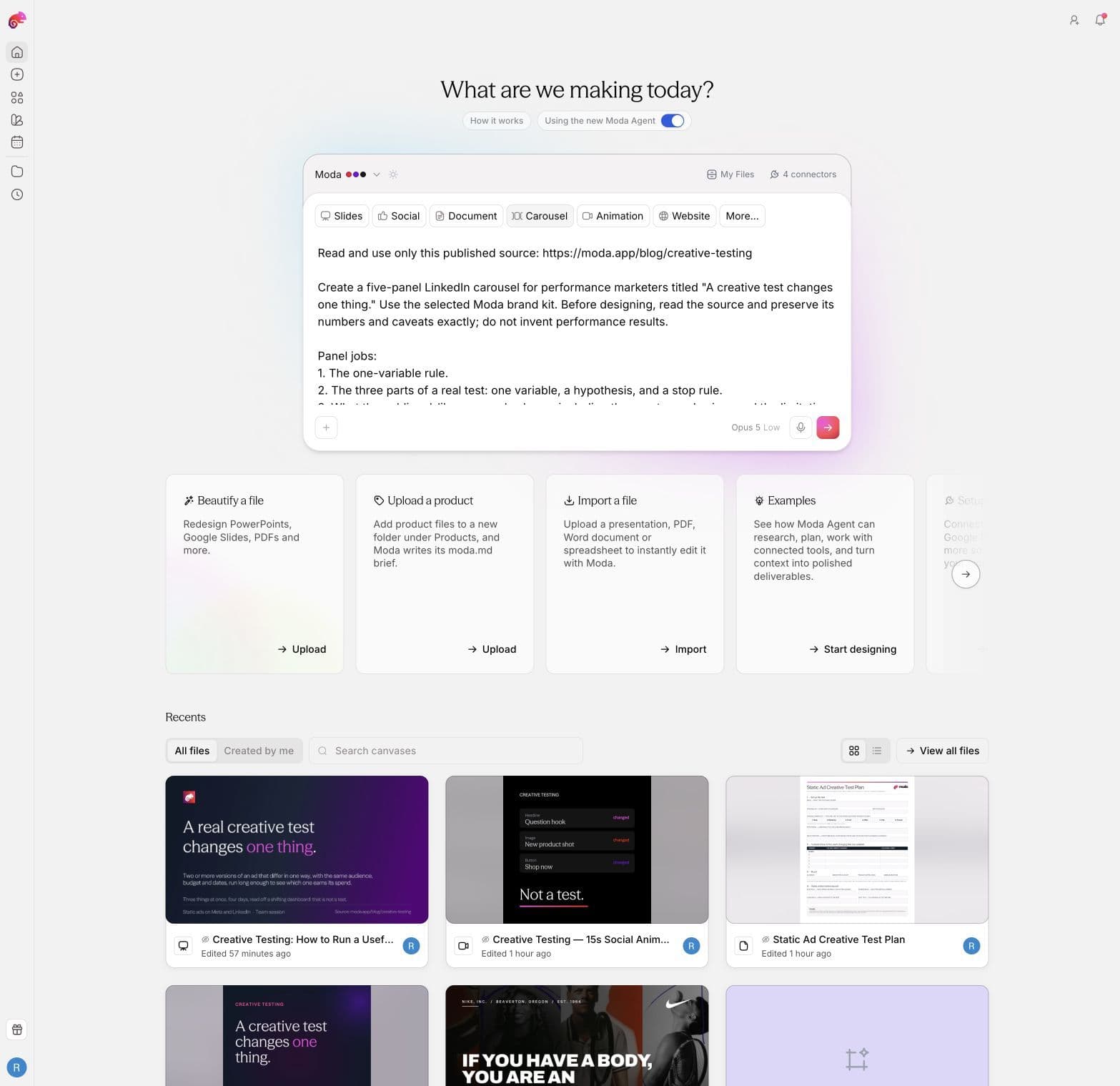
This was our complete carousel prompt:
Read and use only this published source:
https://moda.app/blog/creative-testing

Create a five-panel LinkedIn carousel for performance marketers titled
"A creative test changes one thing." Use the selected Moda brand kit.

Before designing, read the source and preserve its numbers and caveats exactly.
Do not invent performance results.

Panel jobs:
1. The one-variable rule.
2. The three parts of a real test: one variable, a hypothesis, and a stop rule.
3. What the public ad-library sample shows, including the exact sample sizes and
   the limitation that libraries show no results.
4. What to test first: hook, hierarchy, proof, offer, CTA, format.
5. A working default and compact checklist for launching the test.

Make each panel useful on its own, keep text concise, and retain the caveat that
Moda creates variants but does not run or measure ads.
The prompt specifies what to read, who the asset serves, what each panel must do, which facts need protection, and what the tool must not claim. It does not micromanage every color and position because the selected brand kit supplies the visual system.
Step 5: Let the agent research and design
After submission, Moda read the public source, read the selected brand kit, created the canvas, and added the five panels as editable canvas elements.
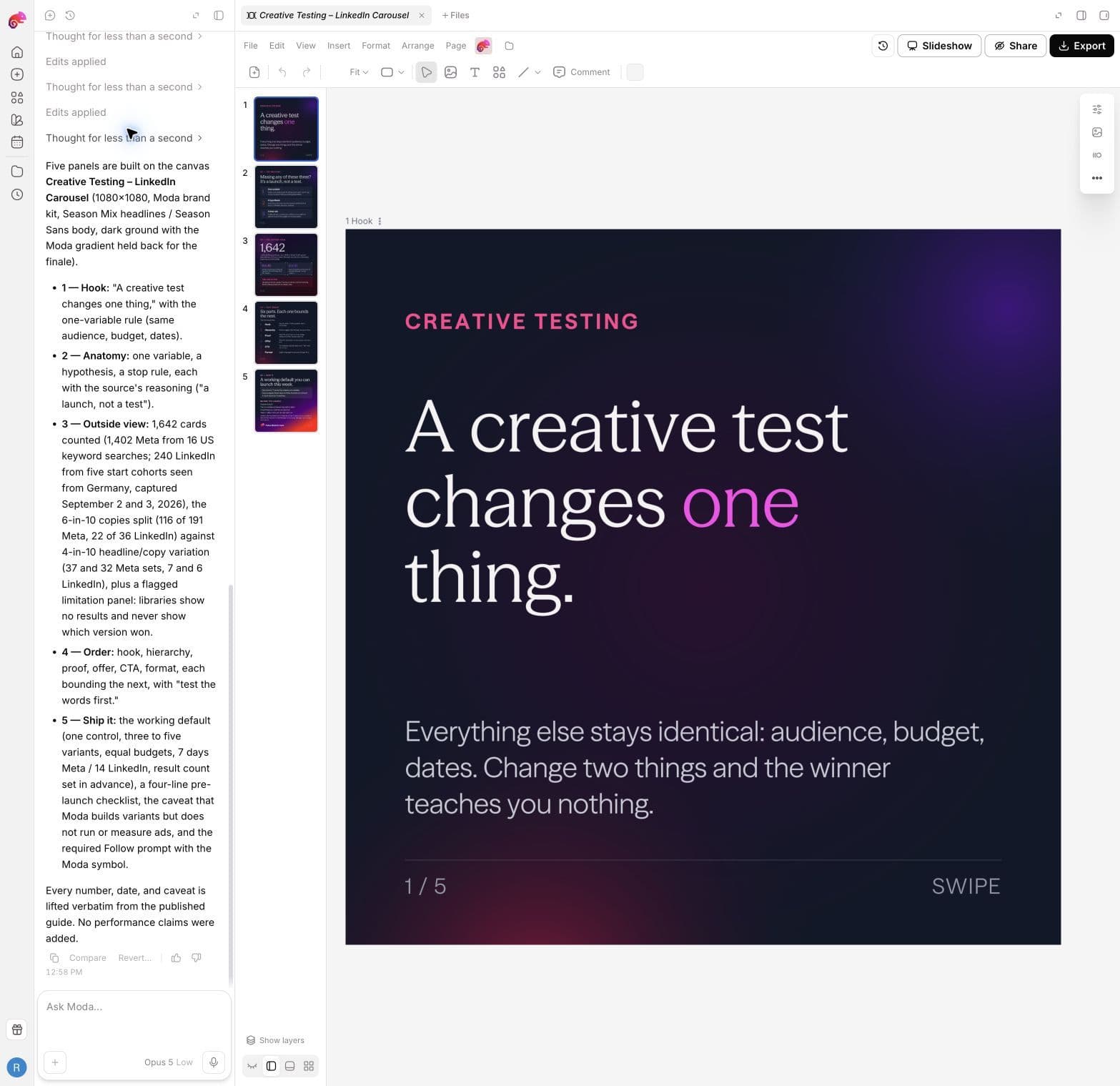
The first carousel result took 3 minutes 35 seconds and needed no follow-up. It produced five editable 1080 by 1080 pages, not flattened images inside a design.
The opening panel stated the source thesis clearly:

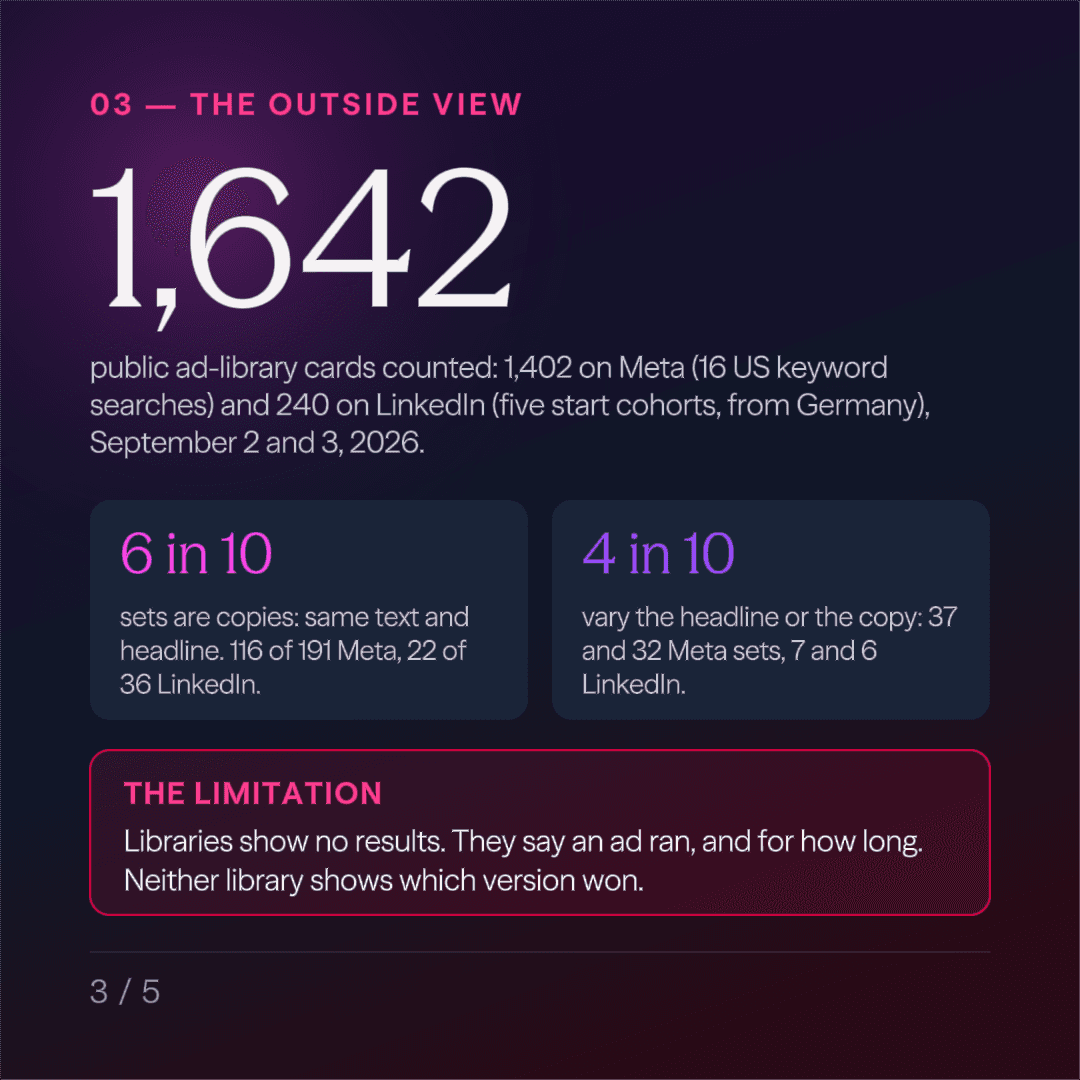
The evidence panel preserved the sample sizes and put the limitation on the page. It did not convert public ad-library observations into a claim about which ads performed best.
Step 6: Review the result at its real size
Read every page or scene before exporting. Check five things:
- Source fidelity: Are the names, numbers, units, and qualifications correct?
- Format usefulness: Does the asset help its intended reader do something?
- Hierarchy: Is the main point clear at feed, presentation, or document size?
- Editability: Can the text, layout, and motion still be changed?
- Completeness: Did the agent include every requested section or scene?
Review for the destination, not just the editor. A slide can technically fit on the canvas and still be unreadable when presented. A social graphic can look polished at full size and fail in a feed preview.
Make repairs specific
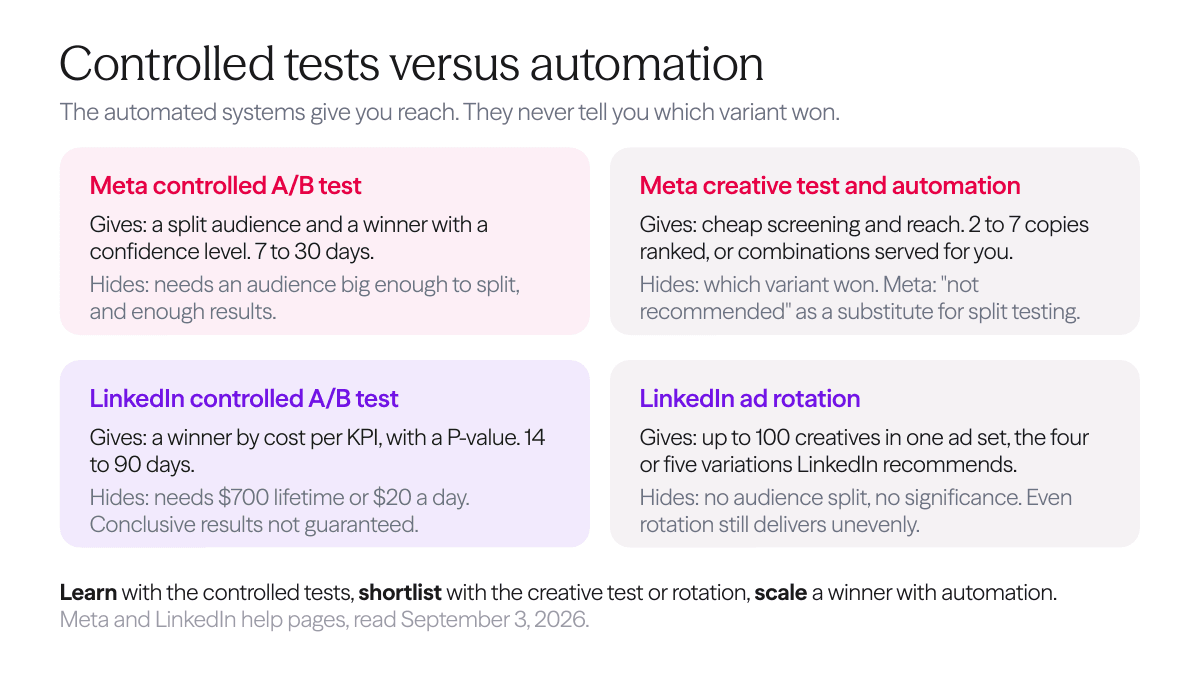
Our presentation was accurate, but slide 3 placed six platform mechanisms in a dense table. “Make it better” would leave the agent guessing. We identified the page, problem, replacement structure, and measurable limit:
Revise slide 3 only.

The current six-row mechanism table is too dense to read in a team presentation.
Replace it with four concise, visually distinct comparisons:
- Meta controlled A/B test
- Meta automation/rotation
- LinkedIn controlled A/B test
- LinkedIn rotation

For each, state only the most decision-useful thing it gives the marketer and the
most important thing it hides. Use no more than 25 words per comparison.

Keep the source's claims and caveats accurate. Do not change the other five slides.
The follow-up changed only slide 3 and replaced the table with four readable cards.
Useful repair prompts usually contain four parts: exact location, visible problem, desired change, and a constraint you can verify.
Step 7: Export and inspect the file
Export the format the reader will actually use. Then open that file and check it again.
For this run, we exported:
| Asset | Export | What we checked |
|---|---|---|
| Carousel | Five PNG files in one ZIP | Correct page count, 1080 by 1080 dimensions, readable text |
| Presentation | Editable PowerPoint | Six slides rendered, no clipped or missing text |
| Working document | US Letter PDF | One complete page, legible fields and caveats |
| Animation | MP4 | 15.0 seconds, 1080 by 1080, 30 fps, all three scenes played |
The one-page document is a useful example of why outputs need different jobs. Instead of summarizing the article, it gives the marketer space to record the control, variable, hypothesis, budget, stop rule, winner rule, and next test.
The animation reduced the source to one visual argument: changing three things is not a test, while changing one thing is. Moda created three editable five-second scenes and exported them as one video.
An export completing successfully does not prove the asset works. Open the PowerPoint, render the PDF, and play the full MP4. Export review is part of authoring, not an optional technical check.
A reusable AI content repurposing prompt
Copy this template and replace the brackets:
Read and use only this source: [URL or attached file]

Create a [format] for [specific audience]. The reader needs to [reader job].
Use the selected [brand kit name] brand kit.

Preserve these facts and caveats exactly:
- [fact, definition, or quote]
- [number with unit and comparison]
- [important limitation]

The output must contain:
1. [section or scene job]
2. [section or scene job]
3. [section or scene job]

Do not invent [performance data, quotes, customer claims, or missing evidence].
[Add a word, page, scene, or duration limit.]
Keep the result editable and export it as [file type].
For slides, add a maximum number of rows or words per section. For documents, name the fields and require usable writing space. For motion, choose one idea and specify the sequence and total duration.
How to adapt the workflow to different source types
Article or report
Use the public URL when possible. Name the sections, statistics, and limitations that matter. Good outputs include carousels, presentations, visual summaries, checklists, and short explainers.
Presentation or PDF
Import the file rather than copying its text into a prompt. Explain whether the goal is to summarize, reframe for a new audience, extract one argument, or turn the material into a different format. State which charts, citations, and numbers must survive.
Video, podcast, webinar, or interview
Start from a transcript or detailed notes. Include timestamps when the output should point back to clips. Mark the strongest claims, stories, or demonstrations rather than asking the agent to average an entire hour of conversation into generic takeaways.
Existing design
Attach or import the design and say what must remain recognizable. Separate changes in message from changes in format. For a clean platform adaptation, keep the core copy and visual identity fixed. For a new campaign concept, state what the agent is allowed to reinterpret.
What AI should and should not automate
AI is well suited to reading supplied material, reorganizing it for a new format, applying a brand system, creating editable first drafts, and making precise revisions.
Keep human judgment around:
- Choosing a source worth amplifying
- Deciding which audiences and formats matter
- Identifying facts and caveats that cannot drift
- Judging whether a result is genuinely useful
- Approving the final exported asset
- Measuring whether the published derivative reaches or converts the intended audience
Our run shows that one source can produce a carousel, presentation, working document, and animation in the same design workflow. It does not show that every source needs four outputs, that AI removes editorial review, or that more assets automatically improve marketing performance.
The main lesson
Good AI content repurposing holds meaning steady while changing the asset's job.
If everything stays fixed, the outputs are resized summaries. If nothing stays fixed, the source can drift into unsupported claims. The useful middle is a short source brief, a specific audience and job, a format-aware prompt, and a real review after export.
Frequently asked questions
What is AI content repurposing?
AI content repurposing uses AI to adapt an existing source into new formats for different audiences, channels, or jobs. The source can be an article, document, presentation, transcript, video, or visual asset.
What content can I repurpose with AI?
You can repurpose public articles, reports, PDFs, presentations, webinar or podcast transcripts, interview notes, videos, and existing designs. The best sources contain a clear argument, useful evidence, examples, or a process worth preserving.
How do I repurpose a blog post into social media content?
Give the AI the article URL, identify the facts and caveats that cannot change, choose a specific social format, and assign every panel or scene a job. Review the result at feed size before exporting.
Can AI turn a PDF or presentation into other content?
Yes. Import or attach the original file, describe the new audience and output, and identify the charts, citations, facts, and visual elements that must remain accurate. Then inspect the editable result and exported file.
How do I keep AI-repurposed content accurate?
Write a source brief before generation. List the exact claims, numbers, units, names, quotes, and limitations that matter. Check those items in the visible design and again after export.
Should every derivative contain every fact from the source?
No. Include the facts required for the derivative's job and never contradict the source. A short animation may carry one idea, while a presentation may need the supporting evidence and caveats.

Real editable visuals. Real canvas. Full control.
Fly through design work