AI Poster Generators: Designing for Distance and Scale
By Moda · Last updated
An AI poster generator composes a large-format sheet from a short brief. Two things make a poster harder than it looks: it is read from across a room, and it is printed at a size most generated images cannot fill. Moda composes posters as objects on a canvas, so type and drawn shapes scale without softening.
A poster fails in ways a smaller print does not. It is not held; it is passed. The reader is moving, several paces away, and gives it a second or two before deciding whether to stop. That distance sets a floor on type size that has nothing to do with taste, and the finished sheet is large enough that the pixel count required to print it exceeds what most image models return by an order of magnitude. A poster generator can produce a striking composition and still fail both tests at once.
What is an AI poster generator?
An AI poster generator produces a large-format sheet from a brief: an event, a title, a date, a venue. What separates one from a general image model is whether the result arrives as an enormous flat picture or as objects that can be rescaled, retyped, and re-exported at the finished size.
The request looks identical to any other design prompt, which is why the category is confusing. The difference emerges at export. A poster is not a screen graphic that happens to be big; it is a physical object at a specific finished size, and every property that makes it printable is a property of the file rather than of the composition.
That matters more here than in any other print format, because posters are the format where the gap between what a model returns and what a press needs is widest. A social graphic and a screen export are roughly the same size. A poster and a screen export are not remotely the same size.
Why is a poster a harder file than it looks?
A standard poster is printed at a size that needs tens of millions of pixels to hold detail. Most generated images arrive at a fraction of that. The composition can be excellent and the file still unusable, because the shortfall is in resolution rather than in design.
The published specification below states the finished size and the pixel dimensions a print shop works to. Multiplying those two dimensions gives a pixel count in the tens of millions, which is the number worth holding in mind when a tool offers to generate a poster: a flat image has to actually contain that many pixels, and an image produced for a screen contains a small fraction of them.
| Specification |
|---|
| Trim size — 24 × 36 in (609.6 × 914.4 mm) |
| Pixels at 300 DPI — 7200 × 10800 |
| Aspect ratio — 2:3 |
| Color mode — CMYK |
| Bleed — 3 mm on every edge |
| Bleed size — 24.25 × 36.25 in |
| Pixels at 300 DPI, bleed size — 7275 × 10875 |
| Safe area — 23.5 × 35.5 in |
| Export formats — PDF, PNG, JPG, TIFF |
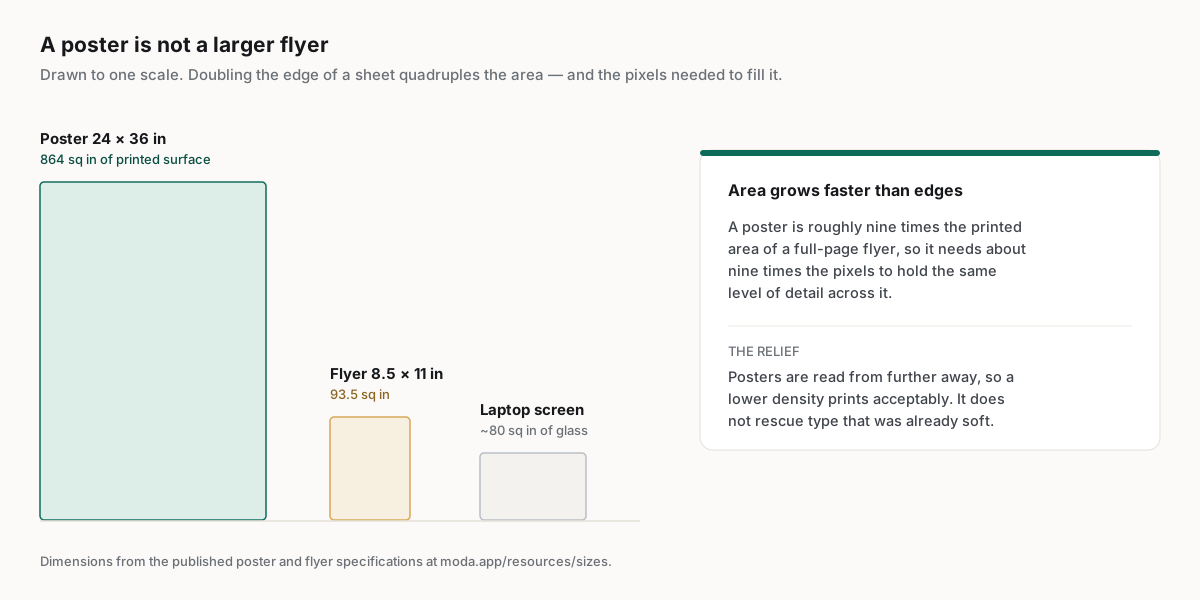
There is one genuine reprieve, and it is worth knowing because it is often applied wrongly. Large-format work is viewed from further away, so the density a printer needs falls as the viewing distance grows. A billboard is printed at a fraction of the density of a business card and looks perfectly sharp. That relaxation is real, but it applies to the whole sheet uniformly and it does not rescue type that was soft to begin with.
How far away will the poster be read from?
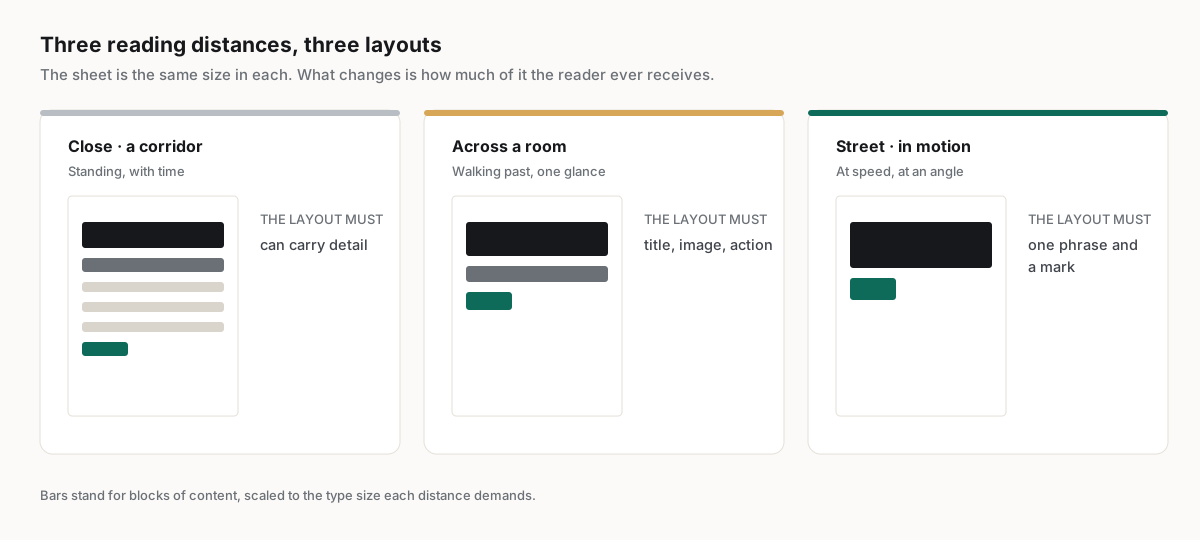
Viewing distance is the first decision, not the last. It sets a floor on type size, decides how much text the sheet can carry, and determines whether a detailed composition will register at all. A poster designed at arm's length usually fails when it is pinned to a wall.
The failure is easy to miss on a screen, because a design viewed at full width on a monitor is being read at roughly the proportion of a poster seen from a few paces. Zooming out to fit is not the same test: it shrinks the artwork and the type together, so a layout that is unreadable at distance still looks balanced. The honest check is to print a section at full size and walk away from it.
| Where it hangs | How it is read | What the layout must do | Common failure |
|---|---|---|---|
| Corridor or lift lobby | Standing, close, with time to wait | Can carry detail, a schedule, a body paragraph | Treated as a poster and left almost empty |
| Across a room or foyer | Walking past, a glance, then a decision | One title, one image, one action, in that order | Subtitles and body text nobody stops to read |
| Street window or hoarding | In motion, at speed, at an angle | A single legible phrase and a mark | A composition that only resolves up close |
What survives being enlarged?
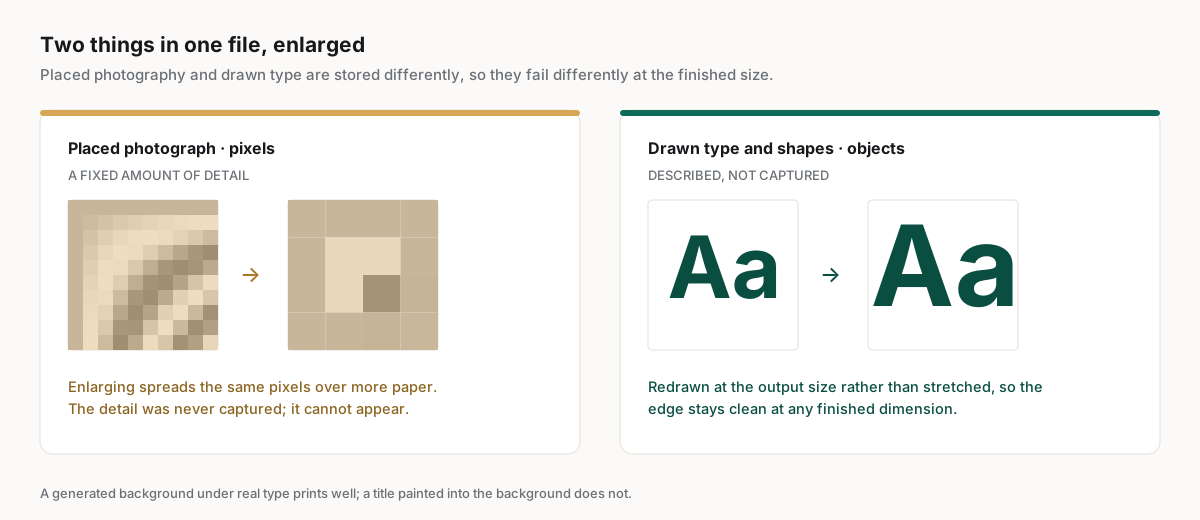
Enlargement separates the two things a generator can return. Pixels have a fixed amount of detail and get softer as they stretch. Objects and type are described mathematically and are redrawn crisply at any size, which is why the underlying output model matters more for posters than anywhere else.
| What the tool returns | Scaling behaviour | Text at final size | Practical ceiling |
|---|---|---|---|
| A flat generated image | Detail is fixed at capture; stretching interpolates | Softens, and cannot be corrected or retyped | Small prints, or large prints viewed from far away |
| An image plus editable overlays | Artwork softens; the overlaid type stays sharp | Sharp where it was added, soft where it was generated | Workable when the artwork is a background, not the message |
| Objects on a vector canvas | Redrawn at the output size rather than stretched | Sharp at any size, and still editable | Limited by the resolution of placed photographs only |
The middle row is where most of the category actually sits, and it is a reasonable place to be as long as the division of labour is deliberate. A generated background carrying a headline set as real type will print well. The same background with the headline painted into it will not, and no export setting recovers it.
How should a team evaluate an AI poster generator?
Test at the finished size, at the real reading distance, and on the second draft. A tool that produces a beautiful thumbnail is answering a different question from the one a printed poster asks, and the difference only becomes visible once the file leaves the screen.
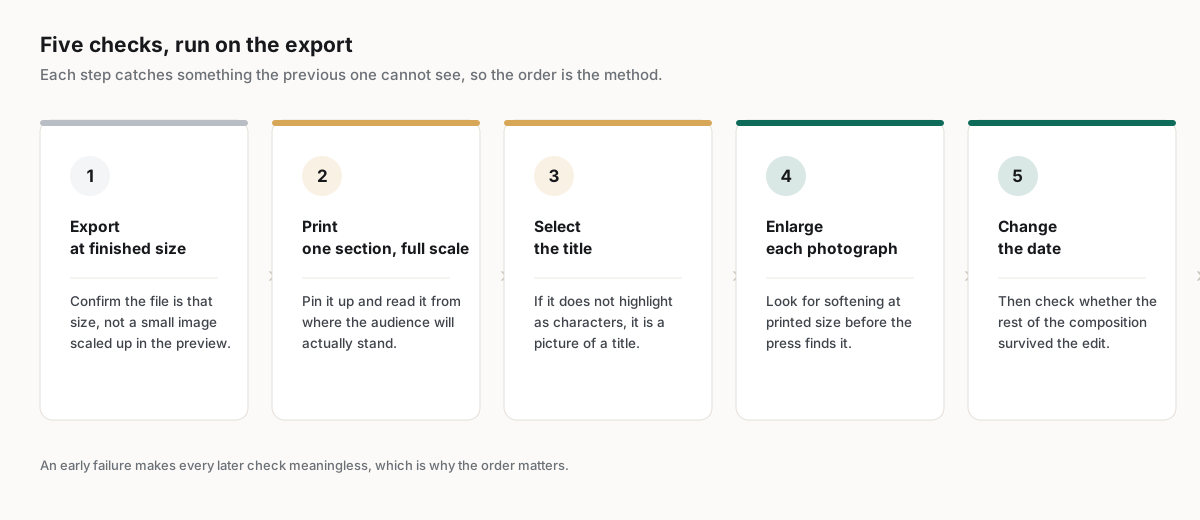
Five checks, in the order they tend to fail:
- Export at the finished size and confirm the file is that size, rather than a small image scaled up in the preview.
- Print one section at full scale, pin it up, and read it from where the audience will stand.
- Select the title in the exported file. If it does not highlight as characters, it is a picture of a title.
- Enlarge a placed photograph to its printed size and look for softening before the press finds it.
- Change the date and the venue, then check whether the composition survived the edit.
The second check is the one teams skip and the one that catches the most. Reading a poster on a monitor is a fundamentally different act from reading it on a wall, and no amount of zooming reproduces it. A single tiled section taped up at full size answers the question in a minute and costs one sheet of paper.
Which teams get the most out of one?
Venues, campuses, retailers and event teams gain the most, because they produce the same poster repeatedly with a new date, a new act, or a new offer. The generator earns its place on the reprint rather than on the original, where the design is already settled.
The reported pattern is the same one that shows up across recurring visual work. Cirrascale reported 20 min saved per asset with a single marketer running the pipeline, at https://moda.app/case-studies/cirrascale, and the saving comes from removing the wait on someone else for a small change rather than from generating faster. A weekly programme poster is that situation exactly: settled design, changing details, a deadline every week.
Where a poster is the campaign rather than a carrier for it, the calculation reverses. A launch piece, an identity poster, or anything going to a large print run deserves a designer, a proof, and a press check. The generator belongs on the recurring sheets in between, which is most of them.
Related guides
Key takeaways
- A poster is read at a distance, and that distance sets a floor on type size before any design decision is made.
- The printed area of a poster demands far more pixels than a generated screen image contains.
- Viewing distance lets print density fall, but it never rescues type that was already soft.
- Type kept as characters stays sharp at any size; type painted into an image has a fixed ceiling.
- Test at the finished size and from the real reading position, because a monitor reproduces neither.
Frequently asked questions
What size is a standard poster?
The most common large-format poster is a portrait sheet, and the exact trim, bleed, safe area and pixel dimensions are published at https://moda.app/resources/sizes/poster. Smaller display sizes are common in retail and events, but the design rules described here scale with the reading distance rather than with the sheet.
Can an AI poster generator produce something printable at full size?
It depends on what the tool returns. A flat image has a fixed amount of detail and cannot gain more when enlarged. Output composed of objects and real type is redrawn at the output size, so it stays sharp. Check by exporting at the finished size and inspecting the type.
How large does poster text need to be?
Size the type from the reading distance rather than from the sheet. A poster read while walking past needs a title that resolves in a second from several paces, which usually means far larger type and far less of it than a design reviewed on a monitor suggests is necessary.
Does a poster need the same print density as a flyer?
Usually not. Large-format work is viewed from further away, so a lower density often prints acceptably and keeps the file manageable. The relaxation applies to the whole sheet evenly, and it does not compensate for artwork or type that was soft before it was enlarged.
Is a generated background acceptable on a printed poster?
Often yes, provided the message is not inside it. A generated image works well as artwork behind a headline set as real type, because the type stays sharp and editable. Problems begin when the title, date or venue are painted into the picture itself.
Published by Moda. Print specifications are read from the same catalogue that drives the published size reference and are linked to it. Customer metrics are attributed to the companies named above and link to their published case studies. Print density, stock and finishing requirements vary by supplier and format; confirm them before committing to a run.