Beautiful.ai vs Gamma: Which Fits the Way You Work?
Compare Beautiful.ai and Gamma by layout model, brand governance, collaboration, pricing, sharing, and editable PowerPoint or Google Slides handoff.
 Anvisha Pai, Co-founder & CEO, Moda
Choose Beautiful.ai if you want slide layouts that rearrange themselves as your content changes, especially for presentations your team updates repeatedly. Choose Gamma if the finished work will often be a link people read on their own, with room for explanations, images, and embedded material.
Both can generate presentations with AI, and both let you revise them afterward. The more useful Beautiful.ai vs Gamma question is: what will you and your audience do with the presentation after the first draft?
This is a research-based comparison, not a head-to-head test of generated decks. We checked current product documentation and independent hands-on reviews in September 2026. Treat output quality and export fidelity as things to verify with your own content.
The short version
| Your priority | Beautiful.ai | Gamma |
|---|---|---|
| Keep a recurring deck organized | Smart Slides automatically adjust layouts as you edit. | Cards combine text, media, and layouts; edit directly or with AI. |
| Send a read-ahead people can explore | Share a presentation link. | Build a browser-readable document as well as a presentation. |
| Go beyond the default layout | Convert a Smart Slide to a freeform Classic Slide on a supported paid plan. | Change layouts, rearrange content blocks, and adjust card sizing. |
| Maintain shared branding | Team themes and shared slide libraries, with administrative controls on relevant plans. | Workspace-shared custom themes; custom branding and fonts are listed on Pro. |
| Hand over a PowerPoint file | Choose editable PowerPoint, not the separate image-slide export. | Export PPTX and check the result in the recipient's app. |
| Start without paying | A 14-day trial; no ongoing general free plan. | An ongoing Free plan with plan-limited generation and Gamma branding. |
| Govern team use | Team themes, shared slides, Owner/Librarian roles, and locked resources on relevant plans. | Team adds billing, folders, admin controls, and a company theme; Business adds SSO and higher seat requirements. |
A structured layout is helpful when you want fewer design decisions; it can be inconvenient when you want a particular composition. A longer card is helpful for a reader, but can contain too much for an audience watching a live talk.
Beautiful.ai: start here for repeatable slide layouts
Imagine a monthly project update. It has milestones, owners, a progress chart, and the decisions needed from leadership. The facts change, but the deck's job does not.
This is a good reason to try Beautiful.ai. Its Smart Slides handle layout adjustments as content changes. A concrete example is its Horizontal Task List: tasks run left to right, with controls for task or progress styling and how the items fit the slide. You work with that structure rather than positioning every label independently.
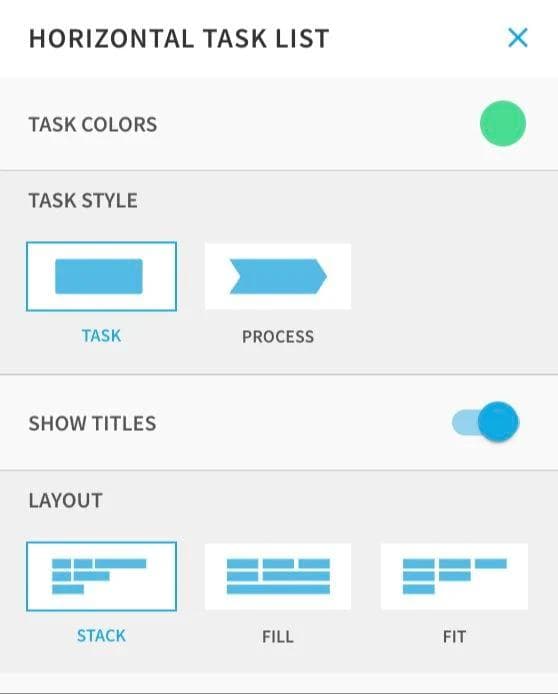
That does not mean starting from scratch manually. Create with AI accepts a prompt, outline, or source material, lets you revise the outline before generating slides, and offers slide-level layout alternatives afterward.
The tradeoff appears when your desired slide stops matching a Smart Slide's structure. Perhaps you want an unusually placed annotation or a deliberately asymmetric cover. Beautiful.ai lets paid users convert a Smart Slide to a Classic Slide and edit freely. You give up the Smart Slide's automatic guardrails on that slide, not the ability to finish the design.
For a trial, bring one slide you update regularly and one awkward exception. If most of your work fits the Smart Slide layouts, their constraints may be exactly what you want. If nearly every slide needs conversion, try a more freeform editor before committing.
Gamma: start here for material people read by link
Now imagine a project proposal sent before a meeting. The recipient needs the recommendation, supporting context, a demo video, and enough detail to forward it without you explaining every page.
Gamma's cards suit that kind of document. A card can hold a section of content rather than only what fits on a conventional slide. You can type directly, add images and embeds, or ask its AI agent to refine content. The content-editing guide describes both manual and AI-assisted editing.
For example, a proposal could open with the decision you want approved, follow with a demonstration, and put implementation details underneath. The reader can work through the material at their own pace. That is a reason to choose Gamma even if you never use its AI to write the text.
Gamma can also present slides. Its slide-sizing documentation explains that cards are fluid by default and offers aspect-ratio settings with guidelines. If you will project the same material, set the intended format early and rehearse in Present mode. A section that reads comfortably on a laptop is not automatically a good slide for a room.
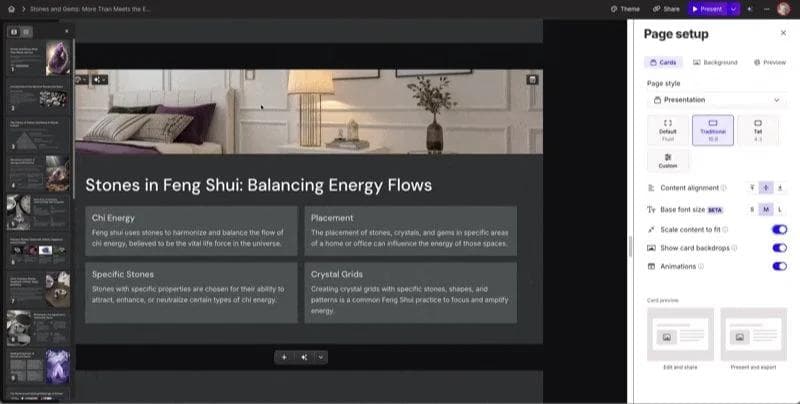
Beautiful.ai also supports presentation links. The distinction is not “one shares, one doesn't.” It is whether you primarily want a sequence of slides or a document that can also be presented.
What independent reviewers found
Neither review proves how the tools will handle your template, charts, or brand system. They do reinforce the practical choice in this article: Beautiful.ai is strongest when constraints are the feature; Gamma is strongest when rapid, reader-friendly composition is the feature.
Branding and collaboration: compare the controls you need
Both products have branding tools. You do not have to accept whatever colors an AI happens to choose.
Beautiful.ai's Shared Theme can be required for a workspace and can update existing presentations when an authorized person changes it. Its current role model gives Owners billing and user control, while Owners and Librarians manage shared slides, assets, presentations, and themes. Team Slides can also update every presentation that uses them. This is more than a color picker: it is governance for recurring material.
Gamma's custom themes cover colors, fonts, logos, and other styling, and are shared within a workspace. Its current Teams plan adds centralized billing, shared folders, admin controls, and advanced data controls, with a two-seat minimum. Business adds SSO and has a ten-seat minimum. Gamma can also extract theme elements from a PowerPoint or Google Slides file. That imports a visual starting point; it is not a promise to reproduce every slide layout in the source deck.
Gamma offers view, comment, and edit permissions, while Beautiful.ai lists real-time collaborative editing on its Team plan. Compare who needs editing access and who only needs to review, rather than buying an editing seat for everyone who receives a deck.
If you are buying for a team, test a specific change: update the approved logo or theme, then inspect an existing deck and a new one. Ask which settings an ordinary editor can override. “Supports our fonts” and “prevents unauthorized changes” are different requirements.
If someone needs an editable PowerPoint, start with that requirement
Being able to present a file is not the same as being able to revise its contents.
Beautiful.ai has two different PowerPoint exports. Editable PowerPoint is available on Pro, Team, and Enterprise. PowerPoint Images places a static picture of each slide inside the file. Choose the first if a colleague needs to change the wording. Its export guide also warns about missing fonts and the loss of its animations and transitions in external platforms.
Gamma exports to PowerPoint, PDF, and PNG. Its export documentation explicitly supports editable tables in PPTX and describes font embedding, plus visual differences for some effects. It also notes that Google Slides ignores embedded PowerPoint fonts. For an export preview, use Present mode rather than the editing view.
For Google Slides handoffs, Beautiful.ai documents a direct editable export on Pro, Team, and Enterprise. Gamma's export guide describes downloading PPTX and uploading it to Google Slides.
Run this editable handoff test before you commit
- Build one representative page with your actual brand font, a chart or table, an image, speaker notes, and one animated or embedded element.
- Export the deck to editable PowerPoint. If Google Slides is part of the workflow, open Beautiful.ai’s direct Slides export and upload Gamma’s PPTX to Slides.
- In the recipient app, change a heading, update a table cell or chart value, move an image, and edit the notes. Confirm which objects remain editable.
- Compare the result with the hosted version for font substitutions, wrapping, crop changes, missing media, animation loss, and visual effects that flattened or changed.
- Send the exported file to the person who will maintain it. Their computer, fonts, permissions, and editing habits are part of the test.
A successful export is not just a file that opens. It is a file the next person can revise without rebuilding the slide.
If the deliverable must remain in a strict company PowerPoint template, working in PowerPoint itself may be the better choice. Neither Beautiful.ai nor Gamma needs to be involved just because the project could use AI.
What to check before paying
Gamma has an ongoing Free plan. Its current pricing page puts removal of Gamma branding on Plus, while Pro adds custom branding and fonts, detailed analytics, advanced sharing, and API access. For organizations, Gamma lists Teams at $240 per seat annually with a two-seat minimum and Business at $480 per seat annually with a ten-seat minimum. Prices and AI-credit allowances can change, so confirm the checkout total for your workspace rather than comparing only individual plans.
Beautiful.ai currently lists Pro at $14.50 per month billed annually, or $45 for a one-off monthly subscription. Team is listed at $40 per user per month billed annually or $50 billed monthly for two to 20 seats. Enterprise pricing is custom. It offers a 14-day trial rather than an ongoing general free plan. Editable PowerPoint and Google Slides exports are available on Pro, Team, and Enterprise. Team and enterprise governance features are not interchangeable, so verify SSO, audit logs, provisioning, and brand-permission requirements before choosing a tier.
Do you need either one?
For the recurring project update, I would try Beautiful.ai first. For the proposal people will read and discuss by link, I would try Gamma first. Both are reasonable choices for client-facing work; the decision depends on the material and how you deliver it.
If you also need to create custom graphics alongside the deck, Moda is another option: an AI-assisted canvas for slides and other visual assets. But canvas freedom means more layout decisions to review. I would still start with Beautiful.ai for automatic slide guardrails, and Gamma for the document-first workflow described here. For a wider shortlist, see our Beautiful.ai alternatives guide, or compare Canva with Google Slides if native office collaboration is the priority.
Pick the tool that handles your ordinary revisions and the audience's viewing format well. A convincing first draft is useful. A presentation you can keep using is the reason to buy.
Frequently asked questions
Is Beautiful.ai or Gamma better for recurring team decks?
Beautiful.ai is the stronger starting point when a team repeatedly updates the same slide patterns and needs centrally managed themes or shared slides. Gamma is the stronger starting point when each deliverable is a fast, self-guided document or presentation that people will read by link.
Can Beautiful.ai and Gamma export editable PowerPoint files?
Both support PPTX export, but editability is not all-or-nothing. Beautiful.ai separates Editable PowerPoint from a static image-slide export. Gamma exports editable tables but documents visual differences for some effects. Test your fonts, charts, media, notes, and Google Slides handoff before committing.
Do Beautiful.ai or Gamma replace PowerPoint or Google Slides?
Not always. Keep the final work in PowerPoint or Google Slides when a strict company template, native animation, offline editing, or an established review workflow is non-negotiable. Use Beautiful.ai or Gamma when their creation and sharing workflows save enough work to justify the handoff.

Real editable visuals. Real canvas. Full control.
Fly through design work