Canva for Nonprofits: Who Qualifies and How to Apply
Canva for Nonprofits gives eligible charities free Canva Pro for up to 50 people. Here is who qualifies, who is excluded, what verification requires, and what to do if you are rejected.
 Anvisha Pai, Co-founder & CEO, Moda
Canva for Nonprofits, which Canva now brands as Canva Nonprofits, gives eligible registered charities free access to every premium feature of Canva Pro plus team and collaboration tools, for one team of up to 50 people. It is a genuinely generous grant. If you run communications at a 501(c)(3) that operates its own charitable programs, the honest advice is short: apply, and stop reading comparison articles.
The part that actually stops people is the exclusion list. Canva's eligibility rules bar a long set of organizations that most people would describe as nonprofits, including every 501(c) type other than 501(c)(3), private and grantmaking foundations of any kind, membership associations, social enterprises, public hospitals, and workforce development programs. This guide covers what the program includes, exactly who qualifies, how verification works through Canva's partner Goodstack, what happens when you are rejected, and what your options are if your organization is never going to be eligible.
Everything here was checked against Canva's own program page, its eligibility guidelines, and its help center article on September 8, 2026. Nothing in this article is legal or tax advice; where a rule depends on your organization's registration status, ask your accountant or counsel.
What Canva for Nonprofits actually includes
The grant is Canva Pro's premium feature set plus the team and collaboration tools, delivered as one free team. Canva's help center lists the specific unlocks:
- Premium images, videos, audio, and graphics from Canva's stock library
- Downloads with transparent backgrounds
- The upgraded Brand Kit: multiple color palettes, uploaded fonts, and uploaded logos
- Publishing designs as brand templates
- Sharing designs and folders with your team
- Template share links
- Access to Affinity, Canva's professional photo editing, layout, and illustration suite
That last one is easy to miss and worth knowing about. Affinity covers the kind of production work, such as multi-page print layout and detailed vector illustration, that Canva itself is not built for.
| Feature | Canva Free | Canva Nonprofits | Canva Enterprise |
|---|---|---|---|
| Cost | Free | Free for eligible orgs | Paid, 50% off for approved nonprofits |
| Premium stock and templates | Limited | Included | Included |
| Brand Kit with custom fonts and logos | No | Included | Included, with tiered approvals |
| Team collaboration | Limited | Included, one team | Included, multi-team |
| Seats | Per account | Up to 50 in one team | Contracted |
| SSO, SCIM, audit logs, multi-team admin | No | No | Yes |
Two limits matter for planning. First, the free team caps at 50 members and Canva grants one team, not one per chapter or department. Second, extra capacity is not another free grant: Canva offers additional seats at 50% off Canva Enterprise, which is a sales conversation rather than a self-serve upgrade. Canva does not publish the discounted per-seat figure, so a federated organization with 200 communicators should budget for a paid contract rather than assume the program scales.
The grant does not include Enterprise governance. If your board or funders require single sign-on, SCIM provisioning, audit logs, or separate managed teams per program, the free nonprofit team will not deliver those.
Canva states on its program page that more than one million nonprofits have free access to Canva Pro through the program, and that nonprofits use Canva in more than 175 countries.
Who qualifies for Canva for Nonprofits
Canva's eligibility guidelines set three requirements. Your organization must be:
- Officially registered as a charitable nonprofit in its country, such as a 501(c)(3) in the United States
- Independent of government affiliation and direct government appropriations
- Not operating for commercial profit
Canva is explicit that meeting those three does not guarantee approval. Its guidelines say participation is subject to review, applicable business policies, and Canva's discretion, and that acceptance and ongoing participation are decided at its sole discretion. That is worth taking literally: this is a discretionary grant program, not an entitlement you can appeal on technical grounds.
Who does not qualify
This is where most applications actually get stuck. Canva's current exclusion list is long and specific.
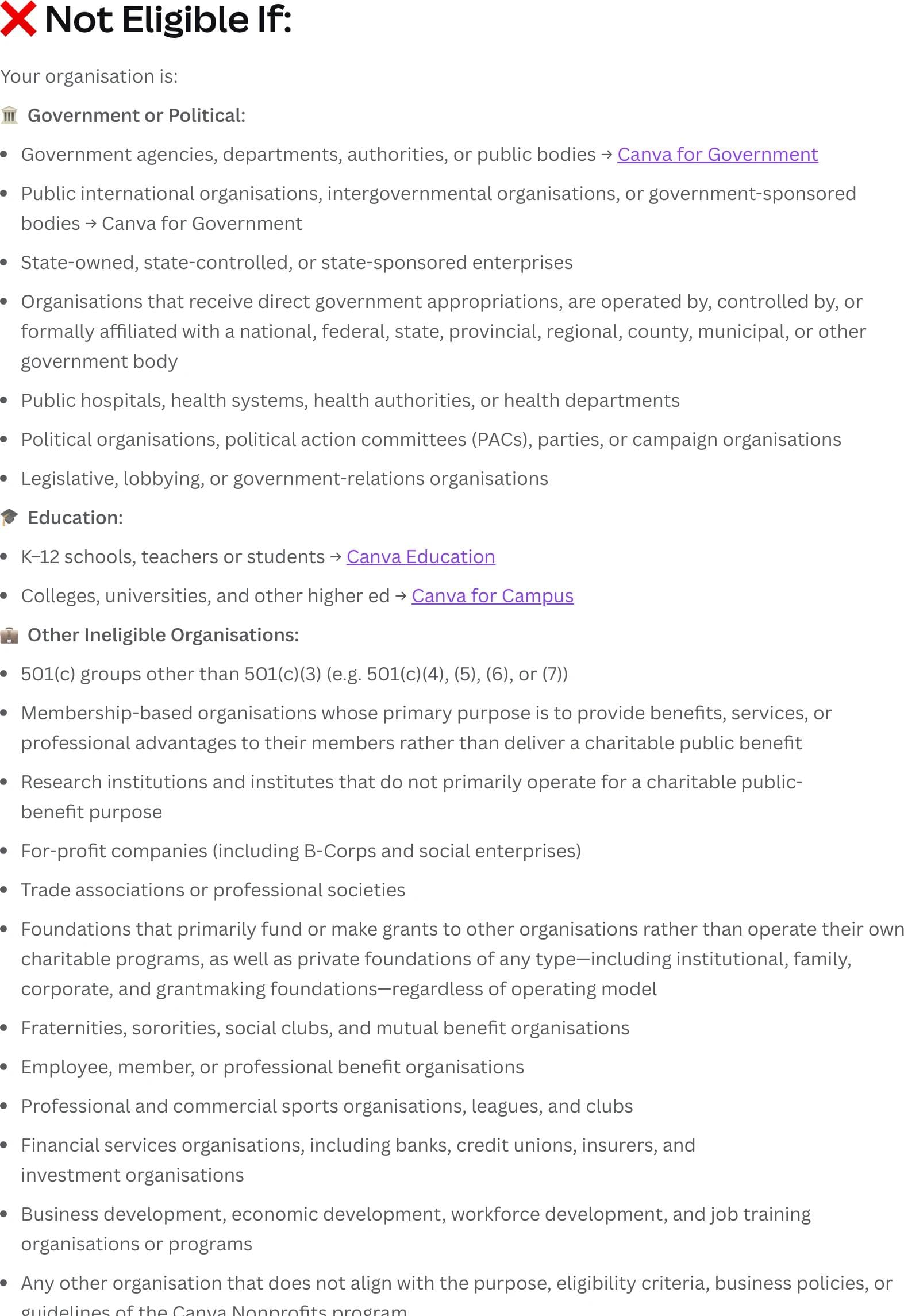
Government and political. Government agencies, departments, authorities, and public bodies are excluded, and Canva points them to Canva for Government. So are intergovernmental and public international organizations, state-owned or state-controlled enterprises, and any organization that receives direct government appropriations or is operated by, controlled by, or formally affiliated with a government body at any level. Public hospitals, health systems, health authorities, and health departments are excluded. So are political organizations, PACs, parties, campaign organizations, and legislative, lobbying, or government-relations groups.
That government-affiliation clause is broader than it first looks. A nonprofit that is genuinely independent but receives a majority of its funding through government contracts sits in a grey area, because Canva's wording targets direct appropriations and formal affiliation rather than contracted program revenue. Canva does not define the line publicly. If your funding is mostly public money, expect the reviewer to look closely.
Education. K-12 schools, teachers, and students go to Canva Education, which is free for eligible K-12 educators. Colleges, universities, and other higher education institutions go to Canva for Campus, which is a paid product for faculty and staff with free student accounts once an institution reaches its license threshold. An education nonprofit that does not directly deliver teaching is in an awkward position: Canva's education guidelines exclude nonprofits that are not delivering teaching directly, and the nonprofit guidelines exclude schools. Which program fits depends on how your entity is registered.
Other excluded organizations. This group catches the most people:
- Any 501(c) type other than 501(c)(3), which explicitly includes 501(c)(4) advocacy organizations, 501(c)(5) labor and agricultural groups, 501(c)(6) business leagues and chambers, and 501(c)(7) social clubs
- Membership organizations whose main purpose is delivering benefits or professional advantages to members rather than a charitable public benefit
- Research institutions and institutes that do not primarily operate for charitable public benefit
- For-profit companies, and Canva names B-Corps and social enterprises specifically
- Trade associations and professional societies
- Foundations that primarily fund or make grants to other organizations, plus private foundations of any type, including institutional, family, corporate, and grantmaking foundations, regardless of operating model
- Fraternities, sororities, social clubs, and mutual benefit organizations
- Employee, member, or professional benefit organizations
- Professional and commercial sports organizations, leagues, and clubs
- Financial services organizations, including banks, credit unions, insurers, and investment organizations
- Business development, economic development, workforce development, and job training organizations or programs
The foundation exclusion deserves emphasis because several widely shared articles get it wrong and tell private foundations they qualify. Canva's current guidelines exclude private foundations of any type regardless of operating model. If you work at a family or corporate foundation, plan on paying.
The list closes with a catch-all for any organization that does not align with the purpose, criteria, or policies of the program, which is what gives reviewers room to decline an edge case.
What you need before you apply
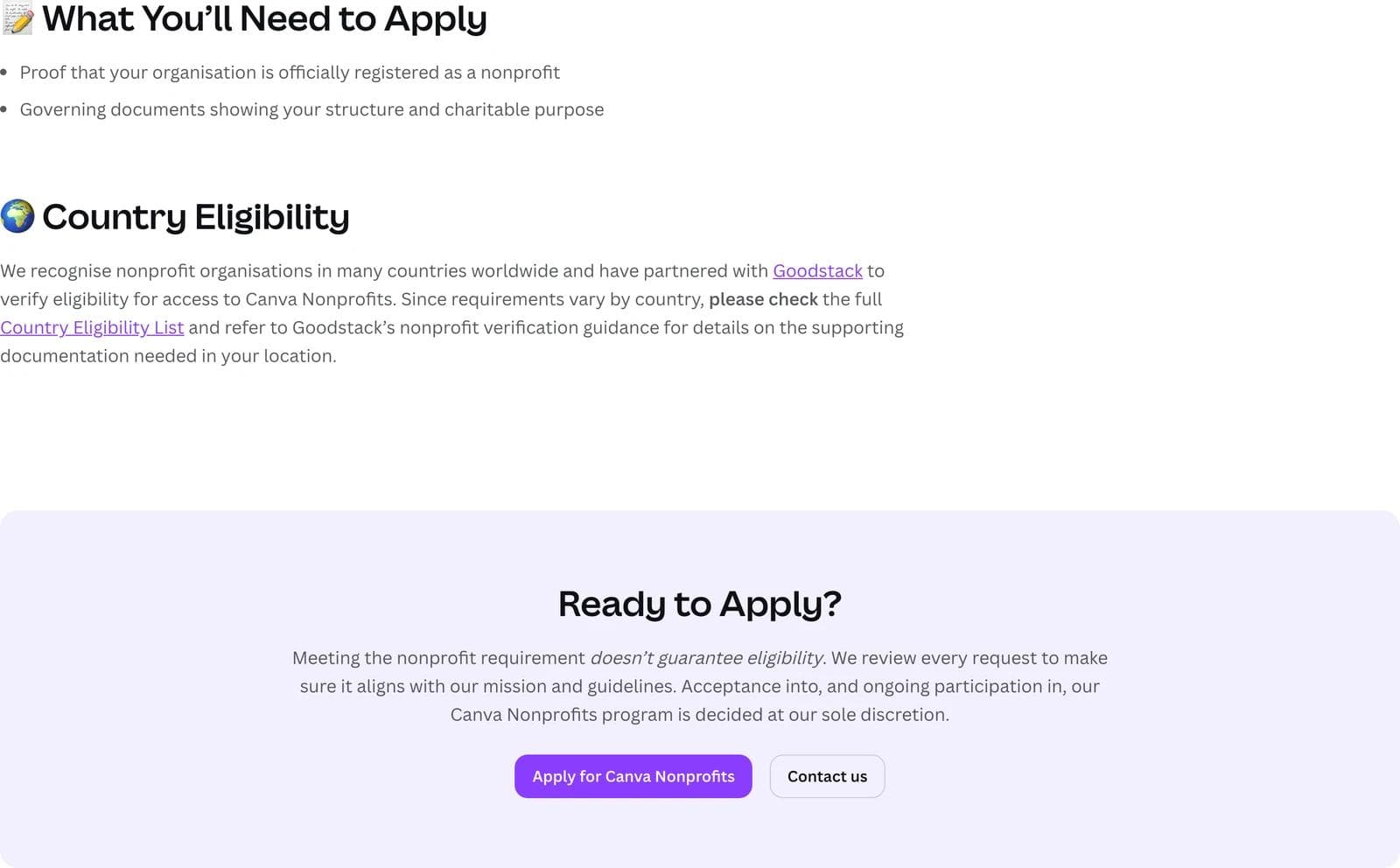
Canva asks for two things: proof that your organization is officially registered as a nonprofit, and governing documents showing your structure and charitable purpose.
Verification runs through Goodstack, the partner Canva names on its eligibility page. Goodstack was previously called Percent, and some older guides still use that name. Goodstack checks three things about the organization, per its own documentation: that a local regulator recognizes it as charitable or nonprofit, that it operates on a not-for-profit basis, and that it operates for public benefit. It also runs two checks beyond that: whether the organization is in good standing with its regulator, and whether the person applying is genuinely affiliated with it.
Two practical points from Goodstack's help documentation:
On organization status, per Goodstack's documentation guidance, you only need to upload documents if your organization does not already appear in Goodstack's registry during the application. When documents are required, Goodstack accepts a government registration certificate, a tax exemption confirmation letter, an official extract from the nonprofit register, or an equivalent record naming your organization. Organizations that their jurisdiction does not require to register cannot be verified at all, because registration is part of the requirement.
On your own affiliation, Goodstack lists organization-produced documents such as bylaws, board meeting minutes, an employment or volunteer confirmation letter, a volunteer agreement, or a certificate of service, alongside a bank statement and, for United States applicants, an EIN verification letter. Its guidance is to supply at least one organization-produced document plus a bank-issued one to speed up review. Applying from an email address on your organization's domain also helps, because Canva's own rejection guidance mentions using a matching domain where possible.
Canva's country eligibility list is Goodstack's nonprofit definitions page, which covers close to 200 countries and territories and names six that are ineligible: Crimea, Cuba, Iran, North Korea, Sudan, and Syria. Requirements vary by country, so check the entry for yours before uploading anything.
How to apply, step by step
- Create a Canva account first if you do not have one, and make sure it has a valid email address on it. Canva's application flow attaches to an existing account.
- Read the eligibility guidelines and confirm your organization type is not on the exclusion list.
- Open the application. If you selected "Non-profit or charity" when you signed up, Canva shows a homepage alert with a direct link to the form for 30 days. Otherwise, go to Settings, then the Billing tab, and choose "Upgrade to Canva for Nonprofits."
- Choose the category that actually matches your organization, such as Registered Nonprofit, Social Impact Organisation, or Public Health Organisation. Picking the wrong one is one of Canva's listed rejection reasons.
- Submit your registration proof and governing documents, then complete Goodstack's verification.
Canva says it reviews applications and updates you by email within 72 hours, and notes that confirming your affiliation with the organization can take longer in some cases. Your team can keep using Canva Free at no cost while the application is under review, so there is no reason to pause work.
One error worth recognizing: if you see "Your organization is already using Canva," someone at your organization has already created the account. Ask that person, or your admin, to add you rather than filing a second application.
Renewal and re-verification
This is the least documented part of the program, and it would be dishonest to pretend otherwise. Canva does not publish a renewal cadence, a re-verification interval, or a description of what happens to your designs if eligibility lapses on its program page, its eligibility guidelines, or its nonprofit help article. What it does publish is that ongoing participation, not just acceptance, is decided at its discretion and remains subject to review.
The practical reading: treat continued access as conditional rather than permanent. Keep your registration in good standing with your regulator, keep the account owned by a role-based address rather than a departing staff member's personal email, and keep an export of your brand assets. If you see a re-verification request from Canva or Goodstack, treat it as time-sensitive. Any article that gives you a confident annual renewal date for this program is stating something Canva does not publish.
If your application is rejected
Canva emails the outcome with a reason, and it publishes four common ones along with the corresponding fix.
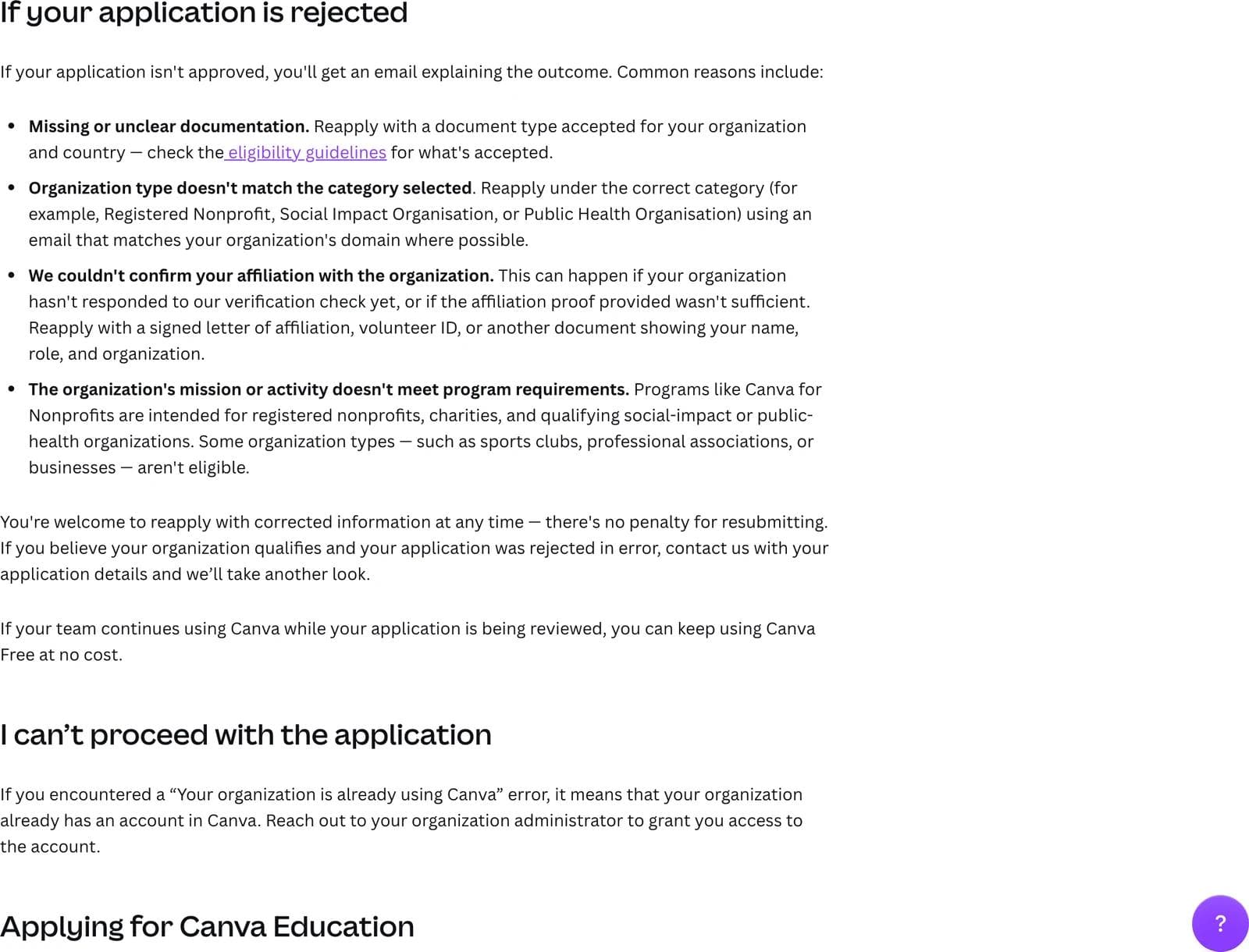
| Rejection reason | What to do |
|---|---|
| Missing or unclear documentation | Reapply with a document type accepted for your organization and country |
| Organization type does not match the category selected | Reapply under the correct category, using an email on your organization's domain where possible |
| Affiliation with the organization could not be confirmed | Reapply with a signed letter of affiliation, a volunteer ID, or another document showing your name, role, and organization |
| The mission or activity does not meet program requirements | This is the substantive decline. Canva names sports clubs, professional associations, and businesses as examples |
Two things Canva states plainly and that are worth knowing before you spiral: there is no penalty for resubmitting, and you can reapply with corrected information at any time. If you believe the rejection was an error, Canva invites you to contact it with your application details for another look. The first three reasons are paperwork problems and are usually fixable on a second attempt. The fourth is a category problem, and no amount of resubmission will change it.
If your organization is not eligible
Some of the most common searches for this program come from groups that will never qualify. Here is the honest read on each.
Fiscally sponsored projects. Canva does not publish a fiscal sponsorship rule, so this is genuinely ambiguous. What is clear is the mechanics: Goodstack verifies a registered legal entity against a regulator, and a fiscally sponsored project without its own registration and determination letter is not that entity. In practice the verifiable organization is the sponsor. Talk to your sponsor about whether they will hold the Canva team and add your project's staff as members, which also puts the sponsor's name on the account. If your project has its own 501(c)(3) determination letter, apply in your own name instead.
501(c)(4), (c)(5), and (c)(6) organizations. Excluded by name. Advocacy organizations, labor groups, and chambers of commerce should plan to pay. If you operate a related 501(c)(3) charitable arm with its own registration, that entity may qualify on its own terms, but the account and the work should sit with the entity that qualifies.
Private and grantmaking foundations. Excluded regardless of operating model. If your foundation also runs its own direct charitable programs through a separately registered operating entity, that entity is the one to look at.
Religious congregations. A registered charitable nonprofit with a clearly charitable mission fits Canva's criteria, and Goodstack's country definitions include religious organizations as a recognized nonprofit form in many jurisdictions. The practical snag in the United States is documentation rather than status: churches are generally treated as tax exempt without filing for recognition, per IRS Publication 1828, so many have never received a determination letter and have to verify with an EIN verification letter and governing documents instead. Canva does not publish a religion-specific rule either way, so approvals here appear to turn on the evidence you can produce. Ask your treasurer what registration documents actually exist before you apply.
Schools, universities, and PTAs. Schools go to Canva Education, which is free for eligible K-12 teachers and schools. Higher education goes to Canva for Campus, which is a paid product. A parent-teacher organization that is separately incorporated as its own 501(c)(3) is a nonprofit in its own right rather than a school, so it is worth applying under the nonprofit program, but expect the reviewer to check the registration.
Government and public health bodies. Public hospitals, health systems, health authorities, and health departments are excluded from the nonprofit program and directed to Canva for Government. This is where Canva's own pages sit slightly out of step: its help center still names Public Health Organisation as a category you can apply under, while the eligibility guidelines exclude publicly run health bodies. The reading that reconciles them is ownership. A privately registered charitable health organization can apply as a public health organization; one that is government-run, government-controlled, or funded by direct appropriations cannot. Several older articles still say public health entities qualify outright, and that is no longer safe to rely on.
Individual organizers and unregistered groups. A mutual aid network, a volunteer collective, or an organizer with no registered entity cannot be verified, because registration with a regulator is the base requirement. Canva Free is the realistic answer here, and it is a capable product.
International NGOs. Goodstack covers close to 200 countries, so a registered charity outside the United States is usually fine in principle. The work is in the documentation: check your country's entry on Goodstack's nonprofit definitions list for the registration record it expects, and be ready for a slower affiliation check.
What to use if you cannot get the grant
Take the free plan seriously first. Canva Free covers a large share of what a small communications team does day to day, and the gap between Free and Pro is mostly premium stock, brand controls, and the more advanced editing tools rather than the ability to make a flyer. If your blocker is stock photography, Unsplash and Pexels cover a lot of it for free. Google Slides and Docs handle decks and reports at no cost, and Adobe Express has a free tier with a similar template-led model. Compare the specific features you actually use against Canva's current plan comparison before paying for anything.
If your bottleneck is specifically producing decks, one-pagers, and reports rather than browsing a template library, Moda works differently: you describe what you need in plain language and an AI agent builds it on a real editable canvas, then you refine it or edit objects directly. That suits a communications lead who has the content but not the layout time, for example turning a program report into a board deck. It is a paid product with no nonprofit grant of its own, and its coverage of everyday design formats is narrower than Canva's suite. If you qualify for free Canva Pro, take the free Canva Pro. We cover the broader landscape in our guide to Canva alternatives.
And if the design tool is not really your problem, it may be the website. Our nonprofit website design teardowns walk through six nonprofit homepages section by section, including how the strongest ones handle donation paths and impact proof.
Canva for Nonprofits FAQ
Is Canva for Nonprofits really free?
Yes. Canva gives eligible registered nonprofits all the premium features of Canva Pro plus team and collaboration tools at no cost, for one team of up to 50 users. There is no fee and Canva does not publish a time limit on the grant, though it reserves the right to review ongoing participation.
How long does Canva nonprofit approval take?
Canva says it reviews applications and emails you the outcome within 72 hours. Confirming that you are affiliated with the organization can take longer in some cases, particularly if your organization has to respond to a verification check. Older articles quoting seven to ten days predate Canva's current guidance.
Who verifies Canva nonprofit applications?
Goodstack, formerly called Percent. It checks that a local regulator recognizes your organization as charitable or nonprofit, that it operates not for profit and for public benefit, that it is in good standing, and that you are genuinely affiliated with it. Canva names Goodstack as the verification partner on its eligibility page; articles describing a TechSoup step for this program are wrong.
Can a 501(c)(4) get Canva for Nonprofits?
No. Canva's eligibility guidelines exclude every 501(c) type other than 501(c)(3), naming 501(c)(4), (5), (6), and (7) specifically.
Do private foundations qualify for Canva for Nonprofits?
No. Canva excludes foundations that primarily make grants to other organizations, and private foundations of any type, including family, corporate, institutional, and grantmaking foundations, regardless of operating model.
What happens if my nonprofit needs more than 50 Canva seats?
The free grant covers one team of up to 50 members. Beyond that, Canva offers additional seats at 50% off Canva Enterprise, which requires talking to its sales team. Canva does not publish the discounted per-seat price.
Can I reapply if Canva rejects my nonprofit application?
Yes, at any time and with no penalty for resubmitting. Fix the specific reason in the rejection email, which is usually documentation, the category you selected, or proof of your affiliation. If you think the decision was wrong, Canva asks you to contact it with your application details.
The short version
If you are a registered 501(c)(3) or its equivalent that runs its own charitable programs, apply. The paperwork is modest, the decision usually lands within 72 hours, and free Canva Pro for 50 people is a real budget line you get back.
If you sit in one of the excluded categories, find that out now rather than after three rejected applications. Check the exclusion list against how your organization is actually registered, not how you describe it in your annual report, and if you are ineligible, spend the energy on making Canva Free work instead.

Real editable visuals. Real canvas. Full control.
Fly through design work