Canva vs Adobe Express: Which Is Better in 2026?
Canva vs Adobe Express compared for campaigns, brand control, social scheduling, AI, presentations, Adobe workflows, and team handoffs.
 Anvisha Pai, Co-founder & CEO, Moda
Canva is the better default for teams that want one broad visual workspace with a deep template ecosystem, presentations, collaborative documents, and social publishing. Adobe Express is the stronger choice when Photoshop, Illustrator, Acrobat, Adobe Fonts, or controlled brand templates are already part of the production chain.
That is the short answer to Canva vs Adobe Express. The more useful answer depends on what happens after the first graphic. Both products can create social posts, short videos, presentations, branded templates, and resized campaign assets. Choose around the system that should own revisions, approvals, source artwork, and distribution.
Canva vs Adobe Express at a glance
| Decision | Canva | Adobe Express |
|---|---|---|
| Best default fit | A broad, self-contained visual workspace | An Adobe-connected content workflow |
| Starting point | Very large template and stock ecosystem, plus Canva AI | Adobe templates, Stock, Fonts, Firefly, and AI Assistant |
| Campaign adaptation | Magic Resize, Translate, brand tools, and a broad multi-format suite | One-click Resize, generative expansion, Safe Zones, and multi-format creation |
| Brand governance | Brand Kits, Brand Templates, approvals, and higher-tier controls | Brand kits, locked templates, style restrictions, and review workflows on team tiers |
| Social distribution | Content Planner on paid individual and business plans | Content Scheduler, including limited scheduling on Free and more accounts on Premium |
| Professional source files | Import and apps cover many workflows, but Canva is usually the destination workspace | Linked Photoshop and Illustrator assets can update inside Express |
| Presentations and workplace breadth | Stronger breadth across Presentations, Docs, Whiteboards, Sheets, and other formats | Presentations and documents are available, with closer Acrobat and Creative Cloud ties |
| Main purchase check | Which capabilities require Pro, Business, or Enterprise | Which controls require Premium, Teams, or Enterprise |
The real difference is where the campaign starts
Imagine a product launch with a hero image from a designer, square and vertical ads, a short social video, a partner presentation, and six scheduled posts. A day before launch, the offer changes.
In a Canva-centered team, Canva is often the main production workspace. People choose a template or existing design, adapt it into other formats, collaborate in the same product, and put social content on the calendar. The product's breadth is part of its value. The same team can also work in presentations, whiteboards, documents, and other parts of the Canva Visual Suite.
In an Adobe-centered team, Express can be the accessible last-mile workspace around professional source assets. A designer can work upstream in Photoshop or Illustrator, while marketers remix approved content, make channel versions, and schedule posts in Express. Adobe documents that linked Photoshop and Illustrator assets can stay synchronized when the source changes.
Neither model is universally better. Canva reduces the need to leave a broad all-in-one workspace. Express reduces friction when leaving Adobe would create a new export-and-upload handoff.
Canva wins on breadth and self-contained teamwork
Canva is the safer default when the people making campaign content do not depend on professional Adobe source files. Its current product spans social graphics, video, presentations, websites, whiteboards, documents, spreadsheets, print, and more. That range matters when one subscription must serve marketing, sales, HR, and other non-design teams.
The advantage is not simply that Canva has more templates. It is that the supporting work can remain nearby. A campaign brief can live in a document, ideas can be organized on a whiteboard, the launch deck can be built as a presentation, and social versions can be adapted from the same general workspace.
Canva's current plan comparison also makes collaboration available broadly, while brand governance becomes more capable on Business and Enterprise. Canva Business currently includes 100 Brand Kits and approvals; Enterprise adds tiered approvals and multi-team management. Those are plan-specific controls, so evaluate the tier that matches the organization rather than treating every Canva account as the same product.

Choose Canva over Adobe Express when:
- The team wants one shared destination for many visual and workplace formats.
- Presentations, whiteboards, documents, and campaign graphics frequently overlap.
- Non-designers will start from templates more often than linked professional artwork.
- A large existing Canva library or established team habit would be costly to migrate.
- You want the design and social-planning workflow in the same broad workspace.
Canva's breadth can also be its tradeoff. More surface area means more places to organize, govern, and teach. A team choosing Canva should agree on where final assets live, which templates are approved, and who owns the campaign calendar. Buying an all-in-one product does not automatically create an operating system.
Adobe Express wins when Adobe files are upstream
Adobe Express is most differentiated when it is not treated as an isolated Canva clone. Its advantage is the relationship to the rest of Adobe.
Adobe's current comparison documents integrations across Photoshop, Illustrator, InDesign, Firefly, Acrobat, and Lightroom. The most decision-useful detail is the linked-source workflow for Photoshop and Illustrator. If a designer changes the original artwork, Express can update the linked asset without asking a marketer to find and re-upload another exported file.
That matters in the late-offer-change scenario. If the hero artwork changes in Photoshop, an Express-centered workflow can preserve the relationship between the professional source and the marketer's downstream versions. In a disconnected workflow, someone must export the new asset, identify every dependent design, and replace it manually.
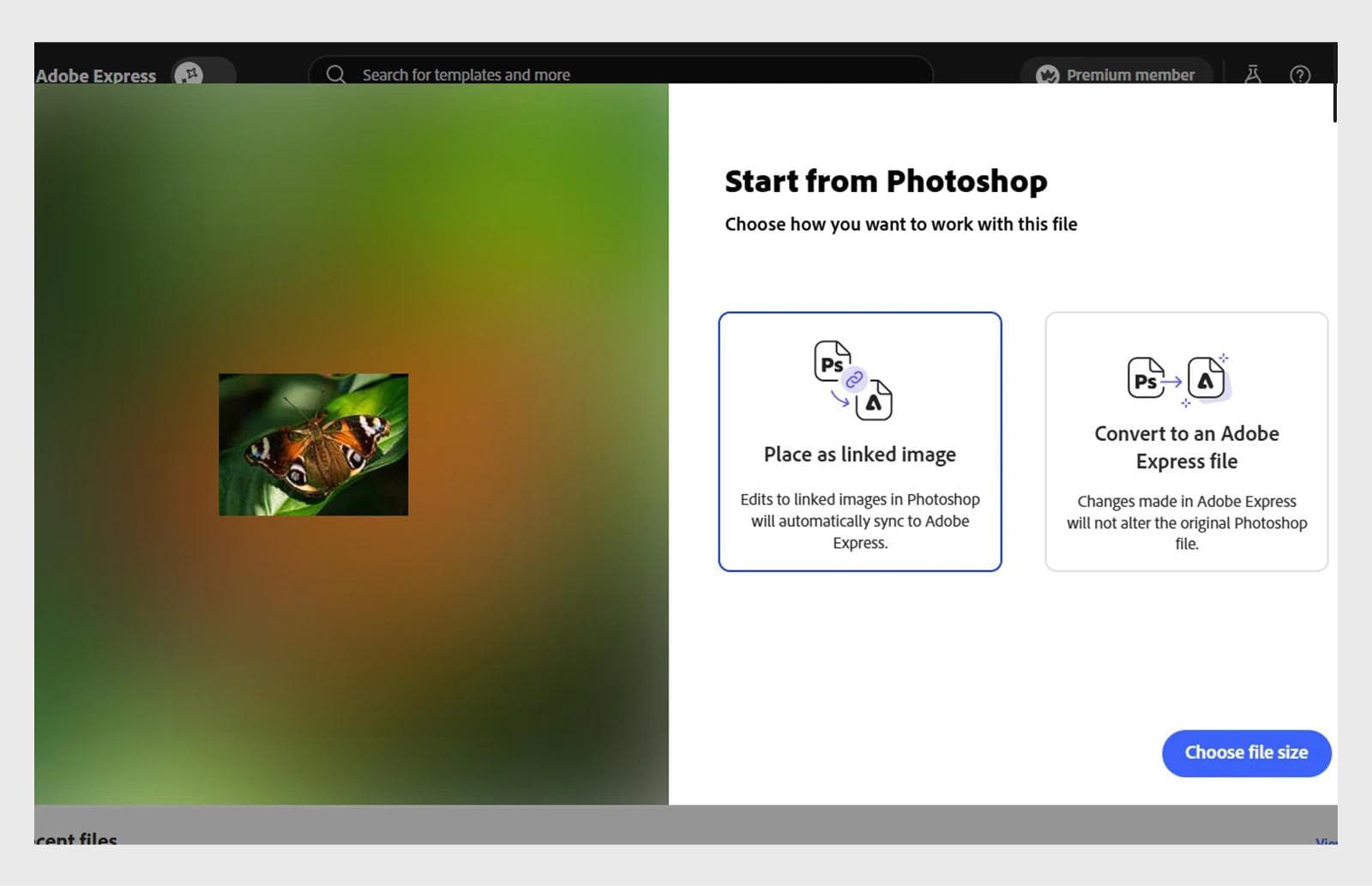
Express also brings Adobe Fonts, Adobe Stock, Acrobat-backed PDF tools, and Firefly into the same buying decision. Its current individual pricing page lists Premium at US$9.99 per month and includes one-click Resize, premium templates and assets, more scheduling capacity, and a longer version-history window than Free. Some Creative Cloud subscriptions include Express Premium, so check existing entitlements before buying another design seat.
Choose Adobe Express over Canva when:
- Photoshop or Illustrator files are the approved source for campaign assets.
- Adobe Fonts, Stock, Acrobat, or Firefly are already important to production.
- Marketers need an accessible editor without severing the designer's source-file workflow.
- Controlled template remixing is more important than a wider workplace suite.
- Express Premium is already included in the Adobe plan the team uses.
The boundary is important. Express does not turn every Adobe file into a fully editable Express design. Verify the behavior of the exact Photoshop, Illustrator, PDF, or presentation file you intend to hand off. A linked image and a converted document solve different problems.
Resizing is a workflow test, not a checkbox
Both products can resize campaign content. Comparisons that award this feature to only one side are out of date.
Canva offers Magic Resize on paid plans and describes using it to transform one design into formats for other channels. Adobe Express Premium includes one-click Resize, and Adobe's current release notes document options that can expand backgrounds and preview multiple layout choices for a new aspect ratio.
The better test is a difficult design. Use a vertical ad with a long headline, product crop, logo, price, and legal line. Make a square and landscape version in each product, then check:
- Did the headline preserve its hierarchy?
- Is the product still framed correctly?
- Did the legal copy remain readable?
- Can a person repair all versions without hunting through separate files?
- Does a later copy change propagate, or must it be repeated?
Automatic resizing saves setup time. It does not guarantee a finished composition. The winning tool is the one that makes the remaining corrections obvious and manageable for the person who owns them.
Brand control is different from saving brand colors
Both products offer brand kits, templates, and higher-tier governance. The distinction is how much control an administrator or designer can retain when someone else remixes the work.
Canva's current plans separate individual brand convenience from organizational control. Pro includes multiple Brand Kits. Business adds many more kits and approvals. Enterprise adds broader governance, security, and multi-team administration.
Adobe Express provides brand kits at the individual level, while its custom template controls for Teams and Enterprise can lock elements, restrict colors and fonts, limit replacement assets to approved locations, and add review and approval workflows.
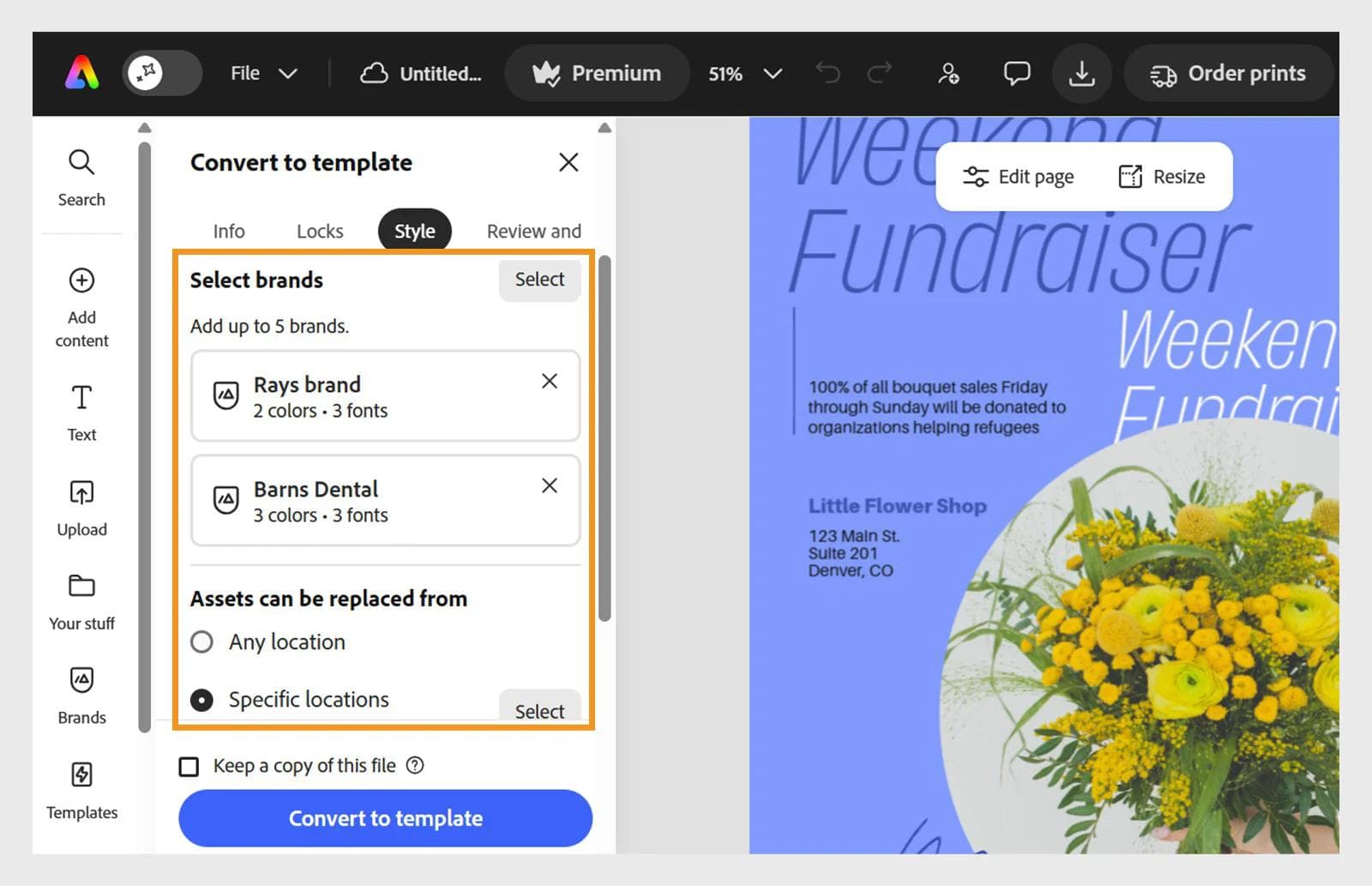
Do not compare these features with a yes-or-no row. Ask for a demonstration using a real template and three roles:
- A designer updates the source template.
- A marketer changes the headline and image.
- A regional teammate localizes the date and offer.
Watch what each role can edit, where approval happens, and what changes when the source template is updated. The right governance model is the one that permits the intended local change while preventing the expensive mistake.
AI is no longer a clean dividing line
Canva and Adobe Express are both actively building AI into their editors. It is inaccurate to describe either as a manual template tool with a few isolated generators.
Canva's current plans include Canva AI, Magic Write, Magic Resize, image and video tools, and different shared AI allowances by plan. Adobe Express combines Firefly-powered generation with an AI Assistant in limited beta that can make changes while preserving manual editing. Adobe's current release notes also document brand-aware prompting and continued editor improvements.
Do not choose from the length of an AI-feature list. Use three prompts on an existing campaign:
- Change the offer without altering the required disclaimer.
- Adapt the approved design for a new audience while keeping the brand treatment.
- Replace one image and preserve the rest of the composition.
Then inspect what changed and what remains editable. This reveals whether the AI is useful for controlled revision, not only for producing an impressive first result.
If commercially governed generative AI matters, inspect the relevant terms and enterprise protections directly. Adobe positions Firefly around commercial safety and offers indemnification for select enterprise workflows. Canva has its own AI safety and indemnity conditions on qualifying plans. These are contractual purchase questions, not claims that one model produces better images.
Both can schedule social content, with different plan limits
Canva's Content Planner lets users schedule existing or new designs, add captions, and manage planned posts from a calendar. Canva's current US pricing page lists social content scheduling with Pro and higher tiers.
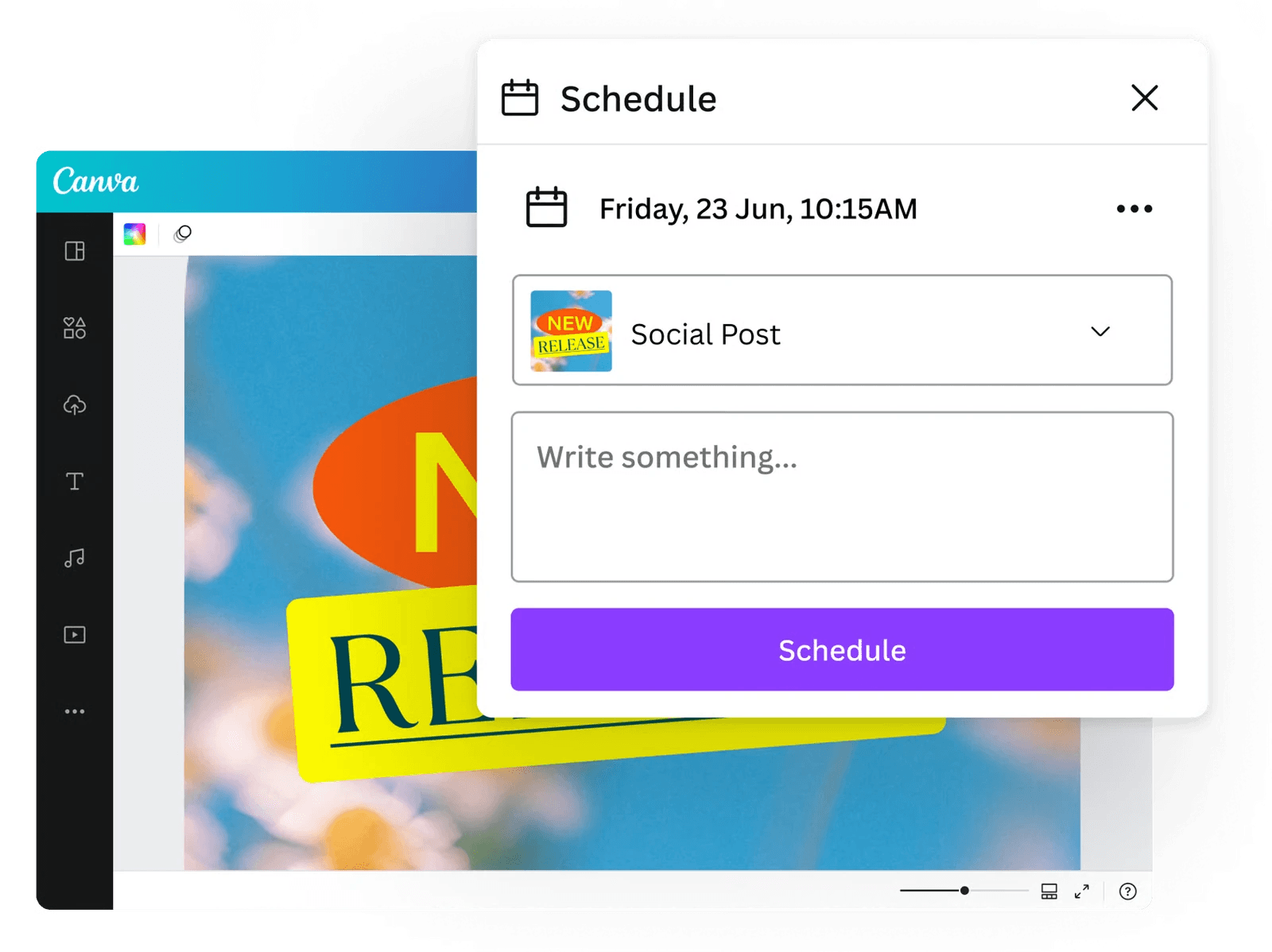
Adobe Express's Content Scheduler supports scheduling and publishing to documented channels including Facebook, Instagram for business, LinkedIn, TikTok, Pinterest, YouTube, and X. Adobe currently includes one account per social network on Free and more accounts on Premium, with plan and format conditions to check.
The practical evaluation is not “Does it schedule Instagram?” Verify the specific account type, post format, number of profiles, approval process, and analytics your team needs. Also test the late change. Can the owner update the creative and caption before publication without losing track of the scheduled version?
Teams with a mature social platform may not need either built-in scheduler. In that case, prioritize clean exports, naming, and handoff rather than paying for a calendar that will remain empty.
Canva vs Adobe Express for presentations and video
Canva has the stronger claim as a broad presentation workspace. Presentations sit alongside its documents, whiteboards, and other team formats, which can make it easier to move from planning to a deck. If presentations are the main deliverable, our Canva vs PowerPoint comparison covers the traditional slide-file decision in more detail.
Adobe Express also supports presentations and documents, including current tools for turning source content into slides on supported plans. Its advantage appears when the deck depends on Adobe assets or must feed into a wider Adobe workflow.
For video, both products cover lightweight marketing creation and editing. Adobe Express documents video quick actions, captions, Clip Maker, voice recording, and animation features. Canva includes a video editor, recording, AI video features, and a broad asset library. Neither should be selected as a substitute for a specialist editor without testing the actual timeline, caption, audio, and handoff requirements.
Canva vs Adobe Express pricing in 2026
Both have usable free plans, but the free tiers are not identical trials of the paid product.
As reviewed on August 31, 2026, Canva's US pricing page lists Pro at US$180 per year for one person and Business at US$250 per year per person. Adobe lists Express Premium at US$9.99 per month. Team and enterprise costs require closer comparison because seat minimums, introductory offers, bundled Adobe entitlements, storage, and governance tiers differ.
Price the workflow, not one headline subscription:
- Count every person who needs to create, approve, or administer content.
- Check whether Express Premium is already included with an Adobe subscription.
- Include any external scheduler, stock, storage, or specialist editor that remains necessary.
- Confirm the brand-control tier instead of assuming the individual plan includes it.
- Estimate migration and training cost for the team's existing design library.
A cheaper editor can become the more expensive system if it adds repeated exports, duplicate asset libraries, or another approval tool.
What if neither workflow fits?
Canva and Adobe Express both make sense when a person wants to create and adapt content inside a broad editor. A different category is worth considering when the bottleneck is getting from a brief to a coherent set of original, editable campaign designs.
Moda takes that approach with an AI agent operating a real design canvas. It is relevant for campaign visuals, social posts, presentations, and one-pagers that need to be generated from a brief and then revised as editable designs. Our Adobe Express alternatives guide compares that workflow with other broad and specialist options.
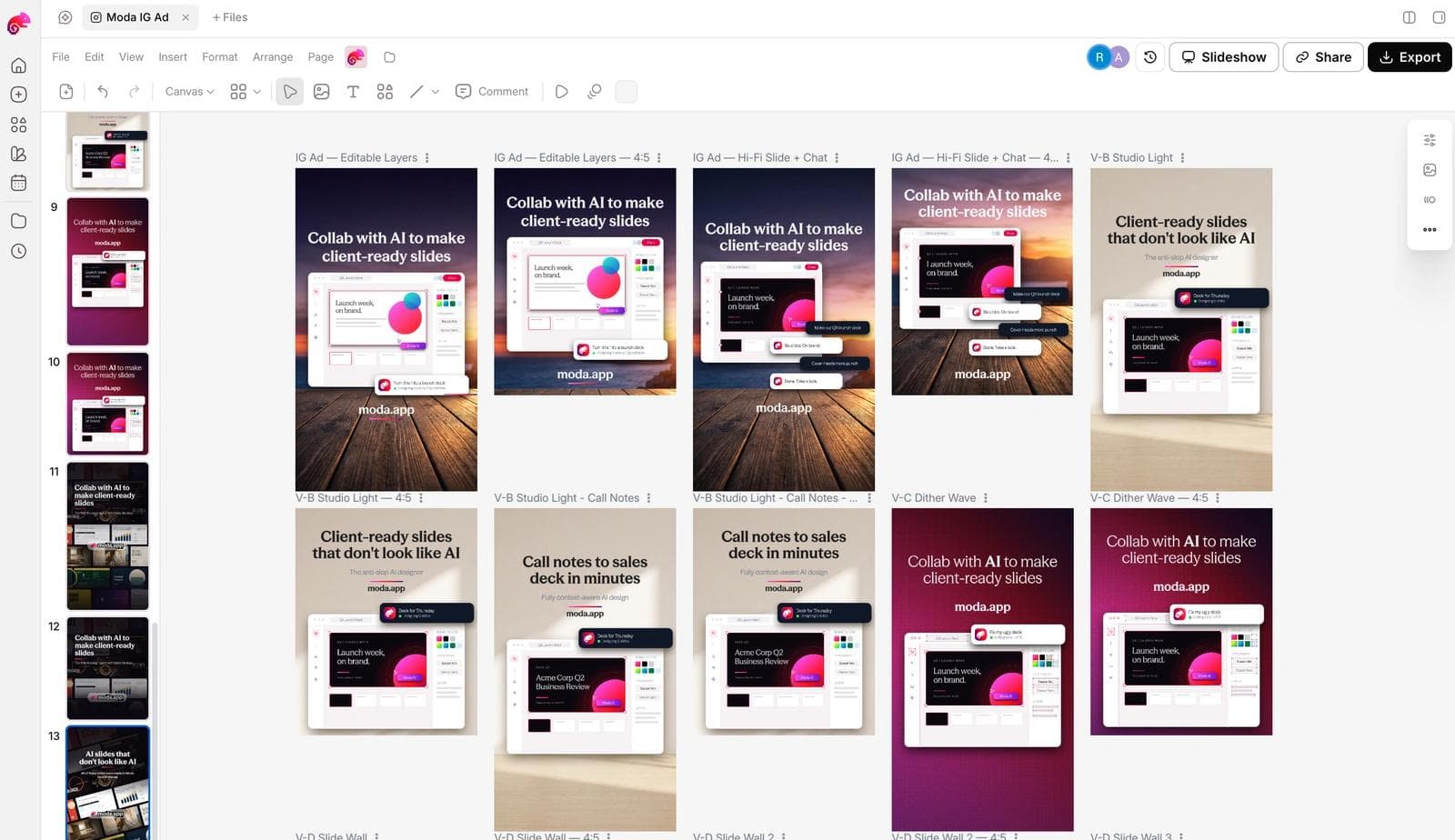
Moda is not a complete replacement for Canva's workplace suite or either product's social scheduler. It is also not the default answer when linked Photoshop and Illustrator assets or mandatory enterprise template controls determine the workflow. Consider it when original generation and iterative design are the main bottleneck, then keep the appropriate publishing and governance systems around it.
A five-step test before you switch
Run this with one existing campaign. No paid batch of AI generations is necessary.
- Import the hardest source. Use the real Photoshop, Illustrator, PDF, presentation, or template file that normally starts the work.
- Make the awkward resize. Create portrait, square, and landscape versions with the longest approved headline.
- Change the offer. Update the copy, image, and legal line after all versions exist.
- Hand it to the next role. Ask a non-designer to make one permitted change and attempt one prohibited change.
- Prepare distribution. Schedule or export the final assets through the workflow the team will actually use.
Record every manual handoff and duplicated change. That evidence is more useful than comparing template counts or watching polished product demos.
Which should you choose?
Choose Canva if your priority is a broad, self-contained visual workspace for a cross-functional team. It is especially compelling when presentations, documents, whiteboards, social graphics, and scheduling need to coexist and professional Adobe files are not the center of the workflow.
Choose Adobe Express if your organization already creates core assets in Photoshop or Illustrator, relies on Adobe Fonts, Stock, Acrobat, or Firefly, or needs to give marketers controlled access to Adobe-centered creative work.
Keep your current product if the migration does not remove a meaningful handoff. The two platforms overlap heavily, and switching editors without changing the operating model can simply move the same work to a new interface.
Frequently asked questions
Is Adobe Express better than Canva?
Adobe Express is better when Photoshop, Illustrator, Acrobat, Adobe Fonts, or other Adobe assets are central to the workflow. Canva is usually the better default for teams that want the broadest self-contained workspace across social content, presentations, documents, whiteboards, and other visual formats.
Is Canva or Adobe Express better for social media?
Both can create, resize, and schedule social content. Canva suits teams that want social work inside a larger visual suite. Adobe Express suits teams that want social production connected to Adobe assets. Check the supported channel, account type, post format, and plan limits before choosing.
Which is cheaper, Canva or Adobe Express?
On the US pages reviewed August 31, 2026, Adobe Express Premium is listed at US$9.99 per month, while Canva Pro is US$180 per year for one person. That does not settle team cost. Compare the seats, storage, AI allowances, governance tier, existing Adobe entitlements, and any separate publishing tools you need.
Can Adobe Express replace Canva?
It can replace Canva for many social graphics, lightweight videos, presentations, brand templates, and scheduled posts. It is not a like-for-like replacement for every part of Canva's wider suite. Test the formats, collaboration workflow, and source files your team actually uses.
Can Canva replace Adobe Express?
Canva can replace much of a self-contained Express workflow, especially when the work starts from templates or uploaded assets. It may add handoffs when Photoshop or Illustrator files are the approved source and linked updates matter. Test one source-file change before migrating.

Real editable visuals. Real canvas. Full control.
Fly through design work