10 Best CapCut Alternatives in 2026, by Editing Workflow
Compare 10 CapCut alternatives for mobile edits, captions, desktop production, and AI creative. Choose by workflow, not just features.
 Anvisha Pai, Co-founder & CEO, Moda
The best CapCut alternatives depend on what you are editing. Start with VN for phone-first social videos, Clipchamp for straightforward free browser editing, Descript for spoken-word footage, and DaVinci Resolve for deeper post-production. Consider Moda when the job starts with generated visuals and branded motion, rather than simply cutting footage you already have.
That distinction matters. Replacing an editor for a quick Reel is a different decision from finding somewhere to cut a podcast, finish a client film, or build a product ad without a shoot. A longer feature list does not necessarily make the switch easier.
Quick comparison: which CapCut alternative fits your work?
The order below follows editing needs, not a universal ranking. Platform notes identify the surface being compared, not every version a vendor offers.
| Alternative | Choose it for | Main surface considered | Check before switching |
|---|---|---|---|
| VN | Phone-first social edits and manual timing | iOS and Android | Your captions, fonts, and favorite effects on that device |
| LumaFusion | More deliberate touch-first editing | iPad; Android version also available | Platform-specific features and add-ons |
| Filmora | Desktop creator editing with effects and AI assistance | Windows and Mac | Editor license versus AI credits and creative assets |
| Clipchamp | Simple edits and free 1080p exports | Browser and Windows | Personal versus work-account entitlements |
| Descript | Interviews, tutorials, and podcasts | Desktop and web | Media-hour allowance and speech-led workflow |
| VEED | Captions, localization, and browser-based review | Browser | Export limits and subtitle/AI allowances |
| Moda | Generated creative, branded graphics, and editable motion | Browser | Fit with your specific footage and delivery requirements |
| DaVinci Resolve | Editing, color, audio, and compositing | Desktop | Hardware, media formats, and free versus Studio tools |
| Adobe Premiere | Production workflows and Adobe handoffs | Windows and Mac | Collaborator project requirements and subscription scope |
| Final Cut Pro | Editing within an Apple workflow | Mac and iPad | Device support and Mac/iPad feature differences |
First, decide which part of CapCut you need to replace
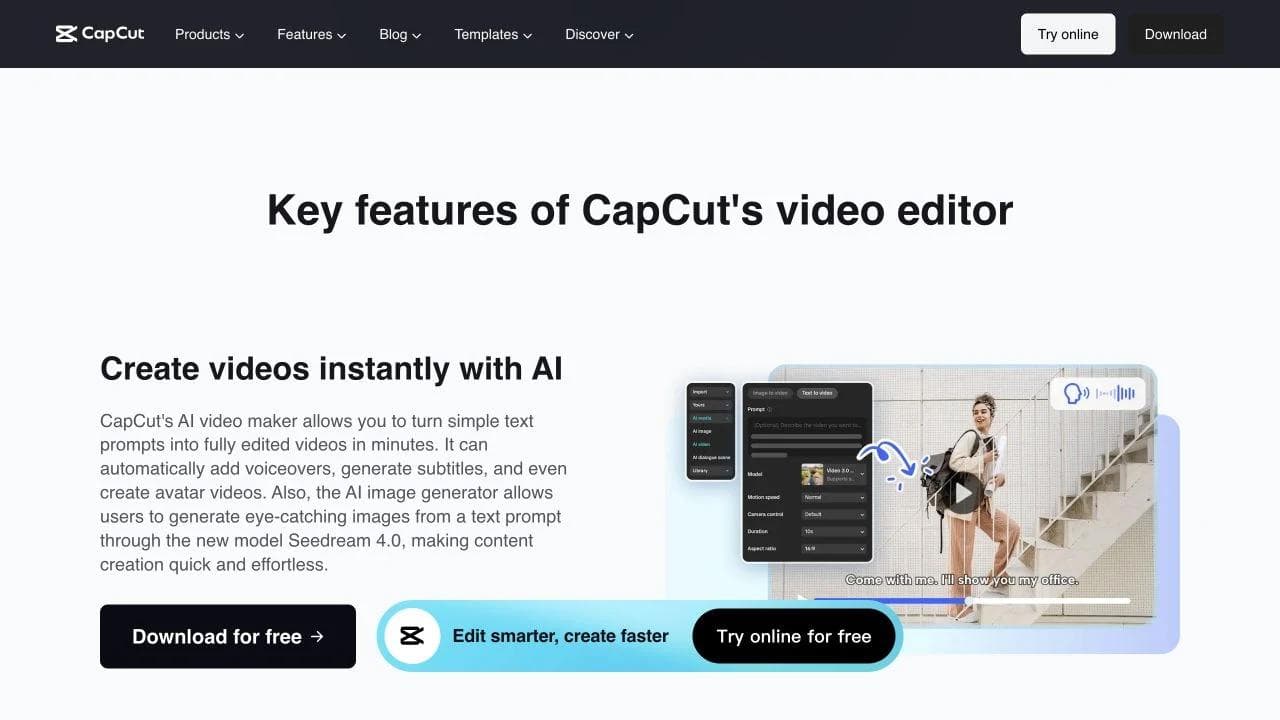
CapCut combines clip editing, social templates, captions, effects, and AI creation across several surfaces. Its own editing overview makes clear that it is more than a basic trimmer. Do not switch just because another product also has a timeline or a video generator.
There are three useful starting points:
- You already have the footage. Prioritize trimming, audio, captions, reframing, and comfortable controls on the device you actually use. VN, Filmora, Clipchamp, and the deeper desktop editors belong here.
- The story is in what someone says. Start by evaluating transcript-led editing in Descript or VEED. A good transcript workflow can matter more than a large transition library.
- You need to create the material first. Compare generation, editable text and graphics, and how shots become a finished piece. Moda belongs here, while CapCut and other editors also offer AI creation.
These groups overlap. The question is which action occupies most of your time: cutting footage, shaping speech, or creating the visuals.
1. VN: a practical starting point for phone-first editing
VN is worth trying first when you like editing on your phone and want control over cuts, overlays, and movement. Its current feature set includes a multitrack timeline, keyframes, speed curves, transitions, and automatic captions. VN also advertises free editing without watermarks. VN features and downloads
The useful comparison is a familiar short project, not a cinematic demo. Can you place an overlay, adjust a speed ramp, correct a caption, and export without rebuilding your habits? Those are more relevant questions for a daily social creator than whether the editor includes an advanced color workspace.
VN is not an exact copy of CapCut's templates or effects. Rebuild the two or three treatments you use most before committing. If a particular font, caption animation, or template is essential to your style, matching that detail matters more than the number of tools listed on the website.
Choose VN if: your main requirement is hands-on social editing on iOS or Android, without turning the switch into a move to desktop production software.
2. LumaFusion: for creators who want more control on a tablet
LumaFusion is a different kind of mobile alternative. Its iOS offering emphasizes track-based and magnetic-timeline editing, layered effects, detailed audio controls, and multilayer titles. It also provides an Android version, with its own feature and purchase details. LumaFusion's current product overview
That makes it a sensible candidate for someone editing interviews, travel footage, or a more structured story on an iPad. You are choosing a touch-first editing workspace, not merely a library of social treatments.
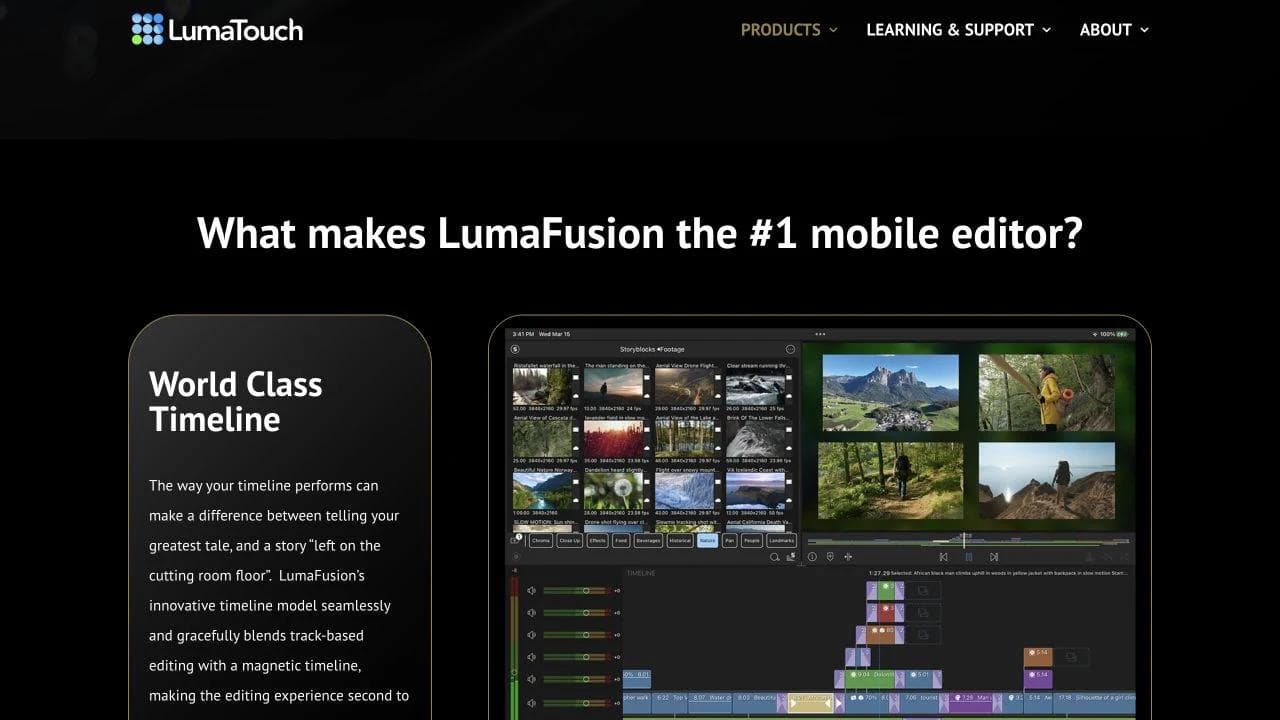
Check the exact edition and purchases. LumaTouch lists enhanced features and a Creator Pass, including options such as multicam and FCPXML export. Do not assume that everything shown in an iOS demonstration is included in the base purchase or available identically on Android.
Choose LumaFusion if: you want deliberate control over tracks, titles, and audio while keeping a tablet-centered workflow. Choose a simpler social editor if rapid template reuse is the whole job.
3. Filmora: for desktop creators who still want effects-led editing
Filmora is a useful bridge between a social editor and a more involved production environment. Its Windows and Mac product combines a conventional editing timeline with creator-oriented effects and AI-assisted tools. Filmora video editor
It belongs on the shortlist for YouTube explainers, product walkthroughs, and social videos assembled from several kinds of material. You can evaluate an installed editor without assuming that you need the full workflow of Premiere or Resolve.
The important purchase distinction is between the editor, creative assets, and metered AI features. Filmora offers different license options, but a perpetual editor license is not a promise of unlimited AI generation or every future upgrade. Check the current plan comparison alongside the AI credit rules.
Choose Filmora if: you want a desktop editing workflow with readily available creative treatments. Price the features you will actually use, not only the entry-level license.
4. Clipchamp: a clear free option for straightforward browser edits
For basic footage assembly, Microsoft Clipchamp deserves an early look. Its personal free plan includes trimming, cropping, recording, AI subtitles and voiceovers, plus watermark-free exports up to 1080p. Premium adds features including 4K export and a brand kit. These are specific published entitlements, not an assumption that every feature is free. Clipchamp plan comparison
Think of a screen recording with a short introduction, a captioned team update, or a simple product demo. If that describes your workload, Clipchamp gives you a concrete baseline before paying for a larger suite.
Account type matters. The personal product and the version supplied through work or education licenses are not interchangeable purchasing decisions. Check your organization's entitlement rather than assuming a personal Microsoft 365 benefit follows you into a work account.
Choose Clipchamp if: you need understandable editing and a documented free 1080p export path. If your favorite CapCut effect is the reason people recognize your videos, reproduce that effect before treating Clipchamp as a replacement.
5. Descript: for videos whose structure comes from speech
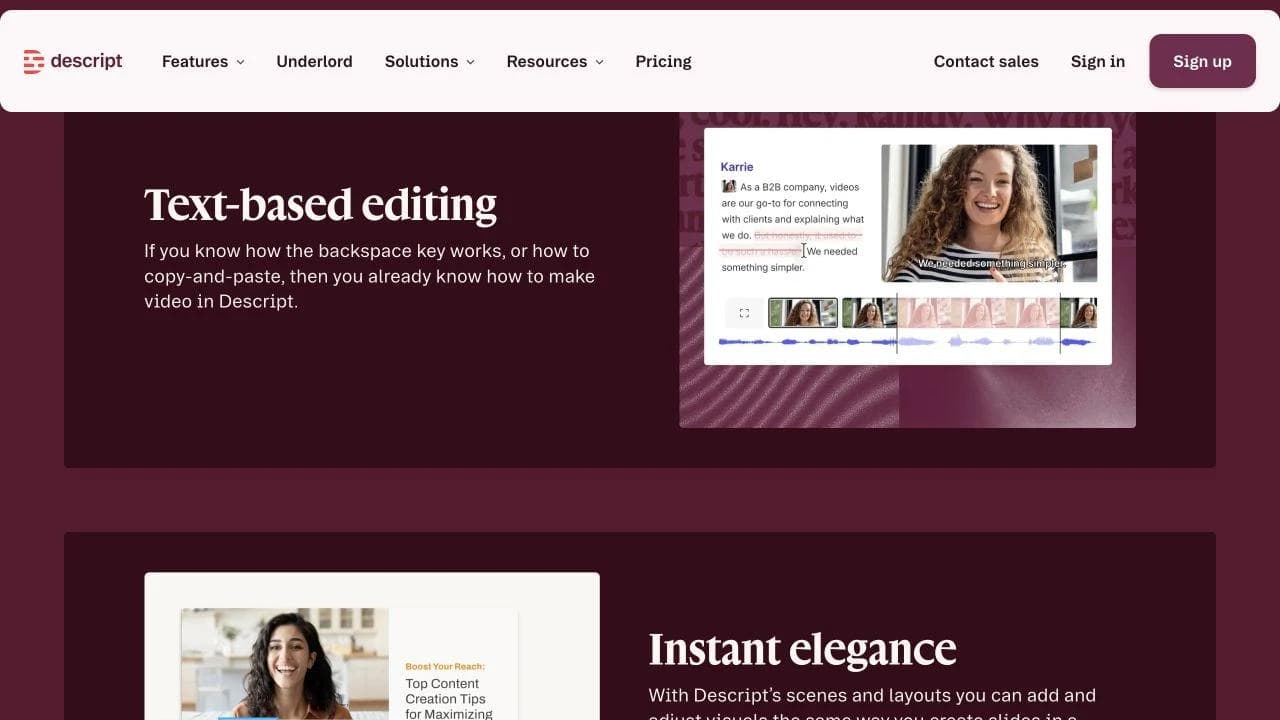
Descript's defining workflow is editing video by editing a transcript. Remove or rearrange spoken material in text, then refine the result with visuals, captions, and audio tools. Underlord adds AI-assisted editing to that workspace. Descript video editing
For a founder interview, podcast, or recorded tutorial, that changes the first editing task from hunting through a timeline to deciding what the speaker should say. It is a useful fit when the rough cut is mostly an editorial decision about language.
It is not a reason to ignore timing. A sentence can read well but cut awkwardly, and B-roll or reactions still need visual judgment. Compare Descript with Filmora or a traditional NLE if beat-by-beat movement matters more than the transcript.
Also separate the allowances: Descript's plans distinguish media hours from AI credits. A large recording workload and frequent AI operations place different demands on the subscription. Descript pricing
Choose Descript if: interviews, explanations, and spoken stories dominate your work. Transcript editing is its organizing principle, not a capability exclusive to Descript.
6. VEED: for browser-based caption and review workflows
VEED combines browser editing with subtitles, translation, audio cleanup, and team feedback. It also offers text-based editing and AI video creation, so it should not be dismissed as only a caption generator. VEED editor and workflow overview
It is worth evaluating when a single source video must become several captioned or localized deliverables, with feedback from people who are not dedicated editors. The important question is how easily a reviewer can identify a moment, request a correction, and approve the next version.
For subtitle-heavy work, check correction and export as carefully as automatic transcription. Can you change a brand name, control a line break, and get the subtitle format you need? Review the current plan limits for output and AI usage rather than equating free access with unrestricted delivery.
Choose VEED if: the work revolves around captions, versions, and browser-based collaboration. Consider Descript first when reshaping a long spoken narrative is the bigger task.
7. Moda: for generated creative that also needs design and motion
Moda is worth considering when the brief starts before the footage exists: a product concept, a campaign, an animated explanation, or a branded social ad. It combines video, image, and audio generation with an editable design canvas, a timeline for arranging compositions, and layer-based motion tools.
The distinction is what happens after the initial asset. You can work on the text, shapes, layout, and animation around a clip instead of treating the whole visual as one flattened image. The Edit timeline and the Compose layer timeline serve different jobs: ordering a piece versus controlling what happens inside a composition.
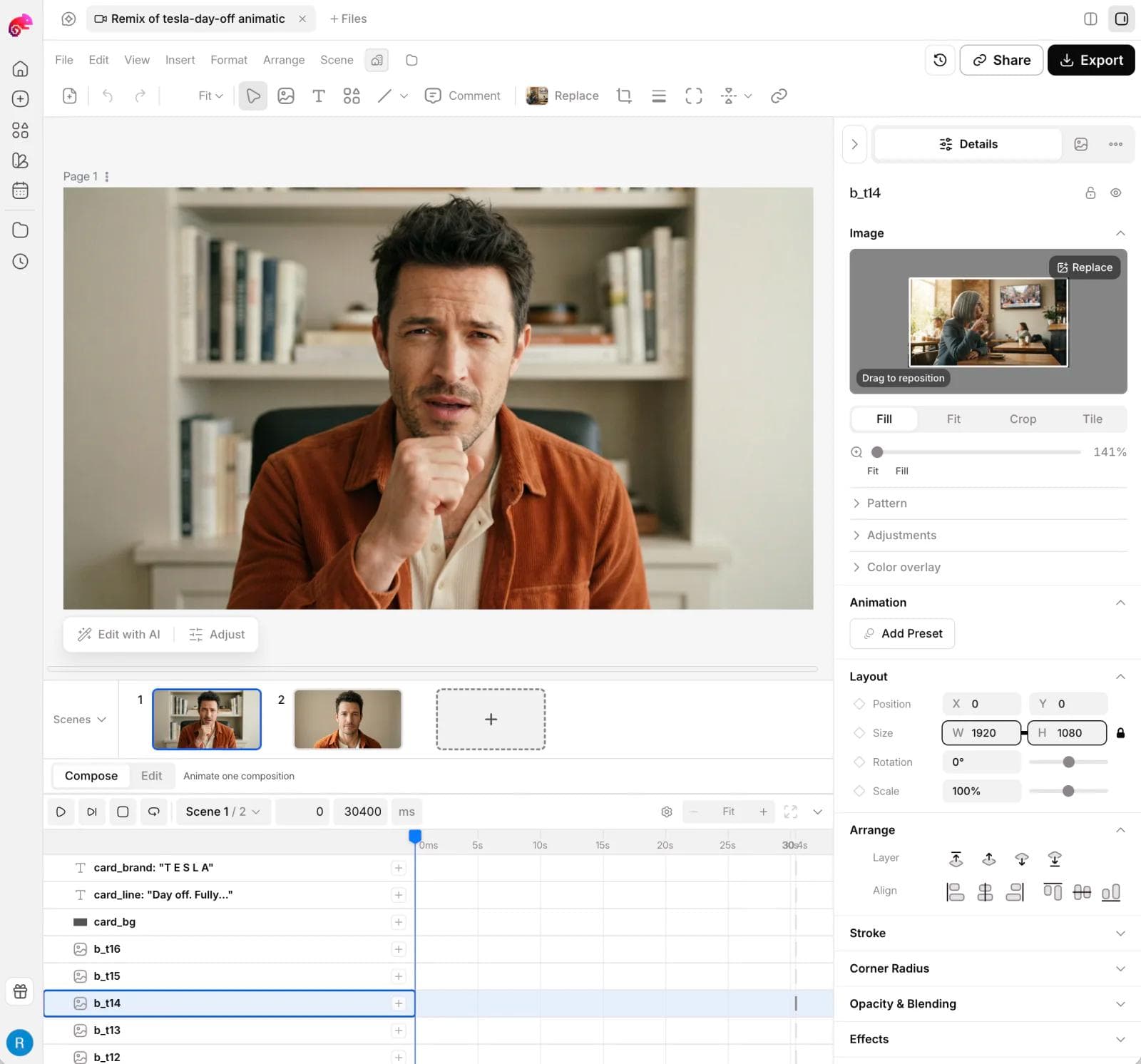
For example, a product ad might need a generated scene, a designed end card, animated benefit labels, and matching static campaign assets. That is a closer fit for Moda than a project whose main challenge is selecting takes from an hour of recorded footage.
This is not a claim that CapCut lacks AI generation, or that Moda replaces every established NLE workflow. For phone-first editing, transcript-heavy interviews, multicamera production, or a specific project-file handoff, evaluate the tools built around those requirements first.
Choose Moda if: generated visuals and editable branded design are central to the video. For the separate decision of where to generate clips, our Higgsfield alternatives guide covers generation-oriented platforms in more detail.
8. DaVinci Resolve: for deeper editing and finishing
DaVinci Resolve brings editing, color correction, Fusion visual effects, and Fairlight audio into one application. Blackmagic offers both a free version and a paid Studio edition, with additional capabilities in Studio. DaVinci Resolve
The reason to consider it is not simply that it has more controls. It is that your projects increasingly require those stages together: match shots, refine a sound mix, build a composite, and keep revising the edit.
That is a substantial workflow change from assembling short social videos. Start with a small project using your actual camera files on your actual machine. Confirm format support and the tools included in your edition before moving a deadline-sensitive job.
Choose Resolve if: you want an editing environment you can grow into across picture, sound, and effects. If the immediate problem is a caption on a ten-second clip, a smaller editor is a more proportionate starting point.
9. Adobe Premiere: when the production handoff matters
Premiere is a strong candidate when a video needs to move through an Adobe-centered production team. Alongside timeline, color, and audio tools, Adobe now documents Text-Based Editing and AI-powered Media Intelligence for finding footage. It is not accurate to frame Premiere as manual editing with no AI assistance. Adobe Premiere features
The practical advantage can be collaboration around a working project rather than the final MP4. If an editor, agency, or motion designer has specified a Premiere workflow, satisfying that requirement may matter more than saving a few clicks in the first cut.
Check the actual handoff: project version, source files, fonts, effects, and linked assets. An exported video is a finished result, not a substitute for an editable project. Adobe's broader tools and subscription packaging should also be part of the purchase decision.
Choose Premiere if: your collaborators or delivery process already depend on it, or you need its deeper editing workflow. Do not adopt it merely because a comparison calls it more professional.
10. Final Cut Pro: for an Apple-centered editing workflow
Final Cut Pro is available on Mac and iPad. Its Magnetic Timeline is designed around keeping connected material in sync as you rearrange a story, and Apple also provides an iPad-to-Mac workflow. Final Cut Pro
It is a good candidate when you already work on Apple hardware and want to invest in a more substantial editor. Compare the exact device experience, not an abstract list of features shared across every version.
Apple offers Final Cut Pro through Creator Studio and also as a one-time Mac purchase. Motion and Compressor are separate Mac applications in the broader workflow; do not assume a Final Cut purchase alone includes every motion-design or delivery capability shown on Apple's site. Hardware and feature requirements vary too.
Choose Final Cut Pro if: a Mac or iPad is already central to how you shoot and edit. For a mixed-device team, verify the working-file handoff before settling on an Apple-specific workflow.
Before you switch: rehearse one real edit
Use a short, non-sensitive project with footage you own. The goal is to discover friction before your next deadline, not to make a benchmark film.
- Cut and revise: trim two shots, insert B-roll, then change the first shot's length. Check what happens to text, music, and everything downstream.
- Correct captions: fix a product name, move a line break, and adjust timing. Test whether you need burned-in text, a separate subtitle file, or both.
- Export the actual deliverable: choose the resolution, frame rate, aspect ratio, and assets you normally use. Inspect the saved file, including watermarks and audio.
- Reopen and hand off: confirm you can find the project and its source media. If another person must continue editing, test that exact workflow.
Do not assume that importing a rendered MP4 transfers the original layers, captions, and edit decisions. Keep your original media and project backups while evaluating the replacement.
Budget the whole workflow too. CapCut says its subscription price can vary by region, platform, and taxes, so compare the offer in your own account with the alternative's actual checkout. For other tools, separate editor access from stock assets, AI credits, subtitle limits, and collaborator seats. CapCut pricing guidance
When staying with CapCut makes sense
If CapCut already handles your device, recurring edits, preferred treatments, and final exports at an acceptable cost, switching is not automatically an upgrade. Learning a new editor and recreating a visual style are real costs.
Change tools for a specific reason. VN and Clipchamp are sensible first checks for everyday editing. Descript and VEED deserve attention when speech or captions dominate. Resolve, Premiere, and Final Cut serve more involved production workflows. Moda is the option to evaluate when creating and designing the material is as important as cutting it.
If your work also extends into research, presentations, and static assets, our Genspark alternatives guide looks at the broader creative-work bundle. For this decision, keep the test narrower: can the replacement make your next video easier to finish and revise?
Frequently asked questions
What is the best free CapCut alternative?
Clipchamp is a clear starting point for basic browser editing: its personal free plan explicitly includes watermark-free 1080p exports. VN also advertises free editing without watermarks and is worth evaluating on a phone. DaVinci Resolve offers a free edition for a deeper desktop workflow. Check the specific tools and assets you need rather than assuming a free plan includes everything.
Which CapCut alternative is best for mobile editing?
Start with VN for phone-first social edits. Consider LumaFusion for more deliberate touch-first editing, especially on a tablet. Final Cut Pro is another option on supported iPads. Verify device support and feature availability in the exact edition you will use.
Is an AI video generator a replacement for CapCut?
Not by itself. Generating a shot does not necessarily provide the editing, captions, audio, graphics, and exports needed to finish a video. Moda combines generation with design and motion tools; other products, including CapCut, also combine AI creation and editing. Compare the full workflow, not just the model list.
Can I transfer my CapCut projects to another editor?
Do not assume full project compatibility. A rendered video can be imported as footage, but that does not preserve the original editable text, layers, effects, or timeline decisions. Before switching, check the destination's supported project or interchange formats and keep the source media and original project available.

Real editable visuals. Real canvas. Full control.
Fly through design work