What Are Claude Skills? How They Work and How to Write One
Claude skills explained: what a SKILL.md file actually contains, how skills differ from prompts, projects, MCP servers and subagents, and how to write one that fires.
 Anvisha Pai, Co-founder & CEO, Moda
A Claude skill is a folder with a SKILL.md file in it. The file has YAML frontmatter with a name and a description, then Markdown instructions underneath. Claude reads every installed skill's name and description at startup, and when your request matches one, it reads the rest of the file. That is the whole mechanism.
Everything else people say about Claude skills follows from those two sentences. The reason a skill costs almost nothing until it is used, the reason a badly written description means the skill never fires, and the reason skills are not the same thing as MCP servers all come out of that one design.
This guide covers what skills are, how they differ from the four things they get confused with, which ones are worth installing, and what it takes to write one that Claude actually picks up.
What a Claude skill actually is
Anthropic's engineering post introducing Agent Skills, published 16 October 2025, describes them as "organized folders of instructions, scripts, and resources that agents can discover and load dynamically to perform better at specific tasks."
The minimum viable skill is four lines:
---
name: pdf-processing
description: Extract text and tables from PDF files, fill forms, merge documents. Use when working with PDF files or when the user mentions PDFs, forms, or document extraction.
---
A real skill adds a Markdown body, and usually some bundled files:
pdf-processing/
  SKILL.md          instructions, loaded when the skill triggers
  FORMS.md          reference file, loaded only if forms come up
  REFERENCE.md      API reference, loaded only if needed
  scripts/
    fill_form.py    executed through bash; its code never enters context
The important property is that those bundled files cost nothing until Claude reads them. Anthropic's documentation calls this progressive disclosure and breaks it into three levels.
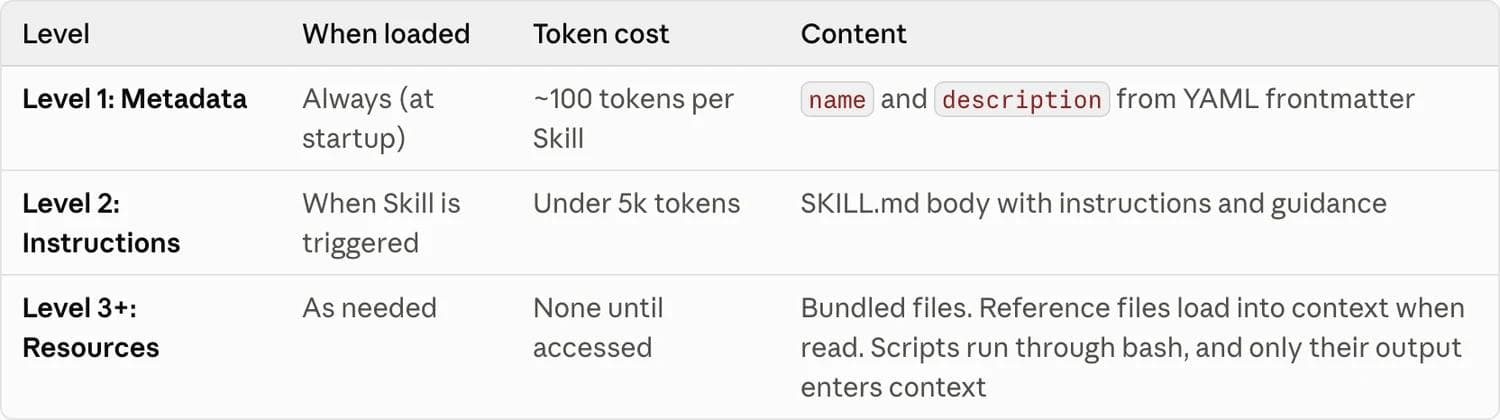
Level 1 is the name and description, always in the system prompt, roughly 100 tokens per skill. Level 2 is the SKILL.md body, loaded when the skill triggers, and Anthropic recommends keeping it under 5,000 tokens and under 500 lines. Level 3 is everything else in the folder, which loads only when Claude reads it, and scripts that run through bash return only their output.
That is why "install a lot of skills" is a reasonable thing to do and "put everything in your system prompt" is not.
Skills vs prompts vs projects vs custom instructions vs MCP vs subagents
This is where most of the confusion lives, and none of it survives a side-by-side comparison. These six things are not competitors. They occupy different slots.
| What it is | When it loads | What it gives Claude | Reach for it when | |
|---|---|---|---|---|
| Prompt | What you type | Now, once | Instructions for this turn | The task is one-off |
| Custom instructions | Account-level or project-level preferences | Every conversation in scope | Standing tone, format and behaviour rules | You always want the same style, regardless of task |
| Project | A workspace with uploaded files and its own instructions | Whenever you chat inside that project | Static knowledge to draw on | The context is a body of material, not a procedure |
| Skill | A folder with SKILL.md plus optional scripts and references | Only when your request matches its description | A repeatable procedure, plus reference material and deterministic scripts | The same multi-step job comes up across many conversations |
| MCP server | A running server exposing named tools over a protocol | Its tool definitions load up front; tools run when called | Access to a system Claude otherwise cannot reach | Claude needs to read or write something outside its own environment |
| Subagent | A separate agent with its own context window, tools and model | When the main agent delegates to it | Isolation, so verbose work stays out of your conversation | The work is self-contained and you only want the summary back |
Three distinctions are worth spelling out, because they are the ones people get wrong.
Skills are not MCP servers. An MCP server gives Claude a new capability: a connection to your Jira, your database, your design tool. A skill gives Claude know-how about a capability it already has. If Claude cannot reach the system at all, no amount of skill authoring fixes that, and you need an MCP server or an API. If Claude can reach the system but keeps doing the job badly or inconsistently, that is a skill problem. The two compose: a skill can and often should tell Claude how to drive a specific MCP server well, and Anthropic's authoring guide even specifies that skills referencing MCP tools should use fully qualified ServerName:tool_name names to avoid "tool not found" errors. If you are evaluating MCP servers for a specific job, we covered what design MCP servers actually expose in Design MCP Tools for AI Agents.
Skills are not projects. Anthropic's own help centre draws the line cleanly: projects hold static knowledge that is always loaded inside that one workspace, while skills activate dynamically based on task relevance and travel with you across conversations. A project is a place. A skill is a procedure.
Skills are not subagents. Claude Code's documentation is explicit about when to use which: use skills when you want reusable prompts or workflows that run in the main conversation context, and use subagents when the work should happen in an isolated context window and return only a summary. A subagent's whole point is that its context is thrown away. A skill's whole point is that its instructions stay in front of Claude while it works.
There is one place where the line genuinely blurs. In Claude Code, a skill can set context: fork in its frontmatter, which runs that skill's content as a subagent prompt. That is a Claude Code extension, not part of the portable format, and it is worth knowing about precisely because it is the exception.
Where skills work, and the constraint nobody mentions
Skills run across Anthropic's surfaces, but not identically, and the differences matter.
| Surface | Custom skills | Pre-built document skills | Sharing scope | Network access |
|---|---|---|---|---|
| claude.ai | Yes, uploaded as zip files in Settings, requires code execution | Yes (pptx, xlsx, docx, pdf) | Individual user only | Varies by user and admin settings |
| Claude Code | Yes, filesystem-based, no upload | No | Personal, project, enterprise, or via plugins | Full, same as any program on your machine |
| Claude API | Yes, via the /v1/skills endpoints | Yes, by skill_id | Workspace-wide | None, and no runtime package installation |
The constraint almost nobody writes about: custom skills do not sync across surfaces. Anthropic's documentation states it plainly. A skill you upload to claude.ai is not available through the API. A skill you upload through the API is not available on claude.ai. Claude Code skills are filesystem-based and separate from both. If you want the same skill in three places, you install it in three places.
The second under-covered constraint is claude.ai's sharing model. Custom skills there are individual to each user, are not shared organization-wide, and cannot be centrally managed by admins. If your plan was "author one skill and roll it out to the marketing team through claude.ai," that is not currently how it works. Claude Code plugins and the API's workspace-wide scope are the paths that do distribute.
Which Claude skills are actually worth installing
Honest answer first: the number of skills that are worth installing for a given person is small, and most of the value in a mature setup comes from skills you wrote for your own recurring work. The listicles ranking for this query mostly measure novelty.
Start with Anthropic's own. The four pre-built document skills (pptx, xlsx, docx, pdf) are the ones with real production engineering behind them, and they are active by default when you create files on claude.ai. They are also the ones you cannot install in Claude Code, which surprises people.
The open-source repository is the honest catalogue. github.com/anthropics/skills holds the reference implementations. As of 9 September 2026 the skills/ directory contains nineteen skills, including skill-creator (helps you author, edit and evaluate skills), mcp-builder (generates MCP servers), webapp-testing, frontend-design, canvas-design, brand-guidelines, internal-comms, algorithmic-art and doc-coauthoring, alongside the four document skills. Most are Apache 2.0. The four document skills are source-available rather than open source, which is a licensing distinction worth checking before you fork one into a commercial product.
`skill-creator` is the one most people should install first. It is the skill for making skills, and it shortens the loop described in the authoring section below.
Third-party bundles deserve scepticism, not enthusiasm. Community directories now index enormous numbers of public skills, and the marginal skill in a 48-skill bundle is a paragraph someone wrote once and never tested. A skill's value is a function of how specific it is to a job you actually repeat. Before installing a bundle, ask what would break if you deleted it. If the answer is nothing, its main effect is 100 tokens of permanent system prompt and one more description competing for Claude's attention.
Anthropic's security guidance is not boilerplate here. The documentation says to use skills only from trusted sources, and warns that a malicious skill can direct Claude to invoke tools or execute code in ways that do not match its stated purpose, with skills that fetch data from external URLs called out as particularly risky. A skill is executable configuration for an agent with filesystem and bash access. Read the whole folder, including scripts, before you install one from a stranger.
How to write a Claude skill that actually fires
This is where the real difficulty is. The failure mode is not "my skill gave bad instructions." It is "my skill never ran."
The description is the product
Claude never sees your skill body until it has already decided to open the file, and it makes that decision from the description alone. Anthropic's authoring guide is blunt about the consequences: the description is critical for skill selection, because Claude uses it to choose the right skill from potentially 100 or more available skills.
Three rules from the documentation, all of which people break:
- Say what it does and when to use it.
description: Helps with documentsis a skill that will never fire.Extract text and tables from PDF files, fill forms, merge documents. Use when working with PDF files or when the user mentions PDFs, forms, or document extractionwill. - Write in third person. The description is injected into the system prompt, and Anthropic warns that inconsistent point of view causes discovery problems. "Processes Excel files and generates reports," not "I can help you process Excel files."
- Include the words a user would actually type. File extensions, product names, the informal phrases people use. The match is semantic, but concrete trigger terms help.
You have 1,024 characters. Most descriptions that fail are under 100.
Write less than you want to
Anthropic's guidance starts from an assumption that most first drafts violate: Claude is already very smart, so only add context Claude does not already have. Their worked example contrasts a 50-token instruction with a 150-token version that explains what a PDF is. The long one is worse, not just more expensive.
Concrete budgets from the documentation: keep the SKILL.md body under 500 lines, split content into separate files when you approach that, and keep file references one level deep from SKILL.md. That last one has a specific reason. When references are nested two deep, Claude may preview files with something like head -100 rather than reading them fully, so information buried in a chain gets partially read. Link every reference file directly from SKILL.md.
For reference files longer than 100 lines, put a table of contents at the top, so a partial read still shows Claude what is in the file.
Match freedom to fragility
The most useful mental model in Anthropic's guide is calibrating how much latitude to give. High freedom, meaning prose instructions, suits tasks where several approaches are valid and context decides. Low freedom, meaning "run exactly this script, do not add flags," suits operations that are fragile and must happen in sequence. Their analogy is a robot on a narrow bridge versus a robot in an open field. Most bad skills over-specify the open field and under-specify the bridge.
Where consistency matters more than cleverness, bundle a script instead of instructions. A pre-written script is more reliable than generated code, costs no context because only its output is returned, and produces the same result every time.
Build the evaluation before the documentation
The single highest-leverage instruction in Anthropic's guide is to create evaluations before writing extensive documentation. The loop they describe:
- Run Claude on a representative task with no skill, and record exactly what it got wrong.
- Build three scenarios that test those gaps.
- Measure the baseline without the skill.
- Write the minimum instructions that close the gaps.
- Re-run and compare.
There is no built-in runner for these evaluations; you assemble your own. The point is that step 1 stops you documenting problems Claude never had. Anthropic also recommends testing across Haiku, Sonnet and Opus, since a skill terse enough for Opus may not carry a smaller model.
The failure modes, collected
- Vague description. The skill never triggers. This is the most common failure by a wide margin.
- First-person description. Point-of-view mismatch degrades discovery.
- Over-explaining. Tokens spent teaching Claude things it already knows crowd out the things it does not.
- Nested references. Files two levels deep get partially read.
- Too many options. Offering five libraries invites an arbitrary choice; give a default with one escape hatch.
- Time-stamped instructions. "Before August, use the old API" ages into a bug. Put superseded guidance in an explicit old-patterns section.
- Inconsistent vocabulary. Alternating between "field," "box" and "element" for the same thing makes instructions harder to follow.
- Windows-style paths. Backslashes break on Unix; always use forward slashes.
A worked example of shipping skills as a product
Because the authoring advice is easier to believe with a real shape attached: Moda ships 29 agent skills covering decks, documents, social posts, diagrams, video, brand kits and websites. Two decisions from that work generalise.
The first is that when you ship more than a handful of skills, descriptions stop being about discovery and start being about routing. Moda's moda-deck description ends by naming what it is not, and where those requests should go instead: an existing PowerPoint file routes to moda-deck-pptx, and a request to animate the slides routes to moda-video. With one skill, a description answers "should this fire?" With twenty, it also has to answer "should this fire instead of its neighbour?" Negative routing in the description is what keeps overlapping skills from fighting.
The second is that the same skill has to exist in more than one dialect, because of the cross-surface constraint above. Moda's skills are authored once for its CLI and mechanically projected into an MCP-flavoured copy by a build script, which fails loudly if a projection rule stops matching its source. That is more machinery than a personal skill needs. The underlying lesson is not: if you maintain the same skill for two surfaces by hand, they will drift, and you will find out from a user.
What changed since most of these articles were written
This area moves fast enough that several pages currently ranking for "claude skills" describe a version of the feature that no longer matches the documentation.
Skills are now a cross-vendor format, not a Claude feature. Anthropic published Agent Skills as an open standard, with a specification at agentskills.io and a public repository. The client showcase lists agent products beyond Anthropic's own that read the same SKILL.md format, including Gemini CLI, GitHub Copilot and VS Code, Cursor, OpenAI's Codex, Block's Goose, OpenCode, JetBrains Junie and Laravel Boost. Practically, this means a skill you write is portable, and "Claude skills" is now a local name for a format with a wider life. Anthropic's own repository README points readers to agentskills.io for the standard itself.
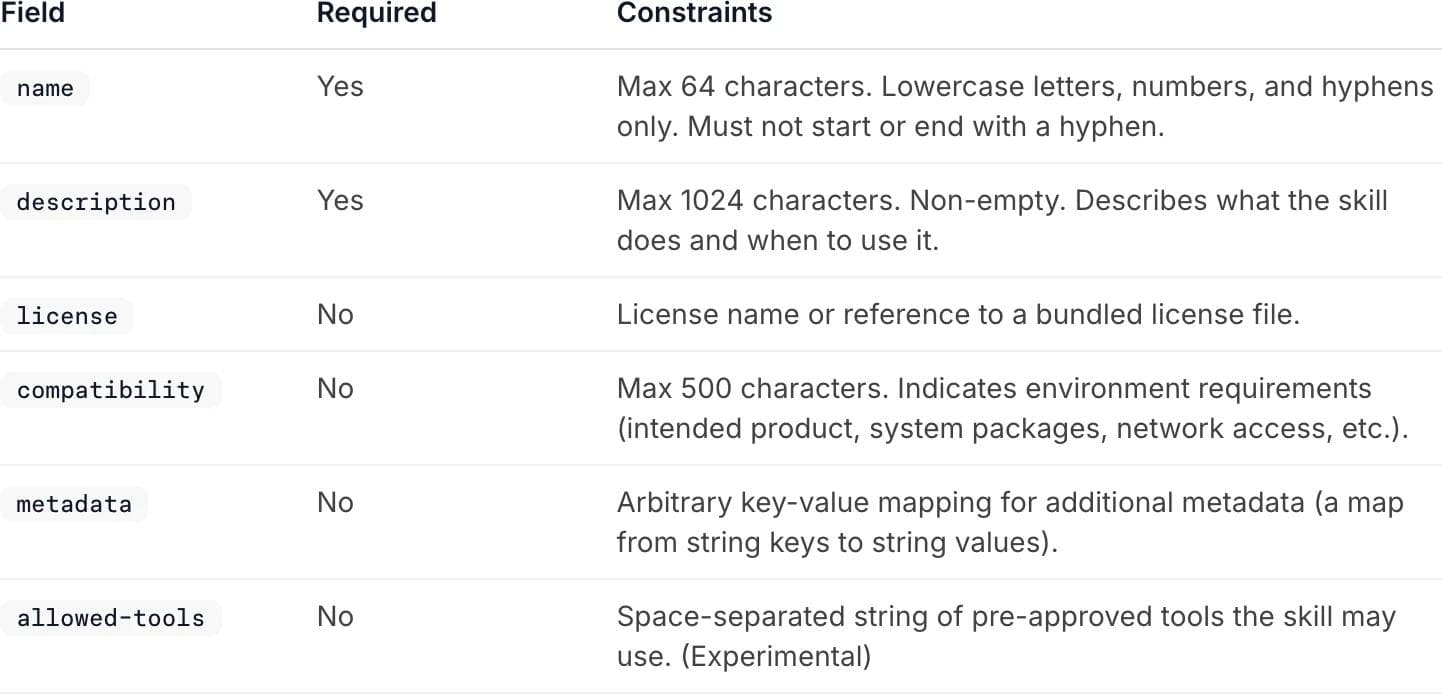
The frontmatter has optional fields many guides do not mention. Beyond name and description, the specification defines license, compatibility (max 500 characters, for environment requirements), metadata (arbitrary string key-value pairs), and allowed-tools, which is still marked experimental and whose support varies between implementations.
Skills do not live in `.claude/commands/`. That was the location before the rename, and the file name was the slash command. Skills now live in ~/.claude/skills/ for personal use and .claude/skills/ for a project, and while they can still be invoked with /skill-name, the main path is that Claude invokes them itself from the description.
Claude Code's skill frontmatter is a superset. In addition to the spec fields, Claude Code supports allowed-tools, disable-model-invocation, model, context: fork, argument-hint and others. Useful, but not portable: a skill you intend to sync to claude.ai has to stick to spec-compliant frontmatter.
Should you write your own?
Write a skill when all three of these are true: the task recurs, you find yourself re-explaining the same context, and the quality of the result depends on following a procedure rather than on raw reasoning. Recipes, house style, an internal schema, a validation loop, a multi-step publishing process. Those are skills.
Do not write a skill when the answer is a one-off prompt, when the real problem is that Claude cannot reach a system (that is an MCP server), when the material is a body of documents rather than a procedure (that is a project), or when you simply want a consistent tone (custom instructions).
And if the recurring job is producing a designed artifact, the skill is only half the answer. A skill can tell an agent exactly how to structure a deck; it still needs something on the other end that can build one. That is the layer Moda works at, and the same split applies to any agent workflow that ends in a file someone has to look at: the procedure and the thing that executes it are separate purchases. We compared the tools in that second category in Claude Design Alternatives.
Frequently asked questions
Are Claude skills free?
Skills themselves are a file format, so writing one costs nothing. Using them requires code execution to be enabled, and custom skill upload on claude.ai is documented for Pro, Max, Team and Enterprise plans. In Claude Code they are filesystem-based with no upload step. On the Claude API they require the code execution tool.
What is the difference between a Claude skill and an MCP server?
An MCP server gives Claude access to a system it otherwise cannot reach, such as a database or a third-party product, by exposing named tools. A skill gives Claude procedural knowledge about how to do a job well. They compose: a skill often exists to teach Claude how to use a specific MCP server properly.
Why is my Claude skill not triggering?
Almost always the description. Claude decides whether to open a skill based on the description field alone, so it has to state both what the skill does and when to use it, be written in third person, and contain the terms a user would actually type. Vague descriptions like "helps with documents" do not fire.
Do skills work outside Claude?
Yes. Agent Skills was released by Anthropic as an open standard, and the same SKILL.md format is read by a range of other agent products listed on the specification site, including Gemini CLI, GitHub Copilot, Cursor, OpenAI's Codex and Block's Goose.
Can I share a custom skill with my whole team?
It depends on the surface. Skills uploaded through the Claude API are workspace-wide. Claude Code skills can be committed to a repository, distributed as plugins, or deployed through managed settings. Custom skills on claude.ai are individual to each user and cannot currently be centrally managed by admins.
How long should a SKILL.md file be?
Anthropic recommends keeping the body under 500 lines and roughly under 5,000 tokens, and splitting anything longer into reference files linked one level deep from SKILL.md. Bundled files cost no context until Claude reads them.
The short version
A Claude skill is a folder that teaches Claude a procedure, loaded only when its description matches what you asked for. It is not a project, which holds knowledge; not custom instructions, which set standing preferences; not an MCP server, which grants access; and not a subagent, which provides isolation.
Install Anthropic's document skills and skill-creator, be sceptical of large third-party bundles, and read any skill you did not write before installing it. When you write your own, spend the effort on the description, keep the body short, and build the evaluation before the documentation. A skill that never fires is worth exactly nothing, and the description is the only thing standing between those two outcomes.
All product behaviour described here was verified against Anthropic's documentation and the Agent Skills specification on 9 September 2026. This area changes quickly; check the primary sources before relying on a specific limit.

Real editable visuals. Real canvas. Full control.
Fly through design work