10 Best Descript Alternatives in 2026, by Workflow
Compare 10 Descript alternatives for transcript editing, podcasts, captions, recording, screen tutorials, clips, and professional video.
 Anvisha Pai, Co-founder & CEO, Moda
The best Descript alternative depends on which part of Descript you need to replace. Start with Riverside for remote recording plus transcript editing, Adobe Premiere for transcript rough cuts with professional finishing, Camtasia for screen tutorials, and Hindenburg PRO for audio-first podcast production. For captions and social versions, Kapwing, VEED, CapCut, and OpusClip solve narrower jobs well.
That is the important distinction. Descript is not one tool with one defining feature. It combines recording, transcription, text-based editing, audio repair, captions, video assembly, and repurposing. Very few competitors replace the entire bundle, and a specialist can be the better choice when you only use one part of it.
Quick comparison: which Descript alternative fits your workflow?
| Tool | Best fit | Edits media from transcript? | Recording role | Main tradeoff to check |
|---|---|---|---|---|
| Riverside | Remote interviews and video podcasts | Yes | Local multitrack remote recording | Recording-first workflow and track allowances |
| Adobe Premiere | Professional video and podcast finishing | Yes | Import recorded footage | Desktop learning curve and Adobe handoff |
| Camtasia | Screen tutorials and product demos | Yes, through its current text-editing workflow | Multitrack screen, camera, mic, and system audio | Plan and Audiate entitlement |
| Hindenburg PRO | Audio podcasts, radio, and narrative work | Yes, for audio | Local and imported audio | Not a full video editor |
| Kapwing | Collaborative browser and social editing | Yes, with Trim with Transcript | Basic browser capture | Upload, export, and workspace limits |
| VEED | Captions, localization, and marketing video | Check the current editor surface | Browser screen and webcam capture | Subtitle, translation, and export allowances |
| CapCut | Fast social and mobile-first editing | Varies by surface | Device and browser capture tools | Platform-specific features and project handoff |
| OpusClip | Turning long recordings into short clips | Transcript and caption refinement | Imports existing recordings | Specialist, not a full long-form editor |
| DaVinci Resolve | Deep editing, color, audio, and effects | Yes, in Resolve Studio | Import recorded footage | Studio entitlement and steeper workflow |
| Otter.ai | Searchable transcripts and subtitle files | No | Meeting and file transcription | Requires another editor for media changes |
First, identify the Descript job you are actually replacing
Descript's defining workflow is real transcript-based editing. Delete or move words in the script and the linked audio or video changes with them. That is different from correcting a transcript typo, which should not alter the recording, and different again from generating captions that appear over a finished edit. Descript documents all three behaviors separately.
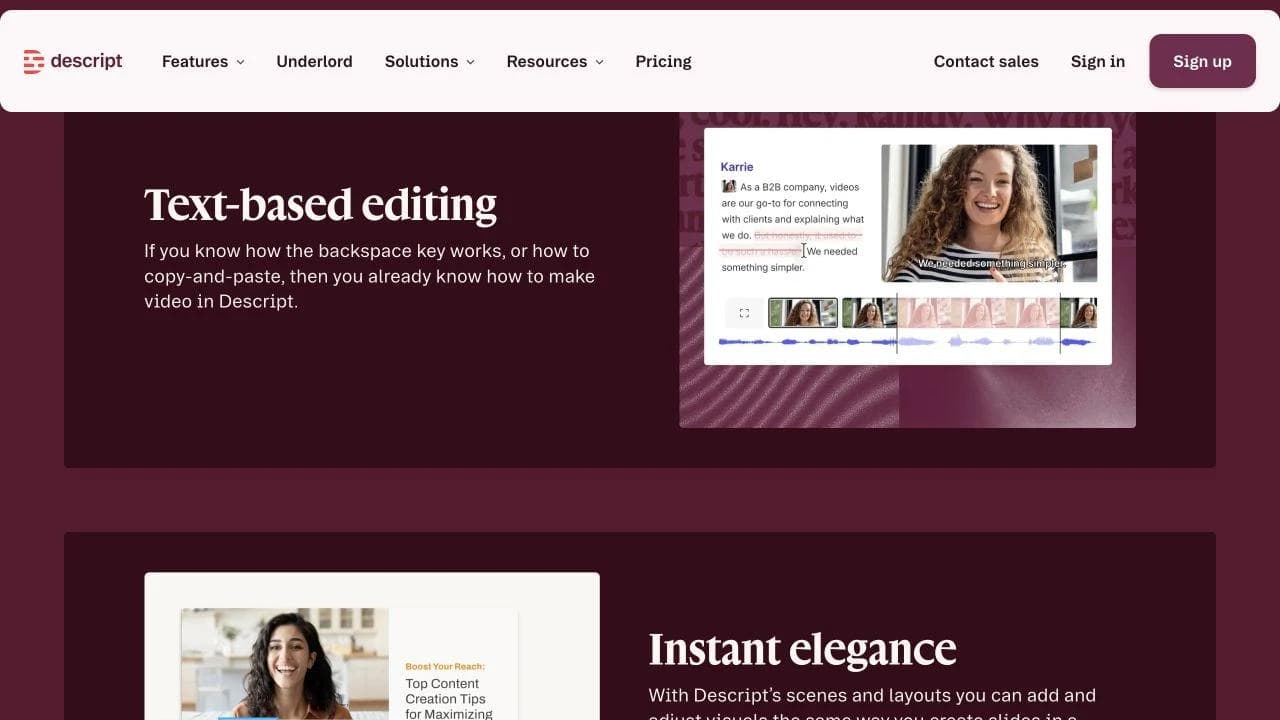
Map your weekly work into six jobs before comparing plans:
- Capture: screen, webcam, microphone, or remote guest recording.
- Story edit: removing and rearranging spoken material from a transcript.
- Audio post: levels, noise, pauses, filler words, and detailed repairs.
- Visual edit: B-roll, layouts, graphics, color, effects, and precise timing.
- Access and localization: captions, subtitle files, translation, and dubbing.
- Repurposing: clips, show notes, summaries, and social versions.
You may need one suite, or you may need two specialists connected by clean exports. The best stack is not the one with the longest feature list. It is the one that preserves your hardest handoff.
1. Riverside: the closest recording-first alternative
Riverside is the first tool to evaluate when your workflow begins with remote interviews. It records participants locally, provides separate tracks, then moves the session into a transcript-based editor with captions, layouts, audio controls, and short-form clips. Riverside's editor overview shows the transcript and speaker-aware timeline as part of the same recording-centered workflow.
This is close to Descript in breadth, but the center of gravity is different. Riverside starts with the session and protects the source recording. Descript's strongest organizing idea is the editable script after media enters a project.
Before switching, run one guest session and download every deliverable you expect to keep. Check separate audio and video tracks, resolution, watermark rules, transcript export, and the allowance attached to track downloads. A polished composite is not a substitute for isolated source tracks if another editor finishes the show.
Choose Riverside if: remote recording quality and guest capture are the first priorities, but you still want transcript editing and clips in the same service.

2. Adobe Premiere: transcript editing with a higher finishing ceiling
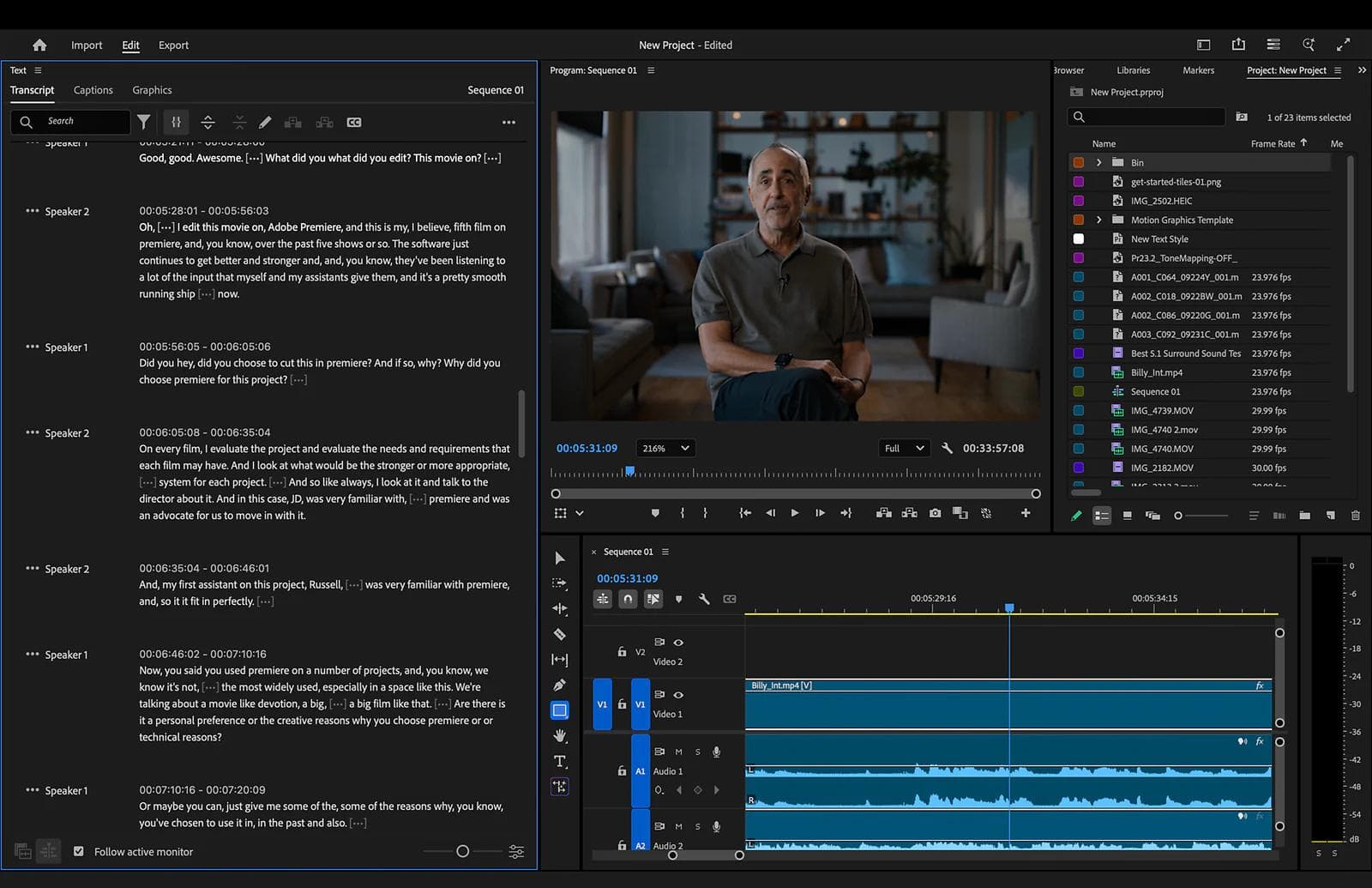
Premiere is the strongest fit when transcript editing needs to lead into a conventional professional timeline. Adobe's Text-Based Editing can transcribe source footage, build and rearrange a rough cut from text, detect filler words, and keep the transcript synchronized with clips. The same project can then move into detailed trimming, multicamera work, color, audio, graphics, and delivery.
One workflow detail matters: Adobe treats text-based editing and captions as related but separate stages. Its documentation recommends generating captions from the final edited sequence. That makes sense for professional delivery, but it is less document-like than treating the script as the entire project.
Premiere does not replace Descript's remote recording room or quick browser workflow. It is a better answer when the edit must continue beyond spoken-word cleanup, or when an agency already expects a Premiere project and source media.
Choose Premiere if: transcript editing should accelerate the rough cut, but editors still need frame-level control and an established production handoff.
3. Camtasia: best for screen tutorials and product demos
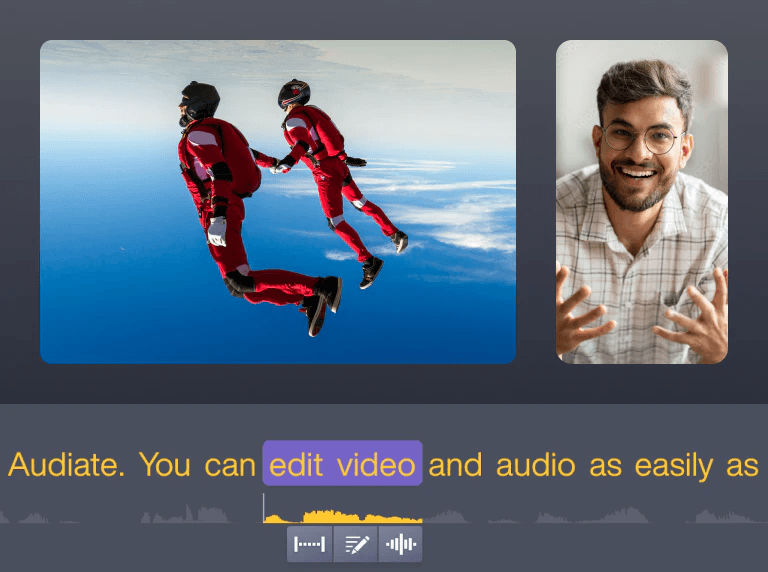
Camtasia is a more specific alternative for people who use Descript primarily to record software walkthroughs, training, and product demos. Its current feature set combines multitrack screen capture with camera, microphone, system audio, cursor effects, captions, and a timeline editor. TechSmith also lists AI text-based video editing through Camtasia and Audiate.
The difference is what the recording contains. A software tutorial often needs cursor emphasis, zooming into a control, callouts, and corrections to the captured screen. Those details can matter more than podcast hosting or remote guest tools.
Check the plan boundary carefully. Camtasia Editor, Audiate, Screencast, AI allowances, and collaborative features can appear together in product material while having different entitlements. Rehearse the path from recording to text edit to caption export using the exact plan you are considering.
Choose Camtasia if: the screen is the subject, and you need to guide attention through a tutorial rather than produce a remote conversation.
4. Hindenburg PRO: best for audio-first storytelling
Hindenburg PRO is built for podcast, radio, journalism, and narrative audio. Its product workflow combines recording, automatic levels, offline transcription, text and audio rough cutting, waveform editing, montage, and delivery to broadcast loudness targets.
For an audio producer, this is a meaningful alternative to Descript rather than a reduced video editor. The transcript helps find and assemble the story, while waveform controls and audio-specific delivery remain close at hand. Offline transcription may also matter when uploading sensitive interviews to a cloud editor is undesirable.
It is not the right replacement for visual podcasts, animated captions, or social video assembly. Hindenburg lists a video track for doing audio post against picture, but that does not make it a general video production environment.
Choose Hindenburg if: the finished product is heard first, and editorial audio control matters more than screen recording or visual templates.
5. Kapwing: best for collaborative browser editing
Kapwing is useful for teams that want a browser editor with transcript trimming, subtitles, brand assets, resizing, and repurposing. Its Video to Text workflow lets editors generate a transcript, search it, remove filler words, use Trim with Transcript, and export text or subtitle files. Its separate Repurpose Studio turns long video into proposed social clips that remain editable in the workspace.
This makes Kapwing a strong fit for a marketing team producing webinars, customer interviews, and social derivatives. Collaborators can work without installing a desktop NLE, and the same source can move into captions and several aspect ratios.
The purchase check is scale. Verify upload duration, storage, transcription minutes, export resolution, watermarks, brand controls, and workspace permissions. A browser tool that works well on a three-minute clip may have a different cost and review experience for weekly hour-long recordings.
Choose Kapwing if: several non-specialist collaborators need to turn recorded content into branded browser-based deliverables.
6. VEED: best for captions and localization in the browser
VEED belongs on the shortlist when subtitles and translated versions are the work, not a final checkbox. Its transcription tool and subtitle workflow sit inside a browser editor that also covers layouts, brand assets, screen recording, voice tools, and team review.
Do not confuse good caption tooling with Descript-style transcript cutting. Confirm in the current editor whether changing transcript words trims the underlying media or only changes the text track. Then test the actions that determine delivery quality: correcting a product name, moving a line break, adjusting timing, translating a subtitle, and exporting the required SRT, VTT, or burned-in version.
VEED can be a better fit than a podcast suite for marketing teams producing multilingual social and training video. It is less compelling if long-form narrative restructuring is the main edit.
Choose VEED if: captions, localization, aspect-ratio variants, and browser review occupy more time than reshaping a long conversation.
7. CapCut: best for fast captioned social video
CapCut is worth considering when Descript is mainly the route from talking-head footage to a polished Reel, Short, or TikTok. Its video editing overview combines timeline editing, captions, effects, reframing, templates, and AI tools across desktop, web, and mobile surfaces.
Its advantage is the social finishing workflow, not a claim that it is a direct podcast-production clone. Test your recurring caption treatment, B-roll rhythm, sound mix, and export on the device you actually use. Features and subscriptions can differ by platform and region, so a desktop demonstration is not proof of the same mobile entitlement.
For a broader comparison of phone, browser, and desktop editors, see our CapCut alternatives guide. That article starts with the editing device and footage; this one starts with the speech and production bundle.
Choose CapCut if: short-form visual treatment is the destination and you do not need Descript's remote recording or audio-podcast workflow.
8. OpusClip: best for long-form-to-short-form repurposing
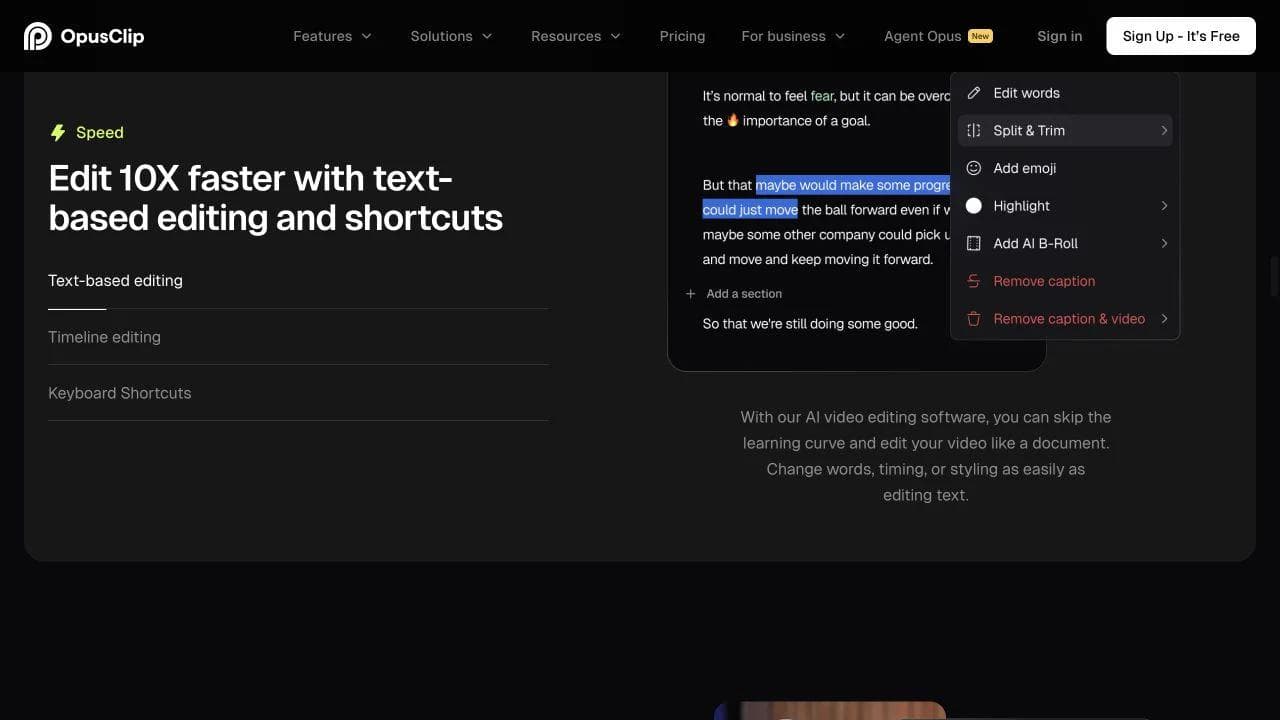
OpusClip is a specialist, which is precisely why it can be the right replacement for one part of Descript. Its AI video editor accepts long video or raw talking-head footage, proposes clips, reframes them, applies captions and visual treatments, and lets the user direct revisions.
Use it when the recurring job is extracting several social assets from a podcast, webinar, interview, or livestream. Do not evaluate it as if it were a complete replacement for recording, a detailed audio edit, or a long-form timeline. The question is whether it reduces the time between an approved episode and a set of usable cutdowns.
Inspect every proposed clip. A selection score is not editorial judgment, and an automatically captioned segment can still begin without context or end before the point lands. Also check whether your plan supports the export path to Premiere or Resolve if a human editor must finish the work.
Choose OpusClip if: repurposing is the bottleneck and the long-form master is already recorded and edited elsewhere.
9. DaVinci Resolve: best for deep post-production
DaVinci Resolve combines editing, color, Fusion effects, Fairlight audio, media management, and delivery. Blackmagic's Edit page overview documents transcription for subtitles and text-based editing alongside multicamera, trimming, and broad file-format support.
The edition boundary matters. Blackmagic lists text-based editing among Resolve Studio capabilities, not as a reason to assume every transcript feature is in the free edition. Verify the current comparison before building a workflow around it.
Resolve is a strong alternative when Descript's timeline and visual finishing are becoming constraints. It is a substantial change for someone who only wants to delete filler words from a weekly interview. You will also need a separate capture workflow for remote guests or quick screen recordings.
Choose Resolve if: you want one desktop environment for picture, sound, effects, and delivery, and transcript tools are an accelerator rather than the whole interface.
10. Otter.ai: best when transcription is the only requirement
Otter is not a media editor, and that boundary makes it useful. It can import audio and video, generate searchable transcripts and notes, and export SRT and text formats. It does not remove a sentence from the underlying video when you delete words from the transcript.
Choose it when the deliverable is a searchable record, interview notes, quotations, or a subtitle starting point. Pair it with another editor when you need to change the recording. This can be more economical and understandable than paying for a production suite that nobody on the team uses to produce media.
For interviews with specialized vocabulary, test speaker names, product terms, timestamps, and your required export format. Accuracy claims on a clean vendor demo do not predict performance on your microphones and speakers.
Choose Otter if: the transcript is the product or an input to another workflow, not the control surface for the final video.
The most important purchase checks
Use one representative recording and trace it through the entire process. A ten-minute interview with two speakers, a correction, a captioned clip, and a handoff is more revealing than a feature grid.
- Does text change media? Correcting words, creating subtitles, and cutting footage from a transcript are separate operations.
- Can you keep source tracks? Download isolated guest audio and video before trusting a remote-recording replacement.
- Can captions leave the tool? Test burned-in text and the exact subtitle formats your publisher requires.
- What is metered? Separate recorded or uploaded minutes, transcription, AI actions, storage, exports, and collaborator seats.
- What survives a handoff? A rendered MP4 does not carry source tracks, editable captions, effects, or project decisions.
- Where is media processed? Cloud upload, local capture, and offline transcription create different privacy and recovery considerations.
Descript itself now separates media minutes from AI credits, and its help center says actions such as filler-word removal, clip creation, Studio Sound, and even Underlord messages can consume credits. Review the current usage rules, then compare the alternative's limits in the same units that matter to your production.
When staying with Descript makes sense
Stay with Descript if its document-like editor still gives your team the shortest path from recording to finished spoken-word content. It remains unusual to have screen and remote recording, transcript-linked cuts, captions, audio cleanup, visual assembly, and repurposing together.
Switch for a specific reason. Riverside is the clearest first comparison for recording-led podcasts. Premiere and Resolve make sense when professional finishing has become the constraint. Camtasia is a more focused home for screen tutorials, Hindenburg for audio storytelling, and OpusClip for a repurposing bottleneck. Otter is enough when you never needed an editor in the first place.
If your real problem is creating footage rather than editing recorded speech, this is the wrong category. Our Higgsfield alternatives guide compares generation platforms, first-party model tools, node workflows, and editing environments for that separate decision.
Frequently asked questions
What is the closest alternative to Descript?
Riverside is the closest recording-first alternative because it combines local remote recording, separate tracks, transcript editing, captions, and short-form clips. Adobe Premiere is closer for editors who want transcript rough cuts followed by a full professional timeline. No single choice is closest for every part of Descript.
Is there a free Descript alternative?
Several alternatives have free access or trials, but the useful limits differ. Check recording minutes, transcription, watermarks, export resolution, storage, and whether text-based editing is included. DaVinci Resolve has a capable free edition, but Blackmagic lists text-based editing among Studio features. Otter's basic plan can cover limited transcription but does not edit media.
Which Descript alternative is best for podcasts?
Choose Riverside for remote video podcasts and a recording-to-edit workflow. Choose Hindenburg PRO for audio-first narrative production and detailed delivery. Premiere or Resolve fit video podcasts that need multicamera editing, color, graphics, or deeper audio post. The right answer depends on whether capture, story editing, or finishing is hardest.
What is the difference between transcript editing and captions?
Transcript editing changes the underlying audio or video when you delete or rearrange words. Correcting a transcript changes the written record without changing what was recorded. Captions are timed text displayed with the finished media. A tool may support one or two of these without supporting all three.

Real editable visuals. Real canvas. Full control.
Fly through design work