LinkedIn Ad Library: How to See Any Company's Ads, With Dates and Impressions (2026)
How to use the LinkedIn Ad Library to find B2B ads worth adapting: why a US search hides dates and impressions, the EU search that reveals them, and how to adapt a reference set on-brand.
 Anvisha Pai, Co-founder & CEO, Moda
The LinkedIn Ad Library is a free, public database of every ad that has run on LinkedIn since June 2023. You do not need a LinkedIn account. Search a company, a payer, or a keyword, pick a country, and you are looking at the sponsored content your buyers see, with the advertiser's name, the ad format, and the full creative.
What most guides skip is the condition attached to the interesting data. Run dates, an impressions band, the split of impressions by country, and the targeting the advertiser chose are shown only for ads whose targeting includes the European Union. Search the United States alone and every ad looks the same age. Search an EU country and the same global campaigns arrive with dates and impressions attached, including the share of impressions that landed in the United States. This guide covers the search, the card, that EU condition and how to use it, where the signals break, and how to turn a reference set into ads that match your own brand.
What the LinkedIn Ad Library shows, and what it hides
LinkedIn launched the library in 2023 to meet the EU's Digital Services Act, and it covers ads that ran after June 1, 2023. Ads stay in it for one year after their last impression, so unlike Meta's library it holds recently ended campaigns too. An ad appears shortly after its first impression.
| Shown for every ad | Shown only when targeting includes the EU | Never shown |
|---|---|---|
| Ad preview: intro text, creative, headline, call to action | The dates the ad ran | Spend, clicks, leads, or any result |
| Ad format: Single Image, Video, Document, Carousel, and others | Estimated total impressions as a band such as 1k to 5k | Exact impression counts |
| Advertiser name, linked to the company page | Impressions by country, rounded to the nearest percent | Landing page performance |
| Payer name, when a different company paid | Targeting the advertiser used, by category, with inclusion or exclusion marked | Ads the advertiser has restricted, which show no preview or names |
Two of these are unusual. The payer field exposes agency-run campaigns and holding-company structures, since the advertiser and the payer can differ. And the country breakdown for EU-targeted ads includes non-EU countries, so an ad found through a German search will often report that most of its impressions landed in the United States. LinkedIn's own documentation lists the targeting categories it shows: language, job, education, company, location, audience, age, gender, demographic, member interests and traits, predictive audiences, and audience expansion.
Set up the search in a minute
Open linkedin.com/ad-library. The form has three text fields and three controls.
- Company or advertiser. The company page that ran the ad. Use this for one brand's whole set.
- Payer. Who paid. Useful when an agency or a parent company runs ads for several brands.
- Keyword. Matches the ad's text. This is the category search, and it is the one most people should start with.
- Country. One or more countries the ad was shown in. This control decides whether you see dates and impressions, which the next section explains.
- Date. A date range for when the ad ran.
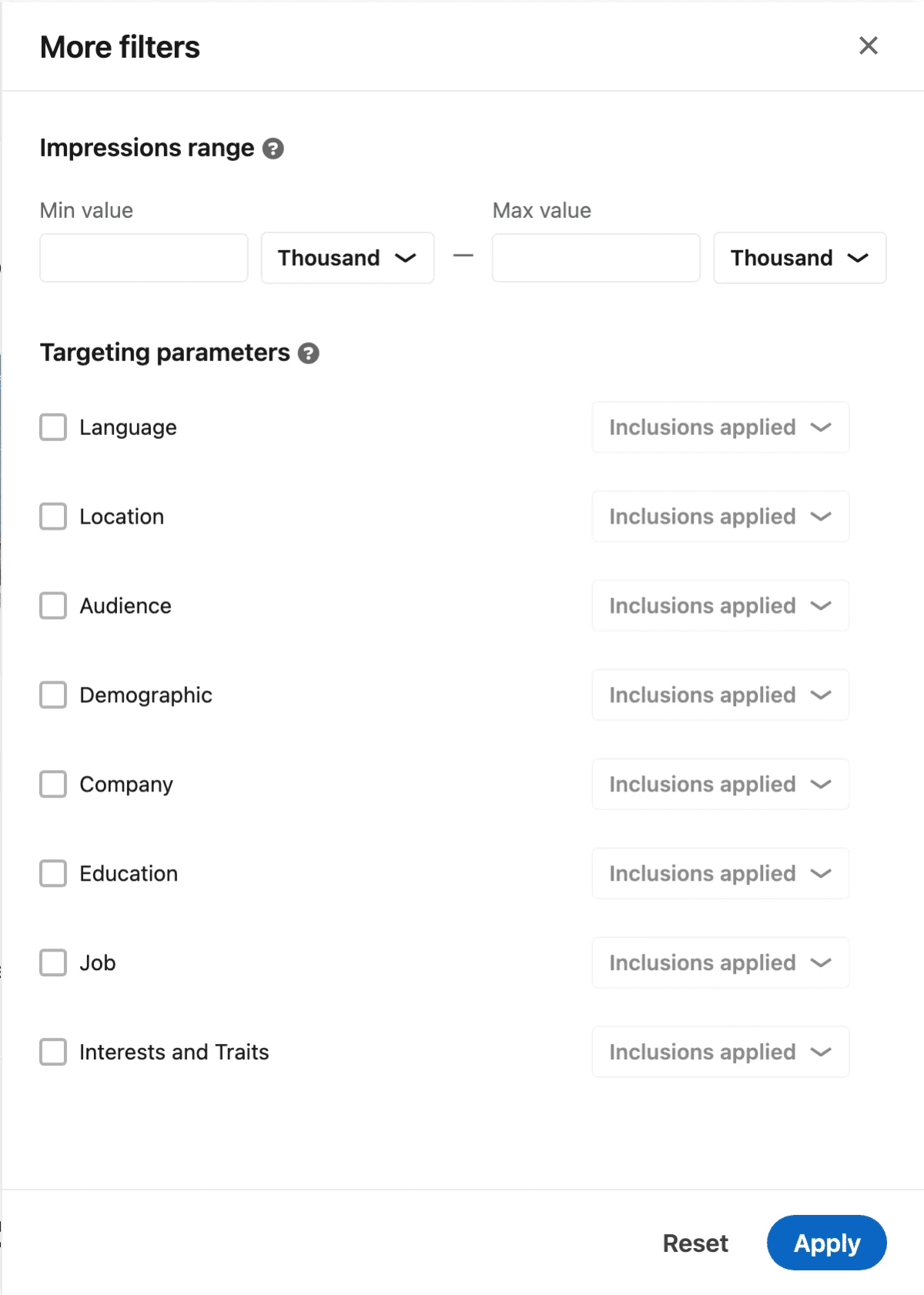
- More. An impressions range and the targeting filters, which apply only to EU-targeted ads.
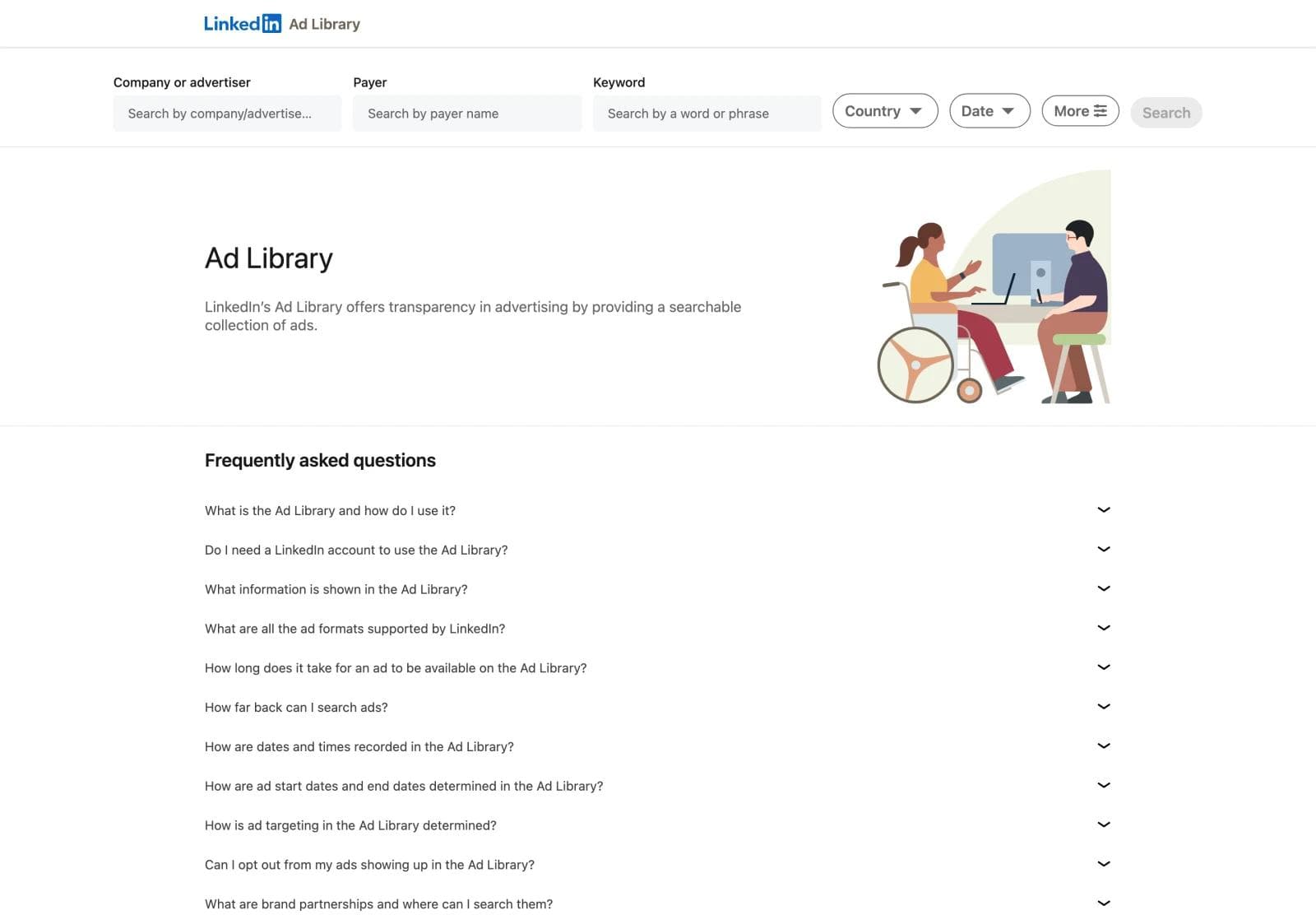
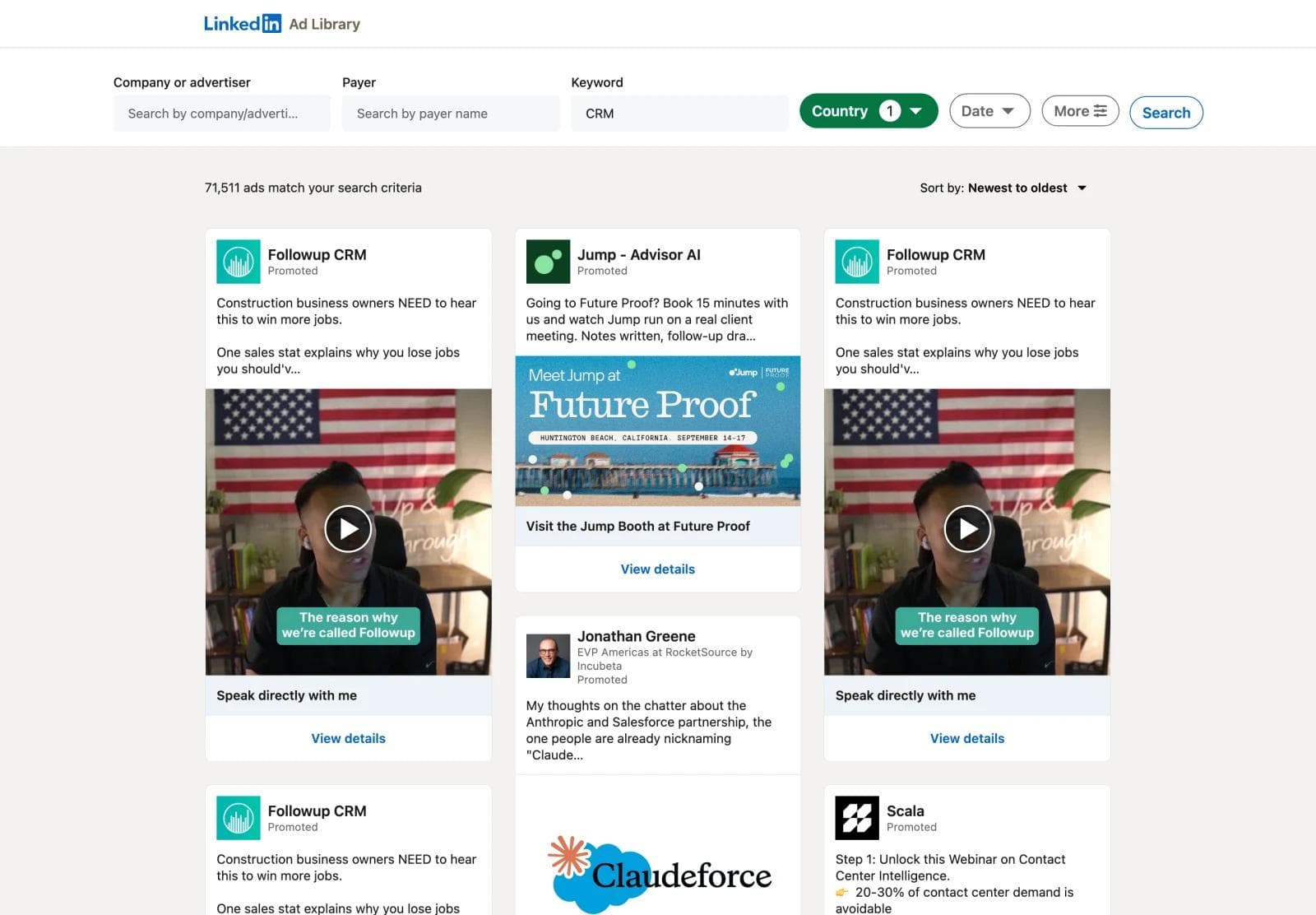
Results sort newest to oldest by default. There is no sort by impressions and no sort by run length, so the ordering signal has to come from the detail pages.
The search is in the URL. A keyword search for CRM ads shown in Germany looks like this:
https://www.linkedin.com/ad-library/search?keyword=CRM&countries=DEChange keyword for another category and countries for another market.
How to read a card and a detail page
Every result card has the same parts: the advertiser's name and logo, the word Promoted, the intro text, the creative, a headline, and a View details link. Three variants tell you the format before you click. A card with a play button is a video ad. A card that says "Preview 1 of 10 pages" is a document ad, LinkedIn's PDF carousel. A card whose advertiser is a person, with their job title under the name and "Promoted by" followed by a company, is a Thought Leader ad, which is a member's post promoted by that company.
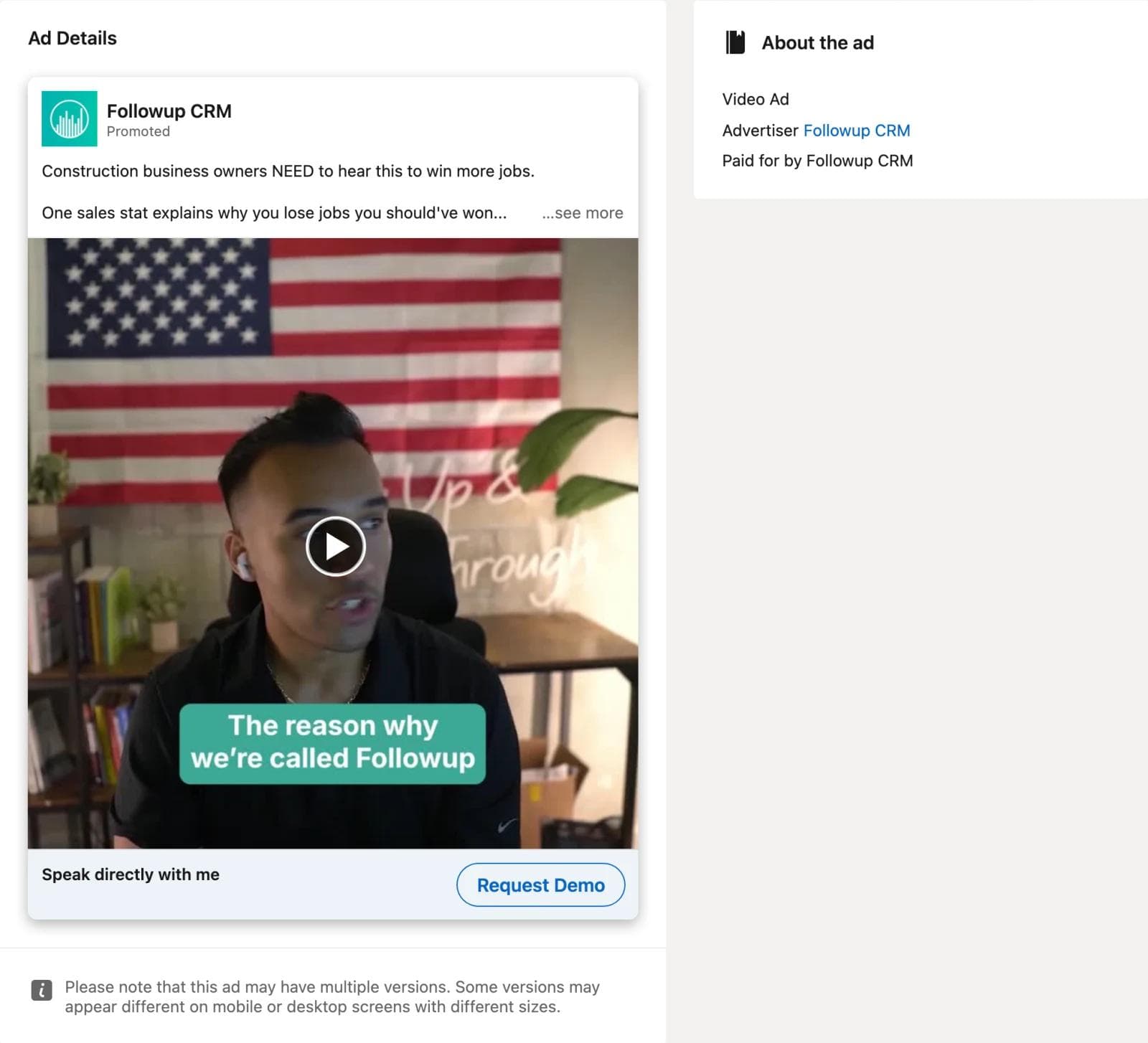
View details opens the ad at full size with its call-to-action button, and an About the ad panel. For a US-only search that panel holds three lines: the format, the advertiser, and who paid.
For an ad whose targeting includes an EU country, the same panel adds the run dates, a total impressions band, the country breakdown, and the targeting summary.
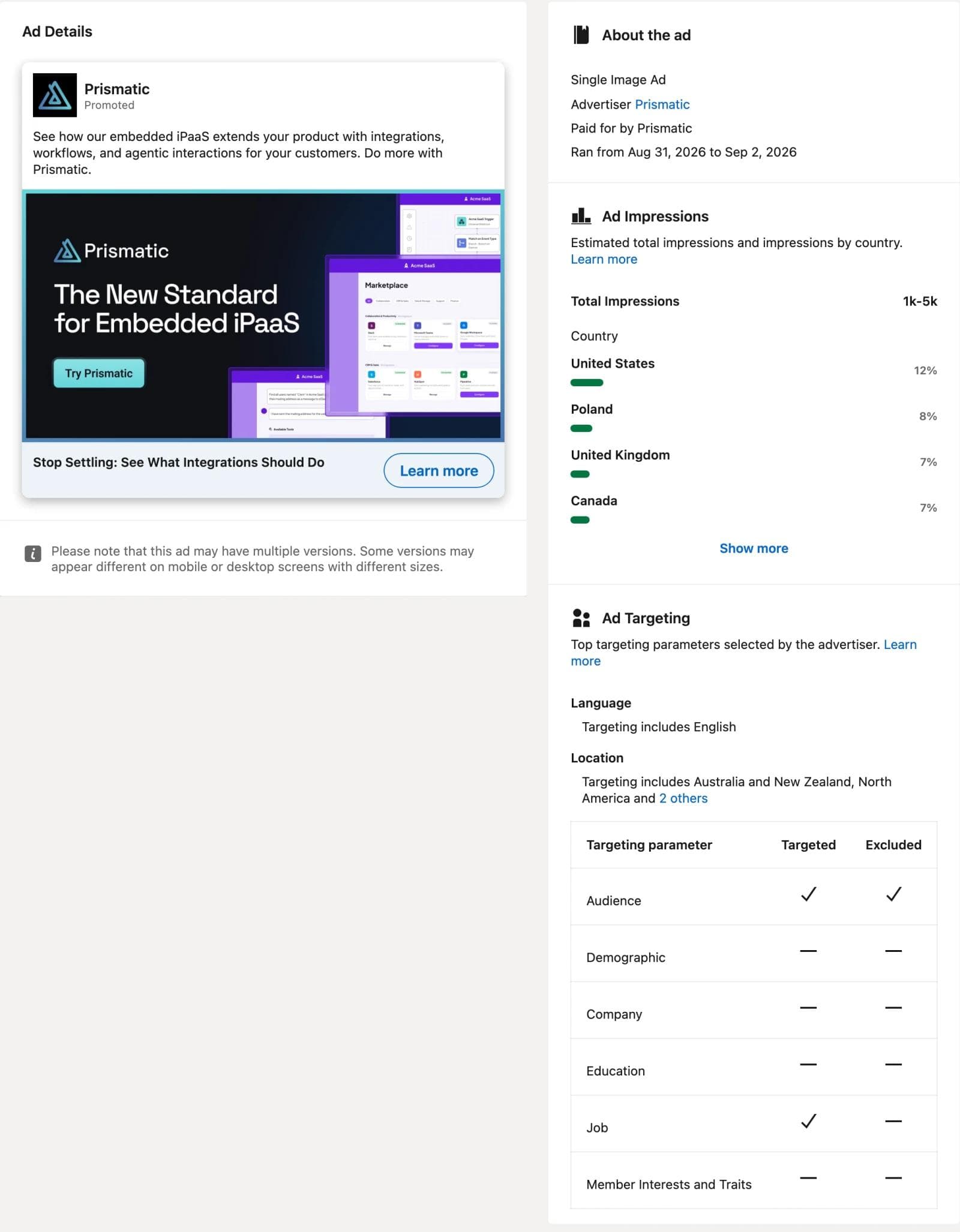
Every detail page carries a note that the ad may have multiple versions. LinkedIn does not list the versions, so unlike Meta's library there is no versions count to read.
The EU-country search, and why it works
An advertiser who targets "North America and Europe", or a language rather than a country, or a global matched audience, has an ad that is served in the EU. LinkedIn is obliged to disclose dates, impressions, and targeting for that ad, and it discloses them to anyone who finds the ad through any EU country. The disclosure is attached to the ad, not to the searcher.
So the method is: run the keyword search once with your own country to see the whole field, then run it again with Germany, France, Ireland, or the Netherlands selected. The second search returns fewer ads, but each one comes with the data the first search hid, and the country breakdown tells you how much of that ad's delivery was in your market anyway. We checked this on September 2, 2026. A keyword search for CRM reported 71,511 matching ads in the United States and 28,877 in Germany. Of the first 40 German-search ads we opened from a June start cohort, all 40 showed run dates, an impressions band, and a country split, and 16 of them reported United States impressions, with a median US share of 24 percent. The 12 US-search ads we opened showed none of that data.
Use the date filter to find survivors, not the newest ads
The default sort is newest to oldest, and a keyword like CRM has tens of thousands of matching ads. Every ad on the first screen started this week, and every one of them shows a run of two or three days, which tells you nothing. The library has no sort by run length or impressions.
The fix is the Date filter. Choose a custom range that covers a month two or three months back. The results are the ads that started in that month, a cohort, and each detail page now shows whether the ad is still running today or when it stopped. An ad from a June cohort still running in September has survived a quarter of budget reviews. One that ran for two days was a test that lost.
https://www.linkedin.com/ad-library/search?keyword=CRM&countries=DE&dateOption=custom-date-range&startdate=2026-06-01&enddate=2026-06-30We ran three June cohorts through a German search on September 2, 2026 and opened the first 25 to 40 ads of each, all of which started on June 26 to 30.
| June start cohort, seen in Germany | Ads opened | Advertisers | Ran 3 days or less | Ran over 30 days | Still running Sep 2 | Median days |
|---|---|---|---|---|---|---|
| CRM | 40 | 23 | 14 | 10 | 6 | 8 |
| payroll | 25 | 9 | 3 | 8 | 5 | 14 |
| cybersecurity | 25 | 16 | 5 | 2 | 0 | 14 |
Two things stand out. The median LinkedIn ad in these cohorts lived one to two weeks, and a third of the CRM cohort was switched off within three days, which is what a creative test looks like from the outside. And in the CRM cohort, every one of the six ads still running ten weeks later was a Thought Leader ad, a person's post promoted by a company, even though those made up 15 of the 40. The company-page ads that survived were in payroll: Deel, WorkMotion, and Redwood Software, each running several variants of one compliance message.
What you can now read for each ad:
- Run length. Ran from and Ran to, with the end date included, so an ad that finished last week is distinguishable from one still running.
- Impressions band. Under 1k, 1k to 5k, 5k to 10k, 10k to 20k, and larger. A band is a budget and audience-size signal, not a performance signal, and it is an estimate.
- Country split. The share of impressions by country. An ad found in Germany with a 32 percent United States share is a global campaign that happened to include Europe.
- Targeting. Which categories the advertiser used to include or exclude. Job and company targeting together usually means an account-based campaign.
- Payer. In the June cohort, a global software brand's ad was paid for by an agency, and a recruitment platform's ad by a holding company. Search the payer to find every brand an agency runs.
Where the signals break
Three cautions, all visible in the sample above.
- A long run is a budget you can afford, not a creative that works. The same rule as on Meta. Compare run lengths within one advertiser's set, not across a keyword.
- Impressions follow budget and audience size, not creative quality. A 100k band on a broad "IT decision makers" audience is cheaper to reach than a 5k band on a named account list. Read the targeting before you read the band.
- Keyword results are uneven by advertiser. One advertiser can hold a large share of a keyword's results by running many near-identical ads. Dedupe by advertiser before you draw a pattern.
And one caution about the tool itself. LinkedIn sits behind bot protection and will block a browser that opens detail pages in quick succession. Browse at a human pace, and if you are blocked, wait rather than retrying.
Search adjacent categories, not just competitors
Searching your competitors by name is the first thing everyone does with this library, and it is worth doing once. Then search the categories that sell to the same buyer. If you sell a CRM, the ads competing for the same sales leader's attention are running for sales intelligence, revenue operations, proposal software, and payroll. Their layouts, offers, and proof formats transfer. Their claims do not.
The formats tell you what transfers. Across the three June cohorts, single image ads were 30 of 40 CRM ads opened, 22 of 25 payroll ads, and 16 of 25 cybersecurity ads. Video was 4, 2, and 2. Document ads and event ads made up the rest. On LinkedIn the static single image is the working unit, so a layout that survives in payroll is directly reusable for a CRM brand.
Impressions bands say where budgets sit. In the CRM cohort, 12 of 40 ads were under 1k impressions, 12 were at 1k to 5k, and 10 were at 10k to 20k. Cybersecurity skewed larger: 9 of 25 at 10k to 20k and one at 500k to 1M. A 500k band on a German cybersecurity search is an enterprise vendor's always-on campaign, not a creative worth copying because it is big.
Build a reference set
A reference set is six to ten ads with a note on why each one is there. LinkedIn's library has no save feature, so keep the set in a document with these fields for each ad:
- Ad ID and advertiser. The number in the detail page URL. Paste it after
/ad-library/detail/to reopen the ad. - Format. Single image, document, video, carousel, or Thought Leader.
- Run length and impressions band, when the EU condition gives them to you.
- What the eye lands on first. A product screenshot, a headline on a color field, a person, a stat, a document cover.
- What the ad asks the reader to believe, and what you would keep and change for your brand.
Save the creative from the detail page and name the file with the ad ID. Those files are the input for the next step.
The creative belongs to the advertiser. Saving it to study is ordinary competitive research. Reusing its screenshot, photography, or copy in your own ad is not. Adapt the structure and supply your own product, people, and claims.
A worked reference set
Four ads from the June cohorts, chosen because they make different decisions. Each record names what the eye lands on, what the ad asks the reader to believe, and what transfers to a different product.
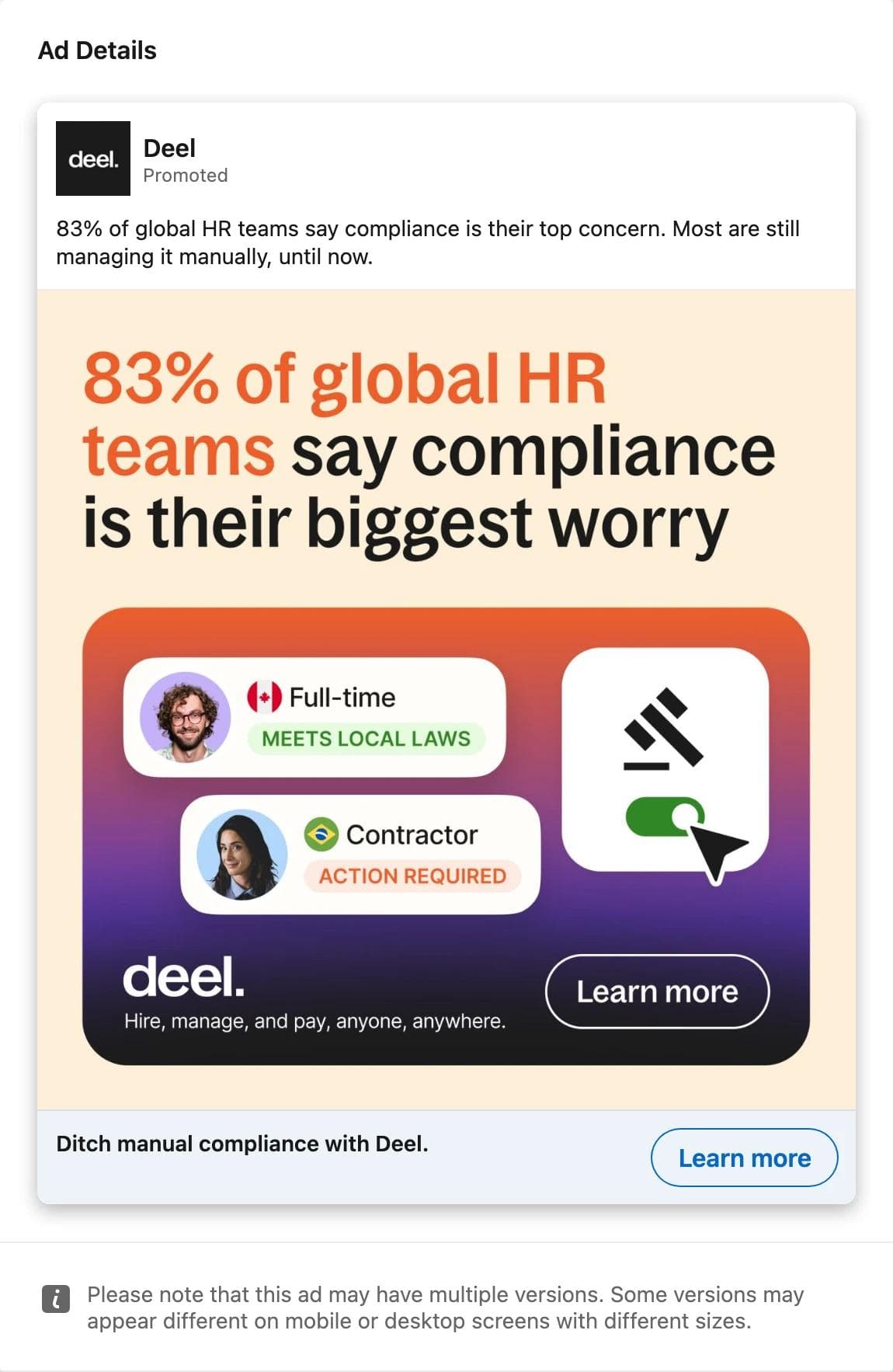
Deel, stat first, product second. The eye lands on a number, 83 percent, set in the brand's orange, and the image repeats the intro text word for word. Below it a small illustration shows the product idea: one worker compliant, one flagged. The headline is a plain benefit. What the ad asks you to believe is that a problem you already have is common and now solved. What transfers: the stat-as-headline layout with the product reduced to a single illustrated state. Deel ran this alongside a carousel and two sibling single images with the same compliance message, and all were still live after ten weeks.
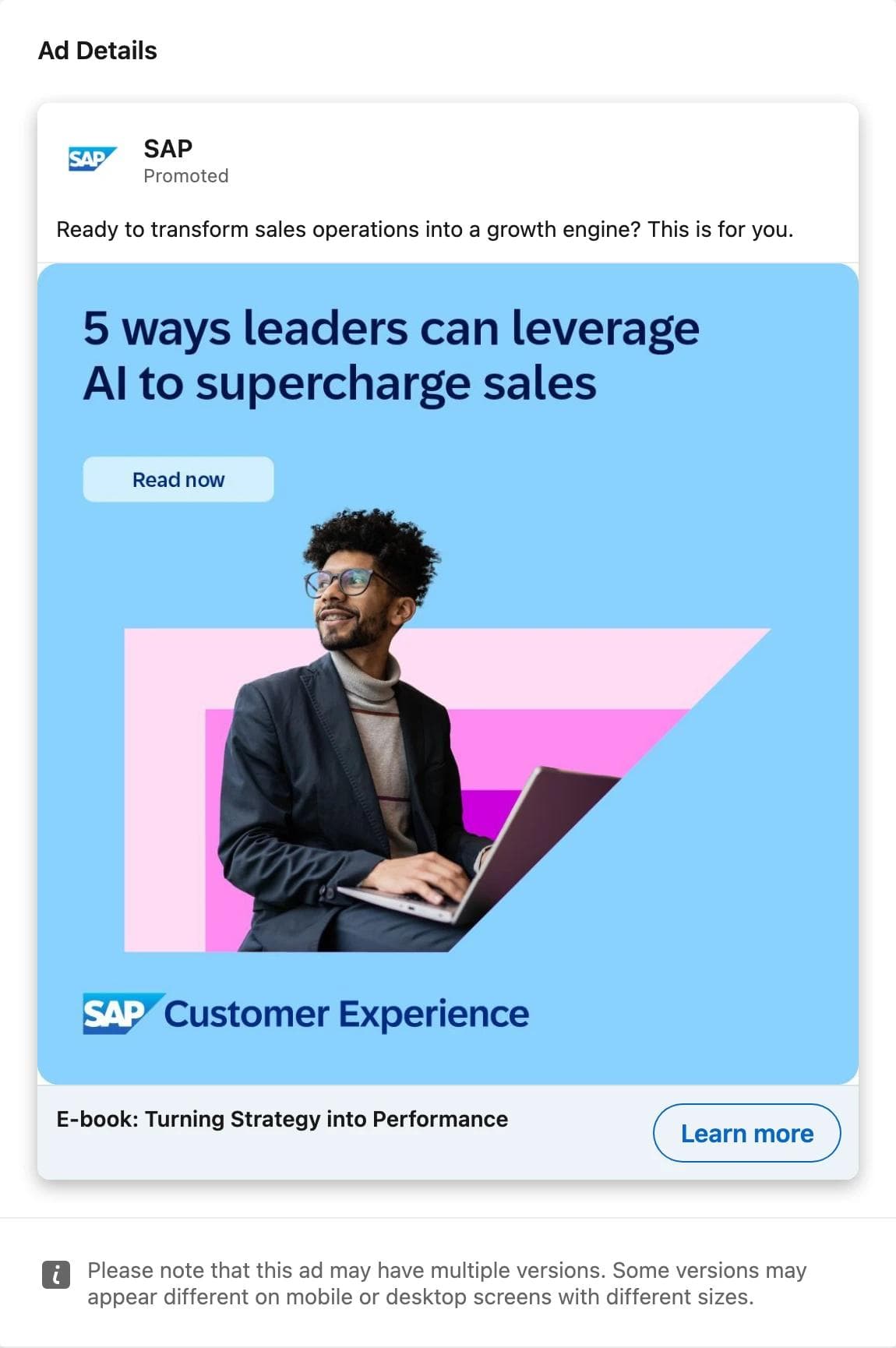
SAP, gated content with a button painted into the image. The eye lands on the title of an e-book, then on a Read now button that is part of the artwork, not a real control, then on the person. The headline names the asset. What the ad asks you to believe is that the report is worth an email address. What transfers: the content-offer layout, title plus fake button plus person, which is the most common B2B single image on the platform. The payer line is the other lesson. SAP is the advertiser, but an agency paid, and searching that agency as the payer lists every brand it runs.
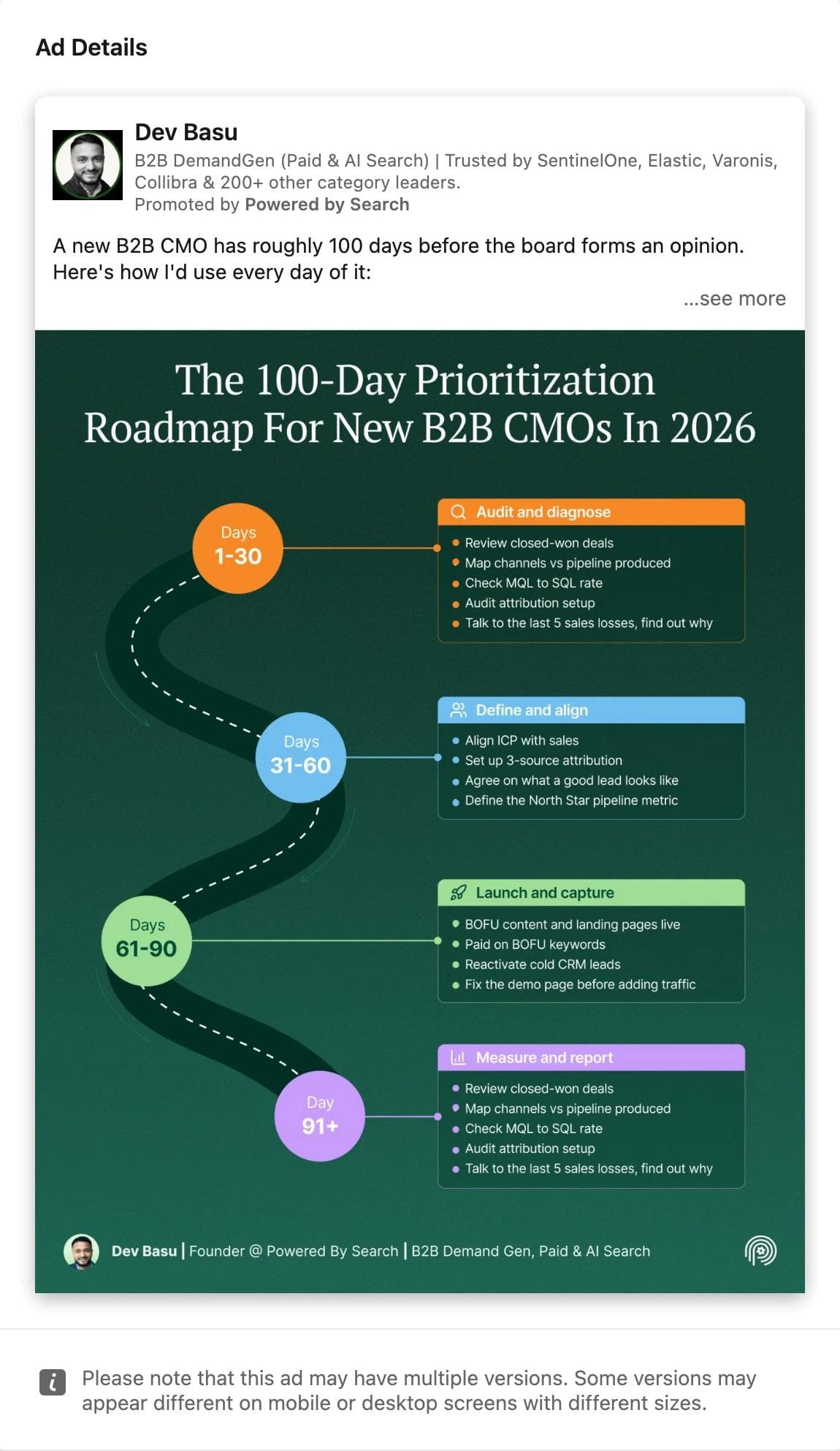
Dev Basu, a person's post as the ad. The advertiser line is a name and a job title, with Promoted by the company underneath. The eye lands on the infographic title, then walks the roadmap. There is no product, no button, and no headline. What the ad asks you to believe is that the author knows the job, which is the whole pitch of a Thought Leader ad. What transfers: the format decision itself. Every CRM cohort ad still running after ten weeks was one of these. The infographic layout also transfers, as long as the content is yours.
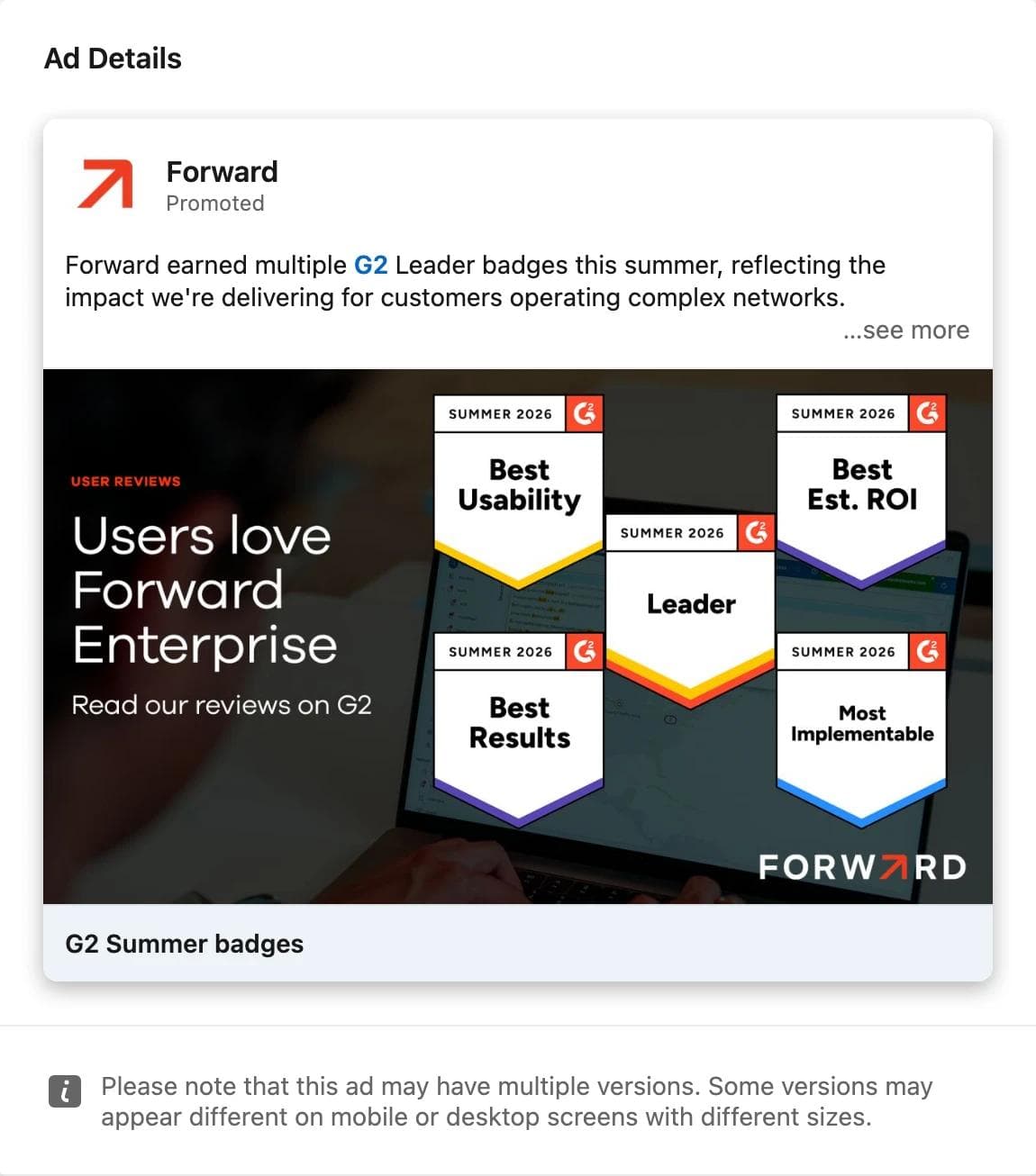
Forward, proof as the entire creative. The eye lands on five review badges, then on a short line at the left. The intro text says what the badges are. What the ad asks you to believe is that users already chose this product. What transfers: badges as a layout, which any company with G2 or Capterra recognition can rebuild in an afternoon. It ran for a month, which for a seasonal badge campaign is a full run rather than a failed test.
Turn references into on-brand ads
Most of what runs on LinkedIn is static: a single image, a document, or a carousel of images. That makes the reference workflow simpler than on Meta, where video dominates. The structure you saved is a layout, a hierarchy, and an argument, and rebuilding it with your own brand kit, screenshots, and claims is a design task.
In Moda, the workflow is: attach two to four saved ads to a message, name the brand kit to apply, and describe what stays and what changes. A prompt that works:
Use these three LinkedIn ads as layout references. Make four single image ads (1200 x 627) for our revenue forecasting product using the Northwind brand kit. Keep the structure of the first reference: one bold claim as the headline, a product screenshot cropped to a single chart, a one-line proof stat, logo bottom left. Replace every screenshot with ours and write new headlines. Do not reuse any reference copy.The result is built on an editable canvas, so headlines, screenshots, badges, and colors stay separate objects, and the same layout can be pushed to a 1080 x 1080 square or a document-ad page without rebuilding it.
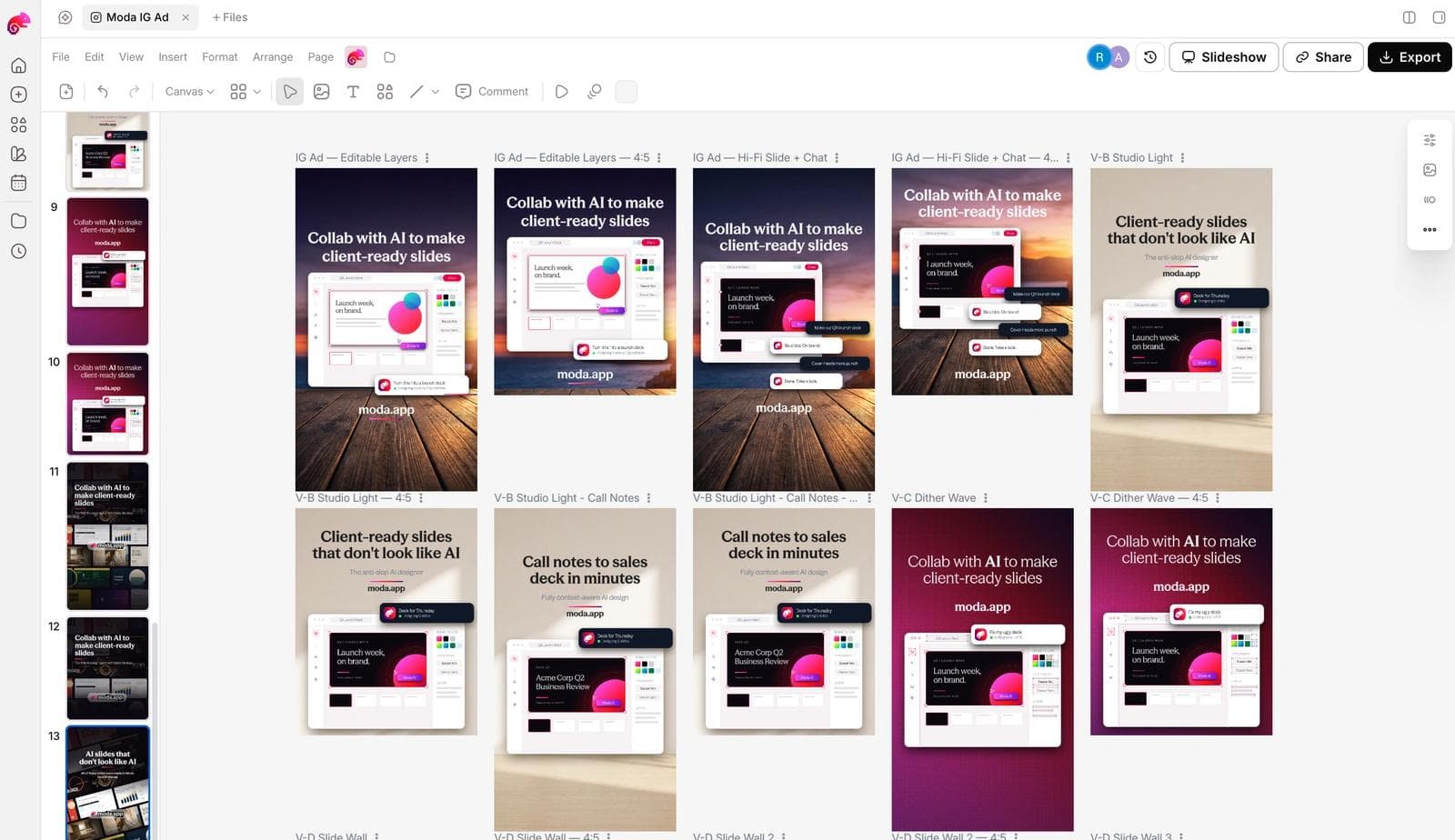
Before any of these ships: the claims are yours and true, the screenshot is legible at feed size, the headline survives on a phone, and you have at least two hooks against the same layout so the first test measures the message and not only the design.
If you have not set up the brand side, how AI design tools build a brand kit from your website covers what gets extracted. The Meta Ad Library guide covers the same workflow for consumer categories, with a measured sample of its own.
Frequently asked questions
Is the LinkedIn Ad Library free, and do I need an account?
It is free and public. LinkedIn describes it as a publicly available database, and every search and detail page in this guide was opened without signing in.
Why do some ads show impressions and dates while others do not?
LinkedIn shows run dates, estimated impressions, the country breakdown, and targeting only for ads whose targeting includes the European Union, to comply with the Digital Services Act. Ads targeted outside the EU show the preview, format, advertiser, and payer only.
How do I see a competitor's ads if they only advertise in the US?
Search their company name with the United States selected. You will see every ad with its creative and format, but no dates or impressions. If the same company runs any campaign that includes an EU country, search with that country selected to see the disclosed data for those ads.
How far back does the library go?
It includes ads that ran after June 1, 2023. An ad remains searchable for one year after its last impression, so ended campaigns stay visible for a year.
Can I see how much a company spends on LinkedIn ads?
No. The closest signal is the estimated impressions band on EU-targeted ads, which reflects budget and audience size rather than results.
What is a Thought Leader ad in the library?
A member's organic post promoted by a company. In the library it appears with the person's name and job title as the advertiser line and the company as the payer.

Real editable visuals. Real canvas. Full control.
Fly through design work