Meta Ad Library: How to Find Static Ads Worth Adapting (2026)
How to use the Meta Ad Library to find long-running static ads in your category and adjacent ones, what the library shows and hides, and how to turn a reference set into on-brand ads.
 Anvisha Pai, Co-founder & CEO, Moda
The Meta Ad Library is a free, public search engine for every ad currently running on Facebook, Instagram, Messenger, Threads, and the Audience Network. You do not need an account. Search a keyword or an advertiser, filter to image ads that are active right now, and you are looking at the creative other companies are paying to run today.
It does not show you which ads work. It shows you one proxy for that, the date each ad started running, and this guide is about using that proxy well: how to set up a search in a minute, how to read an ad card, where the longevity signal breaks, why searching categories next to yours beats searching competitors, and how to turn a reference set into ads that match your own brand.
What the Ad Library shows, and what it hides
Meta launched the library in 2018 for political ad transparency and opened it to every active ad in 2019. The useful side effect for marketers is that all commercial ads became public too. For an ordinary ad you get the creative, the copy, the destination, the start date, and the platforms it runs on. You do not get spend, reach, clicks, or conversions.
| You can see | You cannot see |
|---|---|
| Every active ad from any advertiser, with image, primary text, headline, and call to action | Spend, impressions, reach, clicks, or results for commercial ads |
| The date the ad started running, and whether it has multiple versions | The targeting an advertiser chose, outside the EU |
| Platforms: Facebook, Instagram, Messenger, Threads, Audience Network | Ads that stopped running, for US ads, once they go inactive |
| Ads about social issues, elections, or politics, active or not, kept for seven years, with spend ranges | A "sort by performance" option, or any ranking the library vouches for |
| Ads delivered in the EU or UK for one year after their last impression, with reach by country | An alert when a brand launches or kills an ad |
Two details from Meta's own documentation matter for research. An ad appears in the library within 24 hours of its first impression, and changes to an ad show up within 24 hours as well. So what you see is close to live, and an active-only search is a fair picture of what is running this week.
Set up the search in a minute
Open facebook.com/ads/library. The search bar sits under two controls, and both matter more than they look.
- Country. Pick the country you sell in. Results are ads that reached people there, not ads made there.
- Ad category. Leave it on All ads for consumer and B2B products. The other categories exist for regulated ad types.
- Keyword or advertiser. Type a product word such as "skincare", or a brand name. Keyword search is unordered by default, so "acne serum" matches ads containing both words anywhere. Wrap the phrase in quotes for an exact match, and expect far fewer results.
- Filters. Open Filters and set Media type to Images and Active status to Active ads. Language, Platform, Advertiser, and Impressions by date are available too.
- Sort. The Sort by control offers Most recent and Impressions: high to low. The second one is the only ranking the library gives you, and it applies even though impression counts themselves stay hidden for commercial ads.
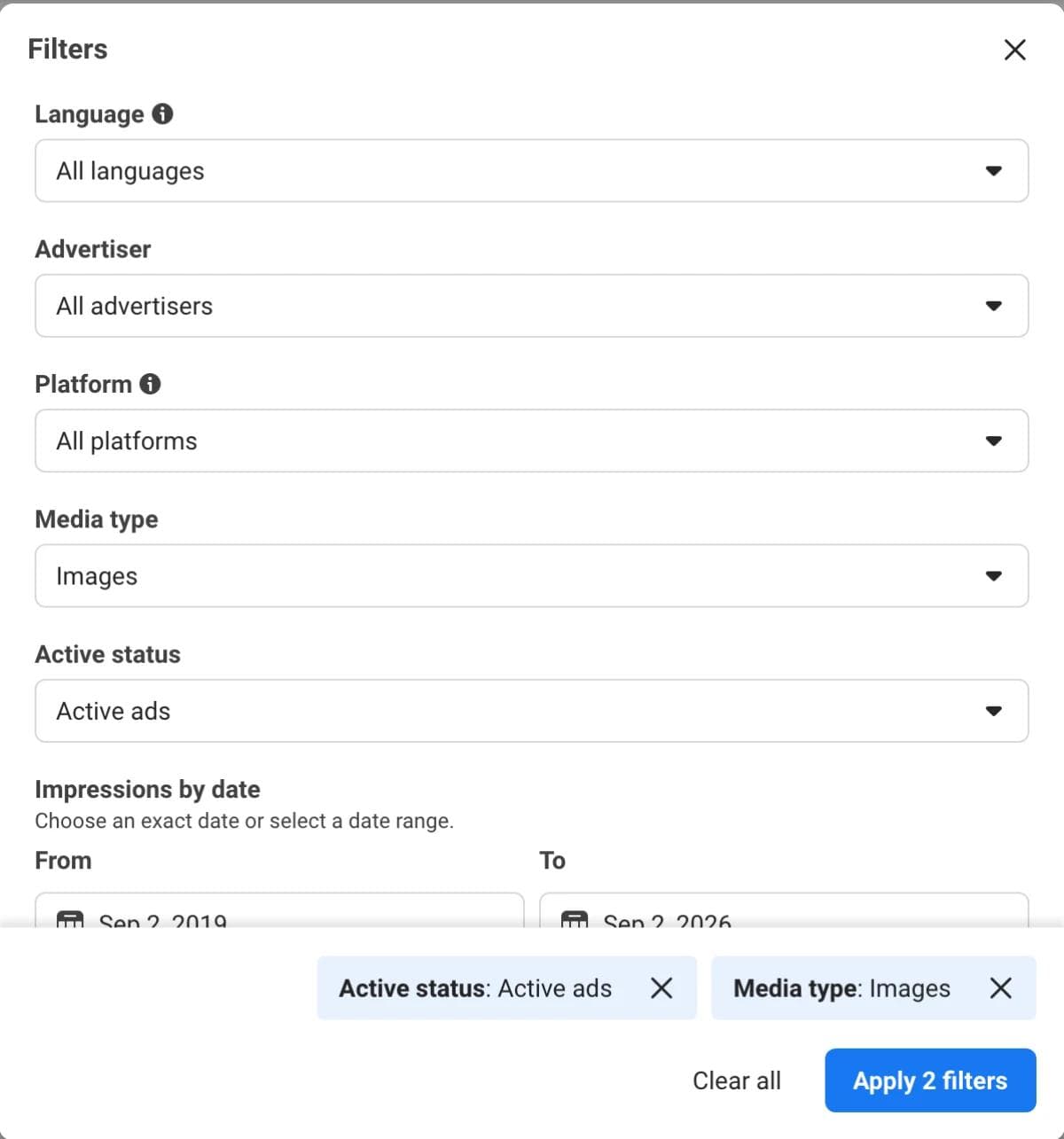
The filtered search lives in the URL, so once you have a setup you like, bookmark it. A skincare search filtered to active US image ads looks like this:
https://www.facebook.com/ads/library/?active_status=active&ad_type=all&country=US&media_type=image&q=skincare&search_type=keyword_unorderedChange q and you have the same search for any category. Change country and you have it for any market.
Search by advertiser when you want one brand's whole active set. Search by keyword when you want the category. The two return different things: a keyword search matches ad text, so a brand whose ads never say "skincare" will not appear in it.
How to read an ad card
Every result is a card with the same anatomy. Reading it takes ten seconds once you know where to look.
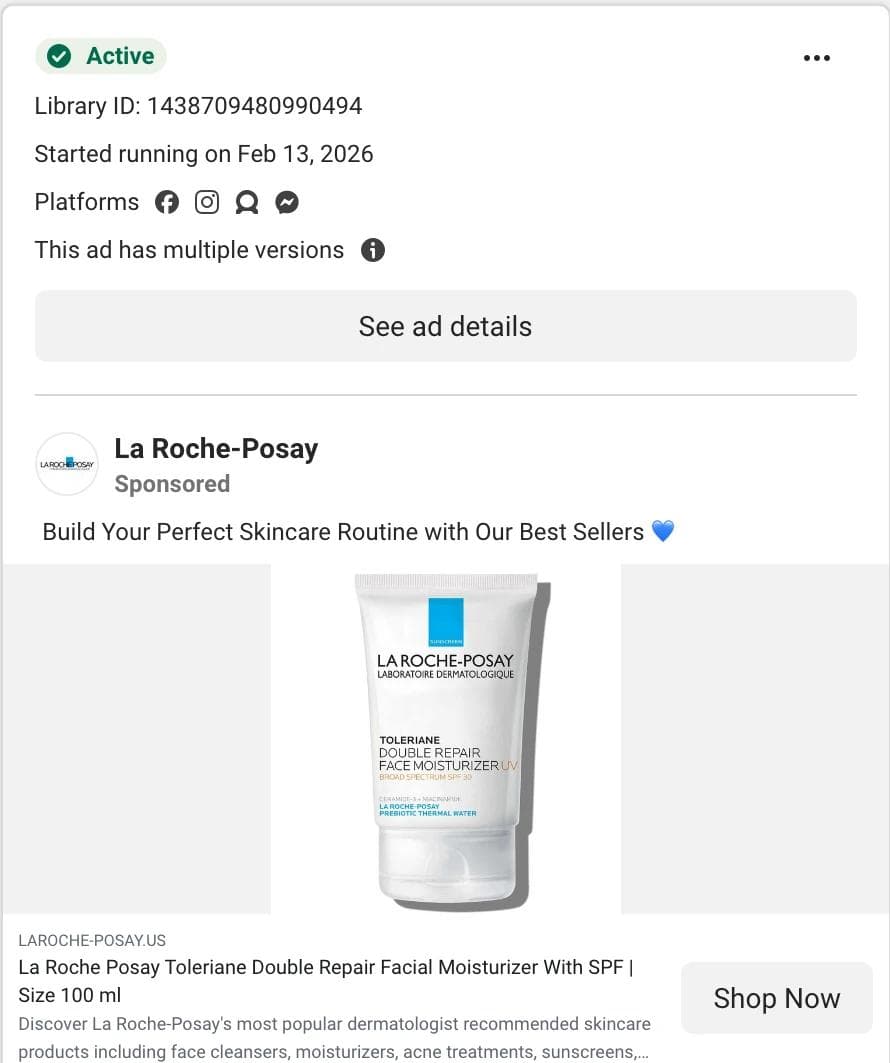
- Active is the status badge. With the active filter on, every card shows it.
- Library ID is a permanent identifier. Paste it after
?id=in the library URL and you have a link to that single ad. Record it whenever you save an ad, because the library has no save feature of its own. - Started running on is the date of the first impression. This is the field the whole method rests on.
- Platforms shows small icons for Facebook, Instagram, Messenger, Threads, and the Audience Network.
- This ad has multiple versions means the advertiser is running variants, usually different creative against the same copy or the reverse. It is a stronger signal than the date alone, because someone is actively testing.
- N ads use this creative and text replaces the versions line when an advertiser runs the same ad in several ad sets. The card then offers See summary details instead of See ad details. Treat it the same way: someone is spending on this creative in more than one place.
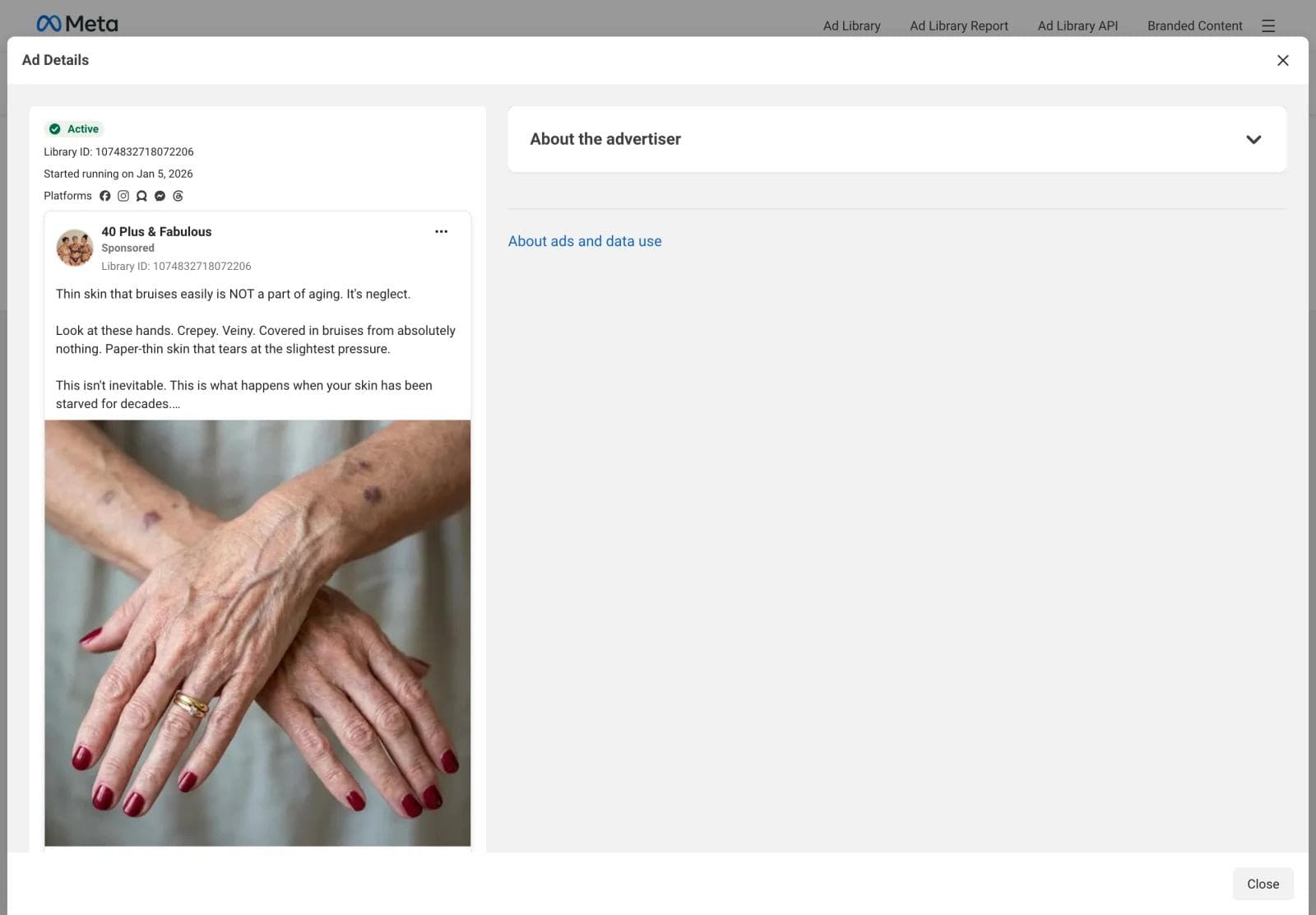
- See ad details opens the full creative and copy. For ads shown in the EU, this is also where reach by country and the targeting summary appear.
The longevity signal, and where it breaks
Advertisers do not keep paying for an ad that loses money. So an ad that has run for months is, on average, one that has earned its spend. That is the entire logic of the longevity signal, and it is sound, but it is a weaker instrument than most guides admit. We pulled the first 125 active image ads for the keyword "skincare" in the United States on September 2, 2026 to see what the signal looks like in practice.
| Skincare sample, 125 active image ads, US | Count |
|---|---|
| Distinct advertisers | 87 |
| Started in the last 30 days | 28 |
| Running 31 to 90 days | 35 |
| Running 91 days to a year | 50 |
| Running more than a year | 12 |
| Marked as having multiple versions | 17 |
| Median days running | 87 |
Half the sample has been live for more than three months. That part supports the signal. The oldest ads are where it breaks. Of the twelve ads running longer than a year, most were not product ads at all: a hair salon's page-like campaign at 1,021 days, two "Visit Instagram profile" ads from small cosmetics accounts near 900 days, a newsletter sign-up, and several more of the same shape. A local business can run a two-dollar-a-day ad indefinitely, and it will sit at the top of any longevity sort forever without telling you anything about creative.
Three rules keep the signal honest:
- Compare within an advertiser, not across a keyword. A 500-day ad from a brand that has ten other ads is a winner. A 1,000-day ad from a page that has one is a budget nobody has looked at.
- Weight the versions notice. In our sample the three longest-running product ads came from one brand, Botanique Paris, all started the same day and all still live at 507 days. That pattern, several old siblings with different hooks and the same offer, is what a tested winner looks like.
- Prefer a Shop now or Learn more destination over a profile visit or page like. The call to action tells you whether the advertiser is buying customers or buying followers. Only the first kind pays for its creative with sales.
One more caution. Longevity is evidence that an ad is affordable for that advertiser at that budget. It is not evidence that the design would work for you, and the library gives you nothing that could prove it. Treat every saved ad as a hypothesis to adapt and test, not a template to trust.
Search adjacent categories, not competitors
The instinct is to search your competitors by name. Do that once to understand the market, then stop, for two reasons. First, copying a competitor's layout puts your ad next to theirs in the same feed, which helps them more than you. Second, competitor searches surface the same handful of ads everyone in your category has already seen.
The better search is the category next to yours: same buyer, different product. If you sell skincare, search haircare, supplements, cosmetics, fragrance, or wellness. The ads that survive in those categories are solving the same problems yours must solve, a crowded feed and a skeptical buyer, and their solutions transfer without the copying problem. What transfers is structure: where the product sits, how big the headline is, whether the proof is a review or a before-and-after, how the offer is framed, and how much text the image carries. What does not transfer is the claim, the photography, and any regulated language.
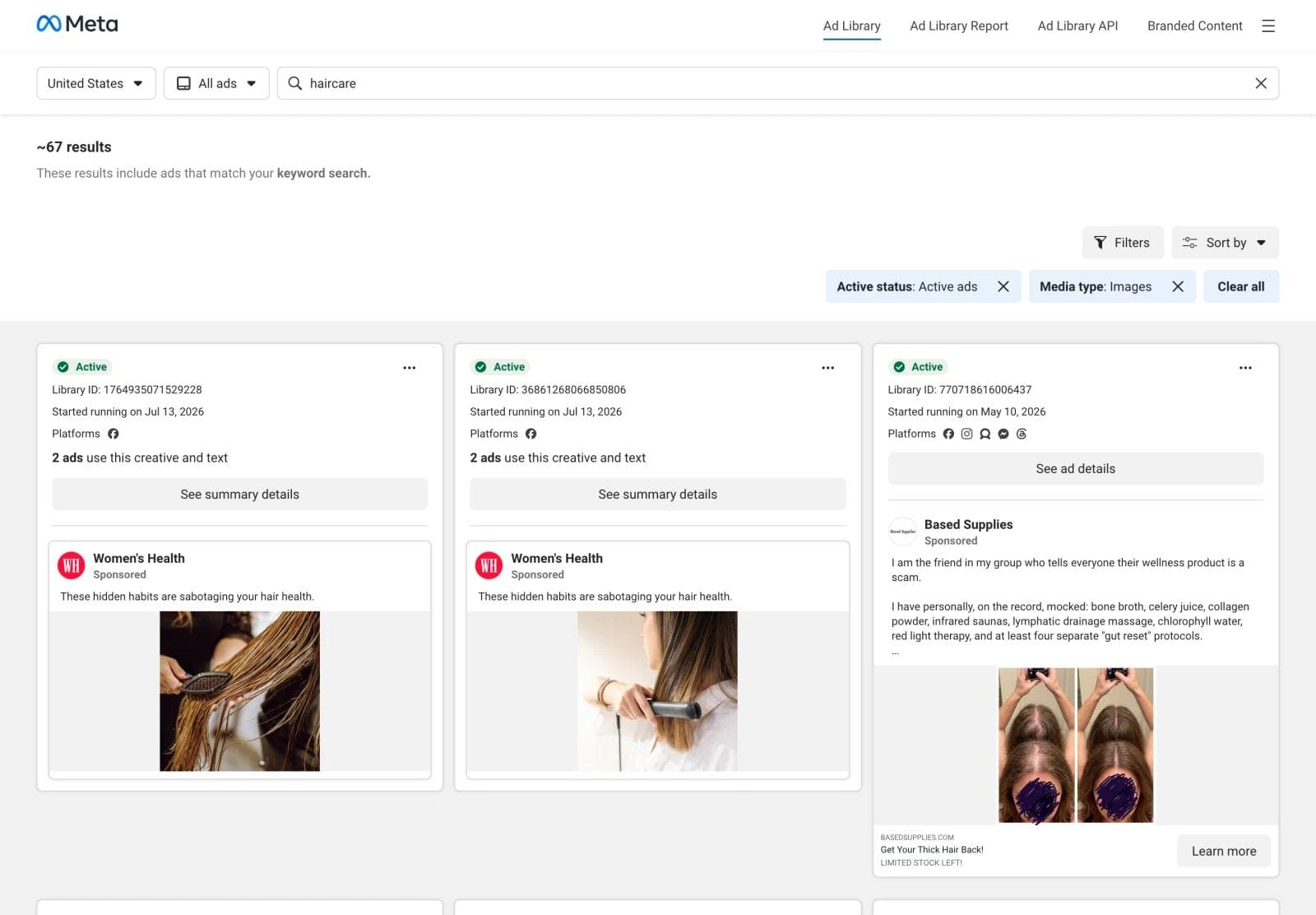
We ran the same active-image-ad search for three categories adjacent to skincare on the same day.
| Category search | Ads sampled | Advertisers | Median days running | Running over 90 days |
|---|---|---|---|---|
| skincare | 125 | 87 | 87 | 62 |
| haircare | 57 | 25 | 23 | 16 |
| supplements | 118 | 65 | 77 | 47 |
| cosmetics | 117 | 62 | 62 | 41 |
The point of the table is not the numbers. It is that each search took under a minute, and each returned a different set of proven layouts aimed at the same person.
Build a reference set
A reference set is six to ten saved ads with a note on why each one is there. Fewer, and you are copying one ad. More, and you stop being able to see the patterns. The library cannot save anything, so the set lives in a document or folder you keep.
For each ad record five things:
- Library ID and advertiser, so you can find it again after it changes or disappears.
- Start date and versions, the two signals above.
- What the eye lands on first, in one phrase: product on plain color, face with text overlay, before-and-after split, review card, price badge.
- What the ad is asking the reader to believe, such as "this is faster than the alternative" or "people like you already use this".
- What you would keep and what you would change for your brand.
Download the image while you are there. Right-click the creative inside Ad Details and save it, then name the file with the Library ID. Those files are the input for the next step.
The image is the advertiser's property. Saving it for reference and analysis is ordinary competitive research. Reusing their photography, their model, or their copy in your own ad is not. Adapt the structure, then supply your own product, people, and claims.
A worked reference set
Here is what the record looks like for four ads from the skincare and cosmetics searches above, chosen because they make different decisions rather than because they are the best ads in the category. Each entry names what the eye lands on, what the ad asks you to believe, and what would transfer to a different product.
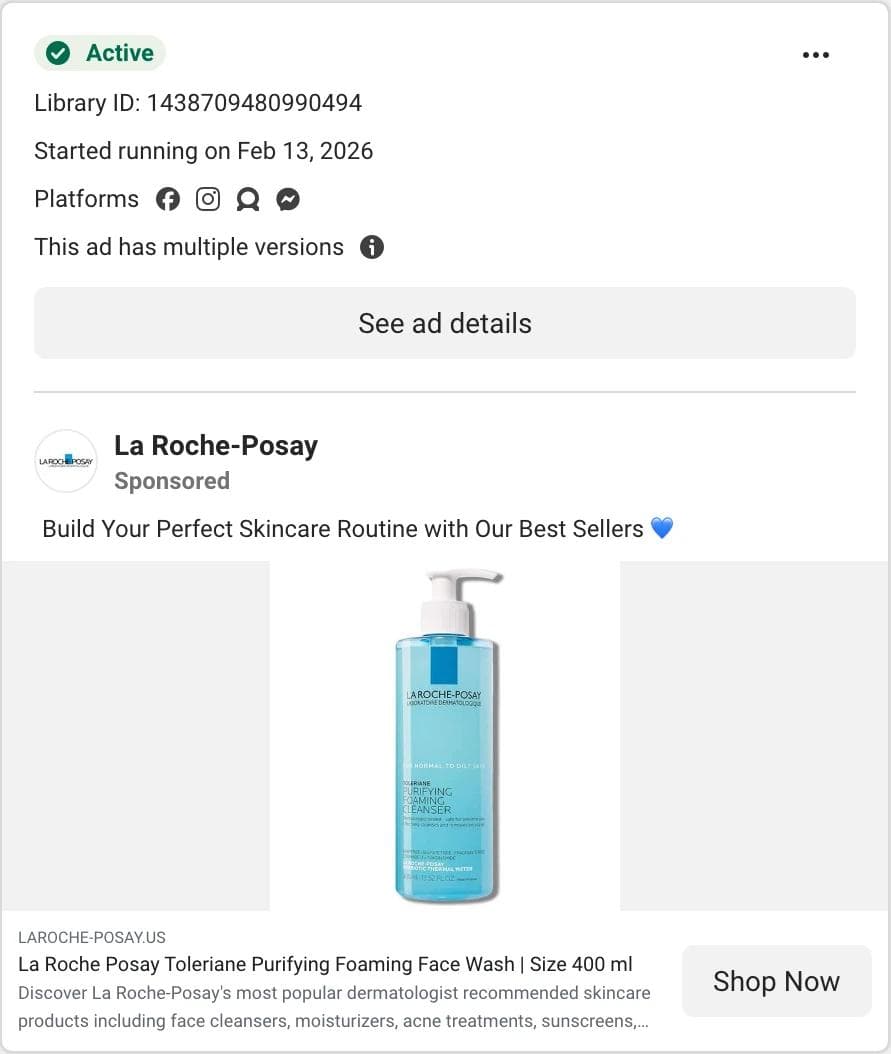
La Roche-Posay, product on a plain field. The eye lands on one product, centered, on a flat background, with no text in the image at all. The headline carries the product name and size, the primary text is one line about a routine, and the versions notice tells you the same layout is being run with other products in the slot. What the ad asks you to believe is that a known brand's best seller is enough reason to click. What transfers: the layout is a template. Swap the product, keep the empty field, keep the text out of the image. It works for any brand whose packaging already does the talking, and it fails for a brand nobody recognizes yet.
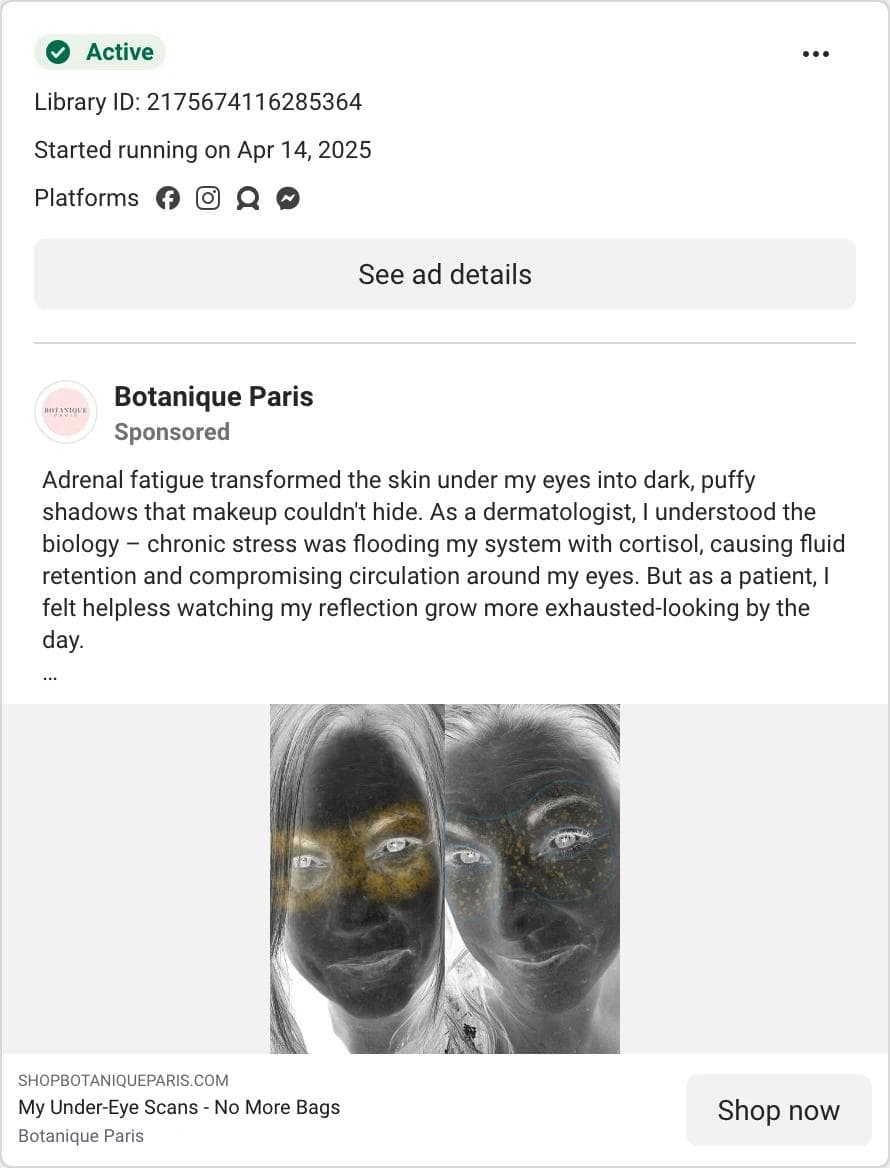
Botanique Paris, story first, product last. The eye lands on the primary text, a first-person account attributed to a dermatologist, and only then on an image that looks like a diagnostic scan of a face. The product does not appear until the headline. This is the outcome-led fork: the ad asks you to believe a mechanism, cortisol and fluid retention, before it asks you to believe in a cream. Three siblings from the same day share the copy and rotate the headline, which is what a tested set looks like at 507 days. What transfers: the sequence of story, mechanism, then product. What does not: the clinical framing and the professional attribution, which you cannot borrow without your own evidence.
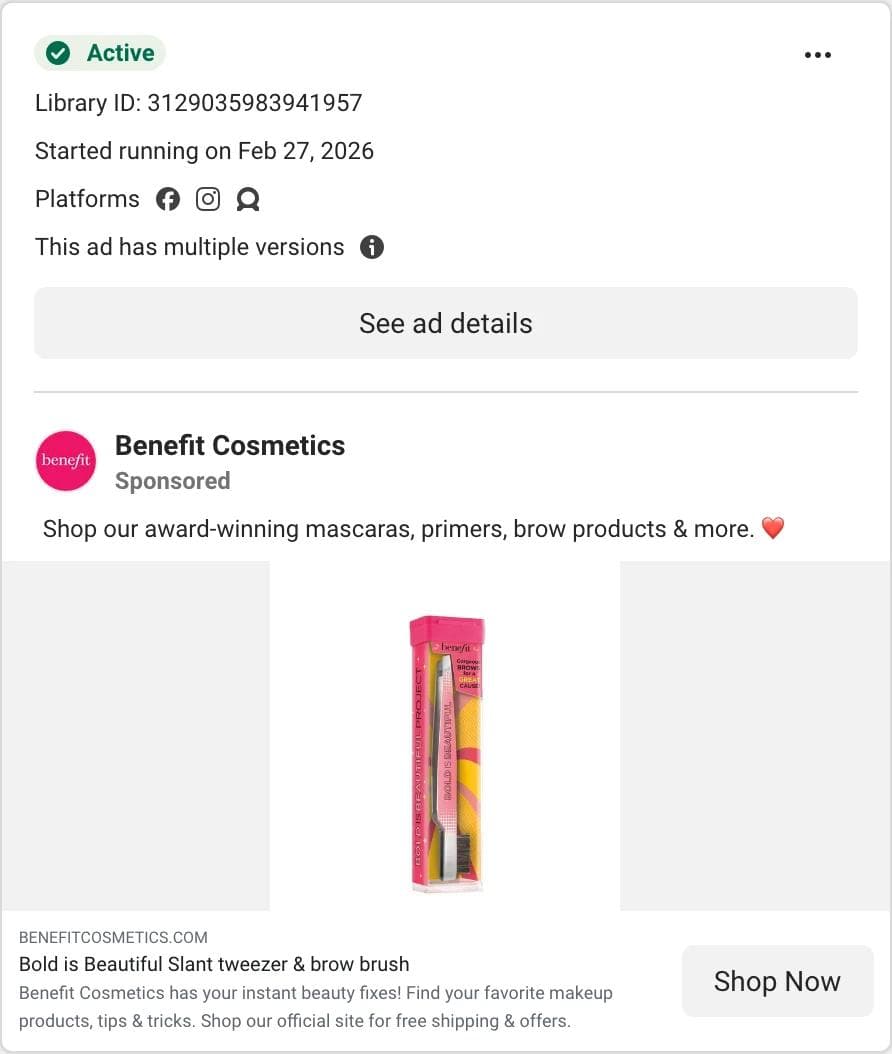
Benefit Cosmetics, the same layout with proof in the copy. Structurally this is the La Roche-Posay ad from an adjacent category: one product, plain field, no text in the image, product name as headline. The difference is where the proof sits. "Award-winning" is the first phrase of the primary text, and the description line promises free shipping. What transfers: for a skincare brand, this is the reminder that a catalog layout can carry a proof claim in the copy rather than in the image, which keeps the creative reusable across products while the claim changes.
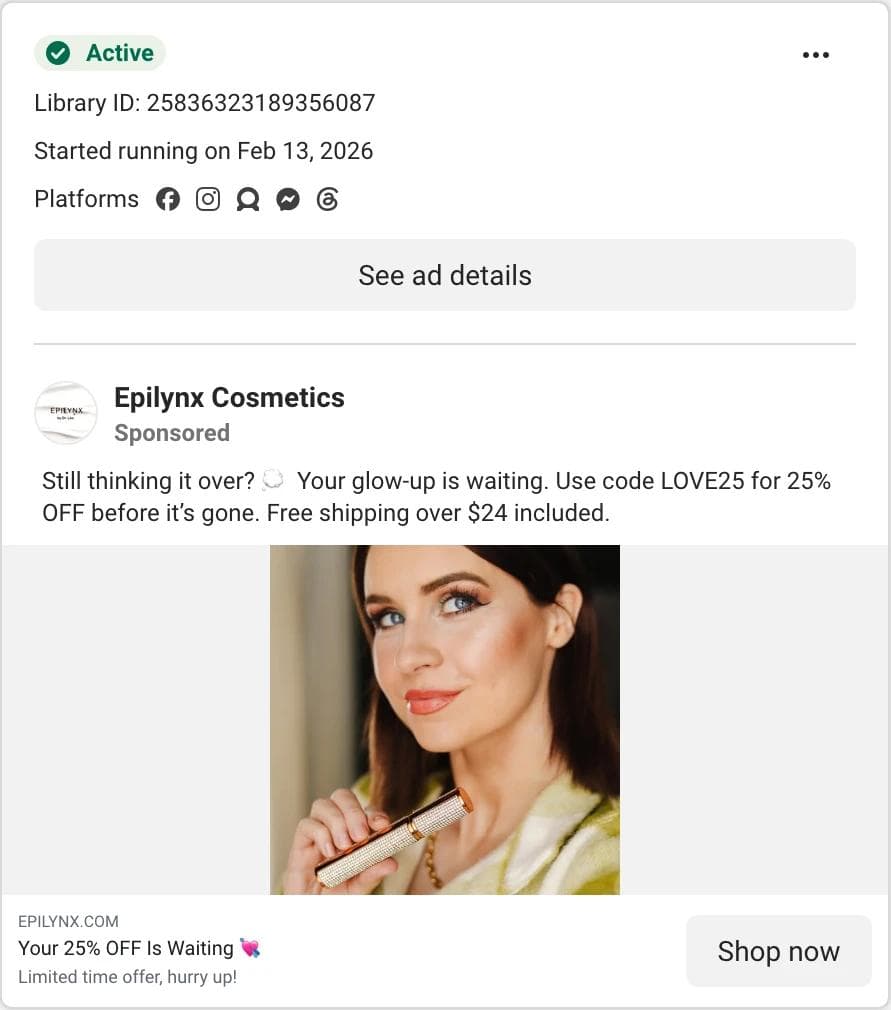
Epilynx Cosmetics, price forward, person in frame. The eye lands on a face, then the product in hand. The primary text opens with "Still thinking it over?", which is retargeting language, and gives a code and a shipping threshold. The headline repeats the discount. What the ad asks you to believe is that the only thing between you and the purchase is the price. What transfers: the offer structure, code plus threshold plus urgency line, and the decision to show a person using the product instead of the product alone. What does not: the model and the photograph, which belong to the advertiser.
One category did not transfer at all. The supplements search returned long-copy story ads from persona pages almost exclusively, with a first-person illness narrative and a Learn more button. That is a copy format, not a layout, and it comes with claims a skincare brand cannot make. Adjacent means the same buyer and a comparable purchase, not merely a nearby shelf.
Turn references into on-brand ads
This is where a reference set stops being a mood board. The structure you saved is a layout, a hierarchy, and an argument. Rebuilding that structure with your own brand kit, product photography, and claims is a design task, and it is one an AI design agent handles well when you give it references instead of adjectives.
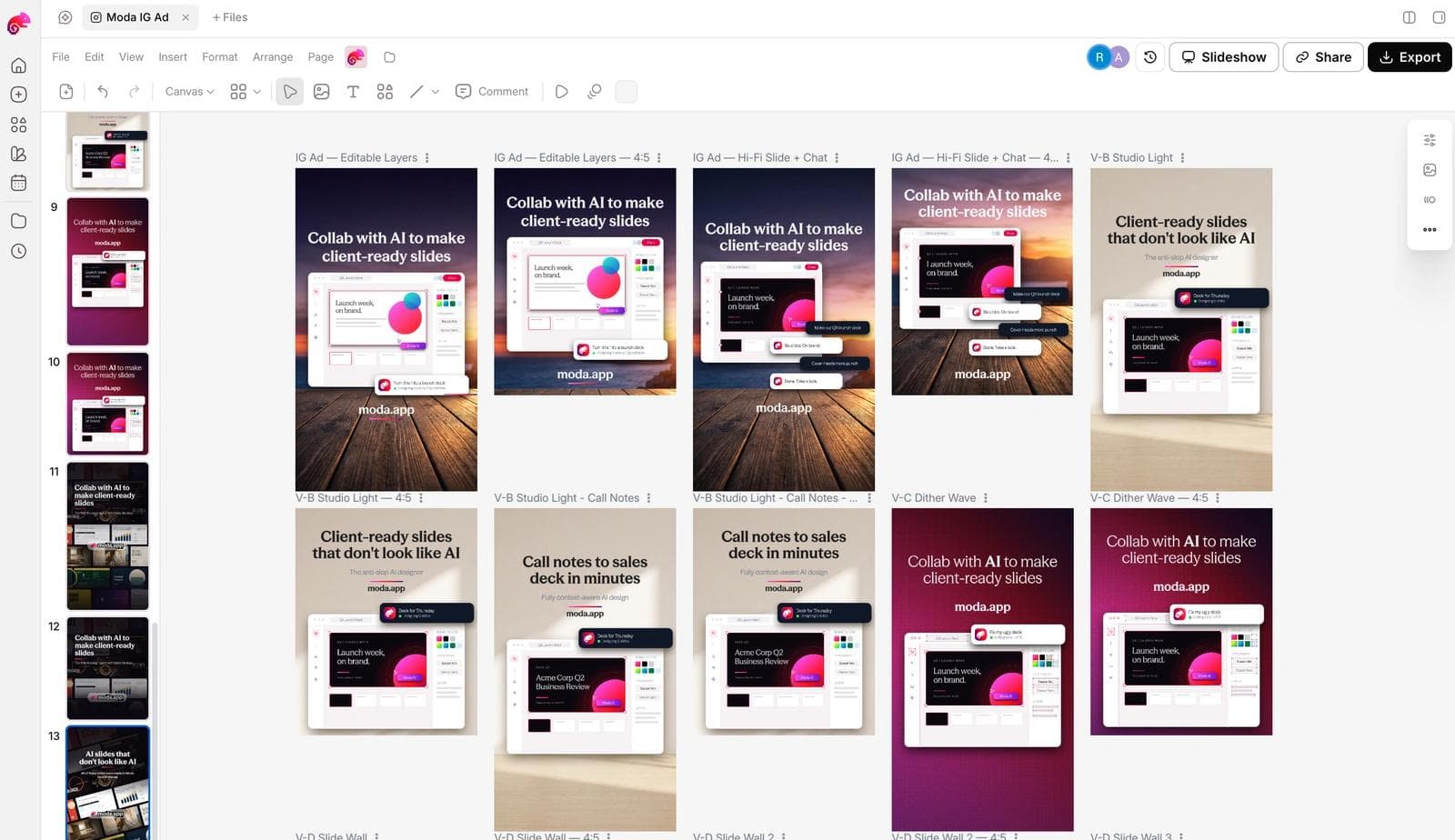
In Moda, the workflow is: attach two to four saved ad images to a message, name the brand kit to apply, and describe what stays and what changes. A prompt that works looks like this:
Use these three ads as layout references. Make four static Instagram feed ads (1080 x 1350) for our vitamin C serum using the Glowlab brand kit. Keep the hierarchy of the first reference: product on a plain color field, one big benefit headline, a small proof line, price badge bottom right. Replace all photography with our product shots and write new headlines. Do not reuse any of the reference copy.The agent builds the ads on an editable canvas, so the result is not a flat image. Headlines, product images, badges, and colors stay as separate objects you can move, restyle, or swap, and the same layout can be pushed to a 1080 x 1080 feed size or a 1080 x 1920 story without rebuilding it.
What to check before any of these ships:
- The claims are yours and true. A reference ad's "dermatologist recommended" line does not come with it.
- The product is recognizably yours at feed size. A layout that worked for a bottle may need a different crop for a jar.
- The text in the image is short enough to read on a phone. Most surviving static ads in the sample carried one headline and at most one proof line.
- You have at least two hooks against the same layout, so the first test tells you something about the message and not just the design.
If you want to set up the brand side first, how AI design tools build a brand kit from your website covers what gets extracted and what to correct. For the broader choice of tools, the AI ad generator roundup separates the systems that produce editable creative from the ones that produce a finished file.
The other ad libraries
Meta's is the largest and the easiest to search, but the same method works elsewhere. The TikTok Creative Center shows top-performing ads with engagement metrics Meta does not publish. LinkedIn's ad library covers every company page's ads, which makes it the best source for B2B static layouts. Google's Ads Transparency Center shows a verified advertiser's search, display, and video ads. Each has different filters and different gaps, and each deserves its own guide.
Frequently asked questions
Is the Meta Ad Library free?
Yes. It is free and does not require a Facebook or Instagram account. Some features, such as the Ad Library API, require a verified account, but searching and viewing ads does not.
Can I see how much a competitor spends on Meta ads?
Not for ordinary commercial ads. Spend and impression ranges are shown only for ads about social issues, elections, or politics. For commercial ads, the start date and the presence of multiple versions are the only performance proxies the library offers.
Does the Ad Library show ads that have stopped running?
For ads shown in the United States, no. An inactive commercial ad disappears from search. Ads that reached people in the EU or the UK remain visible for one year after their last impression, and political ads are kept for seven years.
How do I search for image ads only?
Open Filters, choose Media type, and select Images. Combine it with Active status set to Active ads. The filtered search is reflected in the page URL, so you can bookmark it.
Can I download an ad from the Meta Ad Library?
There is no download button. Open See ad details and save the image from your browser. Keep the Library ID with the file. Use the download for analysis and as a layout reference, not as creative you republish.
Is it better to search competitors or my whole category?
Search competitors once to understand the market, then spend most of your time on adjacent categories that sell to the same buyer. Those ads give you proven structures without putting your creative next to a direct rival's in the same feed.

Real editable visuals. Real canvas. Full control.
Fly through design work