OpenArt vs Higgsfield: Which AI Creative Platform Should You Use in 2026?
Compare OpenArt and Higgsfield for characters, stories, cinematic video, model access, prompt control, and the workflow needed after generation.
 Anvisha Pai, Co-founder & CEO, Moda
OpenArt and Higgsfield both give creators access to many leading image and video models, but they organize the work around different creative units. OpenArt is strongest when a recurring character, story, or visual identity must survive across scenes. Higgsfield is strongest when the immediate goal is a striking shot, camera move, effect, product visual, or social concept.
Choose OpenArt for character libraries, multi-scene story building, broad image creation, and visible control over prompt polishing. Choose Higgsfield for cinematic presets, camera-oriented direction, product and UGC apps, and a more assertive path from a rough prompt to an eye-catching clip. If the real job is a complete edited video, plan a finishing workflow either way.
OpenArt vs Higgsfield at a glance
| Decision | OpenArt | Higgsfield |
|---|---|---|
| Best starting unit | Character, image, scene, or story | Shot, camera move, effect, product, or social concept |
| Model strategy | Multi-model image and video platform | Multi-model platform plus proprietary tools and models |
| Prompt behavior | Auto Polish is exposed as a visible switch | Guided presets and stronger platform interpretation are central to the experience |
| Continuity | Saved characters, references, and story workflows | References, Soul ID, keyframes, Cinema Studio, and connected Canvas nodes |
| Post-production | Generation-focused; official help says direct video editing is not supported | Editing and workflow tools exist, but they are not a full replacement for every NLE |
The useful framework: identity, direction, and assembly
A generic feature checklist makes these platforms look almost identical. Both list popular models, reference inputs, image tools, video tools, and credits. A better comparison asks three questions:
- Identity: Can you establish a character, product, or style once and reuse it across scenes?
- Direction: Does the product translate a simple idea into camera language and visual spectacle, or preserve the user’s exact instruction?
- Assembly: Can the generated scenes become a finished deliverable without leaving the platform?
A creator producing one viral shot may care mostly about direction. A storyteller producing six scenes cares about identity. A marketer producing an ad with pacing, copy, music, and brand overlays must solve assembly too.
Where OpenArt is stronger
Character and story continuity are first-class concepts
OpenArt’s current help center recommends its Consistent Character feature, reference images, and repeated prompting for identity continuity. Its story tools can generate sequences rather than isolated clips. The OpenArt help center says standard videos are generally short and that One Click Story can create longer sequences. This makes OpenArt easier to understand as an image-and-story system rather than simply another video-model wrapper.

That strength is most relevant for illustrated stories, recurring mascots, character-led shorts, and campaigns where the same person or object appears repeatedly. It does not guarantee perfect temporal consistency. References and saved identity reduce repeated setup, but every current generative workflow still benefits from review and repair.
Prompt enhancement is a visible choice
OpenArt exposes Auto Polish beside the generation controls. That is a meaningful usability decision. A beginner can let the system enrich a plain prompt, while a power user can turn it off when literal wording and controlled iteration matter. The toggle does not prove that every model receives identical inputs, but it gives the user a clearer choice than an invisible rewrite.
Where Higgsfield is stronger
Cinematic direction is easier to select than to describe
Higgsfield’s preset browser is built around recognizable camera moves, effects, and production motifs. Its AI video page also emphasizes first and last frames, motion references, video edits, model choice, and virtual lens and camera settings in Cinema Studio. This is useful for creators who know what they want to see but do not know the vocabulary required to prompt it reliably.
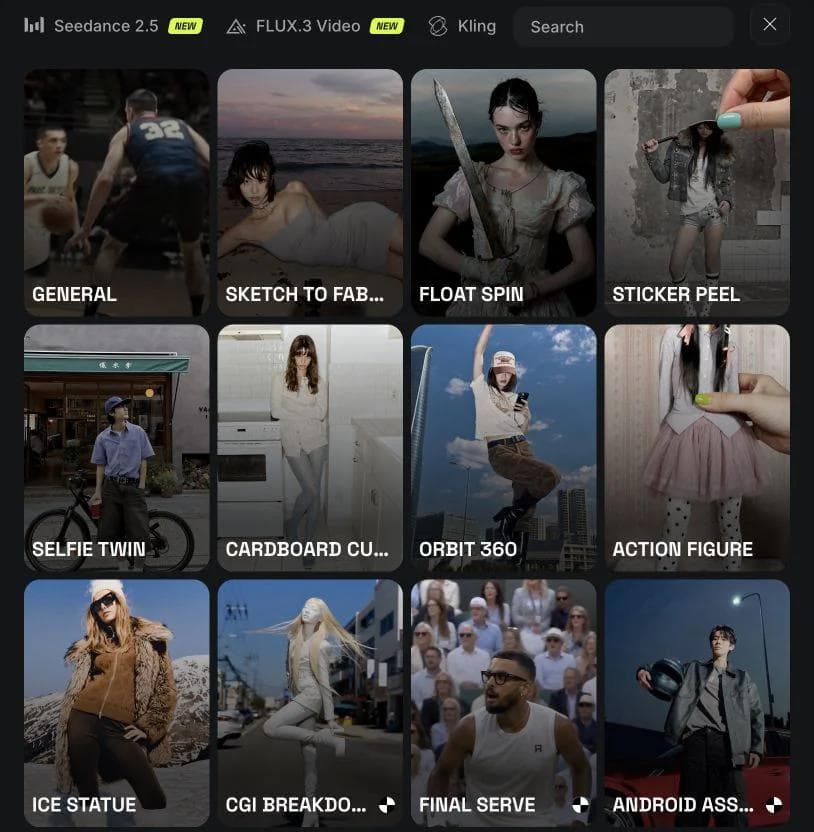
The tradeoff is the same force that creates the appeal. A strong preset and prompt-enhancement layer can produce a more dramatic first result while making controlled, incremental revision less predictable. If you are a power user, test whether small wording changes remain small in practice.
Higgsfield offers more specialized routes to an outcome
Higgsfield now includes Apps, Marketing Studio, Cinema Studio, Canvas, AI Influencer workflows, and proprietary systems such as Soul. Its Canvas overview describes connected nodes for prompts, references, images, models, and video outputs. That gives advanced users a reusable graph while keeping app-like starting points available for people who do not want to build a graph.
Where both comparisons usually go wrong
First, a longer model list is not a quality verdict. When both services expose the same outside model, output differences may reflect references, defaults, prompt processing, or settings. We did not run paid generations for this comparison, so we are not assigning invented quality or speed scores.
Second, credit quantities are not directly comparable without mapping them to the exact model, duration, resolution, and retry rate. A large credit allowance can still be expensive for the model you actually use. Verify the in-product estimator for a representative job.
Third, “story” and “editing” do not mean the same thing. OpenArt’s official help states that direct video editing is not currently supported. Higgsfield can edit and transform generated media and connect workflows, but a creator assembling many shots, audio, captions, graphics, and exact timing may still need a timeline editor.
Where Moda fits
Moda belongs in this decision only when generation is part of a broader design-and-editing job. It supports leading video, image, and audio models, then lets a creator arrange work on an editable canvas, a multi-track timeline, and a layer-based compositor. It is useful for ads, social videos, motion graphics, and campaign systems that need typography and brand design after the model returns a clip.
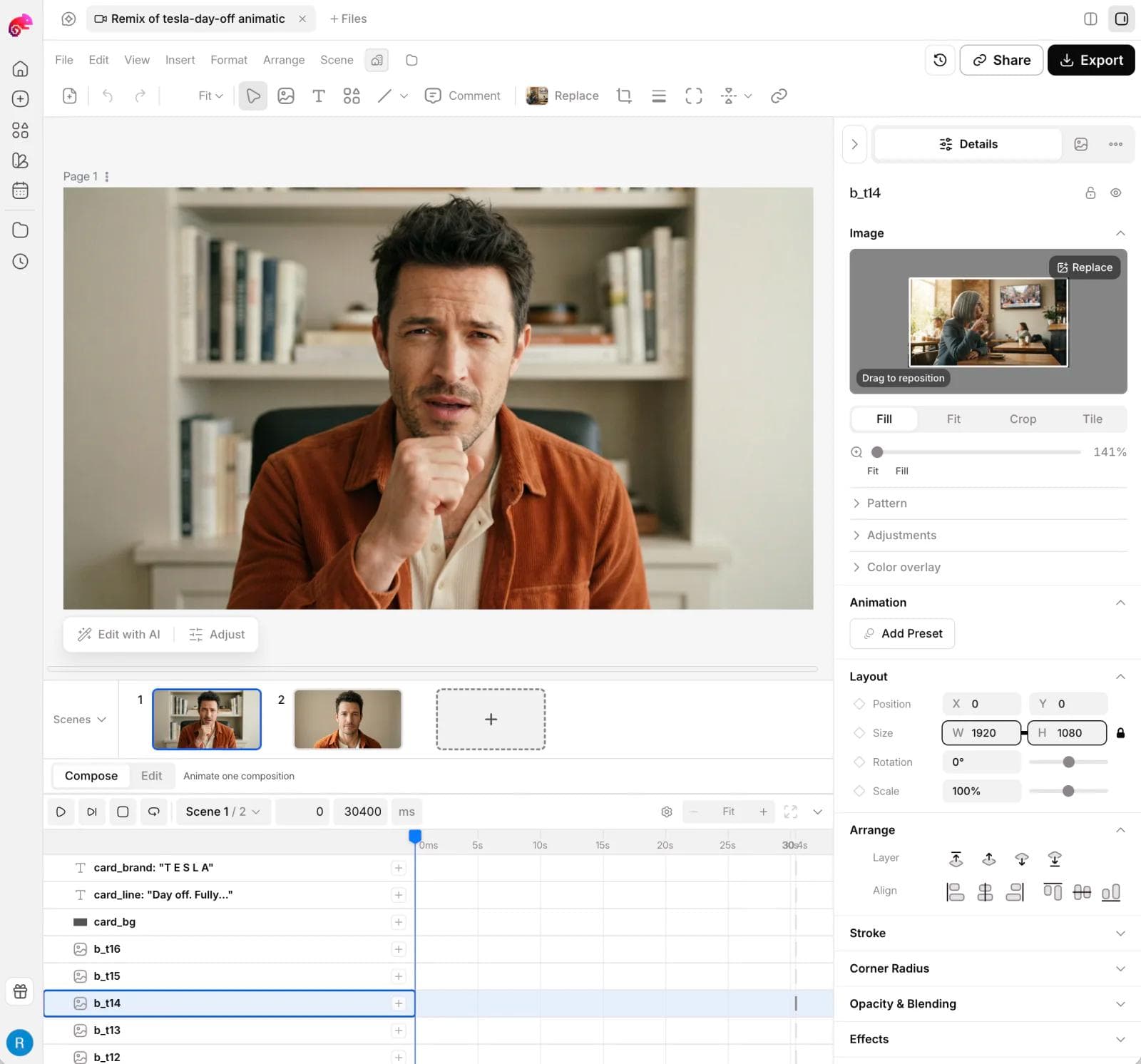
OpenArt remains a better fit for a character-centered generation library. Higgsfield remains a better fit for preset-led cinematic exploration. Moda’s advantage is the production step after generation, especially for non-professionals who do not want to move immediately into a traditional post-production application.
For a broader view of multi-model platforms, read our Higgsfield alternatives guide and Magnific alternatives guide. For an editable design-and-finishing workflow after generation, explore Moda.
Which should you choose?
- Choose OpenArt for recurring characters, image-first exploration, story sequences, and a visible choice over prompt polishing.
- Choose Higgsfield for cinematic presets, camera-oriented controls, product and social apps, and guided access to many video models.
- Choose Moda when your output must become an editable branded video, ad, social asset, or motion composition in the same approachable workspace.
- Choose a dedicated NLE when exact long-form editing, audio mixing, color, captions, or delivery requirements are the center of the job.
How the choice changes by project
A recurring character across six scenes
Start with OpenArt. Its saved-character and story concepts align with the real unit of work: identity that must recur. Build a clean master reference, save it, and test a difficult angle before producing the entire sequence. The platform can reduce setup repetition, but the creator still needs to inspect face, clothing, props, lighting, and scale from scene to scene.
A single cinematic product reveal
Start with Higgsfield. A shot-specific preset, first and last frame, camera movement, and product-oriented app can get closer to the desired visual direction without requiring the user to translate the concept into production terminology. The final decision still depends on whether the product remains accurate enough for the campaign.
A narrated short with six clips, graphics, and music
Separate generation from assembly. OpenArt may help establish the character and story frames. Higgsfield may provide the stronger motion concepts. Neither should be assumed to solve frame-accurate pacing, typography, audio mixing, transitions, and branded end cards. Choose the finishing system before generating every shot so aspect ratios, handles, and shot lengths match the edit.
How to test continuity without wasting credits
- Create one master character or product reference with a clear face, silhouette, palette, and identifying details.
- Test front, profile, wide shot, and a difficult lighting condition before generating a full story.
- Keep the underlying model fixed while comparing platform workflow. Switching both model and platform makes the result impossible to attribute.
- Turn prompt enhancement off when possible for a literal-control test, then turn it on for a convenience test.
- Measure how many manual corrections are required to reach a usable sequence, not how attractive the best single frame looks.
Migration checks before moving a library
A platform switch can break more than prompts. Check whether saved characters, reference images, albums, prompt history, seeds, metadata, and generated assets can be downloaded in a usable form. Recreate one recurring character and one multi-scene project in the candidate system before moving the rest. If the existing library cannot travel, include the cost of rebuilding identity assets and naming conventions in the decision.
Also inspect commercial terms at the model level. A platform-wide plan does not guarantee that every third-party model has the same input rights, output rights, privacy treatment, or availability. For client work, record which model produced an approved asset and retain the source references needed to reproduce or repair it.
Frequently asked questions
Can OpenArt edit a finished video?
OpenArt’s current help center says direct video editing is not supported. It focuses on generating and training visual media. Plan to use another application for cutting, effects, graphics, and final assembly.
Does Higgsfield support character consistency?
Higgsfield offers reference workflows and identity-oriented tools such as Soul ID, plus keyframes and connected Canvas nodes. The right test is the exact character, model, shot range, and sequence you intend to make.
Which is better for beginners?
Higgsfield is often easier for a beginner seeking an immediately cinematic shot because presets externalize creative choices. OpenArt can be easier for a beginner building a recurring character or simple story. The user’s creative unit matters more than a generic ease-of-use score.
The bottom line
OpenArt organizes AI creation around reusable identity and stories. Higgsfield organizes it around directed shots and creator-friendly spectacle. That distinction is more useful than counting models. Start with the creative unit you need to preserve, then verify where assembly, revision, and final delivery will happen.

Real editable visuals. Real canvas. Full control.
Fly through design work