Wix vs Squarespace in 2026: Which Website Builder Fits?
Wix vs Squarespace compared for design, ecommerce, scheduling, total cost, ownership, migration, and everyday site maintenance in 2026.
 Anvisha Pai, Co-founder & CEO, Moda
Wix vs Squarespace is not primarily a template decision. Choose Wix when the site must coordinate several business systems and you want room to customize how they work together. Choose Squarespace when coherent presentation, a more guided editing model, and predictable content upkeep matter more than maximum platform breadth.
If neither platform fits, compare the broader decision frameworks in our guides to Wix alternatives and Squarespace alternatives.
Neither wins every category. Before comparing demos, identify four nonnegotiables: the workflow that earns or collects money, the person who will make weekly updates, the data you must be able to recover, and the full set of subscriptions and fees required after launch.
This refresh uses current vendor documentation plus limited independent hands-on evidence. We did not build and operate the same site in both products. Website Builder Expert's April 2026 comparison reports hands-on builds in both editors and supports the practical split between Wix's broader business toolkit and Squarespace's more guided editing experience. That is useful workflow evidence, not proof that either platform is universally better.
Wix vs Squarespace at a glance
| Decision | Wix | Squarespace |
|---|---|---|
| Best overall fit | Businesses needing broad functionality | Design-led sites with a guided system |
| Editing approach | Flexible drag and drop plus Wix Harmony and Aria | Fluid Engine grid plus Blueprint AI |
| Design freedom | More open-ended | More structured and cohesive |
| Business tools | Particularly broad ecosystem | Strong integrated essentials |
| Ecommerce | Better for varied operational needs | Good for a design-led, manageable catalog |
| Blogging and portfolios | Capable, with many options | Particularly natural content presentation |
| Learning curve | More surface area to understand | Easier to keep visually coherent |
| Best reason to choose it | Your website runs the business | Your website presents the brand |
| Ongoing cost | Plan plus apps, domains, email, and feature-specific fees | Website plan plus separate services such as Acuity or Email Campaigns |
| Portability | Content and some data export, but the working site stays on Wix | Selected content and commerce exports, but design and layouts require rebuilding |
The core difference: operational breadth versus guided coherence

The old shorthand was that Wix offered freedom while Squarespace offered better templates. That misses the operating system around each editor and the cost of keeping the site useful after launch.
Wix's Harmony editor combines drag-and-drop editing with Aria, an AI agent that can help generate and revise a site. Wix also surrounds the editor with systems for stores, bookings, events, content, customer management, and marketing. Check editor and app compatibility before assuming every Wix feature is available in the same build experience.
Squarespace's Blueprint AI and Squarespace AI can help establish content and style choices before the owner refines the result in Fluid Engine. Squarespace has become more flexible while retaining a stronger tendency toward coordinated typography, spacing, and presentation.
The decision is therefore less about whether either product can make a good-looking page. It is about what happens after launch and who operates the site every week.
Use four questions to make the decision
- What must the site operate on day one: pages, products, appointments, events, memberships, email, or customer records?
- Who will make the fifth edit, and can that person do it without the original builder?
- Which content, customer, order, and media data must be recoverable if you leave?
- What is the three-year cost after website plans, add-ons, domains, email, apps, fees, and maintenance are included?
Wix vs Squarespace for AI website building
Both products now treat AI as part of site creation rather than a separate copy generator.
Neither is a vibe-coding platform in the same sense as Lovable, Base44, or Replit. Wix and Squarespace use AI inside a governed website system with established editors, hosting, content models, and business features. That can be less open-ended than vibecoding an application, but it also leaves the owner with a more predictable site-management workflow.
Wix Harmony pairs its editor with Aria, which Wix describes as an AI agent available throughout the building process. The user can work visually, ask AI for changes, or combine the two. Wix's existing business systems give the agent a broad operational environment to work within.
Squarespace offers Blueprint AI Builder, AI-generated template options, and a Squarespace GPT flow that passes a brief into Blueprint. It can generate text and images and select style settings before the user refines the result in Squarespace.
Choose Wix when you want AI assistance inside a broad business platform. Choose Squarespace when you want AI to establish a coherent visual starting point that remains inside a more guided design system. Neither should be selected from the initial generation demo alone. Make several precise revisions and test the weekly publishing workflow before committing.
Wix Harmony documentation and Squarespace AI documentation describe the current workflows.
Wix vs Squarespace for design control
Wix gives the owner more ways to move, style, and configure elements. That freedom is useful for a business with a distinctive layout or a team willing to spend time refining responsive behavior. It can also make consistency the owner's responsibility. More choices create more opportunities for spacing, typography, and mobile layouts to drift.
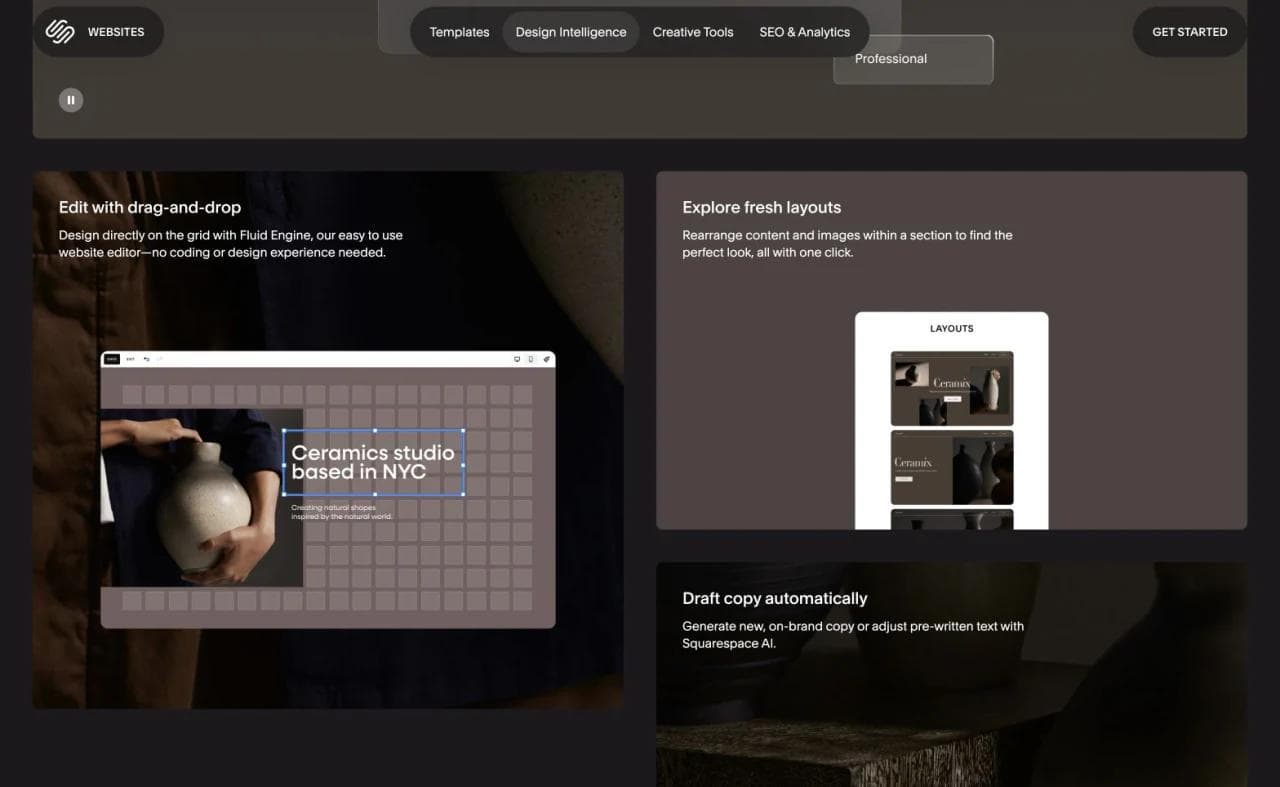
Squarespace's Fluid Engine also supports drag-and-drop positioning, overlapping blocks, and separate desktop and mobile arrangements. However, the surrounding system encourages a more coordinated result. Site-wide styles and reusable section patterns help keep pages related to one another.
Choose Wix if preserving an unusual design or behavior matters more than guardrails. Choose Squarespace if the site owner wants a polished system that is harder to push in conflicting directions.
Wix vs Squarespace for ecommerce
Both platforms can sell physical products, services, and subscriptions. The useful comparison is the exact order lifecycle: what customers can combine at checkout, how inventory behaves, which payment processors are supported, what the staff sees after purchase, and which fees apply on the required plan.
Wix is attractive when commerce shares a dashboard with bookings, events, memberships, customer records, or other business applications. Wix Stores includes catalog, cart, checkout, order, and customer account flows, but selling requires an eligible paid plan. Also separate payment-processing charges from any platform fee attached to a specific Wix product. For example, Wix Pricing Plans can add a transaction fee on paid plans in addition to the payment provider fee.
Squarespace combines its storefront with the same design system used by the rest of the site. It supports products, inventory, and subscription products, but capabilities and fees vary by plan and product type. Squarespace documents separate commerce, digital-product, and payment-processing charges, and its subscription-product rules include checkout and payment-method conditions that deserve a real order test.
For a representative commerce trial, import a small real catalog with variants, configure tax and shipping, create a discount, place a test order, refund it, and export the products again. If subscriptions matter, test the exact renewal item and payment method. A polished product page is not evidence that the back-office workflow fits.
Wix vs Squarespace for appointments, services, and events
Wix Bookings is built into the wider Wix business platform. It supports appointments, classes, courses, staff calendars, reminders, payments, and multiple locations, although an eligible site upgrade is required to accept bookings. Wix documents the current scope in its Bookings overview and multi-location guide.
Squarespace scheduling runs through Acuity. Acuity can operate without a Squarespace website or appear inside one through a scheduling block, and it supports appointments or classes, calendar integrations, reminders, follow-ups, and intake forms. The key purchase distinction is that Acuity requires its own subscription rather than being included automatically in the website plan.
Choose from the actual service model, not the brand of the page builder. Recreate one appointment, one recurring class, the staff and location rules, a cancellation, the customer reminder, and a reschedule. Then compare both the customer experience and the calendar work the team performs after the booking.
Wix vs Squarespace pricing and total cost
The website plan is only the baseline. Price the configuration that reproduces the business, not the cheapest plan that can publish a homepage.
- Website plan and billing term, including the renewal price after any promotion
- Domain renewal, business email, email campaigns, scheduling, and premium apps
- Commerce or digital-product transaction fees plus payment-processing charges
- Collaborator, location, localization, storage, and support requirements
- Migration, setup, training, and the cost of later changes
Wix notes that subscriptions bought during a sale renew at the standard rate, and a Wix account can carry separate charges for plans, domains, business email, and paid apps. Review the billing behavior in Wix's payment guide and inspect the upgrade screen for the exact region and term.
Squarespace states that Acuity Scheduling, Email Campaigns, domains, Google Workspace, and several other services require independent subscriptions. Its plan guide lists those separate services. A lower website-plan price can therefore produce a higher total if the business needs several add-ons.
Build a 36-month ownership estimate and include the likely operator. The cheapest first year is not necessarily the lower-cost site.
Wix vs Squarespace for blogging and content
Squarespace is particularly comfortable for portfolios, articles, podcasts, restaurant content, and other publishing where presentation matters. Its structured collections and styles make it relatively easy for a non-designer to add another entry without redesigning the page.
Wix provides capable blogging and CMS tools and can be the better choice when content connects to a broader application ecosystem. Its flexibility is useful when the site mixes editorial content with directories, bookings, member experiences, or custom data.
For a large publication with complex editorial permissions, content models, migrations, and syndication, neither comparison should stop at the page editor. Evaluate a dedicated CMS or WordPress as well.
Wix vs Squarespace for SEO
Both platforms provide the essentials required for a search-visible small-business site, including editable titles and descriptions, page URLs, redirects, sitemaps, image metadata, and structured site organization. The platform is unlikely to be the limiting factor for an ordinary service-business website.
The larger SEO differences usually come from execution:
- Can the owner publish useful pages consistently?
- Can important pages be organized and linked clearly?
- Does the site load well with the chosen media and integrations?
- Can the team control the metadata and structured content it actually needs?
- Will a future migration preserve URLs and content?
Wix may be preferable when the site needs a wider range of business and CMS functionality. Squarespace may be preferable when a simpler publishing system helps the team keep producing coherent content. Avoid claims that one platform automatically ranks better than the other.
Migration, ownership, and switching risk
Both products are managed SaaS platforms. That removes hosting and software maintenance, but it also means the editable site is not a portable package you can move unchanged to another host.
Wix says the content you build belongs to you, while the working site must remain on Wix infrastructure because it relies on proprietary services. Product data has a CSV export, but Wix currently excludes digital products from that product export. Treat every other Wix application, including bookings, members, automations, and order history, as a separate migration workstream until its export path is confirmed.
Squarespace can export selected site content to XML and products or contacts to CSV, but it cannot export the site design as a working theme, and images or uploaded videos are not available as one bulk export. Its current export guide lists what travels and what does not.
Ownership also includes account control. Keep the domain registrar, DNS, billing contact, payment processor, analytics, ad accounts, original media, and export archives under business-controlled credentials. A transferable domain is not the same as a transferable website.
Before switching, map the ten most valuable URLs, rebuild the hardest page and operational flow, test redirects and forms, and keep the old site active until the new one has processed real submissions or transactions.
Wix vs Squarespace for everyday maintenance
This is the criterion most feature tables miss. A good first build can still become an expensive site if routine changes require the original designer.
The person who builds the site may not be the person who changes holiday hours, adds a service, publishes an article, swaps a promotion, or repairs a mobile layout six months later. Put that future owner in the trial account before signing an annual contract.
Wix offers more capability, but the operator must understand where each function lives and which editor or app owns it. Squarespace has a more consistent page-and-style model, but scheduling, campaigns, domains, and other services can remain separate subscriptions with their own settings.
The best platform is the one the actual owner can maintain and recover without repeatedly hiring the original builder.
A representative 90-minute switching test
We did not run this test for the article. Use the same copy, media, catalog or service data, and future site owner in both trial accounts.
- Build a homepage, one ordinary content page, and either a service page or product page.
- Complete the revenue workflow: book and reschedule an appointment, or place and refund a test order.
- Publish one article or portfolio item with its URL, search title, description, and internal link.
- Change a promotion, navigation label, and business hours, then repair the mobile layout.
- Add a collaborator with the permissions they would actually receive.
- Export the relevant products, contacts, or content, and identify what is still trapped in the platform.
For each task, record whether the owner completed it without help, which plan or add-on was required, what data changed, and how the mistake could be reversed. This tests ownership cost and recovery, not just first-impression design.
What about Moda?
Moda belongs in a different branch of the decision. It is useful when a marketer or founder wants AI to create a brand-faithful static website, landing page, campaign site, portfolio, or lead-generation site alongside the other assets required for a launch.
That is a credible alternative to Wix or Squarespace for a focused site whose content and structure are relatively stable. Moda's advantage is connecting the website to the same brand context used for decks, social posts, ads, imagery, and video.
Moda is not the right substitute for Wix's broad business applications or Squarespace's deeper ongoing content and commerce system. It is not an app builder and should not be used for complex authentication, backend workflows, or a software product. If the website needs to run substantial business operations, choose Wix, Squarespace, Shopify, or another purpose-built platform.
Who should choose Wix?
Choose Wix when:
- The site needs bookings, events, a store, customer workflows, or several business applications.
- You want extensive visual and functional customization.
- You prefer AI assistance that remains available throughout editing.
- The business may add capabilities that are difficult to predict today.
- You are willing to manage a platform with more surface area.
Who should choose Squarespace?
Choose Squarespace when:
- The website's presentation is central to the brand.
- You run a portfolio, service business, publication, restaurant, or manageable store.
- You want a coherent design system with fewer ways to create inconsistency.
- The owner values a predictable publishing and editing workflow.
- Your operational requirements fit Squarespace's integrated tools.
Final verdict
Wix is the better choice for a business that needs its website platform to do more. Squarespace is the better choice for a business that wants the website itself to remain polished and manageable with fewer decisions.
If you are undecided, run the same switching test in both trials. The first draft tests generation. The fifth edit, first refund or reschedule, and first export test whether the platform will work for the business.
Wix vs Squarespace FAQ
Is Wix or Squarespace easier to use?
Squarespace generally presents a more constrained and coherent editing model. Wix offers more options and business capabilities, which can require more learning. Ease depends on the task: a complex booking or store workflow may be easier in Wix even if Squarespace's page editor feels simpler.
Is Wix or Squarespace better for a small business?
Wix is often better for a small business with varied operational needs, including bookings, events, customer workflows, and a growing set of integrations. Squarespace is often better for a design-led service business, portfolio, publication, restaurant, or modest store.
Is Wix or Squarespace better for SEO?
Both provide the core SEO controls most small businesses need. Content quality, site structure, internal linking, performance, authority, and consistent publishing usually matter more than choosing between the two platforms.
Is Wix or Squarespace better for ecommerce?
Wix is generally the stronger fit when ecommerce connects to a broader set of business applications and custom workflows. Squarespace is appealing for a smaller, design-led catalog. Businesses expecting complex commerce operations should also compare Shopify.
Can I move a Wix site to Squarespace or a Squarespace site to Wix?
Not as a complete working site. Squarespace says an incoming site's layout, design, and fonts cannot be imported, while its export tools cover selected site content, products, and contacts. Squarespace documents the exact import and export limits. Wix says your content belongs to you, but a Wix site must run on Wix infrastructure and cannot be moved to another host as the same working site. Wix explains that hosting limitation here. Plan a rebuild and test each data export separately.

Real editable visuals. Real canvas. Full control.
Fly through design work