AI Design Assistants: What They Do and How to Choose One
By Moda · Last updated
An AI design assistant produces visual work from a written brief — slides, social posts, documents, diagrams — and stays available for revisions afterwards. The category spans suggestion features inside an editor, one-shot generators, and agents that build on an editable canvas. Moda is the third kind, and that difference decides what happens after the first draft.
Three different products answer to the name AI design assistant, and they diverge sharply once a first draft exists. One proposes changes inside a file somebody is already editing. One returns a finished artifact from a prompt and starts over when the brief changes. One plans and builds the work on a canvas where every element stays addressable afterwards. Choosing between them is mostly a choice about who owns the revision cycle.
What does an AI design assistant do?
An AI design assistant turns a written brief into visual work and stays involved while that work changes. It reads the intent, picks a format, arranges the content, applies visual rules, and responds to follow-up instructions. What separates one product from another is how much of that loop survives after the first draft is delivered.
The word assistant describes the working relationship rather than the architecture underneath it. A tool that only generates is still an assistant on the first request and an obstacle on the second, because the second request is almost always a small correction: this headline, that color, this one chart. The architecture question — what the tool actually creates — is covered separately at https://moda.app/resources/ai-design-agent, and it is the thing that determines whether a correction is a small edit or a full regeneration.
What kinds of AI design assistant are there?
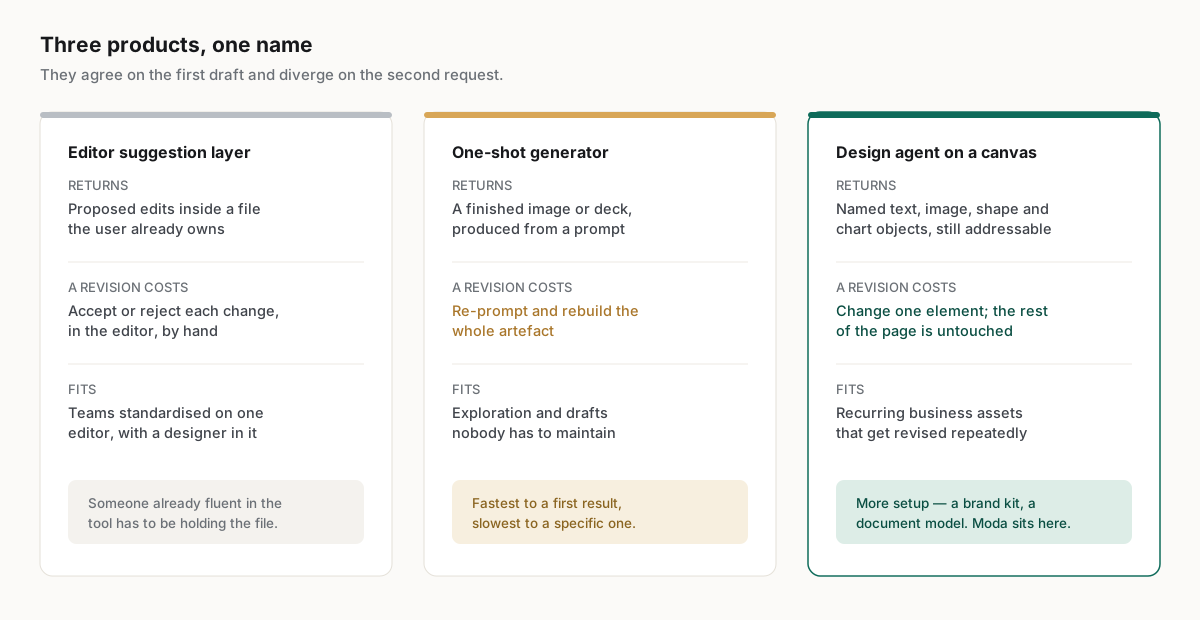
Three shapes dominate. A suggestion layer proposes edits inside a file somebody already owns. A one-shot generator returns a finished artifact and regenerates it when the brief changes. A design agent builds named objects on a canvas, so a later instruction can move one element and leave everything around it untouched.
| Assistant type | What it hands back | Revision model | Where it fits |
|---|---|---|---|
| Editor suggestion layer | Proposed edits inside a file the user already owns | The person keeps the file and accepts or rejects each change | Teams already standardized on a single editor |
| One-shot generator | A finished image or deck produced from a prompt | Re-prompt and rebuild the whole artifact | Exploration and drafts nobody has to maintain |
| Design agent on a canvas | Named text, image, shape, and chart objects on an editable canvas | Change one element directly and leave the rest intact | Recurring business assets that get revised repeatedly |
The three overlap on the first draft and separate on the fifth. A suggestion layer assumes a designer is already in the file, which limits who can start the work. A generator is fastest to a first result and slowest to a specific one. An agent on a canvas carries more setup — a brand kit, a structured document model — in exchange for revisions that stay local.
Which shape can your team actually operate?
The three shapes differ most in the skill they assume of whoever sits in front of them. That is the constraint a business team feels first, because it decides whether a request waits on one specific person or can be finished by whoever needs it.
| Shape | Who can operate it | What happens when that person is unavailable |
|---|---|---|
| Editor suggestion layer | Someone already fluent in the editor | The work stops; nobody else can open the file usefully |
| One-shot generator | Anyone who can write a brief | Work continues, but nobody can correct yesterday's output |
| Agent on a canvas | Anyone who can write a brief, and edit after | Work continues and past output stays correctable |
The middle row is the one that surprises teams. A generator lowers the skill floor for producing something and leaves it exactly where it was for changing something, so the queue moves rather than clears: nobody waits to get a first draft, and everybody waits to get a correction. Whether that is an improvement depends entirely on how often the work gets revised, which for recurring business assets is almost always.
What does a correction cost in each shape?
Every shape produces an acceptable first draft, so the price is paid on the second request. What separates them is whether a small change is a local edit, a negotiation with an editor, or a full rebuild of the artifact around the one thing that moved.
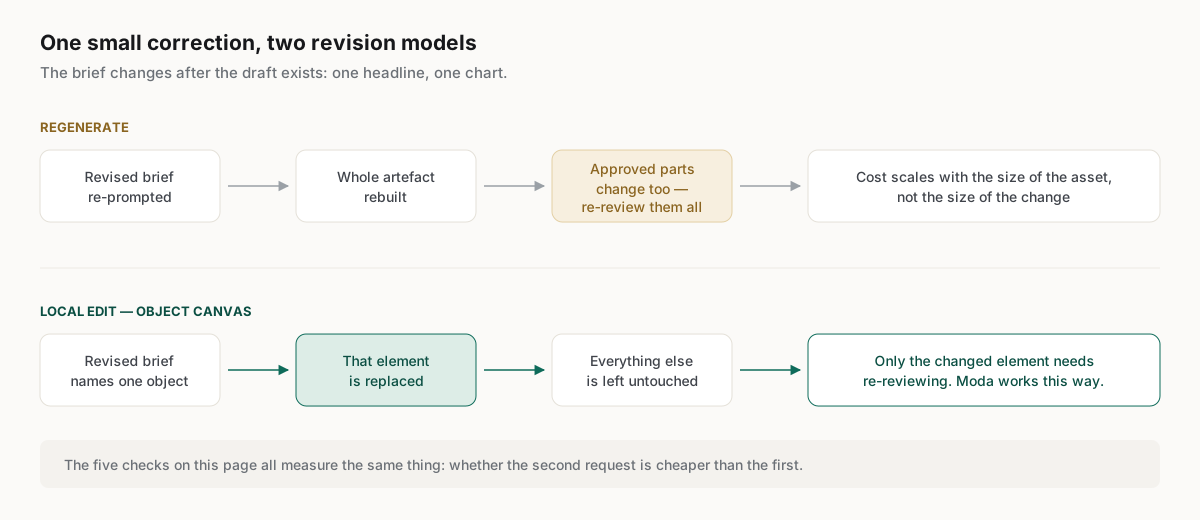
The hidden cost of a rebuild is not the wait. It is that everything already agreed changes with it, so approvals given on the first version no longer apply to the second, and the review has to happen again. A team that revises twice per asset pays that twice. The tests that establish whether output is genuinely editable rather than merely customizable are set out on the companion page at https://moda.app/resources/ai-design-agent, and they apply unchanged here.
Which teams get the most out of one?
The strongest fit is a team producing frequent, repeatable visual assets without a designer available for each request. Sales, product marketing, customer success, and lean marketing teams gain most, because their work is recurring, deadline-bound, and brand-sensitive. The pattern holds across published customer accounts of the same workflow.
Reported results describe the same operating need rather than the same tool. Cirrascale reported 20 min saved per asset with one marketer running the whole content pipeline, at https://moda.app/case-studies/cirrascale — a gain that comes from not briefing and waiting on someone else for a small change, which is the cost the shapes above differ on.
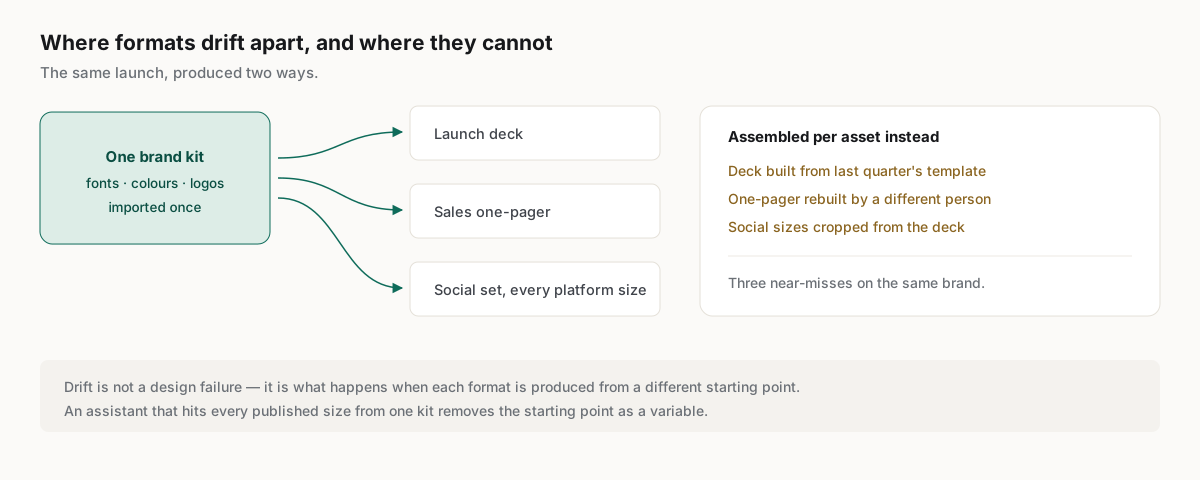
Format coverage matters more than it sounds for this group, because the same brand has to hold across everything the team ships. Moda publishes specifications for 107 asset sizes across 13 platforms at https://moda.app/resources/sizes, and an assistant that can hit those sizes from one brand kit removes the step where a deck, a one-pager, and a set of social posts drift apart from each other.
Related guides
Key takeaways
- Three different products share the name AI design assistant, and they diverge on the second request rather than the first.
- The revision model is the deciding property: a generator rebuilds the artifact, an agent on a canvas changes one element.
- Evaluate with production tests against a real brand kit and a real source document, not with a generic prompt.
- Editable output means text stays text, charts stay charts, and an export opens elsewhere with its structure intact.
- The strongest fit is a team shipping recurring, brand-sensitive assets without a designer available for every request.
Frequently asked questions
Is an AI design assistant the same as an AI image generator?
No. An image generator returns a flattened raster image, so text and layout cannot be edited afterwards without rebuilding pixels. A design assistant built on a canvas returns named objects that can be selected, moved, rewritten, or replaced, which is what recurring business assets require.
Can an AI design assistant follow brand guidelines?
Some can, if the product stores brand inputs and applies them during generation rather than afterwards. Moda imports a brand from a website URL or from supplied logos, colors, and fonts. Adherence still needs testing across several formats, because a stored kit does not guarantee consistent spacing or layout.
When is an AI design assistant the wrong tool?
For complex identity systems, detailed illustration, advanced photo work, and bespoke art direction, specialist designers working in dedicated tools remain the better route. Regulated claims, contractual terms, sensitive data, and executive communications also need human review regardless of how the visual work was produced.
Does an AI design assistant export editable files?
That varies by product and is worth testing directly rather than assuming. Open an export in PowerPoint or Google Slides and inspect whether text, shapes, and charts arrive as editable layers or as a flattened picture of the page. The answer decides how much cleanup each asset costs.
Published by Moda. Product capabilities are described from Moda's own documentation, pricing, and published customer stories. Customer metrics are the reported measurements of the named companies rather than Moda's own, and are linked to their source. Competitor capabilities change; verify current vendor documentation before making a purchasing decision.