Canva Pricing in 2026: What Every Plan Really Costs
Canva pricing verified 2026-09-08: Free, Pro at US$18 a month or US$180 a year, Business at US$25 a person, plus the seat math, AI limits, and what happens if you cancel.
 Anvisha Pai, Co-founder & CEO, Moda
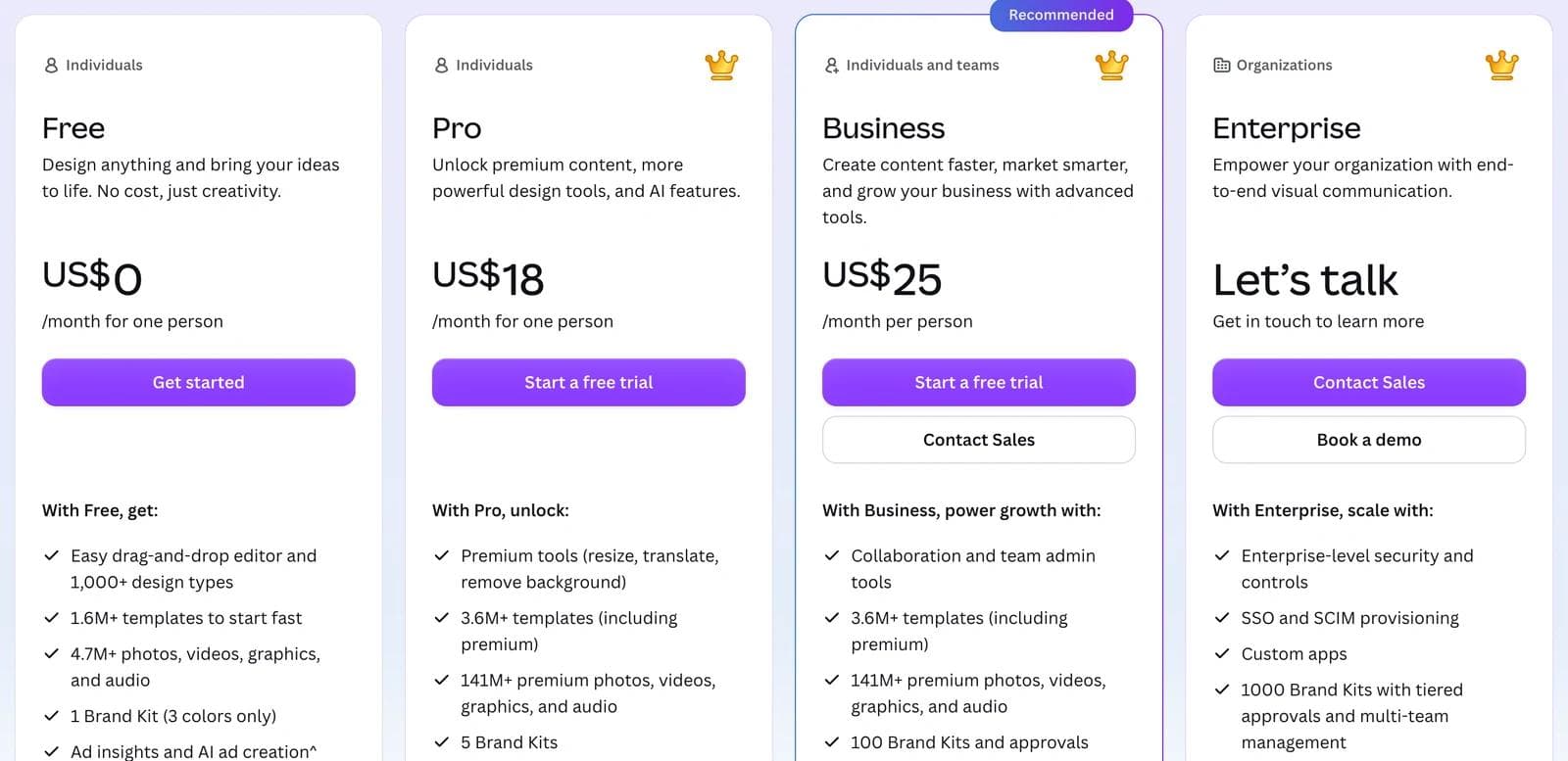
Canva pricing in the United States, read from canva.com/pricing and re-verified on September 8, 2026: Free costs nothing, Pro costs US$18 a month or US$180 a year for one person, and Business costs US$25 a month or US$250 a year per person, with Enterprise quoted by sales. Education is free for K-12, nonprofits get one free team of up to 50 people, and every plan carries a monthly AI allowance that paid users can extend with a US$100 a month AI Pass.
That is the plan table, and every other page ranking for this query has one. What those pages mostly skip is the part that decides your bill: Pro is a single-person licence, so a team of five is five separate accounts or five Business seats, and the gap between those two options is US$350 a year. This article works through the per-seat math, what happens when someone joins mid-cycle, which Free limits actually push people to upgrade, and what happens to your designs and premium assets if you stop paying.
Every figure comes from a dated snapshot of Canva's own pages taken with a script that saves the page text, the plan cards, and a JSON of the prices, then diffs it against the previous run. The baseline was September 3, 2026 and the re-run on September 8 found no changes. The "What changed" section is the log.
Canva pricing plans at a glance
Prices are US list prices before tax, read with the Monthly and Yearly toggles each selected in turn. Canva's help center says pricing "depends on your location", so expect different figures in other currencies.
| Plan | Monthly billing | Yearly billing | Who it covers | What matters in it |
|---|---|---|---|---|
| Free | US$0 | US$0 | One person | 1.6M+ templates, 4.7M+ free assets, 1 Brand Kit with 3 colors, 5GB, up to 200 Standard or 20 Premium AI uses a month |
| Pro | US$18 a month | US$180 a year (US$15 a month equivalent) | One person only | Background remover, resize, translate, 3.6M+ templates, 141M+ premium assets, 5 Brand Kits, social scheduling, 100GB, 10x the Free AI allowance |
| Business | US$25 a person a month | US$250 a person a year (US$20.83 a month equivalent) | Per person, pay as you grow, no listed minimum | Everything in Pro plus team admin, 100 Brand Kits with approvals, Flourish, 10% off print, 500GB, 20x the Free AI allowance, AI top-ups |
| Enterprise | Contact sales | Contact sales | Contracted seats | SSO and SCIM, custom apps, 1,000 Brand Kits with tiered approvals, 1TB; dedicated success manager at 150+ seats |
| Education | Free | Free | K-12 educators, students, qualified districts | Most premium features; Canva Campus for higher education is priced separately |
| Nonprofits | Free | Free | One team of up to 50 verified users | Pro features plus team tools; extra seats at 50% off Enterprise |
Sources: Canva pricing page, Canva Nonprofits, and Canva Education.
Canva Teams is no longer on the page. The pricing FAQ says Teams "is no longer available for new sign-ups or upgrades", and the Business billing help article repeats it. Existing Teams subscribers keep their plan, so anyone pricing Canva Teams today is really pricing Canva Business. That distinction matters because several guides still quote the old Teams three-seat minimum and its US$100 a year per-user price, and neither applies to anything you can buy now.
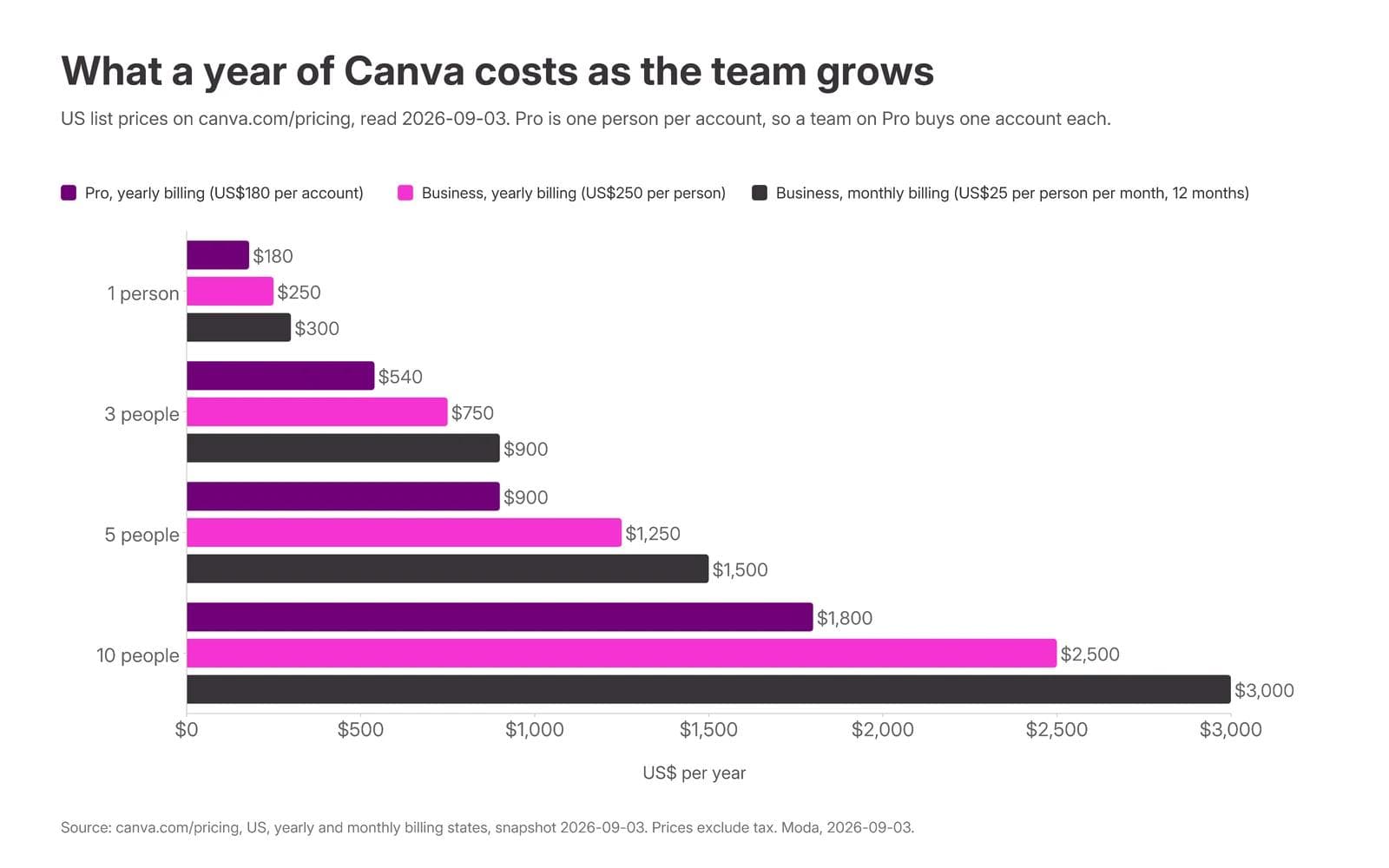
What a year of Canva costs at 2, 5, and 10 people
The Pro card says "for one person", and the pricing FAQ is blunt about it: "Only one person can use a Canva Pro account." So the real question for a small team is not Free versus Pro. It is N Pro accounts versus N Business seats.
| Head count | Pro accounts, yearly | Business seats, yearly | Business seats, monthly | Business premium over Pro |
|---|---|---|---|---|
| 1 | US$180 | US$250 | US$300 | US$70 |
| 2 | US$360 | US$500 | US$600 | US$140 |
| 5 | US$900 | US$1,250 | US$1,500 | US$350 |
| 10 | US$1,800 | US$2,500 | US$3,000 | US$700 |
The premium is a flat US$70 a person a year. For that you get shared Brand Kits with approvals, team admin, a shared workspace, double the AI allowance per person, and the ability to add and remove people without juggling logins. If nobody in the group ever reviews anyone else's work, separate Pro accounts are genuinely cheaper and nothing breaks. The moment two people need the same brand fonts, or someone leaves and you need their designs, the Pro-per-person arrangement starts costing you in other ways.
Sharing one Pro login across a team is the workaround people reach for. It works until two people edit at once, and it gives you no way to remove access when someone leaves.
Adding someone mid-cycle: no minimum, but a quarterly rhythm
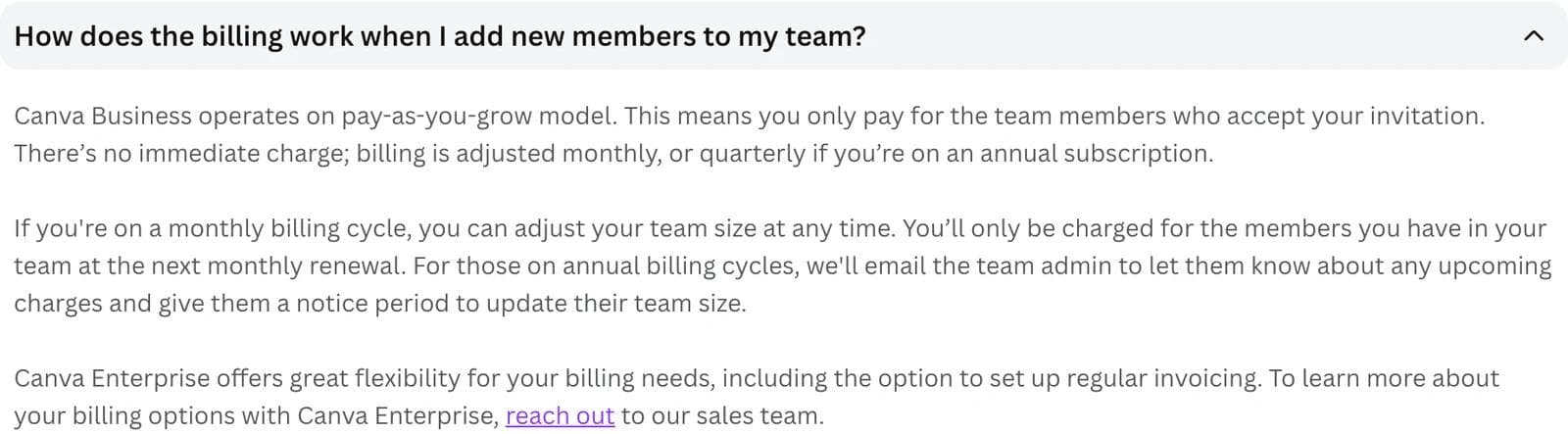
Nothing on the pricing page or in the help center lists a minimum number of Business seats. The FAQ describes a "pay-as-you-grow model" where "you only pay for the team members who accept your invitation", so an invitation that is never accepted costs nothing.
The part that surprises admins is the cadence. On yearly billing, Canva's help article says "you pay every year, but we'll send you a bill every three months" to settle people added or removed in the previous quarter, prorated for the remaining plan duration. So a person you add in month two of an annual plan does not generate a charge that week. It lands on the next quarterly true-up, prorated to the rest of the year. On monthly billing, changes land on the next monthly bill. Someone who joins within three days of a billing date is charged on the bill after that.
Removing someone works the same way in reverse, which means you keep paying for a departed teammate's seat until the next true-up.
Yearly is 16 to 17 percent cheaper, not 30
Canva's toggle says "Save 16%". Pro at US$18 a month is US$216 a year against US$180 on yearly billing, so the saving is US$36, or 16.7 percent. Business at US$25 a month is US$300 a year against US$250, the same 16.7 percent. Several third-party guides still describe a US$72 saving on Pro, or quote an annual price of US$120 or US$144. Those were true in earlier pricing rounds and are not true against the page we captured.
The yearly plan is charged once, up front, and renews automatically. Canva's billing frequency article says the only place you can pay yearly in monthly installments is Brazil, and only by credit card. Everywhere else, "yearly" means one charge for the full amount.
Tax is on top. The page says prices exclude applicable tax; in the US, sales tax is added where required based on the billing address. Budget the list price plus your local rate.
Which Free-plan limits actually bite
Canva Free is a working product, not a demo. The Free card lists the editor with 1,000+ design types, 1.6M+ templates, 4.7M+ photos, videos, graphics and audio, one Brand Kit limited to three colors, 5GB of storage, Canva Offline, and an AI allowance. The comparison table keeps custom dimensions, PDF, JPG and PNG export, presentation modes, and social sharing in Free. Plenty of small businesses never need more.
Four limits do real damage, and they are the ones that push people to upgrade:
- Premium elements are watermarked. The watermarks help article states it plainly: "Premium elements will have watermarks on your design if you're a Canva Free user." Search results in the editor mix free and premium assets, so the constraint is not obvious until download.
- The Brand Kit stores three colors and nothing else useful. No uploaded brand fonts, no logo variants, no approvals. If your brand has a typeface, Free cannot hold it.
- No background remover, no Magic Resize. These are the two tools people cite most often when they explain why they upgraded. Cutting out a product photo or turning one design into six formats is manual work on Free.
- Published websites carry a "Designed with Canva" footer. Canva's help center says the footer appears on all Free websites, "regardless of whether you're using a free Canva domain or your own custom domain".
Limits that sound worse than they are: 5GB of storage is more than most solo users fill in a year, presentation and PDF export are already in Free, and Standard-tier AI generation is included. Custom short links go from none on Free to five on Pro and 100 on Business, which almost nobody upgrades for.
If your work is occasional social posts from templates with your own photos, Free covers it. If you remove backgrounds, resize one design into six formats, or need brand fonts, Pro pays for itself in the first month. Business adds admin and approvals, which only matter once a second person is involved.
Canva AI credits and their limits
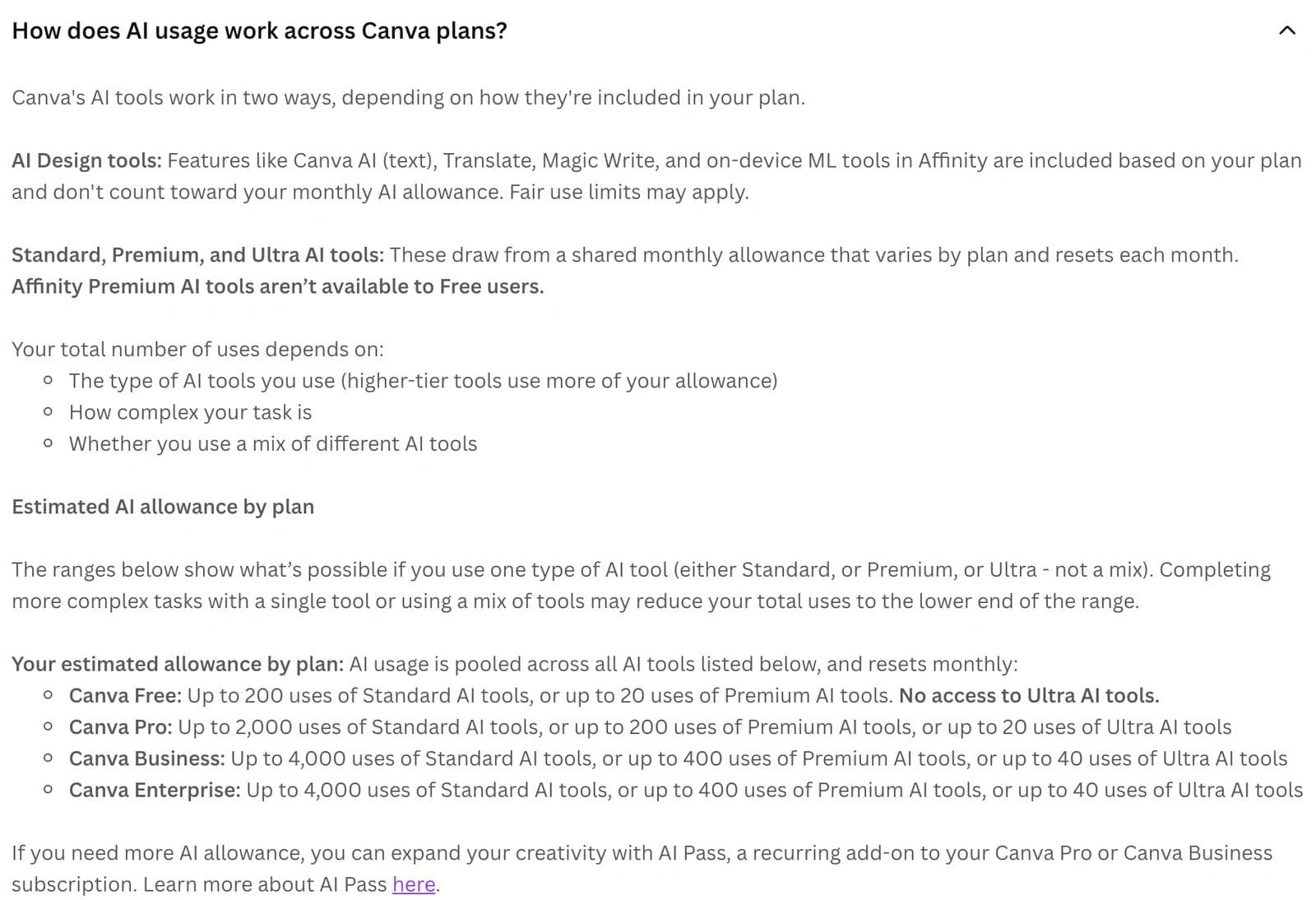
Canva does not sell AI credits by name. Each plan gets a monthly "AI allowance" shared across three tiers of tools, and how far it goes depends on which tier you use. From the pricing FAQ and the AI usage help article:
| Plan | Estimated monthly allowance (one tier at a time) | Notes |
|---|---|---|
| Free | Up to 200 Standard uses, or up to 20 Premium uses | No Ultra tier at all |
| Pro | Up to 2,000 Standard, or 200 Premium, or 20 Ultra uses | Standard tools do not draw down the allowance on paid plans, subject to fair use |
| Business | Up to 4,000 Standard, or 400 Premium, or 40 Ultra uses | AI top-ups available |
| Enterprise | Same as Business | No AI Pass |
| Education | Up to 200 Premium, or 20 Ultra uses | No AI Pass |
Standard tools include image upscaling, image generation with Canva AI, and Magic Formulas. Premium tools include Magic Layers, generating a design, Canva Code, and the generative tools in Affinity. Ultra is the newest models: conversational design with Canva AI 2.0, video clips, and higher-quality image generation. A multi-page design generated through conversation uses more of the allowance than one text-to-image prompt, and Canva's help article says real usage usually lands at the low end of these ranges.
Four rules decide whether the allowance is enough:
- It resets monthly on your billing date even on a yearly plan. Free resets on the first of the month at midnight UTC.
- On team plans, each member has their own allowance. Allowances are not pooled, so a heavy user cannot borrow from a light one.
- Running out is harsher on Free than on paid. Canva's help center says that on Free, all tiers become unavailable until the reset; on paid plans, Premium may be temporarily unavailable while Standard stays available and does not draw from the allowance.
- Third-party AI apps in the Marketplace use their own limits, not Canva's.
Two ways to buy more. AI Pass is a recurring add-on at USD $100 per person per month, giving Pro, Teams and Nonprofit subscribers 40 times their allowance and Business subscribers 20 times. Note what that does to the bill: AI Pass on a single Pro account costs US$1,200 a year on top of US$180, so heavy AI use is the one case where Canva stops being a cheap subscription. It is sold only on web-managed monthly or yearly plans, not on Free, Education, Enterprise, trials, prepaid plans, or App Store subscriptions, and only owners or admins can buy it for a team. AI top-ups are a one-time purchase for Business only: one extra block equal to the monthly allowance, valid 30 days, one active at a time. Canva's help pages do not publish a top-up price; it is shown at purchase.
One inconsistency worth knowing: the pricing page says Free gets up to 200 Standard uses, while the AI usage help article says up to 20. Treat the smaller number as the safe assumption until Canva reconciles the two.
What happens if you downgrade or cancel
This is the question the plan tables never answer, and the answer has one genuinely expensive detail in it.
Your designs stay. Canva's cancellation article says cancelling stops future payments, you keep paid features until the end of the current billing period, and after that "all designs remain accessible on Canva Free". Your account stays active and Affinity remains free with it. For a team, "all designs, Brand Kit content, and shared folders are retained on Canva Free", the workspace moves to the free plan, and the admin remains the owner.
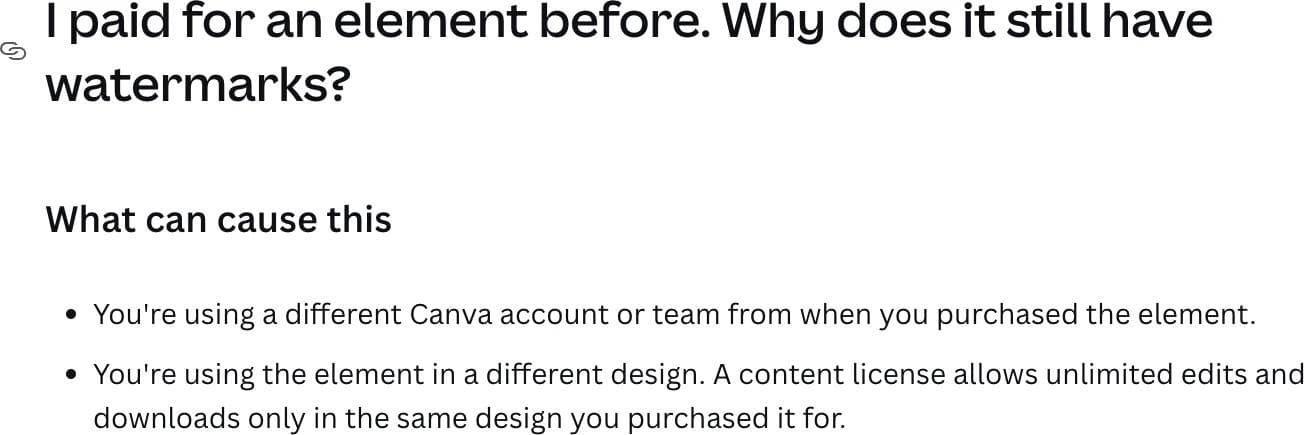
Premium elements do not stay. Anything in those designs that came from the premium library goes back to being watermarked, because watermarking is a function of your current plan, not of when you placed the element. To use one of those designs again you either resubscribe or buy the elements individually.
Buying them individually is where the fine print bites. Canva issues a content licence per element per design, and the help center is explicit that a licence "allows unlimited edits and downloads only in the same design you purchased it for". Use the same photo in a second design and you buy it again. A library of forty past designs built on premium stock is not something you can cheaply unlock element by element.
Practical version. Before you cancel, download final files for anything you may need again. A downloaded PNG or PDF made while you were on Pro is yours to keep; the editable design will be the watermarked one.
Pausing is often the better move. Canva offers a pause of up to three months on Pro, Teams and Business, with no charges during the pause and premium features suspended for that time. On a yearly plan you can only pause when there are fewer than two months until renewal. Cancelling a legacy Teams plan is permanent, since Teams cannot be re-bought, so a Teams subscriber who might come back should switch to Business rather than cancel.
Trials, refunds, and the auto-renew trap
Free trial. Pro and Business each offer a trial from the pricing page. Canva's upgrade help article does not publish a fixed length; it says "the trial duration shown at sign-up is how long you'll have access before charges begin". Third-party guides say 30 days, but Canva itself does not commit to a number, so read the figure on your own sign-up screen. The trial is available once per Canva account and once per payment method, and it auto-renews into a paid plan unless you cancel. Canva emails a reminder before the end date. If you start a trial without entering payment details, it ends on its own with no charge. During a Business trial you can invite team members and the FAQ says you are not billed at all during the trial. There is no Enterprise trial; sales offers a demo instead.
One detail that generates support tickets: Canva's billing runs on UTC, so depending on your time zone a trial charge can appear a day earlier than you expect. That is normal, not an error.
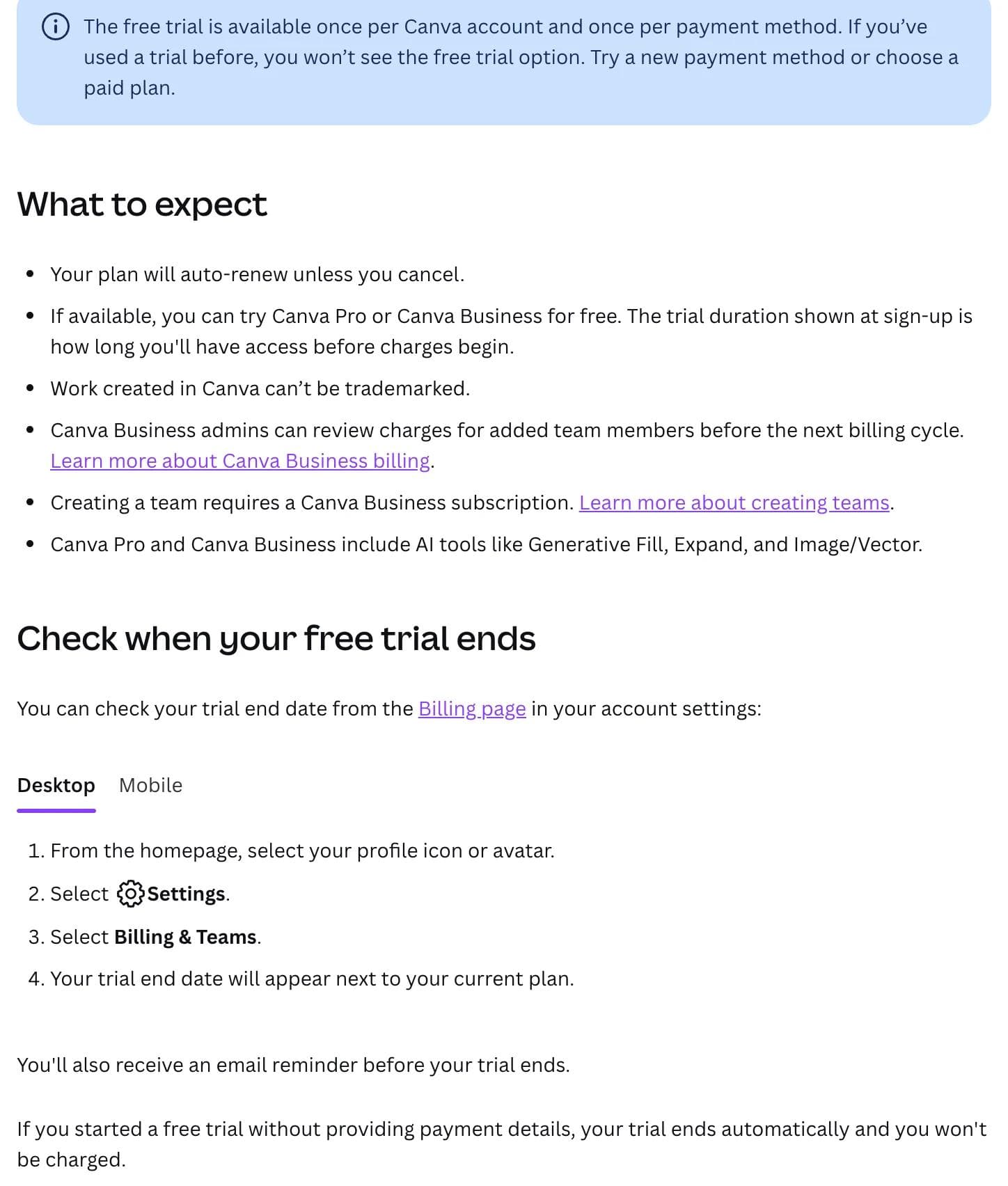
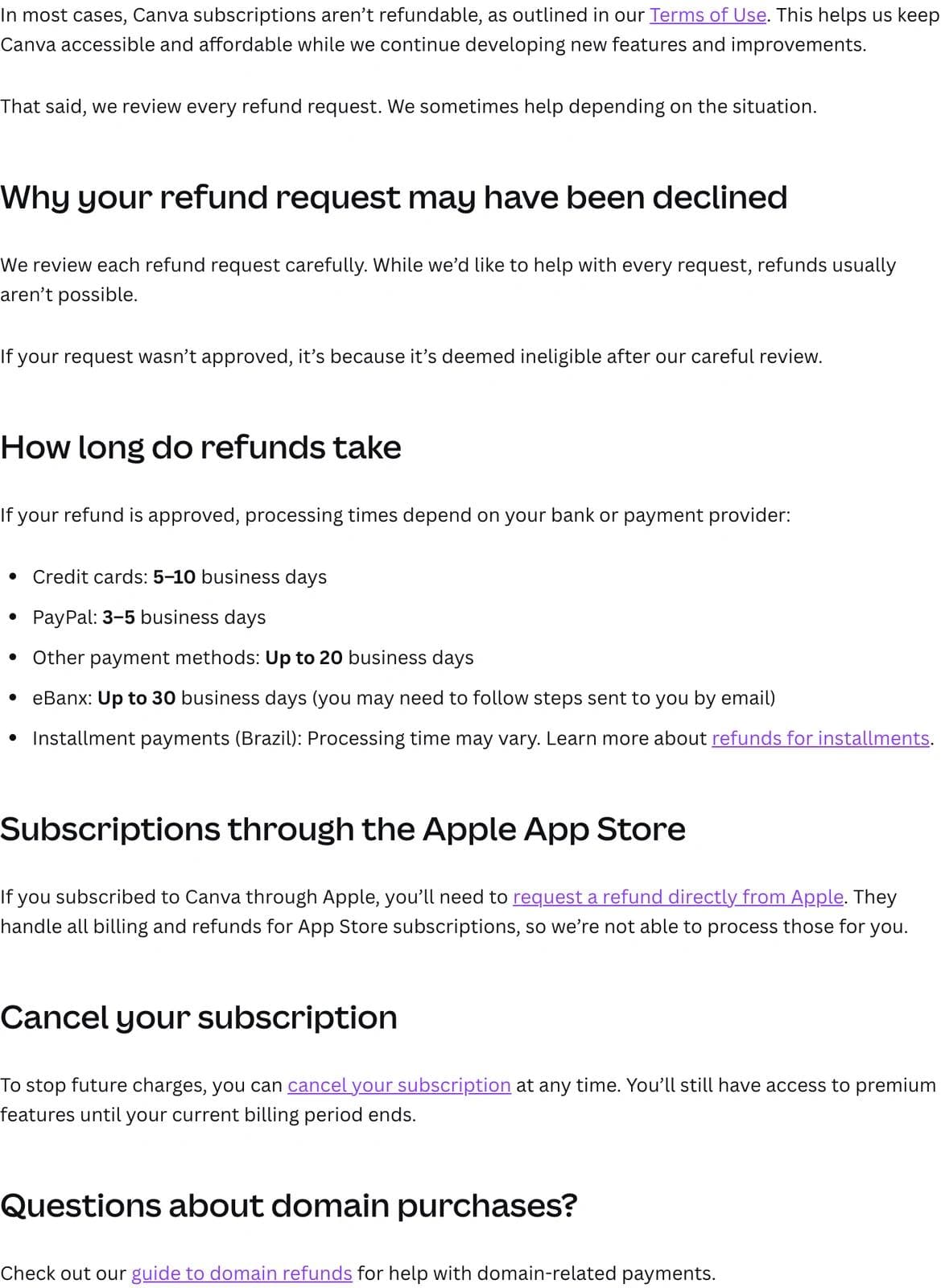
Refunds. Canva's refunds article opens with "In most cases, Canva subscriptions aren't refundable, as outlined in our Terms of Use", then says every request is reviewed and "we sometimes help depending on the situation". Approved refunds take 5 to 10 business days on cards, 3 to 5 on PayPal, and up to 20 or 30 on other methods. App Store subscriptions are refunded by Apple, not Canva. Treat an annual plan as a committed US$180 or US$250 per person, not a cancellable monthly.
Where you bought it decides how you cancel. A plan bought through the App Store or Google Play has to be cancelled there; uninstalling the app does nothing. Renewals follow GMT, and a monthly plan renewing on the 31st shifts to the last day of shorter months.
The surprise costs, in one list
- Pro is one person. A team on Pro is N accounts, or a shared login that breaks the first time two people edit at once.
- AI Pass is the biggest add-on. US$100 per person per month, more than five times the Pro subscription it sits on.
- Business seat changes settle quarterly on annual billing, so headcount changes do not show up on your bill when they happen.
- Annual is a single up-front charge outside Brazil, and refunds are discretionary.
- Print is separate. Business gets 10% off Canva Print; the print orders themselves are not part of any subscription.
- Tax is added on top of every list price shown here.
- Old Teams pricing still circulates. If a guide quotes a three-seat minimum or US$100 a year per user, it is describing a plan you cannot buy.
- Downgrading re-watermarks premium elements, and unlocking them again is per element and per design.
What changed
This section is a log. Each re-run of the snapshot script adds a dated entry when a plan, price, seat rule, or headline inclusion differs from the previous run.
2026-09-03, baseline. Pro US$18 a month, US$180 a year. Business US$25 a person a month, US$250 a person a year. Free and Enterprise unpriced. Teams absent from the page. AI Pass US$100 a person a month.
2026-09-08, no change. The script diffed the pricing page against the baseline and reported no differences in plans, prices, seat rules, or headline inclusions.
Context for the baseline. Third-party pricing guides updated as recently as July 21, 2026 list Pro at US$144 a year, and older ones at US$120 a year. The page we captured shows US$180. Business was already US$250 a person a year in our Canva vs Adobe Express comparison reviewed on August 31, 2026, and is unchanged. Canva also lists a Pro Lite plan, priced between Free and Pro, but the Pro Lite help article says it is currently available only in India and Indonesia, so it does not appear on the US page.
How Canva pricing compares with Moda
Moda is an AI design tool where an agent builds decks, social posts and one-pagers on a real canvas from a prompt, so the comparison is a different shape: you are paying for generation as well as editing. We snapshotted moda.app/pricing the same way on the same dates.
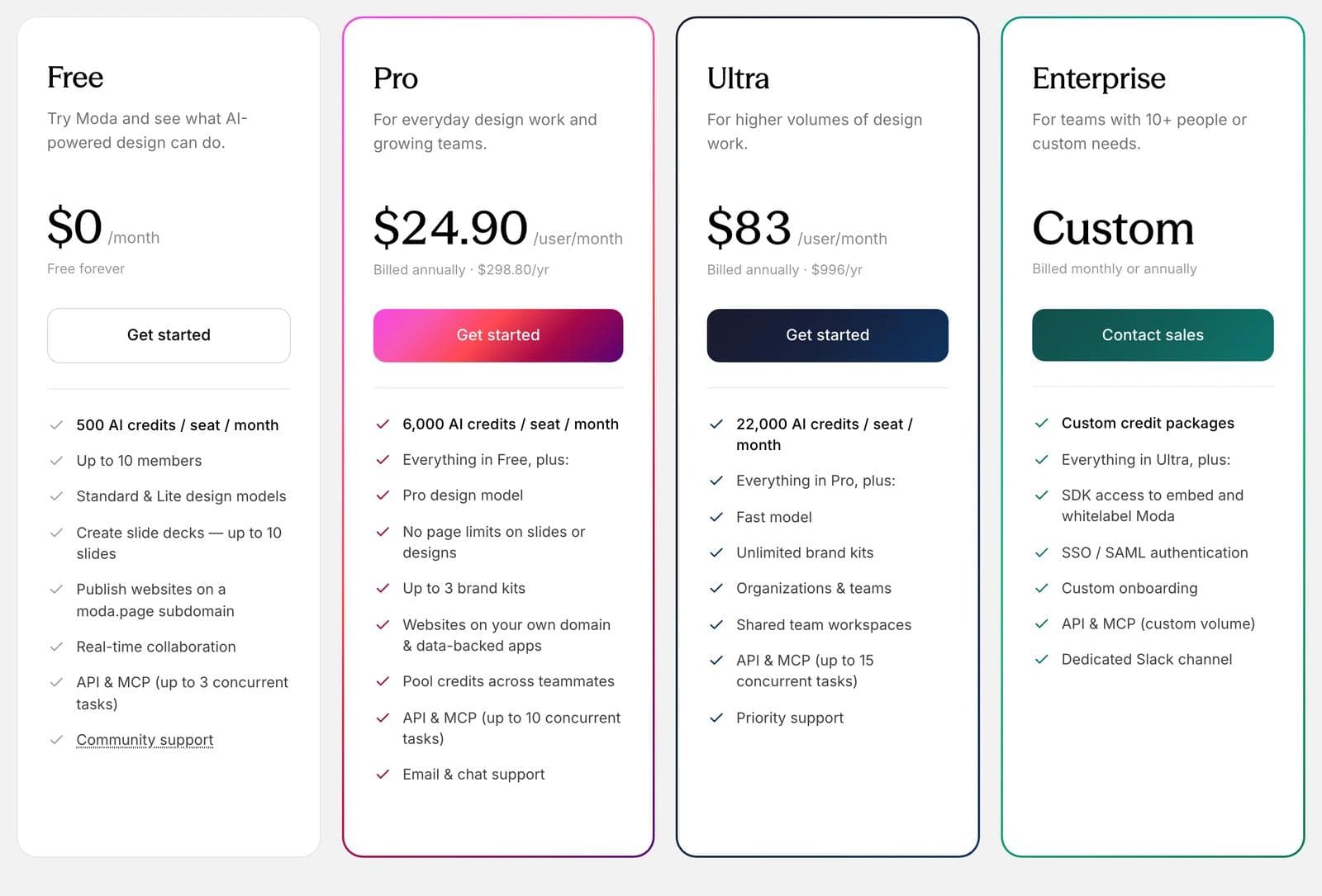
| Canva Pro | Canva Business | Moda Free | Moda Pro | Moda Ultra | |
|---|---|---|---|---|---|
| Monthly billing | US$18, one person | US$25 a person | $0 | $30 a user | $100 a user |
| Yearly billing | US$180 | US$250 a person | $0 | $298.80 a user ($24.90 a month) | $996 a user ($83 a month) |
| AI included | Up to 200 Premium or 20 Ultra uses a month | Up to 400 Premium or 40 Ultra uses a month | 500 credits a seat a month | 6,000 credits a seat a month | 22,000 credits a seat a month |
| When you run out | Premium may pause; AI Pass US$100 a month | Same, plus one-time top-ups | Generation pauses until reset | Metered overage, with a cap you set | Metered overage |
| Team model | One person | Per seat, own allowance each | Up to 10 members | Per seat, credits pooled | Per seat, pooled, shared workspaces |
Where Canva is cheaper or the better fit: a solo creator who mostly edits templates pays US$180 a year on Canva against $298.80 on Moda Pro, and Canva's template library, print ordering, social scheduling, Affinity, and offline app have no equivalent in Moda. A team that needs approval workflows across 100 Brand Kits, or the free K-12 and nonprofit programs, is also better served by Canva.
Where Moda's price buys something different: the credits pay for an agent that generates a full deck or a set of on-brand posts from a brief and leaves everything editable on the canvas, and paid plans meter overage instead of pausing, so a heavy month costs more rather than stopping. Credits pool across a team rather than sitting per person, and the free plan allows up to ten members, which Canva Free does not.
If you are weighing Canva against other tools rather than choosing a Canva tier, our Canva alternatives guide covers the workflow differences, Canva vs Adobe Express is the closest head-to-head on price and brand controls, and how AI design tools build a brand kit from your website explains what "on-brand" means once a Brand Kit is involved.
Canva pricing FAQ
How much is Canva Pro?
Canva Pro costs US$18 a month on monthly billing or US$180 a year on yearly billing, before tax, for one person. The yearly plan works out to US$15 a month. Verified on the US pricing page on September 8, 2026.
Is Canva free?
Yes. Canva Free has no time limit and includes the editor, 1.6M+ templates, 4.7M+ free photos, videos and graphics, one Brand Kit with three colors, 5GB of storage, and a monthly AI allowance. Premium library elements are watermarked unless you buy them individually. Education is free for K-12 teachers and students, and nonprofits get one free team of up to 50 people.
What is the difference between Canva Pro monthly and yearly?
Monthly is US$18, which is US$216 over a year. Yearly is one charge of US$180. The difference is US$36, or about 17 percent, which matches the "Save 16%" label on Canva's toggle. Outside Brazil there is no option to pay a yearly plan in installments, and refunds are discretionary.
What is Canva Teams pricing now?
Canva Teams is closed to new sign-ups. Its replacement, Canva Business, costs US$25 per person per month or US$250 per person per year, with no listed minimum seats. You pay for people who accept an invitation, and on yearly billing Canva reconciles added and removed seats on a quarterly bill.
How much does Canva cost for a team of five?
Five Pro accounts cost US$900 a year, since Pro is one person per account. Five Business seats cost US$1,250 a year and add shared Brand Kits with approvals, team admin, a shared workspace, and twice the AI allowance per person. The premium is US$70 per person per year.
What happens to my designs if I cancel Canva Pro?
You keep paid features until the end of the billing period, then the account drops to Free with all designs, Brand Kit content and shared folders intact. Premium elements inside those designs become watermarked again. Buying an element back covers only the one design it was purchased for, so download final files before you cancel.
Which Canva plan should I pick?
Free if you edit templates occasionally and three brand colors are enough. Pro if you need the background remover, resize, premium assets, or scheduling and you work alone. Business once a second person needs to review or share brand assets. Enterprise when SSO, SCIM, and tiered approvals are requirements; Canva quotes it through sales and reserves a dedicated success manager for 150 or more contracted seats.

Real editable visuals. Real canvas. Full control.
Fly through design work