What Is a Digital Sales Room? Examples, Features, and How to Build One
Learn what a digital sales room is, what buyers need from one, which features matter, and how to build a secure, useful room for a real sales process.
 Anvisha Pai, Co-founder & CEO, Moda
A digital sales room is a buyer-facing online space for one sales opportunity. It gives the buying committee a current summary, relevant evidence, shared next steps, and a clear path to a decision in one link. It can be as simple as a focused sales microsite or as capable as an authenticated workspace connected to a CRM.
The important part is not the software category. It is the operating job. A useful room reduces the work buyers must do when the seller is not present: finding the latest file, explaining the recommendation internally, involving a new stakeholder, or working out what happens next.
This guide separates that job from the long feature lists used to market digital sales room software. It shows the minimum structure every room needs, three worked examples, the capabilities that require a specialized platform, and a practical build and governance process.
The short answer: a digital sales room should help a buying committee reorient, investigate, coordinate, and advocate. If it only stores attachments, it is a file folder with branding. If it contains sensitive material without real access control, it is a security risk.
Digital sales room vs. sales microsite, virtual data room, and client portal
The boundaries are easy to blur because all four formats can contain documents, videos, contacts, and next steps. The better distinction is the job, access model, and lifecycle. A microsite is defined by its narrow audience and purpose. A digital sales room is a more specific buyer-facing use of that model.
| Format | Primary job | Typical access | Collaboration | Best fit |
|---|---|---|---|---|
| Landing page | Make one argument and drive one action | Public | Usually none | Acquisition, registration, or lead capture |
| Sales microsite | Present a focused story and resources for an account or segment | Public, unlisted, or gated | Light or external | Personalized follow-up and non-sensitive buyer enablement |
| Digital sales room | Help one buying committee evaluate and coordinate a deal | Share link, email gate, or authenticated access | Often comments, tasks, and shared plans | Sales-assisted B2B decisions with repeat visits |
| Virtual data room | Control due-diligence access to sensitive records | Authenticated with granular permissions | Review and audit oriented | M&A, financing, legal, and regulated diligence |
| Client portal | Operate an ongoing customer relationship | Authenticated | Tasks, service, files, and account state | Onboarding, delivery, support, and renewal |
A digital sales room can start as a microsite and become more application-like as requirements grow. Authentication, document-level permissions, audit logs, e-signatures, structured tasks, and CRM synchronization are not decorative upgrades. They change the risk and operating model of the room.
An unlisted URL is not access control. If a room contains confidential pricing, contracts, security responses, personal data, or buyer-specific information, use authenticated access and server-side authorization. OWASP recommends denying access by default for non-public resources and identifies forced browsing and URL manipulation as common access-control failures.
The four jobs a digital sales room should do for buyers
Most feature lists are written from the seller’s perspective: upload content, track views, automate reminders. Buyers experience the room differently. They return because they need to complete one of four jobs.
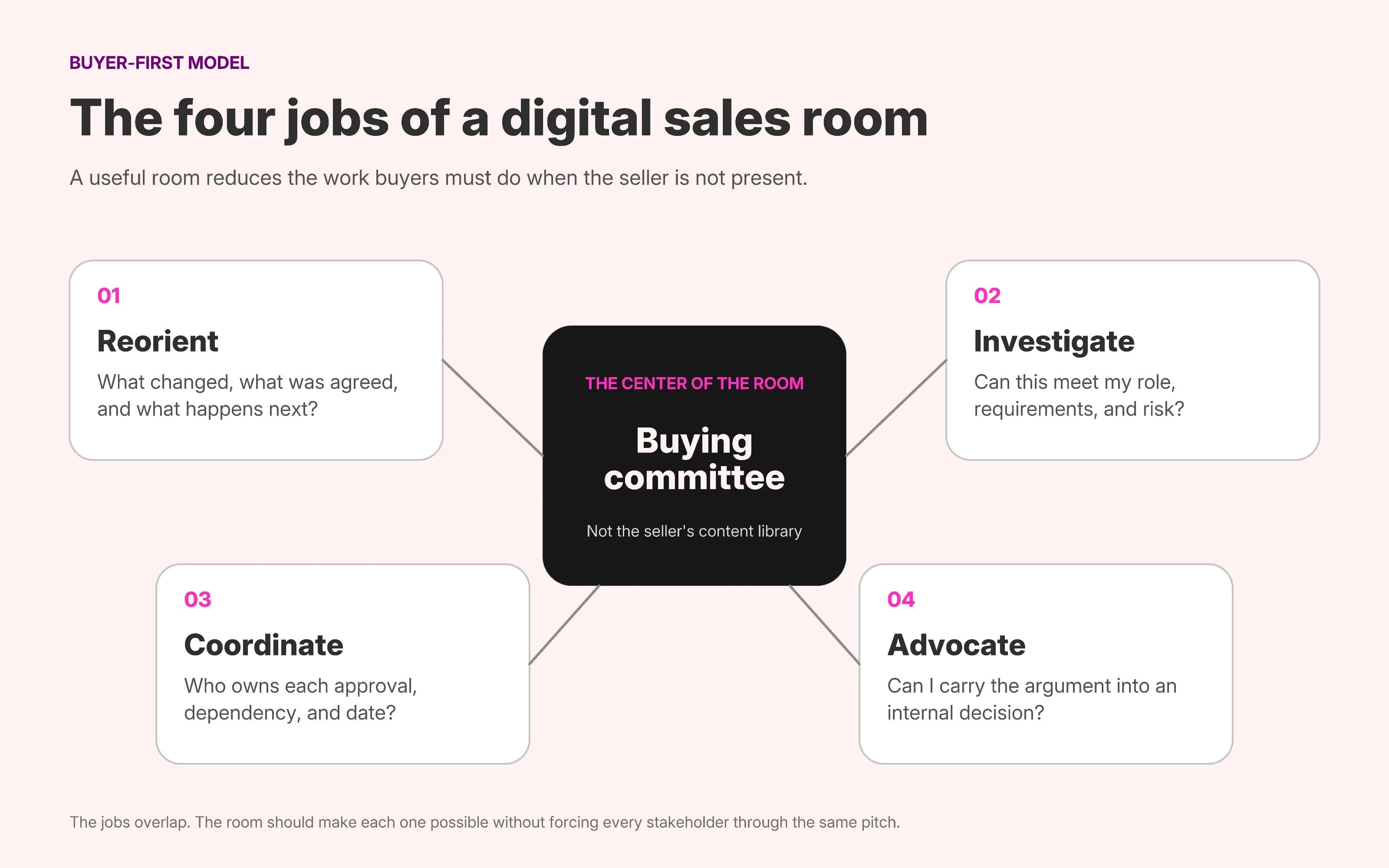
1. Reorient
A returning visitor should understand the current state of the deal in less than a minute. What was agreed? What has changed? Which decision is being made? What is the next milestone? A dated recap, current recommendation, and visible next step do more work here than a generic welcome video.
2. Investigate
Different stakeholders need different depths of evidence. An executive may need the business case and risk summary. A technical evaluator may need architecture, integration, and implementation details. Security, legal, procurement, and end users each arrive with distinct questions. The room should make those paths obvious without forcing everyone through the same pitch.
3. Coordinate
The buying committee must move work across organizational boundaries. A shared plan can expose owners, dependencies, approvals, and dates that would otherwise remain scattered across calls and email. The plan is useful only when both sides recognize it as their plan. A seller-authored checklist disguised as collaboration creates activity without alignment.
4. Advocate
Your champion will often explain the decision to people you have never met. The room should give that person a concise, forwardable argument: the problem, recommended approach, expected value, evidence, risks, and next step. A room that works only when the seller narrates it has not solved the internal sale.
The minimum viable digital sales room
A useful room does not need every enterprise feature. It does need enough structure to answer the buyer’s recurring questions. Seven components form a practical minimum.
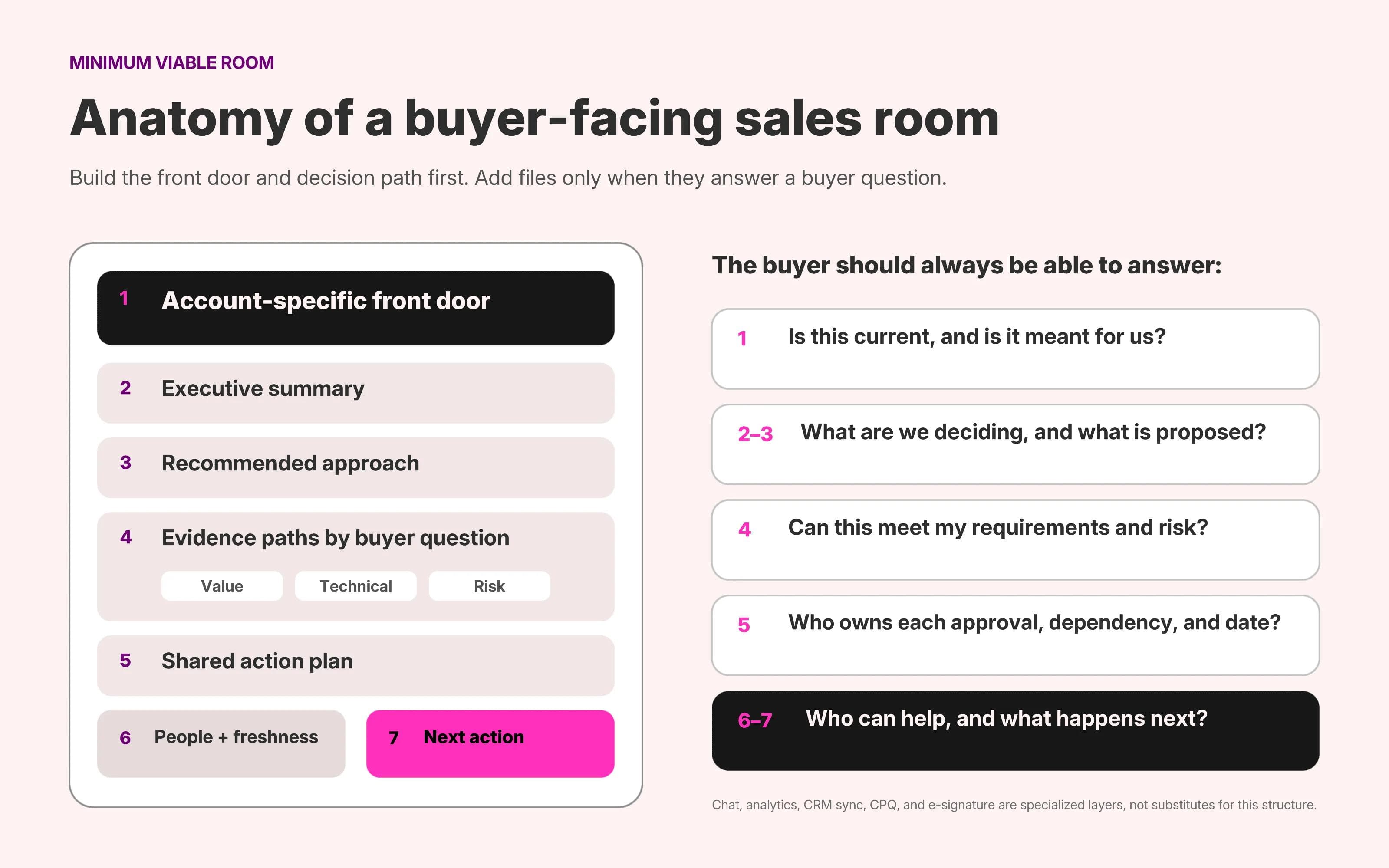
| Component | Question it answers | Typical owner |
|---|---|---|
| Account-specific front door | Is this current, and is it meant for us? | Account executive |
| Executive summary | What are we deciding, and why now? | Account executive and champion |
| Recommended approach | What exactly is being proposed? | Account executive and solutions consultant |
| Evidence paths | Can this work for my role, requirements, and risk? | Product marketing, security, legal, and solutions teams |
| Shared action plan | Who must do what, by when, and what depends on it? | Buyer and seller together |
| People and freshness cues | Who owns this, and can I trust that it is current? | Room owner |
| Next action | What is the smallest useful step from here? | Account executive and champion |
The front door should behave more like a briefing than a brochure. Name the companies, the decision, the current stage, and the latest update. Do not spend the first screen repeating public homepage copy the recipient already knows.
Evidence paths should be organized around buyer questions rather than your internal content library. “Security and data handling” is easier to navigate than “Resources.” “Implementation plan” is more useful than “More information.” Each item should have an owner, a date, and one authoritative version.
The next action should change as the deal develops. Early in evaluation it might be confirming requirements. Later it might be reviewing a business case, opening a security assessment, or agreeing on a procurement timeline. A permanent “Book a demo” button signals that the room has not kept pace with the relationship.
Three digital sales room examples by deal type
The following are illustrative architectures, not claims about customer results. For public pages analyzed from top to bottom, see our collection of 15 microsite examples, which includes presales and proposal demonstrations.
Example 1: a post-discovery room for a mid-market SaaS deal
This room is introduced after a qualified discovery call. The buyer understands the category, so the site does not need to recreate the vendor homepage. Its job is to preserve the agreed problem and make the next evaluation step easier.
- A co-branded opening confirms the account, objective, owner, and last-updated date.
- A short discovery recap separates confirmed needs from open questions.
- A recommended workflow shows only the product capabilities relevant to those needs.
- One demo recording and two matched customer examples provide evidence without creating a content dump.
- A compact next-steps block assigns the next seller and buyer actions.
This can be a single page because the committee and risk surface are still small. The design should favor scanning and forwarding. A five-minute video, one-page summary, and clear next meeting are more useful than a library of every available asset.
Example 2: a multi-stakeholder enterprise evaluation room
This room supports repeated visits from executives, technical evaluators, security, legal, procurement, and potential users. It needs navigation because no single linear story will serve every role.
- The overview states the decision, desired business outcome, current stage, and target go-live date.
- An executive path contains the business case, recommendation, commercial options, and decision risks.
- A technical path contains architecture, integrations, implementation assumptions, and proof-of-concept results.
- A trust path routes security, privacy, legal, and procurement material through the appropriate access controls.
- A shared action plan works backward from the buyer’s desired value date and names owners on both sides.
- A contacts section makes peer-to-peer escalation possible across executive, technical, and commercial teams.
The architectural fork is access. Public case studies and product education may be easy to share. Security questionnaires, negotiated pricing, contracts, buyer names, and internal timelines require controlled access. Do not weaken the entire room’s usability if sensitive records can instead live in a protected system linked from an appropriate gated section.
Example 3: an RFP or proposal room
An RFP room does not replace the formal response. It helps evaluators interpret it. The page structure should mirror the buyer’s scoring model, not the seller’s org chart.
- The opening names the opportunity and links directly to the authoritative response file.
- A concise interpretation explains the buyer’s objectives and the proposed approach.
- Navigation follows evaluation categories such as solution, delivery, team, security, evidence, and commercials.
- Relevant case evidence appears beside the criterion it supports instead of in a separate logo gallery.
- A process and implementation section shows how the promise becomes operational after selection.
- The closing section identifies the response team, clarification route, document version, and next procurement milestone.
The room is persuasive, but it should never obscure compliance. Evaluators must be able to find the exact required file, version, and answer quickly. Visual storytelling supports the formal response rather than competing with it.
Digital sales room features: required, conditional, and specialized
Dedicated platforms such as Dock, Flowla, and GetAccept combine the buyer-facing page with capabilities such as action plans, comments, engagement analytics, CRM integrations, forms, quotes, or e-signatures. Those features can be valuable, but they are not equally necessary for every deal.
| Layer | Capabilities | When it is justified |
|---|---|---|
| Required experience | Clear structure, current content, account context, evidence, owners, and a next action | Every room |
| Conditional workflow | Shared tasks, comments, notifications, stakeholder invitations, role-based paths, and reusable templates | Longer deals with active collaboration or several stakeholders |
| Controlled access | Authentication, granular permissions, expiring access, watermarking, and audit logs | Sensitive, regulated, contractual, or buyer-specific material |
| Revenue operations | CRM sync, governance, analytics, standardized room creation, and portfolio reporting | Teams operating many rooms across many representatives |
| Deal execution | CPQ, approval workflows, e-signatures, contract handling, and structured order forms | When the room must support transaction steps, not just evaluation |
Choose the platform from the highest-risk or highest-coordination requirement, not from the most impressive demo. A small team sharing non-sensitive follow-up material may need a well-designed site and disciplined ownership. A global sales organization handling negotiated terms and buyer activity across hundreds of opportunities may need governance, permissions, analytics, and CRM integration.
Also separate observed behavior from interpretation. A document view proves that a request reached the room and was opened. It does not prove approval, urgency, authority, or purchase intent. Use engagement data to ask a better question, not to replace one.
How to build a digital sales room
1. Define the completed buyer job
Write one sentence describing what the buying committee should be able to do without another meeting. For example: “Evaluate the recommended workflow, circulate the business case, and agree on technical validation.” If the goal is merely “share content,” the room will become a content dump.
2. Map the buying committee and its questions
List the champion, economic buyer, technical evaluator, security and legal reviewers, procurement, administrators, and end users who matter for this decision. For each role, capture the question they must answer and the evidence they can accept. Unknown stakeholders are a finding, not an empty field to ignore.
3. Classify the content before choosing the platform
Separate public, account-specific, confidential, and regulated material. Public product education can live on an open page. Account-specific recaps may justify an email gate. Contracts, security responses, personal information, and negotiated pricing require appropriate authorization and retention controls.
4. Choose the simplest capable operating model
Use a focused website when the room is primarily a designed, non-sensitive narrative. Use a specialized digital sales room when the process requires authenticated stakeholders, collaboration, analytics, governance, or CRM integration. Use a virtual data room when due diligence and document control dominate.
5. Build the front door before the library
Create the account-specific overview, decision summary, current recommendation, and next milestone first. Then link the evidence required to support that story. This order prevents the room from inheriting the structure of a shared drive.
6. Add a mutual action plan only when it is mutual
Build the plan with the buyer, work backward from the date they want value, name individuals rather than departments, and define what completion means. If the buyer will not participate, keep the plan as an internal close plan and do not pretend that visibility equals commitment.
7. Introduce the room during a live interaction
Walk the champion through the structure, ask whether the paths match the committee, and agree that this is where current material will live. A surprise link in a follow-up email asks the buyer to learn a new interface without context.
8. Update the room after material changes
Add the latest recap, replace superseded files, update dates, record decisions, and change the next action. Keep one authoritative version of each artifact. A stale room is worse than an email thread because its polished presentation can make old information look current.
9. Close the lifecycle deliberately
After a win, decide whether the room becomes an onboarding hub or hands off to a client portal. After a loss, revoke access to sensitive material, preserve only the records your organization needs, and retire public or unlisted pages. Assign this responsibility before launch.
How to measure whether a digital sales room is working
The strongest evidence is buyer progress, not page activity by itself. Measure the room as a sequence of increasingly meaningful signals.
- Reach: Did the intended stakeholders receive and access the current room?
- Comprehension: Can the champion explain the recommendation, and are repeated information requests decreasing?
- Coordination: Are owners accepting tasks, surfacing dependencies, and contributing realistic dates?
- Evidence resolution: Are technical, security, commercial, and implementation questions being answered with authoritative material?
- Decision progress: Are the committee’s actual approval milestones moving, changing, or being rejected explicitly?
Views, repeat visits, downloads, and time spent can help identify where to investigate. They should not be reported as buyer intent without additional context. A security reviewer may spend a long time because the evidence is useful, confusing, or incomplete. The next conversation establishes which interpretation is correct.
Common digital sales room mistakes
Treating the room as a branded file folder
A grid of decks, PDFs, and videos transfers organization work to the buyer. Lead with the decision and route evidence from the questions it answers.
Personalizing the welcome but not the argument
A buyer logo and first name create recognition, not relevance. The discovery recap, recommendation, proof, risk discussion, and next steps must change for the account.
Using seller-stage navigation
“Discovery,” “demo,” and “proposal” describe your pipeline. Buyers think in questions: fit, value, risk, implementation, approval, and timing. Build the room around their work.
Putting sensitive material behind an unlisted link
A hard-to-guess URL may reduce accidental discovery, but it does not establish identity or permission. Match access controls and retention to the sensitivity of the content.
Reading activity as commitment
Opening a proposal is not accepting it. Completing a jointly owned task, introducing a required stakeholder, correcting a date, or beginning an approval process carries more meaning because the buyer has changed the state of the deal.
Letting the room go stale
Outdated pricing, old contacts, duplicate files, and completed next steps destroy trust. Put the owner and last-updated date where both teams can see them.
Ending the story at signature
The buyer’s desired outcome begins after the contract. Show implementation assumptions, owners, dependencies, and the route to first value before asking for commitment.
Where Moda fits
Moda is a good fit for a visually designed, buyer-facing sales microsite that contains non-sensitive content. A team can describe the room, create the page on an editable canvas, apply its brand, refine the hierarchy and visuals, and publish it as a hosted website. The same workspace can produce the proposal graphics, diagrams, one-pagers, and presentation assets used inside the room.
Moda is not a dedicated digital sales room platform. It does not replace per-buyer authentication, granular document permissions, buyer engagement analytics, CRM synchronization, CPQ, e-signatures, or deal-governance workflows. When those capabilities are required, use a specialized system and treat the design layer as one part of the workflow.
For a public, non-sensitive room, start with the minimum structure above and build the sales microsite in Moda. For a single conversion journey rather than an ongoing buyer workspace, study how complete SaaS landing pages sequence positioning, evidence, objections, and action.
A digital sales room is useful when it reduces buyer work
The best test is simple: can a new stakeholder enter the room, understand the decision, find the evidence relevant to their role, see what happens next, and carry the argument into an internal conversation without the seller present?
If yes, the room is doing buyer-enablement work. If not, adding more files, animation, personalization, or tracking will not fix the information architecture. Start with the buyer’s four jobs, choose the access model from the risk, and add specialized software only where the operating requirements justify it.
Digital sales room FAQ
When should you create a digital sales room?
Create one after the opportunity is qualified and the buyer has a real evaluation job that will span meetings, stakeholders, or approvals. For a short transactional sale or a buyer who only needs one document, a clear follow-up email or landing page may be simpler.
Is a digital sales room the same as a microsite?
A digital sales room can use a microsite as its buyer-facing interface, but the terms are not identical. A microsite is any focused web experience for a narrow audience or initiative. A digital sales room specifically supports one buying committee and may add authentication, collaboration, analytics, tasks, and deal workflows.
What should a digital sales room include?
Include an account-specific overview, a current decision summary, the recommended approach, evidence organized by buyer question, a shared plan when appropriate, named contacts, freshness cues, and one clear next action. Add pricing, security, contracts, or buyer data only with suitable access controls.
Should a digital sales room be public or private?
Use a public page only for material that is safe to publish openly. Use authenticated access for confidential pricing, contracts, security responses, personal information, internal timelines, or other buyer-specific content. An unlisted URL is not a substitute for authorization.
Can a small sales team build a digital sales room without specialized software?
Yes, when the room mainly organizes non-sensitive content and does not require structured collaboration, engagement analytics, CRM synchronization, or transaction workflows. Use a specialized platform when identity, permissions, governance, shared tasks, analytics, quotes, or e-signatures are material requirements.

Real editable visuals. Real canvas. Full control.
Fly through design work