What Is a Microsite? Examples, Uses, Benefits, and How to Build One
Learn what a microsite is, when to use one, what it costs to operate, and how to build, measure, maintain, and retire it responsibly.
 Anvisha Pai, Co-founder & CEO, Moda
What is a microsite? A microsite is a focused website or small group of pages created for one audience, initiative, account, event, product, or body of content. It is intentionally narrower than the organization’s main website and usually has its own navigation, message, experience, or lifecycle.
The word “micro” is misleading. A microsite can be one page or twenty. It can live in a subdirectory, on a subdomain, or on a separate domain. What makes it a microsite is purposeful independence, not page count or URL format.
A practical decision rule: use a microsite when the initiative needs meaningful independence in at least two areas, such as audience, narrative, interaction, operations, or lifecycle. It also needs a named owner and an exit plan. Without those, add a landing page or section to the main website instead.
The answer in 30 seconds
- A microsite serves a narrower job and audience than the main website.
- It can be temporary or permanent, public or access-controlled, one page or several pages.
- Common uses include launches, annual events, account-specific sales hubs, interactive tools, reports, regional campaigns, and educational resources.
- Its main benefit is focus. Its main cost is operating another web property or experience.
- A microsite does not automatically improve SEO, increase conversion, lower cost, or make measurement easier.
- Before building one, decide who owns it, how traffic will reach it, what data it collects, how it will be maintained, and what happens when its job ends.
Microsite vs. landing page vs. website section vs. portal
Teams often choose the wrong format because all four can contain similar copy and design. The better distinction is the reader’s job and the operating model behind the experience.
| Format | Best for | Typical structure | Main constraint |
|---|---|---|---|
| Landing page | One audience, one offer, one primary action | Usually one page inside an existing campaign or site system | Too narrow for repeated visits, several resources, or multiple stakeholder paths |
| Main-site section | Evergreen content that belongs to the company’s permanent information architecture | One or more pages using the main navigation, CMS, analytics, and domain | Less freedom when the initiative needs a distinct identity or operating team |
| Microsite | A focused initiative with its own audience, narrative, experience, operation, or lifecycle | One page or a small site with deliberately limited navigation | Creates another experience to govern, measure, maintain, and eventually retire |
| Portal or application | Authenticated workflows, private data, collaboration, transactions, or ongoing account service | Access control, user state, application logic, and support processes | More technical and operational complexity than a public marketing site |
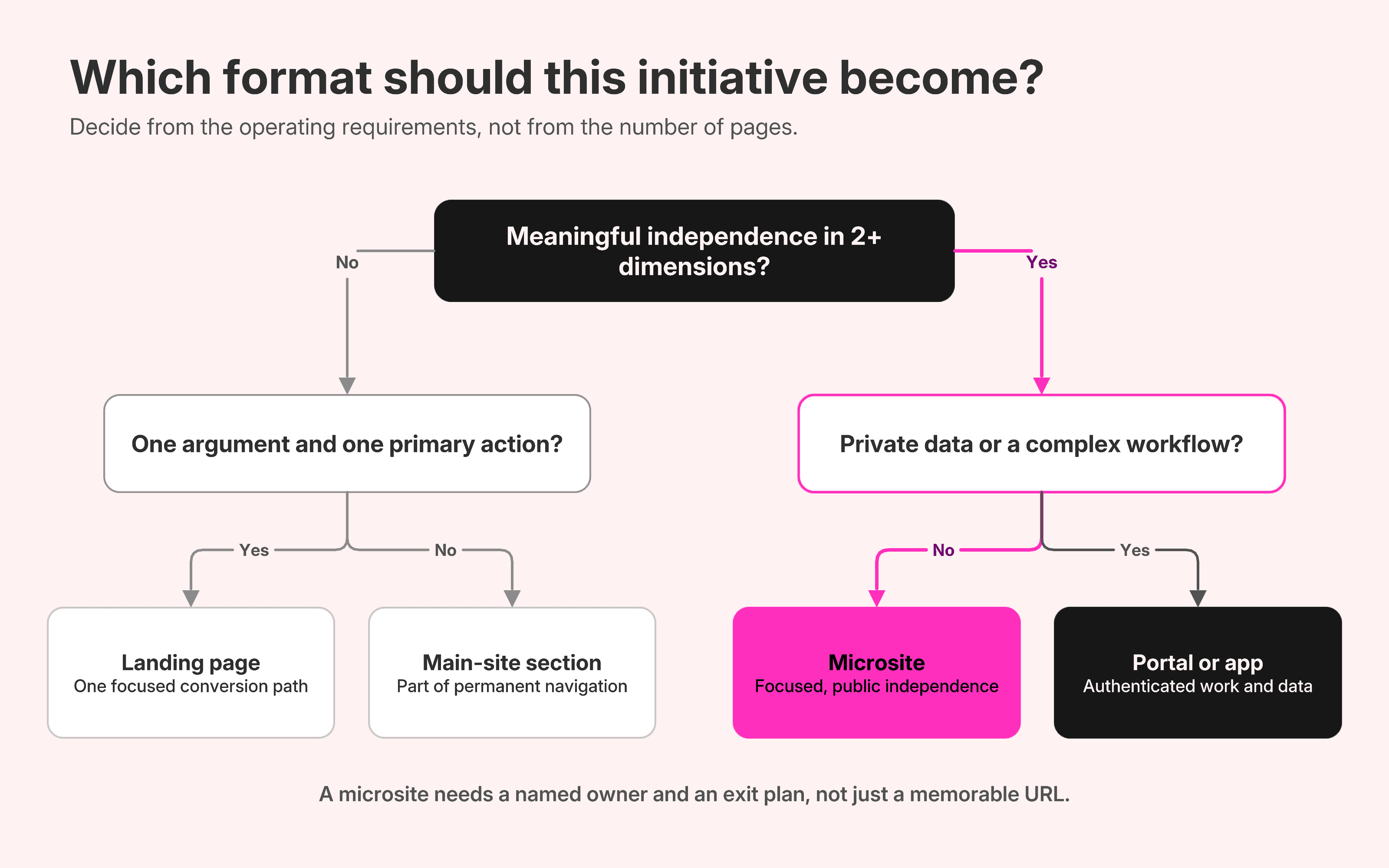
A campaign can start as a landing page and grow into a microsite. A successful microsite can later become a permanent main-site section. The format should follow the work, not remain fixed because of the original brief.
The five kinds of independence
The useful question is not “Can we make a separate site?” It is “What must be independent, and why?” A microsite earns its overhead when independence solves a real problem in at least two of the following dimensions.
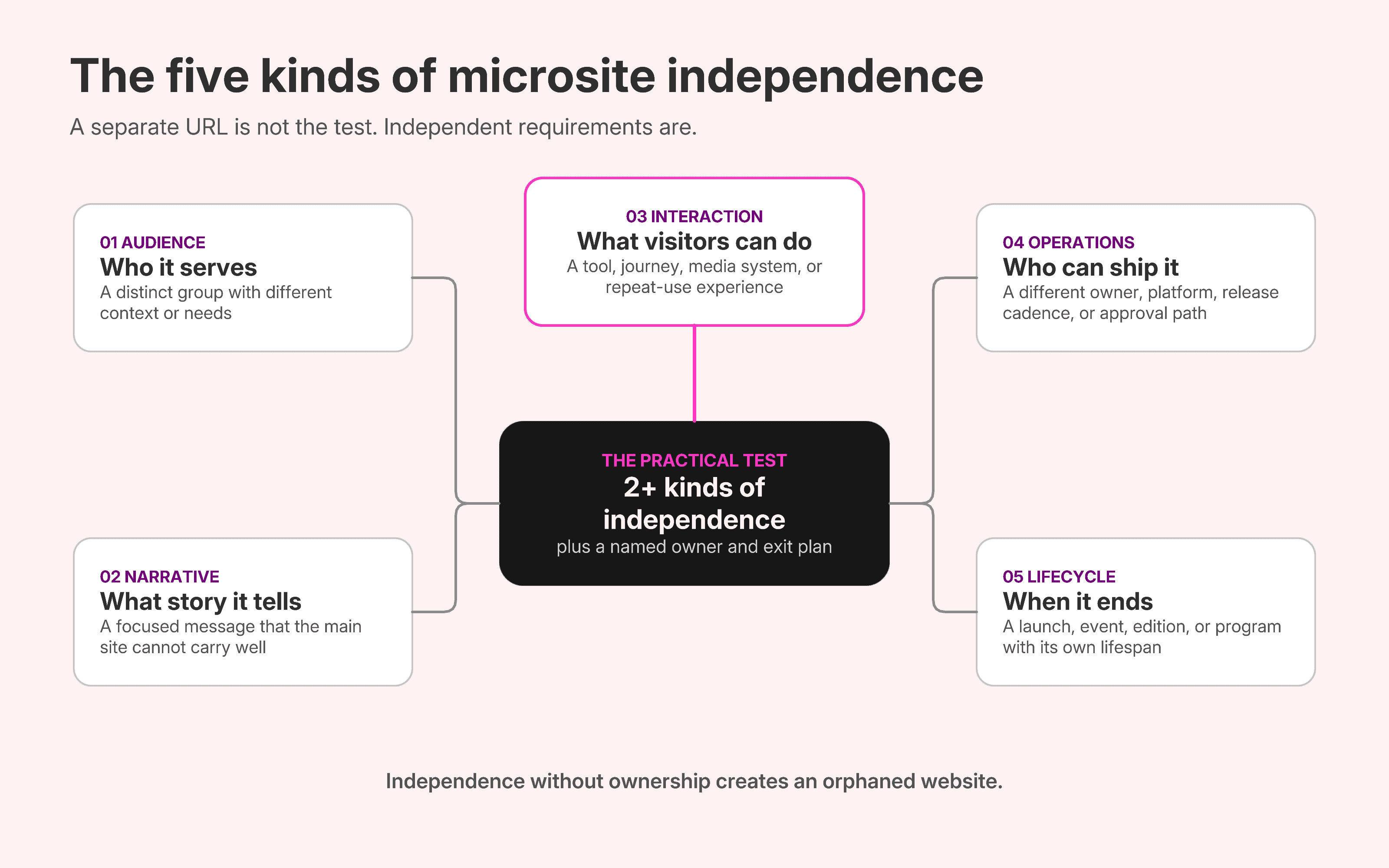
1. Audience independence
The initiative is for a group whose questions, terminology, proof, or next step differ materially from the main audience. Examples include one enterprise account, attendees at an annual conference, partners using a brand system, or buyers in a new geography.
A logo swap or industry-specific headline is not enough. If the same content and conversion path work for everyone, use the main site’s segmentation tools or a landing page.
2. Narrative independence
The initiative needs a complete argument that would be weakened by the company website’s broad navigation and competing messages. A merger announcement, research report, public-awareness project, or new category launch may need its own beginning, sequence, evidence, and conclusion.
Narrative independence does not require visual rebellion. A distinct identity should clarify the idea while preserving enough parent-brand context for visitors to know who is responsible.
3. Interaction independence
The experience does something the main site is not designed to do. It might grade a website, configure a product, present an interactive report, guide a lesson, host an event schedule, or organize deal-specific resources.
If the interaction collects data, creates user state, or exposes private material, the project may be closer to a portal or application. The label “microsite” does not reduce the need for security, privacy, reliability, and support.
4. Operational independence
A different team, vendor, publishing workflow, technology, approval process, or release cadence owns the initiative. This can speed up a launch when the main site has a long backlog, but it can also create duplicated analytics, consent, accessibility, security, and content-governance work.
Operational independence is a reason to plan carefully, not automatically a benefit. The project still needs an accountable owner inside the organization.
5. Lifecycle independence
The initiative starts, changes, and ends on a different schedule from the main website. Events move from registration to live information to an archive. Sales hubs change with the deal stage. Annual reports need a dated record. Campaigns expire.
Lifecycle independence is often the strongest reason for a microsite and the most neglected part of the brief. If nobody knows what happens after launch, the site will eventually become stale, misleading, or orphaned.
What are microsites used for?
Use cases are easier to evaluate when you name the independence they require.
Product or category launches
A launch may need narrative independence to explain a new category, plus lifecycle independence around the release. If it is simply a new item in an established catalog, a product page is usually the better long-term home.
Events and conferences
An annual event often needs audience, interaction, and lifecycle independence. Registration, schedules, speaker information, venue details, live updates, recordings, and the next year’s announcement do not fit neatly into one static landing page.
Sales, proposals, and account programs
A buyer-facing hub needs audience independence for one account and operational independence from public acquisition pages. It may collect demos, a proposal, validation, security material, implementation plans, and next steps. Sensitive content requires appropriate access control.
Reports and thought leadership
A digital report can use narrative and interaction independence to make findings easier to scan, explore, and share. If the research will grow into an evergreen program, plan how the yearly microsite becomes a durable archive or main-site hub.
Interactive utilities and education
Calculators, graders, configurators, experiments, and guided lessons justify interaction independence when the experience itself delivers value. A weak quiz that only gates a lead form rarely needs a separate site.
Regional, partner, and audience-specific programs
A microsite can support a distinct market, partner group, or community when the content, people, proof, and calls to action truly change. If only the language or location changes, use the organization’s established localization architecture instead.
For detailed page structures rather than another short example list, study 15 complete microsite examples by use case.
The benefits of a microsite are conditional
Most guides present the benefits below as automatic. They are not. Each advantage appears only when the operating condition behind it is true.
Focus
A microsite can remove unrelated navigation, offers, and corporate content. That helps only when the remaining experience answers the complete set of questions for its audience. Removing useful context or trust signals creates confusion, not focus.
Message and design freedom
A focused initiative can use a tailored voice, visual system, and content sequence. The freedom is useful when it makes the idea clearer or the audience feel recognized. It is wasteful when a team redesigns standard components only to make the campaign look special.
Faster publishing
A separate stack or team can avoid the main website backlog. Speed disappears if the project must rebuild consent, analytics, forms, integrations, accessibility, security review, and content operations from scratch.
Cleaner measurement
A narrow experience can produce a clearer event model because the audience and desired actions are limited. A separate domain can also fragment a user journey if cross-domain measurement is not configured. Google’s Analytics guidance recommends a single web data stream with cross-domain measurement when a journey spans domains.
Useful experimentation
A microsite can isolate a new message, audience, or experience before it affects the main site. It is still a product decision, not a scientific control group. Define what you are learning, how traffic is selected, and what evidence would justify consolidation or expansion.
Search visibility for a focused topic
A microsite can rank when it offers distinctive, useful content and earns discovery. Separation alone is not an SEO advantage. A new URL still needs crawlable links, indexing, relevant content, and long-term maintenance. Similar content across URLs may also require clear canonical signals.
Google explains how it selects canonical URLs and consolidates signals for similar pages.
The costs teams underestimate
Discovery has to be designed
The main website already has navigation, internal links, returning visitors, search visibility, and familiar branding. A microsite needs a distribution plan across email, ads, events, sales outreach, social channels, QR codes, partner links, or the parent site. “We will share it” is not a launch plan.
Measurement can split
Decide which property, data stream, consent model, campaign taxonomy, and event definitions apply before launch. Test the journey from the main site to the microsite and back. Otherwise, one visitor can look like several sessions or users, and the handoff can disappear from reporting.
For journeys across domains, review Google Analytics guidance on account structure and cross-domain measurement.
Governance gets duplicated
Every public site needs ownership for domains, hosting, certificates, accessibility, privacy, security, forms, integrations, content review, incident response, and vendor access. The project budget must cover those responsibilities after launch, not just design and development.
Creative experiences still need accessible fallbacks
Heavy animation, scroll effects, custom navigation, video, and experimental layouts can make a microsite memorable. They can also make important content difficult to perceive or operate. Plan text alternatives, captions, keyboard access, readable contrast, visible focus, reduced motion, and a usable small-screen layout.
The W3C Web Accessibility Initiative summarizes the principles for perceivable, operable, understandable, and robust web experiences.
Retirement is a real migration
When the microsite ends, its links, traffic, downloads, and indexed URLs do not vanish. Map each valuable URL to a relevant destination, preserve a dated archive when the record matters, update campaigns and profiles, and monitor the transition.
Google’s site-move documentation recommends planning URL mappings, redirects, internal links, sitemaps, and monitoring rather than treating a domain change as a switch you flip.
Four worked decisions
1. A single paid campaign for one offer
Decision: use a landing page. The audience, message, and action are narrow, but the experience has no reason for separate navigation, operations, or lifecycle infrastructure. Keep the page inside the established analytics, consent, forms, and domain system.
2. An annual customer conference
Decision: use a microsite or distinct main-site section, depending on the organization’s CMS. The event has a repeated lifecycle, several content paths, live information, and a growing archive. Assign an owner for the transition from registration to live event to recordings to the following year.
3. A private enterprise proposal hub
Decision: use an access-controlled sales microsite or digital sales room. The experience needs account-specific content, repeated visits, multiple stakeholders, and a deal-stage lifecycle. Do not place confidential pricing, security responses, or buyer information on a public campaign site.
4. A research program publishing every year
Decision: bias toward a durable main-site hub. A microsite can support the first flagship report, but the program’s success will create an archive, internal links, author pages, methodology, and related stories. Design the permanent home before years of reports accumulate across abandoned domains.
How to build a microsite that survives launch
1. Write the decision memo
State the audience, job, desired change, owner, launch date, review cadence, end state, and the dimensions that need independence. Include the simpler alternative you rejected. If the team cannot explain why a landing page or main-site section fails, the microsite is not ready for approval.
2. Define one audience and one completed job
“Increase awareness” is not a completed job. “Help conference attendees build an agenda and find sessions on the day” is. “Help an enterprise buying committee revisit the recommended approach, evidence, and next step” is. A precise job determines the page map and the metrics.
3. Choose the address deliberately
| Location | Use it when | What to plan |
|---|---|---|
| Main-site subdirectory | The content is public, durable, and should remain part of the main information architecture | Navigation, CMS ownership, canonical URLs, and how much visual difference the shared system allows |
| Subdomain | The initiative needs operational or technical separation while retaining a visible parent-brand relationship | Cross-domain measurement, consent, search properties, internal links, authentication, and eventual consolidation |
| Separate domain | The initiative needs strong brand, partnership, merger, geographic, or lifecycle independence | Trust and attribution, domain ownership, analytics, accessibility, security, distribution, maintenance, and a redirect or archive plan |
Do not choose a separate domain because it feels more like a campaign. Choose it because the required independence is worth the additional operating surface.
4. Map the reader’s questions before designing sections
List what the audience needs to recognize, understand, believe, find, and do. Then order those questions. A microsite can be linear when everyone needs the same story, or navigable when returning visitors and different stakeholders need different resources.
5. Build the evidence and content system
Collect the approved claims, source material, proof, people, files, media, dates, and calls to action. Decide which content changes frequently and who can update it. A beautiful page with no reliable update path is an operational defect.
6. Select the simplest capable platform
A visual website builder fits a mostly static campaign, event, report, or public resource. A CMS fits a growing archive and several editors. A coded site fits unusual interactions and integration requirements. A sales-room or portal product fits authenticated buyer or customer workflows.
If you are choosing an authoring system, compare AI website builders by the type of site they are designed to maintain.
7. Instrument the whole journey
Define the meaningful events, campaign parameters, form destinations, CRM ownership, consent behavior, and cross-domain handoffs. Test with real journeys rather than checking whether one pageview appears.
8. Run content, accessibility, performance, and failure QA
Review the site on small and large screens, with keyboard navigation, reduced motion, slow connections, blocked third-party scripts, invalid form input, and missing media. Confirm that critical content remains understandable when animation, video, or analytics fail.
9. Launch distribution with the site
Publish the parent-site links, email, social, sales materials, QR codes, event signage, ads, partner placements, and internal enablement at the same time. Assign an owner to monitor forms, broken links, traffic sources, and content freshness.
10. Review, archive, consolidate, or redirect
Set the review date before launch. At that checkpoint, decide whether the microsite is still active, should become a dated archive, belongs in the main website, or should redirect to a successor. Preserve important records and avoid sending every old URL to an unrelated homepage.
The one-page microsite operating brief
A strong brief should fit on one page and answer these questions before visual design begins:
- Audience: who is this for, and who is it explicitly not for?
- Job: what should a qualified visitor understand, find, decide, or complete?
- Independence: which of the five dimensions require separation from the main site?
- Content: what claims, proof, files, media, and updates are required?
- Address and platform: where will it live, and why is that the simplest capable choice?
- Owner: who approves, publishes, monitors, fixes, and retires it?
- Data: what is collected, where does it go, and how is consent handled?
- Measurement: what events indicate the audience completed the intended job?
- Distribution: which channels and parent-site links will bring the right visitors?
- Lifecycle: launch date, review cadence, archive or redirect plan, and domain ownership after the initiative ends.
Where Moda fits
Moda is a good fit for visually designed, mostly static microsites such as launches, event pages, public reports, resource guides, portfolios, and campaign destinations. You can describe the site in a prompt, refine the copy and visual hierarchy, edit the result, and publish it as a hosted website.
Moda is not a replacement for authenticated deal-room software, a customer portal with complex permissions, an event ticketing system, a large editorial CMS, or an application backend. Choose the platform around the operating requirements first, then the design workflow.
For a single conversion-focused page, the SaaS landing page teardowns show how positioning, proof, fit, and action can work without creating a separate microsite.
If a focused public site is the right format, try building it with Moda and keep the owner, measurement, and retirement plan beside the design brief.
Frequently asked questions
What is a microsite in simple terms?
A microsite is a focused website or small set of pages for one audience, initiative, product, account, event, or topic. It is narrower than the main company website and has some combination of independent messaging, navigation, interaction, operations, or lifecycle.
Is a microsite the same as a landing page?
No. A landing page usually supports one argument and one primary action, often within an existing website and campaign system. A microsite supports a more complete focused experience, which may include several pages, resources, interactions, audiences, or repeat visits.
Does a microsite need a separate domain?
No. A microsite can live in a subdirectory, on a subdomain, or on a separate domain. Use a separate domain only when the need for brand, partnership, technical, operational, or lifecycle independence justifies the added governance and measurement work.
Are microsites good for SEO?
They can earn search visibility when they provide useful, distinctive content and receive crawlable links. They do not get an automatic SEO advantage from being separate. New URLs need discovery and maintenance, while similar content across sites can create canonicalization and measurement decisions.
How much does a microsite cost?
Cost depends on content, design, interaction, platform, integrations, accessibility, security, analytics, maintenance, and retirement. A simple static page can be inexpensive. A custom interactive experience or private portal can require product-level engineering and ongoing support.
How long should a microsite stay live?
Keep it live while it remains accurate and useful. Decide the review date and end state before launch. The end state may be an updated active site, a dated archive, consolidation into the main website, restricted access, or redirects to relevant successor pages.
What is the most important microsite best practice?
Assign a named owner and an exit plan before launch. Focused design cannot compensate for stale content, broken forms, fragmented analytics, expired domains, or an abandoned site that still appears authoritative.

Real editable visuals. Real canvas. Full control.
Fly through design work