Gamma vs Canva: Which Is Better for Presentations?
Gamma vs Canva for presentations: compare AI drafting, visual control, brand governance, sharing, pricing, and PowerPoint handoff.
 Anvisha Pai, Co-founder & CEO, Moda
Choose Gamma when your main job is turning an outline, document, or rough set of notes into a structured presentation that people will read or view by link. Choose Canva when presentations are part of a broader visual-content workflow and you want more hands-on control over layouts, assets, brand materials, and related campaign formats.
That is the central Gamma vs Canva distinction. Gamma is a content-first presentation and publishing tool. Canva is a broad visual workspace whose presentation editor sits beside social, video, document, whiteboard, and brand workflows. Both now generate presentation drafts with AI, so “has AI” is no longer a useful deciding factor.
This comparison is based on current product documentation, independent hands-on reviews, and clearly labeled practitioner reports. We did not run a controlled head-to-head generation or export benchmark, so we do not claim one product is universally faster or that either export is always more faithful.
Gamma vs Canva at a glance
| Decision | Gamma | Canva |
|---|---|---|
| Best fit | Content-first decks, proposals, explainers, and presentations shared as live links | Presentations that belong to a wider campaign or visual-content system |
| Typical starting point | A prompt, outline, pasted text, file, webpage, or Google Drive source | A prompt, template, existing design, brand style, or manually assembled canvas |
| Editing model | Structured cards, themes, layouts, and AI-assisted revisions | Free-form drag-and-drop editing with templates, layouts, and AI tools |
| Strongest handoff | A live Gamma link with presentation controls and optional engagement analytics | A Canva link, downloaded asset, or related set of visual deliverables |
| Brand workflow | Themes, custom branding, fonts, logos, and workspace options, with important plan gates | Brand Kits, Brand Templates, controls, approvals, and shared assets, depending on plan |
| PowerPoint workflow | PPTX export is supported, with documented visual and font edge cases | PPTX import and export are supported, but converted files still need destination-app review |
| Broader ecosystem | Presentations, documents, websites, social content, and graphics | Presentations plus a much wider design, media, marketing, print, and workplace suite |
| Keep looking if | Your final file must remain deeply editable in a strict PowerPoint or Google Slides master | You want AI to do most of the narrative structuring and prefer a link-first presentation format |
Start with the final handoff
A generated first draft is only the first ten percent of the decision. The harder questions come later: Who revises it? Where does the authoritative version live? Does the recipient open a link or expect an editable PowerPoint? Will the same team need matching social graphics, a one-pager, and a video? Do you need to see which sections a prospect actually viewed?
Use those questions to choose the working model before comparing templates or AI demos:
- Choose a link-first workflow if the live browser version is the deliverable and you want to update it after sharing.
- Choose a canvas-first workflow if authors need to position, layer, and restyle individual visual elements.
- Choose a native slide workflow if PowerPoint or Google Slides must remain the source of truth. In that case, either Gamma or Canva may add an avoidable conversion step.
- Choose a broader content system if the presentation is one output among many campaign assets.
Gamma and Canva overlap, but they optimize different parts of this chain. Picking from the end of the workflow prevents an impressive AI draft from creating weeks of cleanup and version confusion later.
Where Gamma is stronger
Turning source material into a structured narrative
Gamma separates several useful starting modes. You can generate from a prompt, paste existing material, or import content from sources such as PowerPoint, Google Docs, Word files, webpages, and Google Drive. That makes it a natural choice when the words or outline already exist and the main problem is organizing them into a readable sequence.
An independent Tom’s Guide hands-on review found the generated structure “impressively coherent,” while also noting that some language was vague, repetitive, or filler. That is a fair description of the tradeoff: Gamma can accelerate structure and layout, but it does not replace subject-matter review or audience judgment.
Gamma works best when you provide the audience, purpose, evidence, desired structure, and source material. Treat its generated facts and recommendations as draft content until someone verifies them.
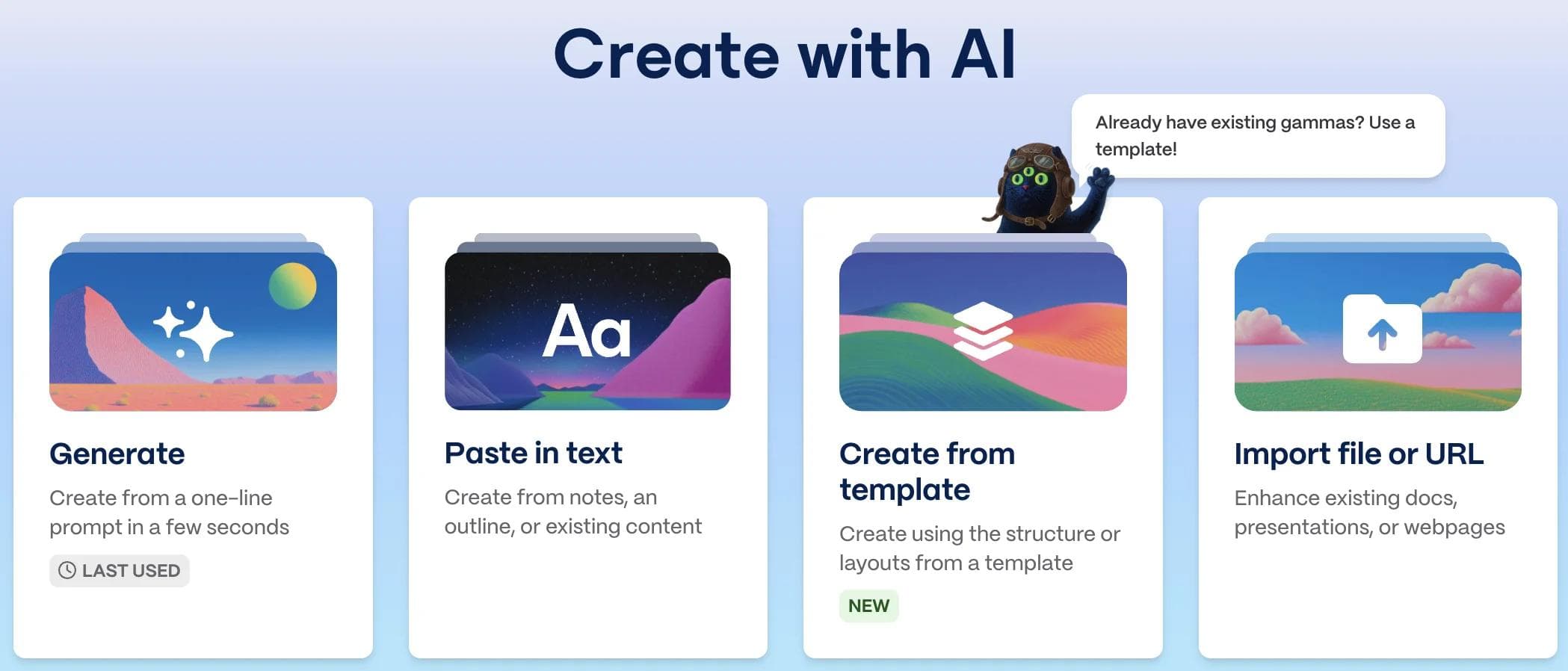
Publishing a presentation as a living link
Gamma’s strongest distinction appears after editing. A gamma can be shared with view, comment, or edit permissions rather than frozen into an attachment. Current sharing documentation describes link access, workspace permissions, badge removal on paid plans, and password protection for Gamma documents on Pro and higher.
For eligible plans, Gamma analytics can show signals including views, unique viewers, slides viewed, and relative time spent per slide. That can matter for a proposal, sales follow-up, course, or report where the author cares whether the recipient reached a specific section. Canva has design insights on eligible plans, but audience analytics are more central to Gamma’s link-first presentation workflow.
Structured layouts with less manual arrangement
Gamma uses cards, themes, and layout controls to keep content visually organized. You can change text, media, colors, fonts, and layouts, and you can ask the agent to revise content. The constraint is not that Gamma is uneditable. It is that the editor is optimized around structured blocks rather than unrestricted placement of every object.
That is an advantage for recurring updates, educational material, proposals, and explainers. It becomes a tradeoff when a presentation depends on unusual layering, bespoke art direction, or exact positioning across many slides.
Where Canva is stronger
Direct visual control after the first draft
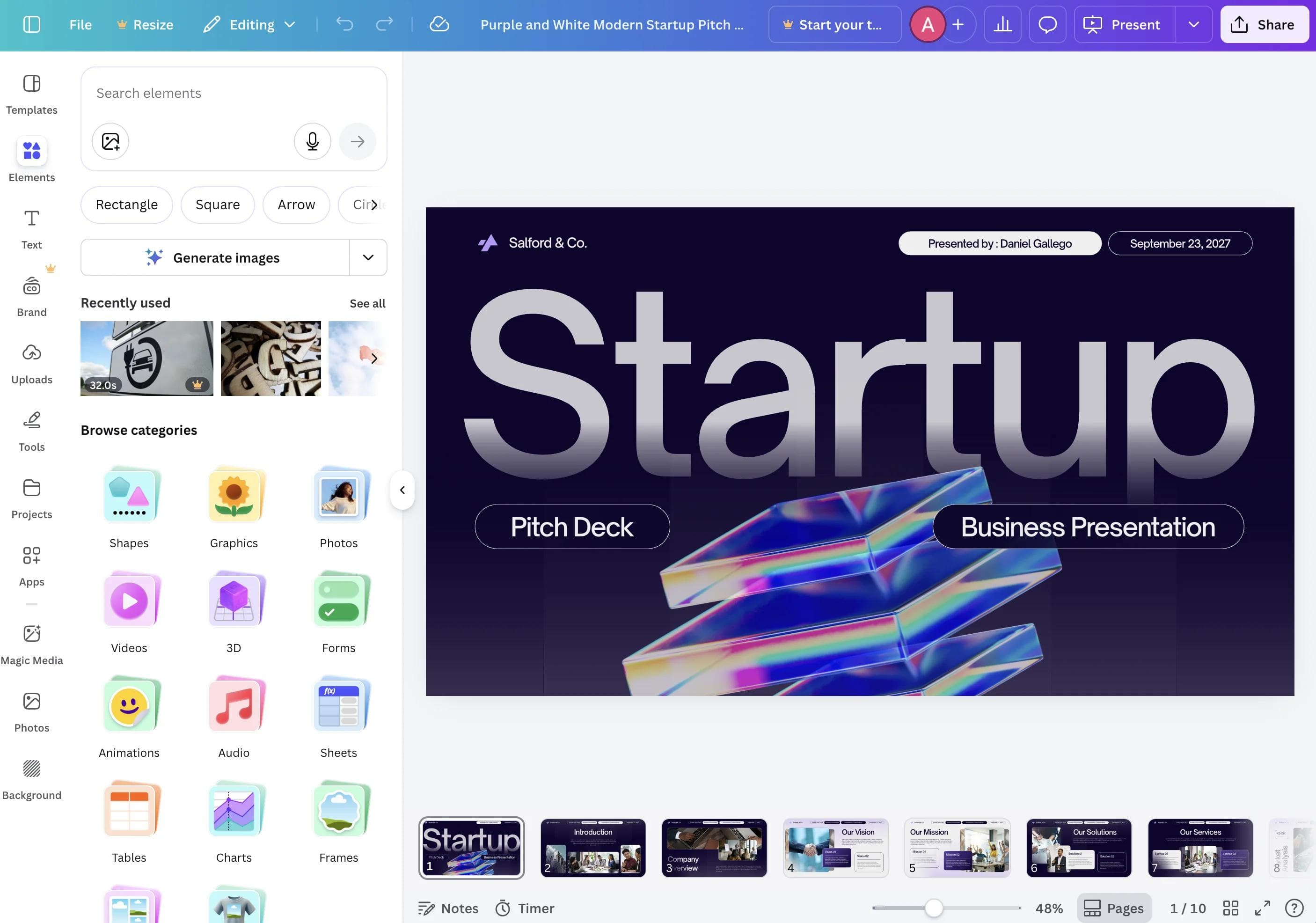
Canva’s AI presentation maker can generate an outline and slides from a prompt. The result then opens in Canva’s regular drag-and-drop editor, where authors can move, resize, layer, animate, replace, and restyle elements. Layout suggestions, Styles, Magic Write, image tools, charts, and a large media library remain available during the edit.
A 2026 TechRadar hands-on workflow test called Canva the “best option for teams that still want hands-on design control,” but found its initial AI layout generic. The important point is not that every Canva draft is generic. It is that Canva’s value often begins, rather than ends, with the generated draft. The editor and asset ecosystem are the reason to keep working there.
Creating the rest of the campaign in the same system
Canva is usually the better fit when a deck is one item in a launch, event, training program, or social campaign. Its current product suite includes presentations, social content, video, websites, whiteboards, documents, sheets, print, and other design formats. Assets can be reused without exporting every graphic to another tool.
This breadth is not automatically useful. If your team creates only presentations, Canva can expose more tools and choices than the job requires. If the same source material must become a deck, LinkedIn carousel, short video, handout, and event graphic, the shared ecosystem becomes a concrete advantage.
Brand governance for a broad group of creators
Canva’s brand system extends beyond choosing a palette. Its current brand-management documentation describes Brand Kits, Brand Templates, shared brand folders, element locking, logo replacement, controls, approvals, and real-time collaboration. Availability varies by plan, and the most advanced governance belongs to Business or Enterprise rather than every Canva account.
Gamma also supports customized themes, fonts, logos, and team options. The practical difference is scope. Gamma’s system governs Gamma documents, decks, and sites. Canva’s brand system can govern a much wider set of visual outputs. Choose based on what the team needs to standardize, not on which product has a “brand” checkbox.
AI drafting: Gamma usually asks you to steer the story less
Both products can start from a prompt. Gamma is more purpose-built around taking a body of material and turning it into a coherent, structured deliverable. Canva’s AI can also draft slides, generate media, write or rewrite text, create presenter notes, translate content, and suggest layouts. Its workflow leaves more of the detailed visual assembly available to the human editor.
The better choice depends on what you want AI to own. Choose Gamma when you want the system to propose more of the sequence and presentation structure. Choose Canva when you want an AI-assisted starting point but expect to make more direct design decisions afterward.
Neither tool knows your confidential context, which facts are approved, or what your audience will challenge. Supply source material, remove invented specifics, verify every external claim, and rewrite generic language before presenting.
PowerPoint and Google Slides handoff
Do not choose either product from the phrase “PowerPoint export” alone. A file can open in PowerPoint while still losing the exact behavior, typography, editability, or layout that made the browser version appealing.
Gamma exports to PDF, PNG, and PowerPoint. Its current documentation says tables can export as editable PowerPoint tables and theme fonts are embedded when possible. It also documents specific differences: gradients or frosted effects can fall back, editable tables lose rounded corners, some font styles can differ, and Google Slides may ignore fonts embedded in an uploaded PPTX.
Canva can import, edit, share, and download PowerPoint files. Its PPTX workflow page confirms that presentations can be downloaded as PPTX as well as other formats. Canva designs can contain stock assets, animation, effects, video, and app content that does not map neatly to a conventional slide file. That is why the destination file still needs review even though the format is supported.
Practitioner reports are mixed and anecdotal. One recent Gamma community comparison praised Gamma’s draft speed and Canva’s asset and brand workflows, while warning that Gamma PPTX exports needed cleanup. Treat that as one user’s experience, not a benchmark. The vendors’ own documentation makes the safer point: conversion has edge cases, so test your actual deck.
If editable handoff matters, build a three-slide trial containing the hardest things you expect to use:
- Your real fonts, including italic or uncommon weights.
- A chart or table whose values must remain editable.
- One image-led slide with layers, cropping, transparency, or effects.
- Speaker notes, links, animation, and any embedded media the presenter relies on.
- A theme or master slide that the recipient expects to keep using.
Export the trial, open it in the recipient’s exact application, and ask that person to change a number, move an element, and add a slide. If the deck must remain native to a strict company template, start in PowerPoint or Google Slides and use AI that works inside that editor.
Collaboration and presentation delivery
Both products support collaborative editing and link sharing. Gamma lets owners manage view, comment, and edit access and offers a presenter view with speaker notes, a timer, and navigation controls. Canva supports real-time co-editing, comments, tasks, presentation modes, recordings, and phone-based presentation controls. Exact collaboration, approval, analytics, and admin capabilities depend on the account and plan.
For a team, test a real approval cycle rather than inviting colleagues only to admire a sample. Ask a writer to revise the story, a designer to enforce the visual standard, a stakeholder to comment, and an owner to publish or export the final version. Note which tool makes the authoritative copy obvious.
Pricing: compare the plan that unlocks your real workflow
Both Gamma and Canva offer free access, but the free accounts are best used to test the working model. Gamma’s current pricing page separates Free, Plus, Pro, and Ultra. Custom branding and fonts, detailed analytics, advanced sharing, and API access sit above the entry tiers. Canva’s current plan comparison separates Free, Pro, Business, and Enterprise, with material differences in AI allowances, premium media, Brand Kits, approvals, storage, and administration.
Prices and allowances change and may be localized. Compare the annual cost for the actual number of editors, approvers, and workspaces you need. Then include migration time, asset rebuilding, export cleanup, and training. A lower subscription price can be a false economy if the team repairs every client handoff.
Which should you choose?
Choose Gamma if:
- You regularly start from an outline, long document, webpage, meeting notes, or other source material.
- The finished presentation will usually be read or presented through a live link.
- You value structured layouts and AI-assisted revision more than unrestricted object placement.
- Viewer engagement analytics are part of the sales, proposal, or education workflow.
- Your team creates many content-heavy presentations and wants less manual layout work.
Choose Canva if:
- The presentation is one piece of a broader visual campaign.
- Editors want free-form control over individual visual elements after generation.
- Your team already depends on Canva templates, stock media, brand assets, or other Canva formats.
- Brand governance must cover presentations, social content, video, print, and other deliverables.
- You prefer to begin with a template or AI draft and then design more of the final result yourself.
Choose neither if:
- A deeply editable PowerPoint or Google Slides file in an existing corporate master is non-negotiable.
- The deck requires specialist data analysis, complex scientific figures, or another workflow neither product owns.
- Your current tool already handles the recurring work and switching would only improve the novelty of the first draft.
Where Moda fits
Moda is a third option when you want an AI agent to build and revise a presentation on an editable visual canvas, especially when the same project also needs diagrams, one-pagers, or social assets. The working model is more agent-led than Canva’s usual template-and-editor workflow and more canvas-oriented than Gamma’s structured cards.
Moda is not the better answer when Gamma’s live-link publishing and viewer analytics are the requirement. It also does not match Canva’s template, stock-media, print, and app ecosystem. PowerPoint and Google Slides handoffs still deserve the same representative export test described above. For a broader view, compare the best Gamma alternatives by presentation workflow or read our full Gamma review. If you are evaluating the wider category, see our Canva alternatives guide.
Run this trial before committing
Give both products the same approved source material and use the same real delivery requirement. Then:
- Create one content-heavy slide, one visual slide, and one data slide.
- Apply your actual fonts, colors, logos, and image style.
- Ask someone who did not create the deck to make three ordinary revisions.
- Share the native link and inspect the viewer experience without an editor account.
- Export to the exact format the recipient expects and reopen it in that application.
- Produce one related asset, such as a social graphic or one-page summary, if that is part of the job.
- Record the cleanup time and decide which copy becomes authoritative after export.
The winner is not the tool that generates the flashiest sample. It is the one that carries your source material through editing, approval, delivery, and future revision with the least ambiguity.
Bottom line
Gamma is the stronger default for content-first presentations that begin with source material and end as a shareable, measurable web experience. Canva is the stronger default for visually directed presentations that belong to a larger system of brand and campaign assets.
If the final deliverable is an editable PowerPoint or Google Slides file, neither product wins automatically. Test the hardest slide in the destination editor before moving a production workflow. That single handoff check is more useful than comparing another dozen AI features.

Real editable visuals. Real canvas. Full control.
Fly through design work