Google Ads Transparency Center: How to See Any Advertiser's Ads (2026)
How to use the Google Ads Transparency Center to see any advertiser's search, display, and YouTube ads, the region switch that reveals run dates, and how to adapt a reference set on-brand.
 Anvisha Pai, Co-founder & CEO, Moda
The Google Ads Transparency Center is Google's free, public archive of the ads that verified advertisers have run on Search, YouTube, Shopping, Maps, and Play in the last year. You do not need an account. Type an advertiser's name or website at adstransparency.google.com, pick a region, and you are looking at their text, image, and video ads as Google rendered them.
Two things separate it from the Meta and LinkedIn libraries, and most guides get at least one of them wrong. There is no keyword search: you can only look up an advertiser or a website, so finding ads in a category is a different job than it is on Meta. And the data attached to an ad depends on where you say you are. Search with the United States selected and an ad's detail page shows the date it was last shown and nothing else. Switch the region to Germany, or any other EEA country, and the same advertiser's ads arrive with a first-shown date, a times-shown range, a topic label, and a summary of the audience selection. This guide covers the search, the card and the detail page, that region switch and where the signal it unlocks breaks, the workarounds for advertiser-only search, a measured sample of eight advertisers, and how to turn a reference set into ads that match your own brand.
What the Ads Transparency Center shows, and what it hides
Google launched the center in March 2023, on top of the advertiser identity verification it had required since 2020, and it now doubles as the disclosure surface the EU's Digital Services Act demands. Its FAQ, read on September 2, 2026, states the coverage: ads from verified advertisers served across Search, Play, Maps, Shopping, and YouTube, kept for one year from the date the ad was last displayed; ads from unverified advertisers in Europe and Türkiye; and election ads for up to seven years. An ad takes 48 to 72 hours to appear after it is shown, dates are in Pacific Time, and the payer's name is shown when it differs from the advertiser's.
| Shown for every ad | Shown only with an EEA or Türkiye region selected | Never shown for commercial ads |
|---|---|---|
| The ad as rendered: text ad with sitelinks, image, or video | First shown date, so the run length is readable | Spend, clicks, conversions, or any result |
| Advertiser name, legal name, country, and verified status | A Times shown range such as 0 to 1K, published after a 90-day delay | Keywords, bids, or the search terms that triggered a text ad |
| Last shown date, format, and the platforms filter | A topic label assigned by Google | Audience selection outside the EEA and Türkiye |
| Up to five variations of the same ad, as a carousel | Audience selection by category, with included and excluded marked | A landing page link: Google removed click-through permanently |
| Political ads: spend range, times shown, run length, and age, gender, and location targeting, in every supported region | Any sort by performance, impressions, or run length |
The last row is the one to remember. On Meta you can at least sort by impressions. Here the commercial listing has no sort control at all, its order is not stated, and you read the dates one detail page at a time.
Set up the search in a minute
Open adstransparency.google.com. There is one search box and three controls.
- Topic. Leave All topics selected. Political ads is a separate archive with its own spend and times-shown filters, an Insights tab, and a sort menu.
- Region. The button reads Ads In United States by default. Results are ads that were shown in that region, so an advertiser that does not sell in your country returns nothing until you change it. The list starts with Anywhere and then runs through every country.
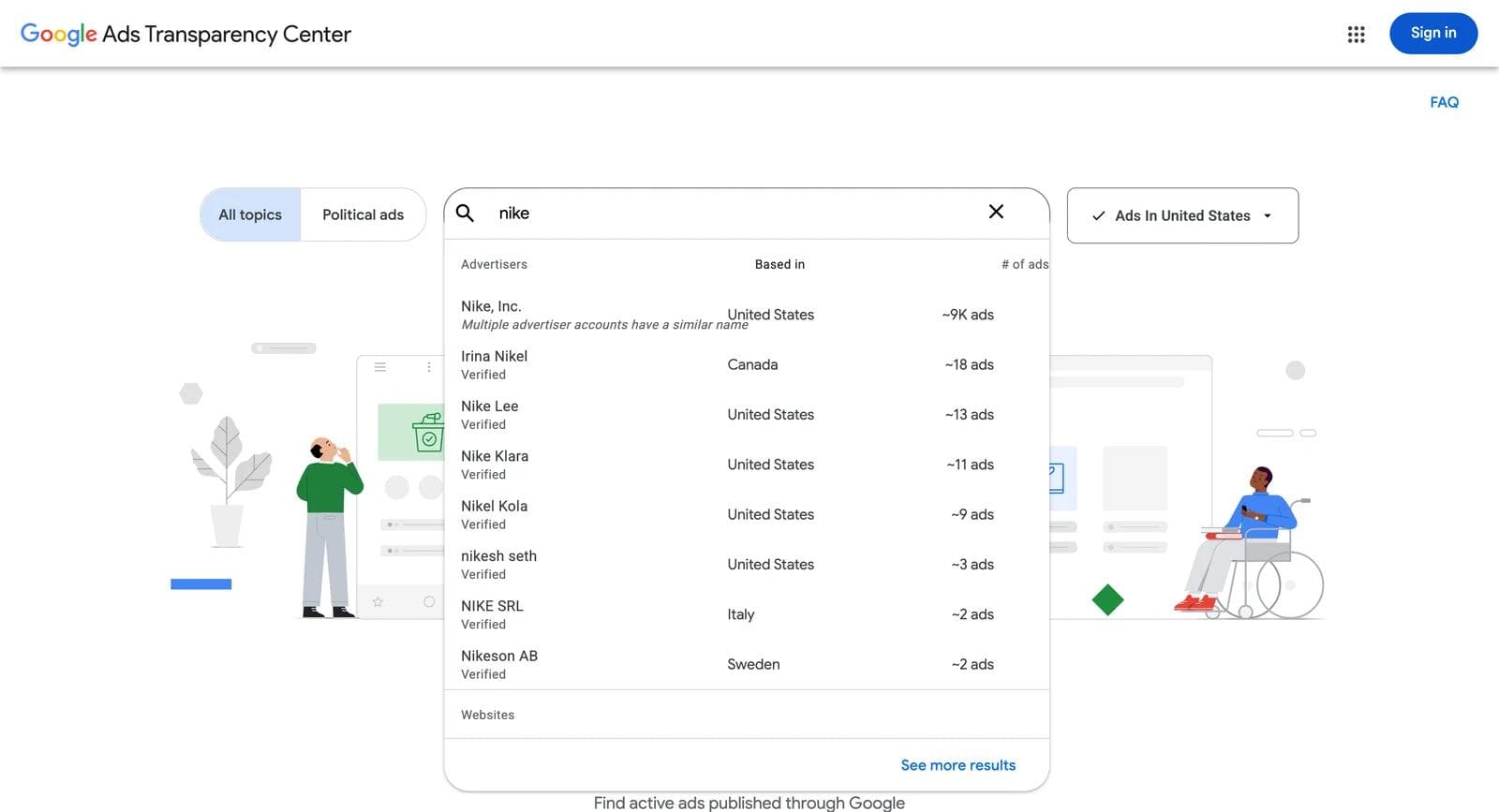
- Advertiser or website. Start typing and a dropdown splits into Advertisers, each with where they are based and an approximate ad count, and Websites. Type a brand name and you will usually see several accounts with similar names; type the domain and you get every verified account whose ads point to it.
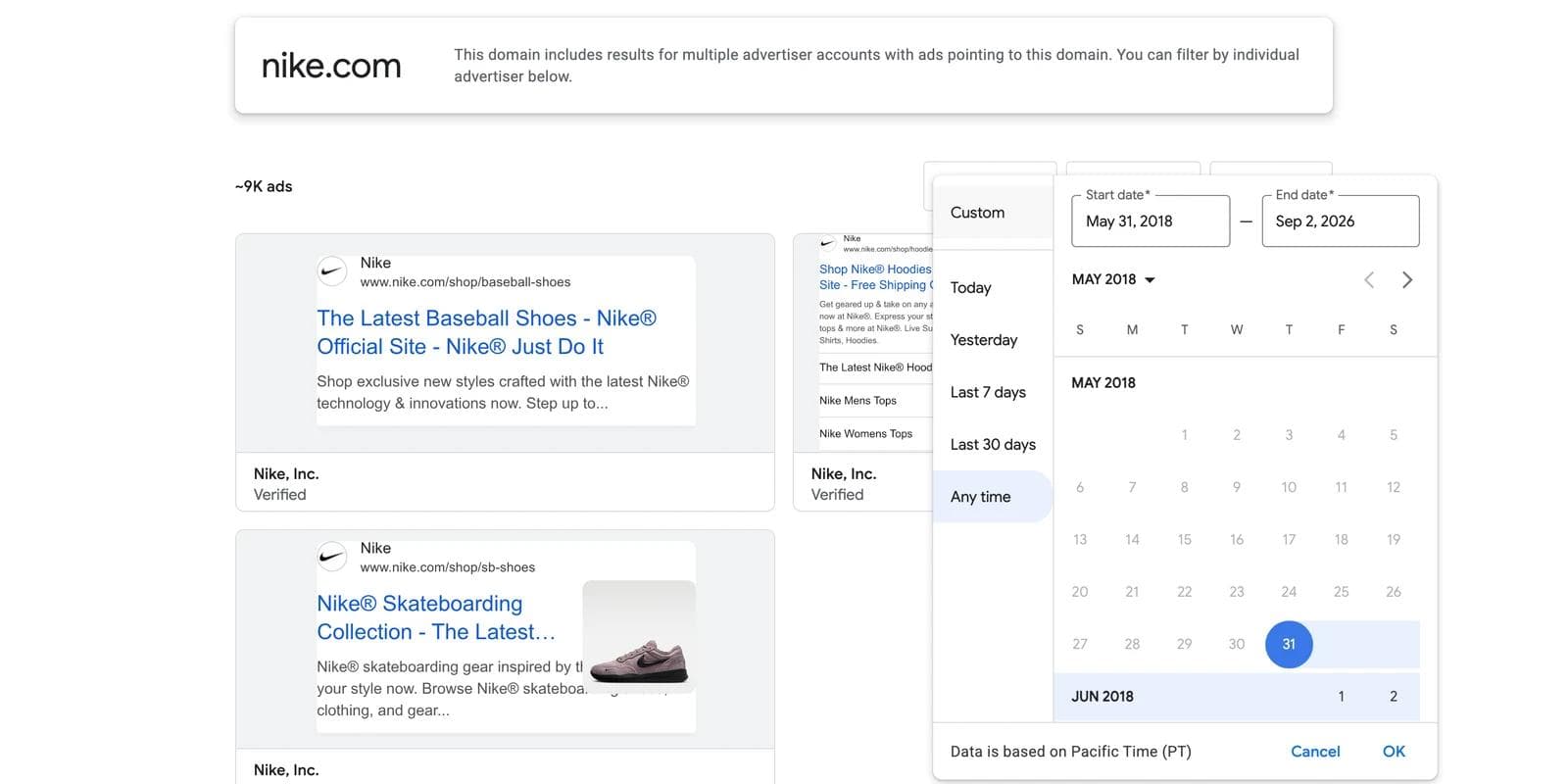
Once a listing is open, three filters appear above the grid: a date range with Today, Yesterday, Last 7 days, Last 30 days, Any time, and a custom range; a platform filter for Google Maps, Google Play, Google Shopping, Google Search, and YouTube; and a format filter for Image, Text, and Video. The first screen shows a handful of cards and a See all ads link; click it before you judge anything.
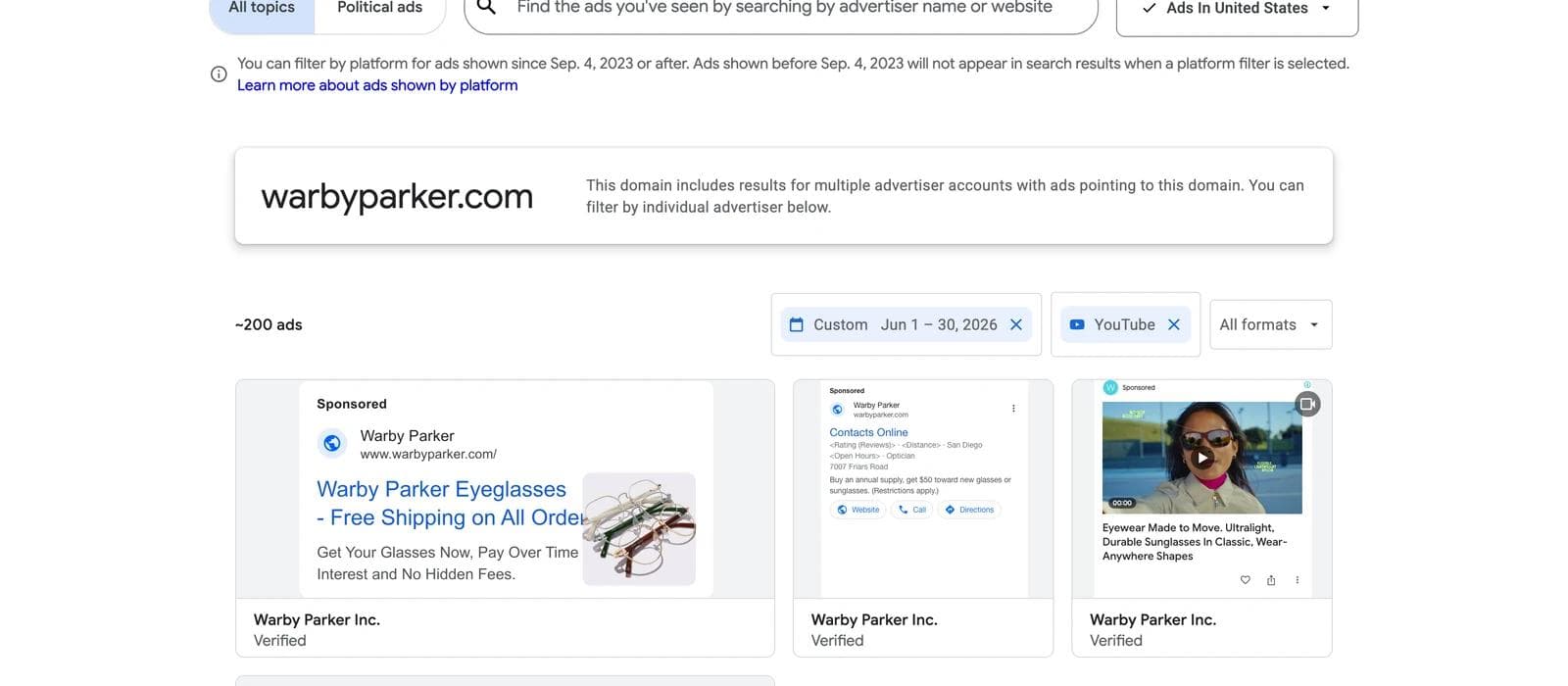
Everything is in the URL, so a search you like is bookmarkable. Warby Parker's image ads shown in the United States in the last 30 days:
https://adstransparency.google.com/?region=US&domain=warbyparker.com&format=IMAGE&preset-date=Last+30+daysregion takes a country code or anywhere, domain a website, format is IMAGE, TEXT, or VIDEO, platform takes YOUTUBE and the other platform names, and a custom range is start-date=2026-06-01&end-date=2026-06-30. A single verified account has its own path, /advertiser/AR…, which is where See more ads and About this advertiser on a live Google ad send you.
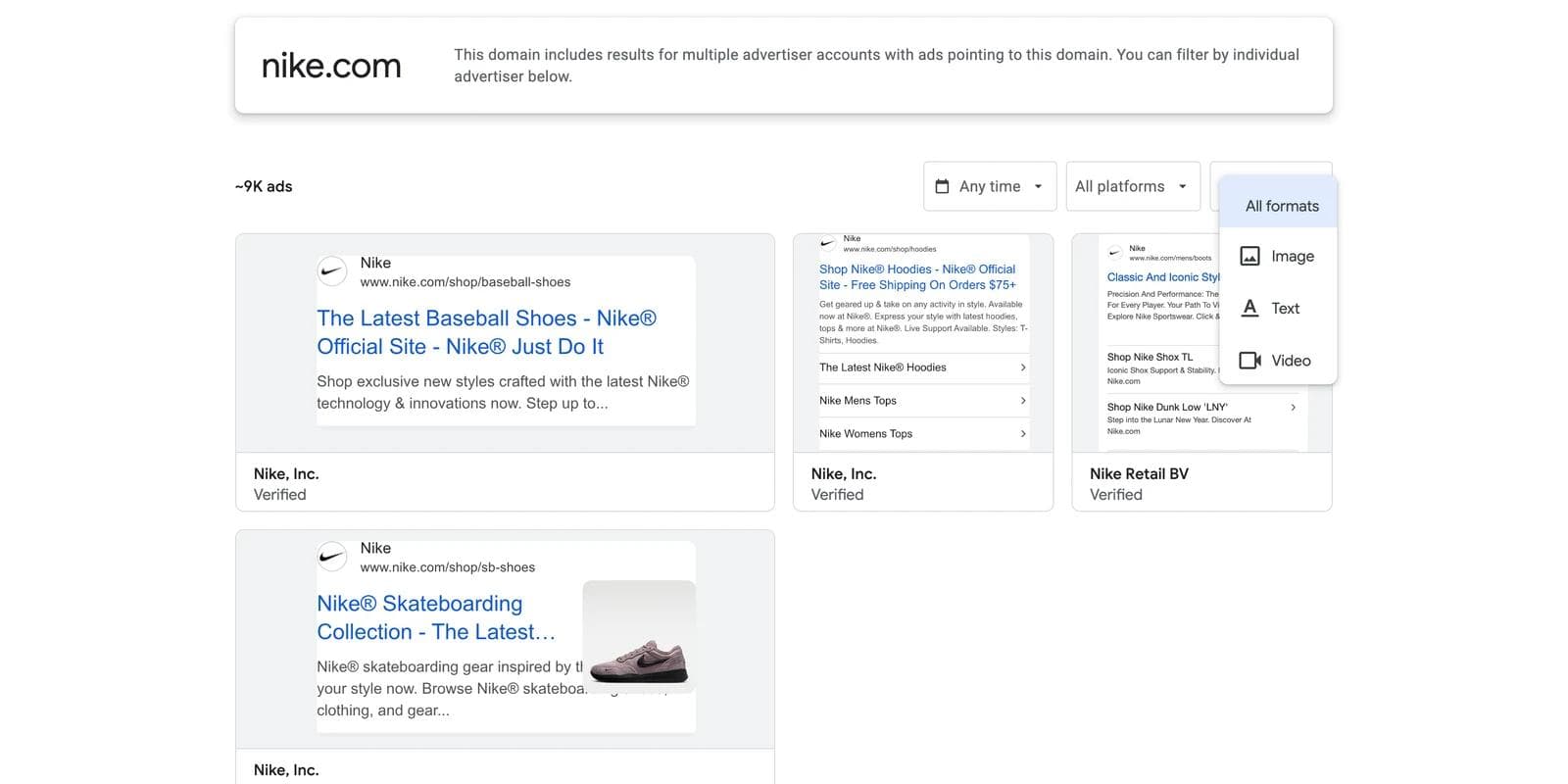
A domain search aggregates every verified account pointing to that website, and the header says so. On nike.com that was three Nike, Inc. accounts, Nike Retail BV, and a media agency's account. On hubspot.com in Germany, only one of the first twelve image ads was HubSpot's own; the rest came from agencies and partners whose ads link there. Open the brand's own advertiser page when you want one team's work, and use the domain when you want everything that points at a site.
How to read a card and a detail page
The grid shows each ad as Google rendered it: a text ad with its sitelinks, an image, or a video thumbnail, with the advertiser name and a Verified label underneath. That is all a card carries. There is no date, no ID, and no status on the card, so the listing tells you what an advertiser runs but not for how long. In our captures a few image cards loaded as a Google error box instead of the creative, and some EEA listings showed a "not able to show you this ad" placeholder; the detail page rendered the same ad normally.
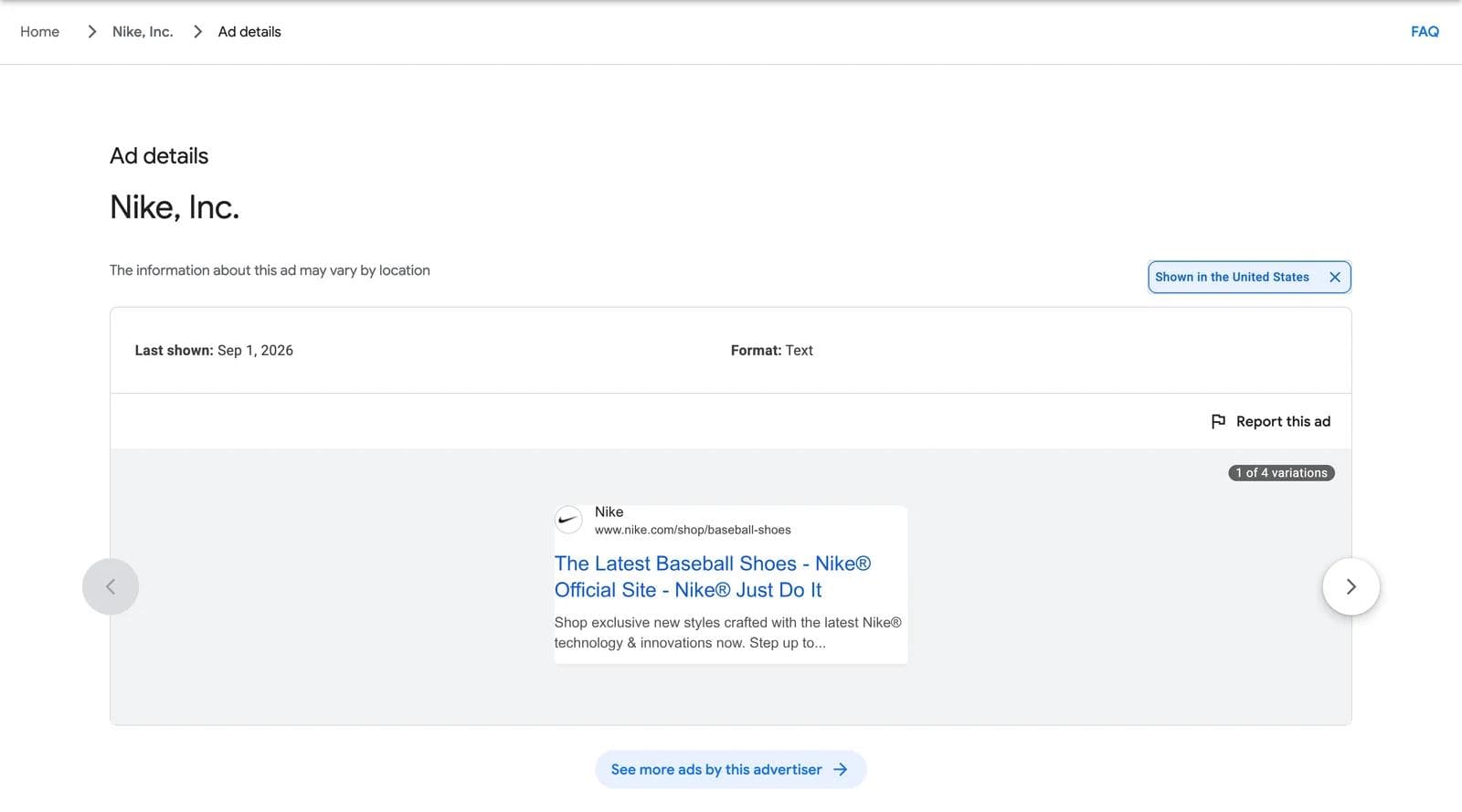
Click a card and the Ad details page opens. With the United States selected it holds four things: the region chip, Last shown, Format, and the ad in a carousel labeled 1 of N variations. The variations are the combinations Google assembled from the advertiser's headlines and images, up to five, which is why one responsive search ad can show four different headlines here.
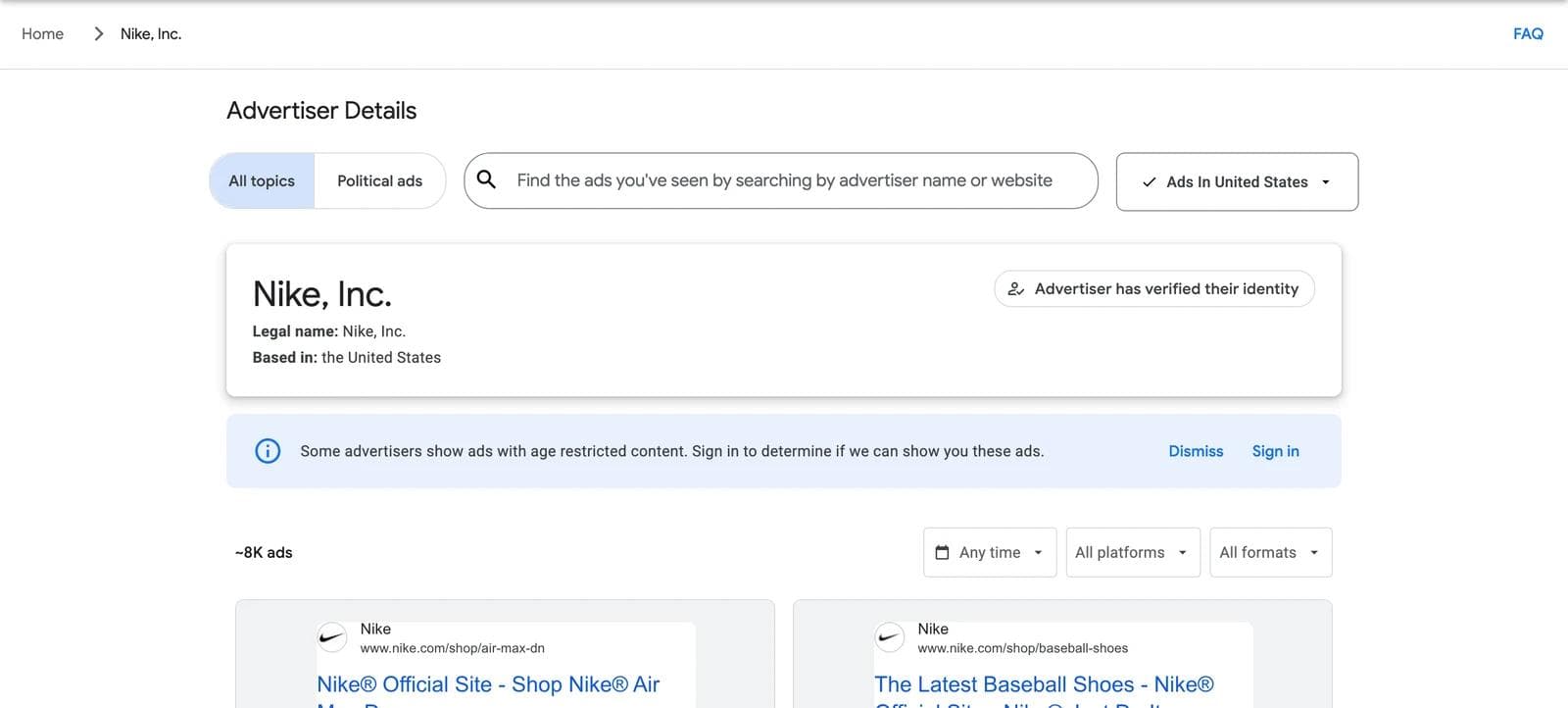
The advertiser page, reached from the breadcrumb or from About this advertiser on a live ad, adds the legal name, the country the advertiser is based in, whether it has verified its identity, and its approximate ad count with the same three filters.
The date signal, and the region switch that unlocks it
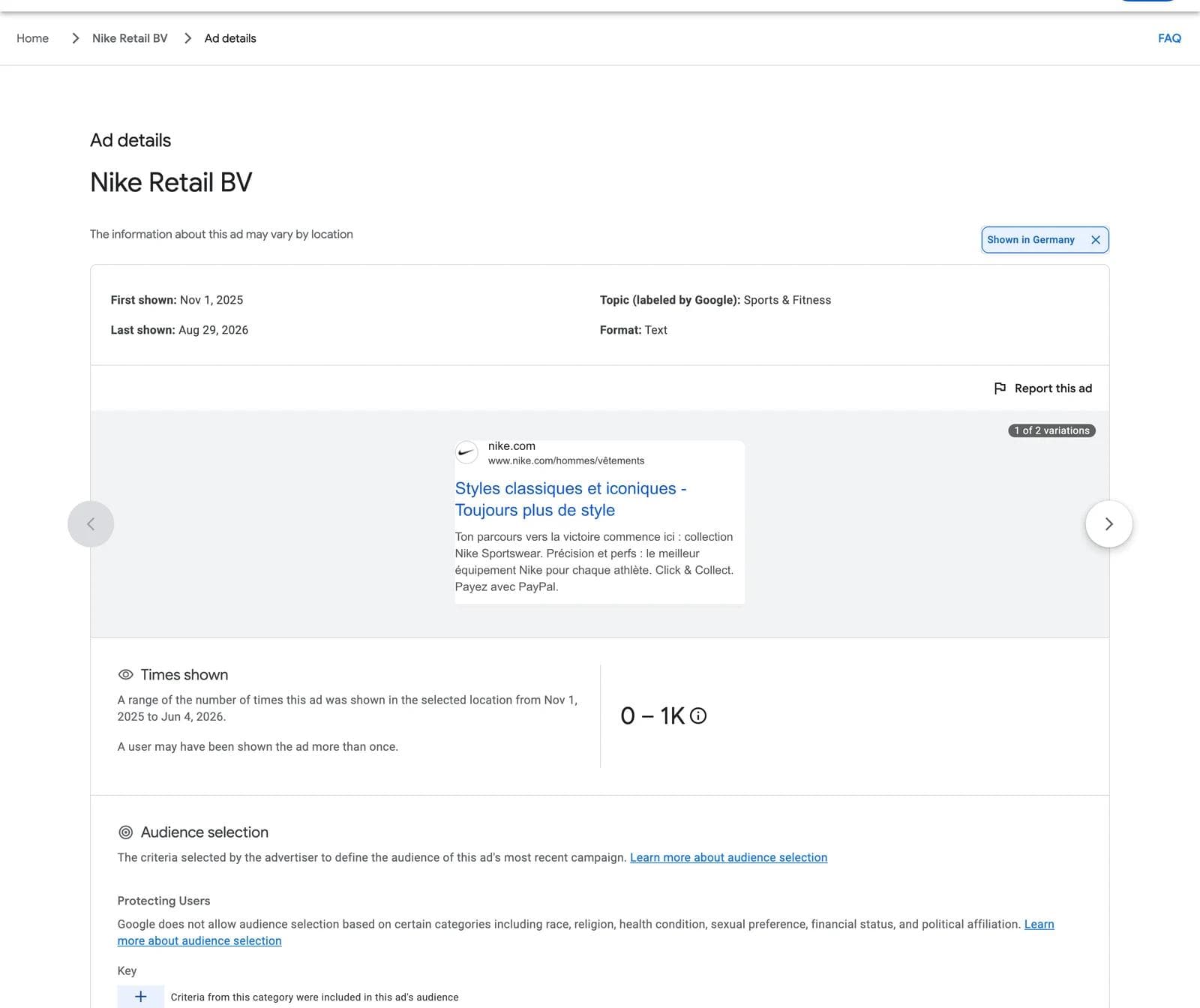
The Meta method rests on the start date of an ad. The Transparency Center gives a US searcher only the last-shown date, which says whether an ad is alive this week and nothing about how long it has been alive. The first-shown date exists, but Google publishes it only where the Digital Services Act requires it: for ads shown in the European Economic Area and Türkiye.
The disclosure is attached to the ad, not to you. So for any advertiser that also serves the EEA, change the region to Germany, France, the Netherlands, or Ireland, open the same ads, and the detail page grows.
We used that switch to measure a sample on September 2, 2026: eight well-known advertisers, four B2B and four direct-to-consumer, each opened on its own verified advertiser page with the format filter set to Image, first with the United States selected and then with Germany, reading the first twelve image ads of each listing.
| Advertiser (verified account) | US ads, all formats | US image / text / video | German image ads with a first-shown date | Median days shown, Germany | Over 30 days | Over a year |
|---|---|---|---|---|---|---|
| HubSpot (Hubspot, Inc.) | ~700 | 41 / ~500 / ~200 | 5 of 7 | 696 | 4 | 3 |
| monday.com (monday.com LTD) | ~900 | ~900 / 0 / 41 | 12 of 12 | 66 | 11 | 0 |
| Shopify (Shopify Inc.) | ~10K | ~2K / ~6K / ~3K | 12 of 12 | 113 | 12 | 0 |
| Grammarly (Superhuman Platform Inc.) | ~20K | ~500 / ~5K / ~10K | 12 of 12 | 17 | 4 | 1 |
| Warby Parker (Warby Parker Inc.) | ~6K | ~300 / ~6K / 93 | 11 of 12 | 26 | 2 | 2 |
| Allbirds (Allbirds Inc) | ~2K | ~400 / ~300 / ~500 | no ads shown in Germany | |||
| Casper (Casper Sleep Inc.) | ~800 | ~200 / ~400 / ~300 | 6 ads in Germany, none image | |||
| Glossier (Glossier Inc.) | ~800 | ~200 / ~400 / ~300 | 15 ads in Germany, none image |
Pooled, the German view gave a first-shown date for 52 of the 55 image ads we opened: median 60 days shown, 33 over 30 days, 20 over 90, and 6 over a year. Three of HubSpot's seven were first shown in March 2024 or earlier. Grammarly's twelve split into a batch of week-long tests from late July and two ads that had run since 2025, one of them with a times-shown range of 400K to 450K in Germany alone. monday.com's twelve were four creatives in three sizes each, launched on the same three dates and all last shown on January 29, which is what a campaign end looks like. And the three DTC brands that only sell in the US gave us nothing: the switch works for global advertisers and not at all for domestic ones.
Three places the signal breaks:
- Last shown is not still running, and the listing is not sorted. The archive lags 48 to 72 hours, so an ad last shown two days ago is live. For seven of the eight advertisers the first screen of image ads was last shown within three days; for monday.com it was ads last shown in January and February, seven months earlier. Set the date filter to Last 7 days before you read a listing as current.
- A long run is a budget, not a verdict. The same caution as on Meta. A brand campaign or a low-budget catalog ad can run for a year without anyone looking at it. Compare run lengths within one advertiser's set, and weight ads that have several variations and recent last-shown dates.
- The EEA view is a different ad set, and its numbers are German. Searching Germany returns the ads shown in Germany. For a global advertiser that is often the same campaign; for a US-only brand it is nothing. The times-shown range counts impressions in the selected region and appears only for ads first shown more than 90 days ago, so in our sample every ad launched after early June had no range yet. The one-year clock also appears to run on the ad's last impression anywhere: the German view listed HubSpot and Warby Parker ads whose German last-shown dates were in 2025 and 2024.
No keyword search: how to find advertisers anyway
This is the constraint that changes the workflow. On Meta you search "skincare" and read the category. Here the search box only autocompletes advertiser names and websites: typing "running shoes" returned no advertisers and a single site that happened to have those words in its domain, and typing "mattress" listed nine small businesses with mattress in their name and no Casper. Four ways around it:
- Search the websites you already know. Your competitors, the brands your buyers mention, the companies bidding on your search terms. The domain search is more reliable than the name search because it collapses agency, parent-company, and renamed accounts into one view.
- Read the search results page you are competing on. Run your own money keywords in Google. Every sponsored result has a three-dot menu with See more ads and About this advertiser, which open that advertiser's page in the center. It is the closest thing to keyword search the center has, and it finds advertisers who never appear in a brand search.
- Move sideways to adjacent categories. The point of a reference set is structure, not claims, and the structures that survive in categories next to yours transfer without putting your ad beside a rival's. If you sell a CRM, look at payroll, sales intelligence, and proposal software brands. If you sell skincare, look at haircare and eyewear.
- Use the platform filter as a category lens. Google Shopping surfaces product-image ads with prices; YouTube isolates video. Filtering a big retailer to Shopping is a fast way to see how a category renders product-on-field ads.
Build a reference set
The center cannot save anything, and its cards have no ID on them, so the set lives in a document you keep. For each ad record:
- The detail page URL. It contains the advertiser ID and the creative ID, and it reopens the ad with the region you were using.
- Format and platform, plus Last shown, and First shown and the times-shown range when the EEA view gives them to you.
- The variations count. Several variations with a recent last-shown date is the closest the center comes to Meta's multiple-versions notice.
- What the eye lands on first, what the ad asks the reader to believe, and what you would keep and change for your brand.
Save the creative from the detail page with the creative ID as the filename. Those files are the input for the last step.
The creative belongs to the advertiser. Saving it to study is ordinary competitive research. Reusing its photography, product shots, or copy in your own ad is not. Adapt the structure and supply your own product, people, and claims.
Four Google display ad examples, read as a reference set
Four image ads from the sample, chosen because they make different decisions rather than because they are the best ads their advertisers run. Each record names what the eye lands on, what the ad asks the reader to believe, and what transfers to a different product.

Warby Parker, product on a plain field. The eye lands on one pair of sunglasses, centered on white, and then on a headline that is just the product's name. There is no price, no offer, and no person. What the ad asks you to believe is that the object is desirable enough on its own, which is a bet a brand with recognizable design can make. What transfers: the layout is a template with three slots, product, name, logo, and the discipline of leaving everything else out. It works for any product whose shape sells it and fails for one that needs explaining.
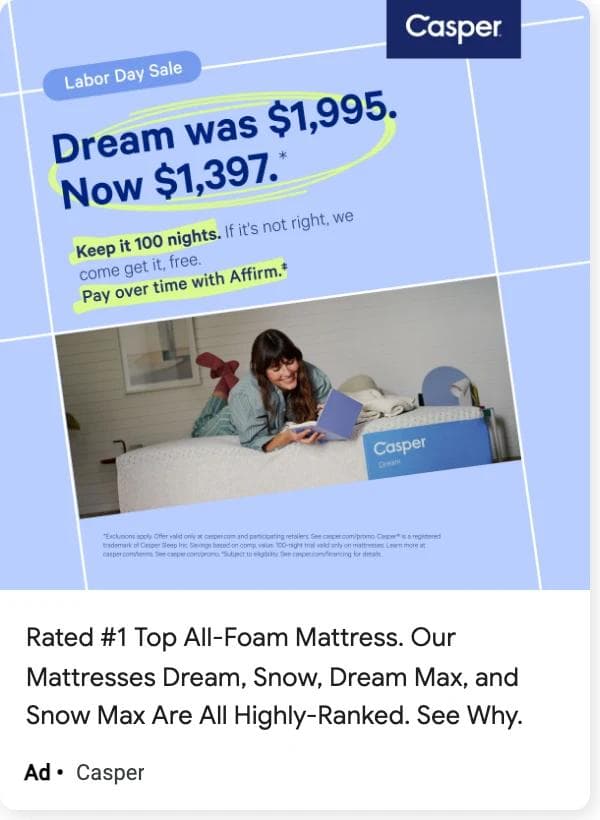
Casper, the offer is the headline. The eye lands on two prices, the old one and the new one, set large on a brand-blue field above a photograph of someone on the mattress. A Labor Day Sale label sits in the corner, two highlighted lines add a trial and a financing option, and the description under the image carries a top-rated claim. What the ad asks you to believe is that the only thing between you and the purchase is the price, and that this week it moved. What transfers: the price-pair headline and the decision to make the offer, not the product, the first thing read. What does not: the photograph, and the ranking claim, which needs your own evidence.
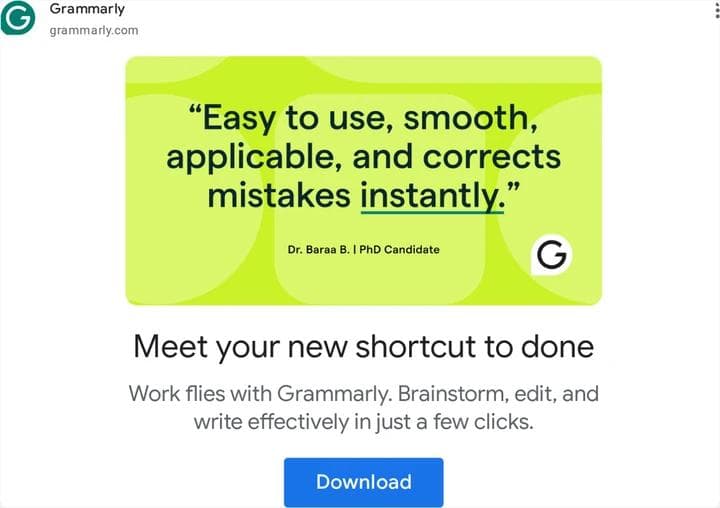
Grammarly, the quote is the creative. The eye lands on a sentence in quotation marks, set as large as a headline, on a flat lime field with a one-line attribution and a logo. The product is not pictured. The headline under the image, Meet your new shortcut to done, is a plain benefit. What the ad asks you to believe is that a named user already said the thing the brand wants to say. What transfers: the testimonial-as-headline layout, which any product with one good quote can rebuild in an hour, and the choice to put the proof in the image and the benefit in the headline.

monday.com, brand first. The eye lands on the product name, monday sidekick, then on a person smiling at a furry purple character, then on a Start free trial button. No proof, no price, no screenshot. What the ad asks you to believe is that the brand is worth a try on personality alone, which is a bet a company with an existing audience can place. The record is also the lesson: this ad ran for 66 days in Germany, ended in January, and was still on the first screen of the US listing in September. What transfers: the name-plus-character layout and the trial button; the mascot does not.
Turn references into on-brand display ads
Google's image inventory is mostly responsive display and Demand Gen: the advertiser supplies a landscape, a square, and a portrait image plus headlines, and Google assembles the ad. So what you saved is a layout, a hierarchy, and an argument that has to survive three crops. Rebuilding that with your own brand kit, product photography, and claims is a design task, and it is one an AI design agent handles well when you give it references instead of adjectives.
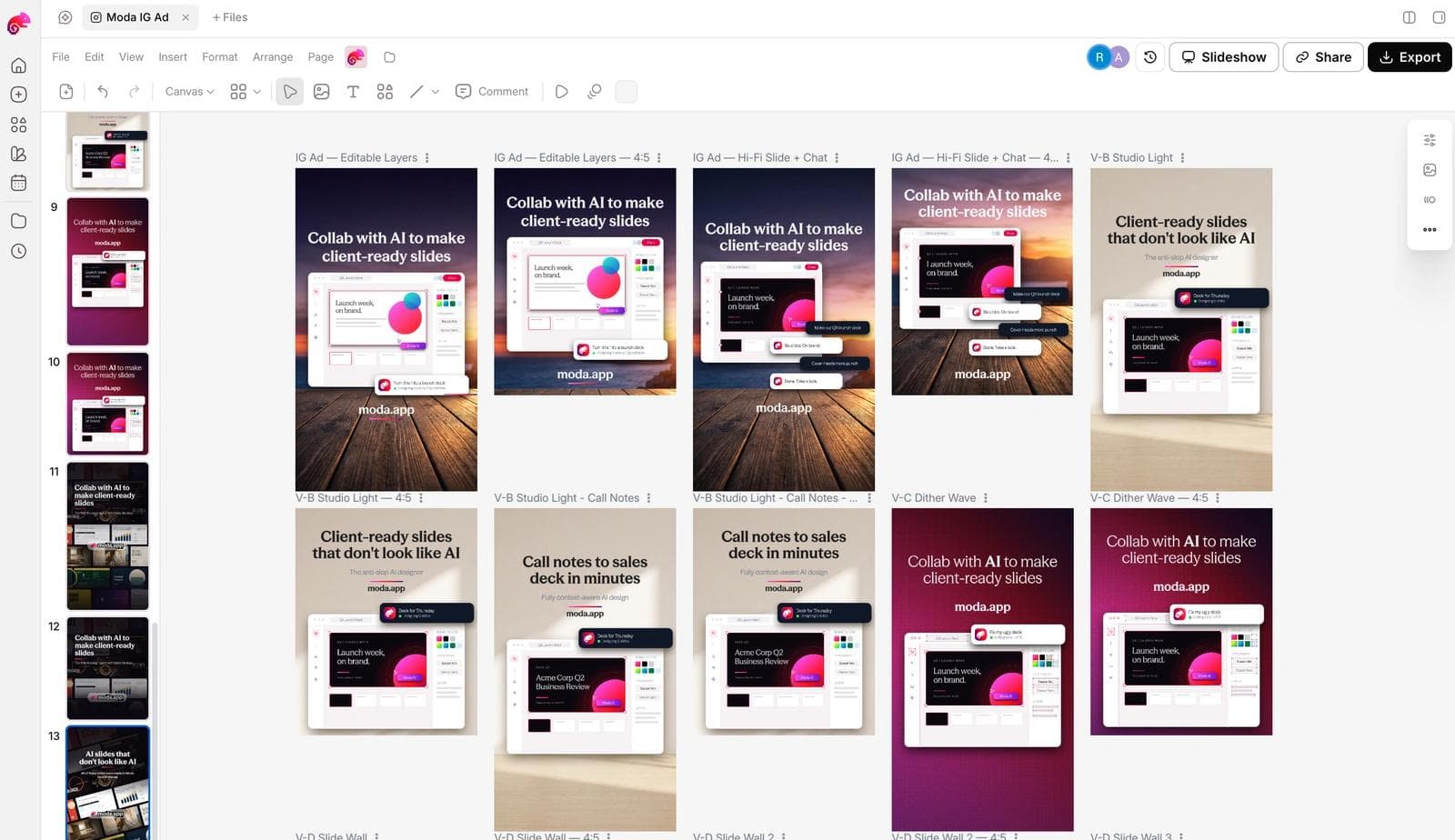
In Moda, the workflow is: attach two to four saved ads to a message, name the brand kit to apply, and describe what stays and what changes. A prompt that works:
Use these three display ads as layout references. Make a responsive display set for our meal-kit brand using the Greenline brand kit: 1200 x 628, 1200 x 1200, and 960 x 1200, plus a 300 x 250 and a 728 x 90. Keep the structure of the first reference: product on a plain brand-color field, one short benefit headline, a price or offer badge, logo bottom left. Replace every photo with our product shots and write new headlines under 30 characters. Do not reuse any reference copy.The result is built on an editable canvas, so the headline, product image, badge, and logo stay separate objects, and the same layout can be pushed to the other sizes without rebuilding it.
Before any of these ships: the claims are yours and true, the product is recognizable at 300 x 250, the headline fits Google's 30-character limit, and you have at least two headlines against the same layout so the first test measures the message and not only the design.
If you have not set up the brand side, how AI design tools build a brand kit from your website covers what gets extracted. The Meta Ad Library guide is the hub for this method, with keyword search and a measured skincare sample, and the LinkedIn Ad Library guide covers the B2B library, where the same EU condition decides what you can see.
Frequently asked questions
Is there a Google Ads library like Meta's?
Yes, it is called the Ads Transparency Center, at adstransparency.google.com. It is free, needs no account, and covers ads from verified advertisers on Search, YouTube, Shopping, Maps, and Play for a year after they were last shown. The difference is that you search by advertiser or website, not by keyword.
Can I search the Ads Transparency Center by keyword?
No. The search box autocompletes advertiser names and websites only. To find advertisers in a category, run the search terms in Google and use See more ads on the sponsored results, search competitor and adjacent-category domains, or filter a large advertiser by platform.
Why does an ad show a first-shown date for some regions and not others?
Google publishes the first-shown date, a times-shown range, a topic, and audience selection only for ads shown in the European Economic Area and Türkiye, where the Digital Services Act requires it. With the United States selected, a commercial ad's detail page shows the last-shown date, the format, and its variations.
Can I see how much an advertiser spends on Google Ads?
Not for commercial ads. Spend ranges, times shown, and run length are published for political ads in the regions where Google supports election-ad transparency. For everything else the closest signals are the run length from an EEA search and the variations count.
How long do ads stay in the Ads Transparency Center?
One year from the date the ad was last shown, according to Google's FAQ, and up to seven years for election ads. An advertiser disappears from search if it has not served ads in the last 365 days or has not completed verification.
Why can't I find an advertiser I know is running ads?
The account may not have completed advertiser verification, its ads may be under 72 hours old, or the ads may be shown in a region other than the one selected. Try the website search instead of the name, and check the region button. The account may also be verified under a legal name you do not recognize; grammarly.com's ads are listed under Superhuman Platform Inc.

Real editable visuals. Real canvas. Full control.
Fly through design work