Moda vs Claude Design: Which Fits Your Workflow?
A neutral comparison of Moda and Claude Design for presentations, prototypes, brand systems, direct editing, collaboration, agent access, and export.
 Anvisha Pai, Co-founder & CEO, Moda
Claude Design and Moda now overlap much more than they did at launch. Both can generate designs through conversation, apply a reusable design system, let you edit on a canvas, and export presentations. The right choice depends less on whether the output is “real” and more on what you are making and where the work needs to go next.
Choose Claude Design when the job is an interactive prototype, product interface, microsite, or design tied closely to a codebase and the rest of your Claude workflow. Choose Moda when you want an external agent such as Claude Code, Codex, or Cursor to create and revise decks, social graphics, documents, diagrams, and related brand assets on an editable canvas.
Moda vs Claude Design at a glance
| Area | Claude Design | Moda |
| Best fit | Interactive prototypes, UI, microsites, presentations, and code-connected design | Decks, documents, social graphics, diagrams, UI mockups, websites, and campaign assets |
| Agent access | Built into Claude web and desktop; Claude Code can connect through MCP | Web app plus MCP, CLI, and API paths for several external agents |
| Brand context | Design systems built from codebases, design files, decks, documents, and brand assets | Brand kits built from websites and uploaded brand assets, selectable per workflow |
| Editing | Chat, inline comments, and direct drag, resize, and alignment controls | Chat plus direct editing of text, shapes, images, groups, pages, and other canvas elements |
| Exports and handoff | HTML bundles, PPTX, PDF, Claude Code, and several partner handoffs | PNG, JPEG, PDF, PPTX, Google Slides in the app, and an editable Moda canvas |
| Collaboration | View, comment, and edit sharing; simultaneous editing remains basic | Real-time canvas collaboration |
| Important limitation | Beta product with shared Claude usage limits and basic multi-person editing | Newer ecosystem than established design suites; specialist Adobe or Figma workflows may fit better |
The old “HTML versus vector canvas” distinction is no longer enough
Claude Design was initially easy to describe as a prompt-to-HTML prototype tool. That description is now stale. The current product supports designs, interactive prototypes, presentations, and microsites. Users can make broad changes through chat, leave inline comments on individual elements, and directly drag, resize, and align objects on the canvas.
Anthropic documents export to HTML bundles, PPTX, and PDF, along with handoff to Claude Code and partner products. Claude Design is not limited to flat images, and it is not accurate to say every meaningful edit requires regeneration.
Moda also combines chat-driven creation with direct canvas editing. Its canvas is designed for multi-page visual documents and graphics, with text, shapes, images, groups, tables, and other elements available for direct manipulation. That structure is especially useful when a presentation or campaign asset will go through many small copy and layout revisions.
Neither architecture proves that an exported PowerPoint will be perfect. Fonts, unsupported effects, charts, animations, and application-specific behavior can change during export from any web design tool. If PowerPoint or Google Slides is the final destination, test one representative deck in that exact application.
Where Claude Design is better
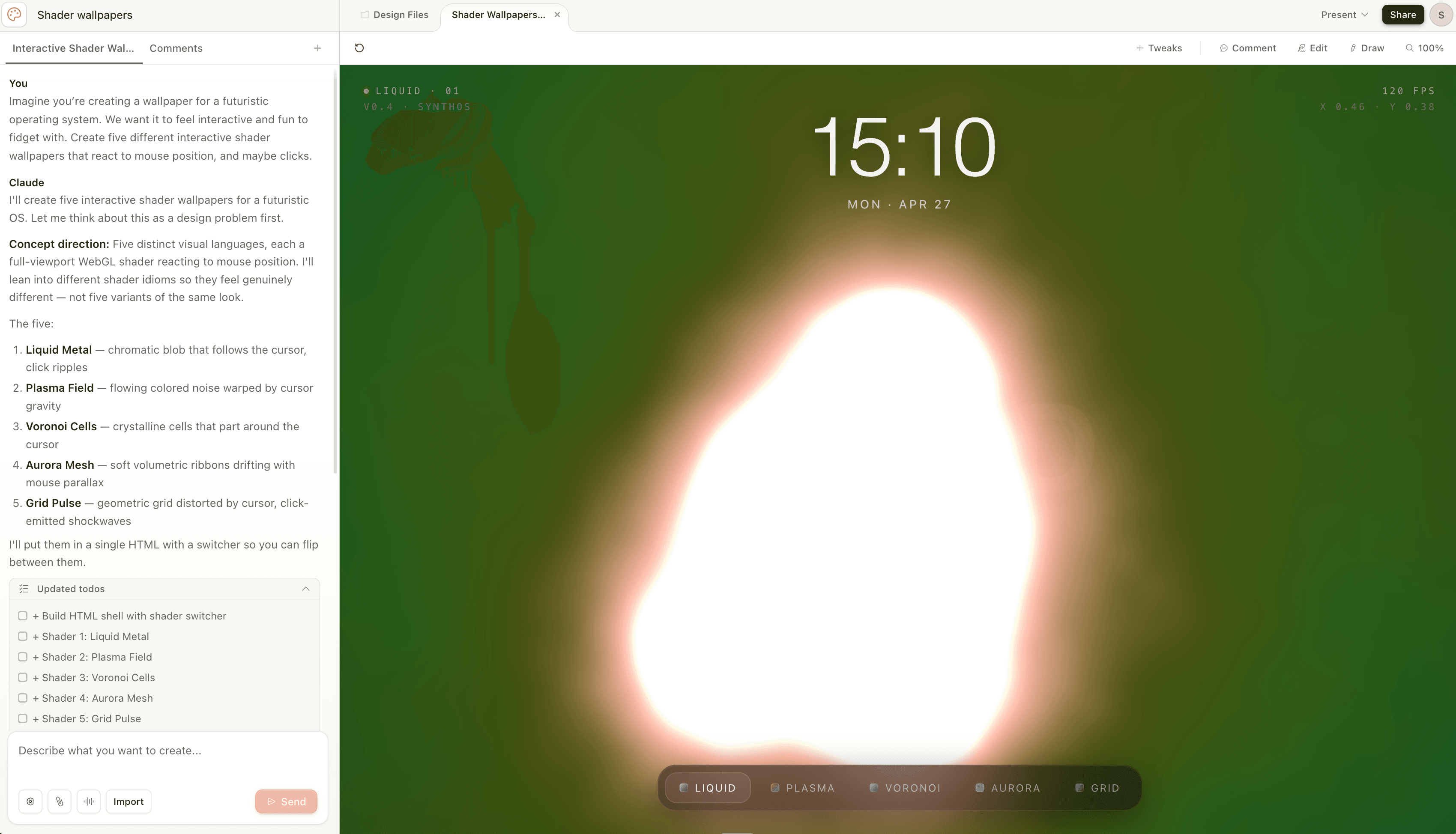
Interactive prototypes and web experiences
Claude Design is the more natural choice when interaction is part of the deliverable. A responsive dashboard, clickable prototype, animated microsite, or shader-driven experiment benefits from a code-connected environment. Moda can build websites and static UI mockups, but Claude Design has a clearer path from design exploration into interactive implementation.
Design systems that live in code
Claude Design can build a reusable design system from a codebase, component library, design files, prototypes, slide decks, documents, and individual brand assets. For product teams whose true source of truth is a React component library or a repository, that codebase connection is a meaningful advantage.
Moda’s brand kits are better suited to visual identity inputs such as a website, logos, colors, fonts, tone, and reference images. They do not replace a mature application component system. If the task is extending an existing product UI with the same components developers already ship, Claude Design or Figma may fit better.
Teams already centered on Claude
Claude Design is low-friction for people who already spend the day in Claude. The same account and usage allowance cover chat, Claude Code, Cowork, and Design. A PM or engineer can move from research and requirements into a prototype without adding another product or authentication flow.
Partner handoffs
Anthropic supports handoff from Claude Design to Claude Code and several design, development, and publishing partners. That is useful when the design is an intermediate step in a software workflow rather than the final artifact.
Where Moda is better
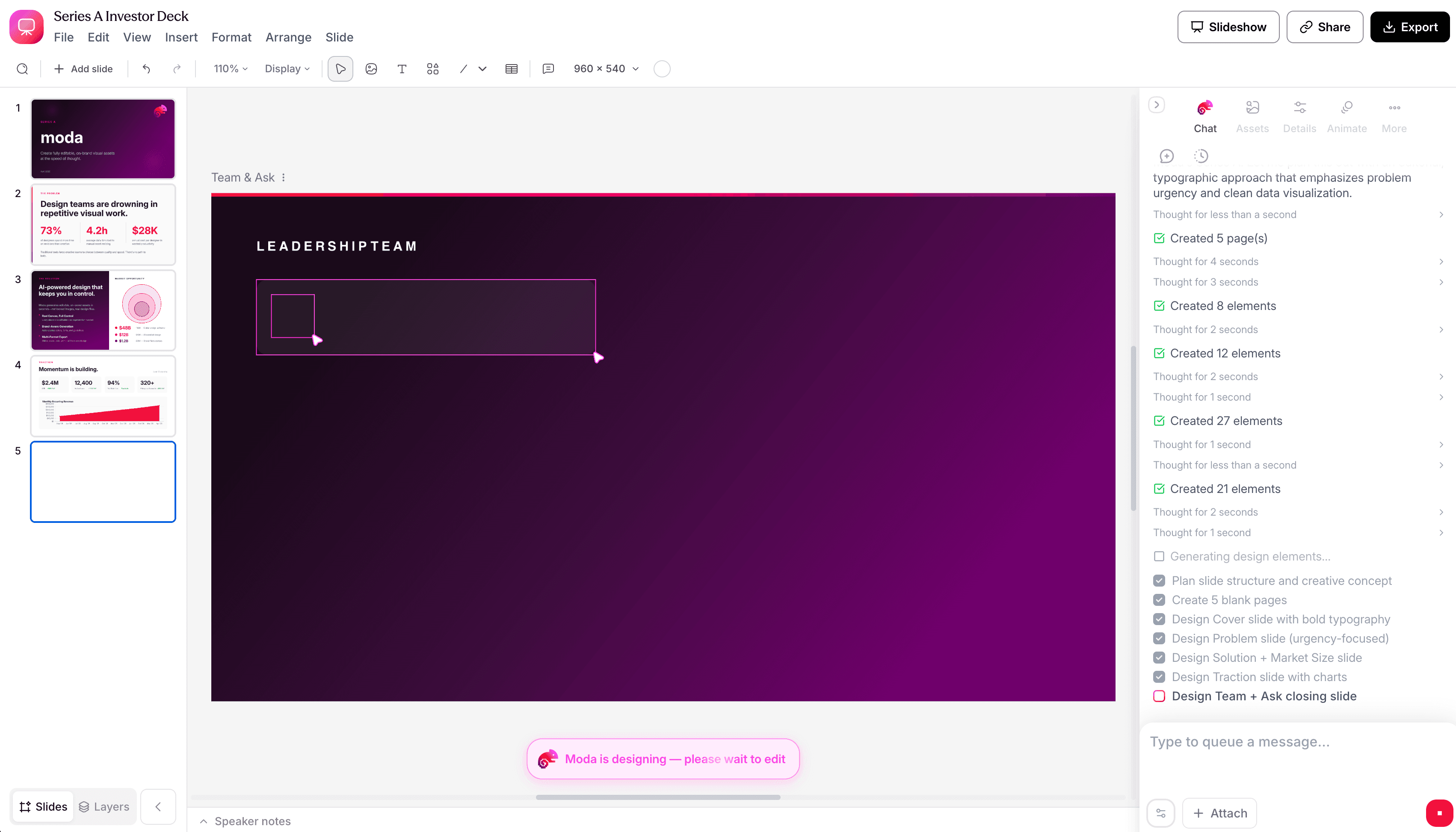
Decks and repeatable visual deliverables
Moda is centered on artifacts such as pitch decks, sales presentations, one-pagers, reports, social posts, carousels, and diagrams. The agent can create the first version, continue working on the same canvas, and respond to targeted requests while a person makes direct edits alongside it.
Claude Design can also create presentations, so this is not a question of basic capability. Moda is the better fit when slide and document production is the recurring job rather than one use case inside a broader prototyping environment.
One brand across several formats
A Moda brand kit can be applied to a deck, social graphic, PDF, diagram, or website within the same design workflow. That matters when a launch needs several coordinated assets rather than one prototype. Claude Design’s design systems are more technically expansive, especially for product UI, while Moda’s brand workflow is oriented toward repeatable visual communication.
External coding agents
Moda exposes design work through MCP, a CLI, and a public API. Claude Code, Codex, Cursor, and other compatible agents can read canvas structure and tokens, create or edit a design, remix existing work, attach source files, and export the result without a person driving the Moda interface.
Claude Design has an MCP path for Claude Code, but its main experience is closely tied to Claude. If your team wants to choose among coding agents or run a design step in CI or another server-side workflow, Moda’s broader programmatic surface is the clearer fit.
Live team editing
Anthropic describes Claude Design’s multi-person editing as basic. Moda supports real-time canvas collaboration. For a deck being revised simultaneously by marketing, sales, and leadership, that difference can matter more than the generation model.
What both products still require from you
Neither product can decide whether the story is persuasive, the financial model is sound, or the visual hierarchy fits your audience without good source material and review. Treat the first generation as a draft. Check claims, numbers, accessibility, image rights, and whether the format works in the place it will actually be presented.
For brand-sensitive work, create the design system or brand kit before judging output. A generic first result without that context is not a useful test of either product.
Which should you choose?
- Choose Claude Design for a product prototype tied to an existing codebase or component library.
- Choose Claude Design when interaction, responsive behavior, or web deployment is central to the artifact.
- Choose Claude Design when your team already works in Claude and wants one integrated environment.
- Choose Moda for recurring pitch decks, sales collateral, reports, social graphics, and diagrams.
- Choose Moda when one brand needs to carry across several visual formats.
- Choose Moda when Codex, Cursor, Claude Code, or an automated process needs to create and revise the design programmatically.
If your job sits in the overlap, run the same small brief through both products. Include one difficult slide or screen, make two targeted edits, and export to the application your team uses. The better choice is the one that preserves your source material and makes the second and third revision easier, not the one with the most impressive first screenshot.
Bottom line
Claude Design is no longer just a prototype preview, and Moda is not automatically better because it has a canvas. Claude Design is stronger for interactive, code-connected work inside the Claude ecosystem. Moda is stronger for agent-driven production of editable decks and coordinated brand assets across several formats.
For more context on using Claude specifically for presentations, see how to use Claude to create a pitch deck. If you are comparing a wider set of presentation products, use our AI pitch deck generator comparison.

Real editable visuals. Real canvas. Full control.
Fly through design work