TikTok Creative Center: How to Use Top Ads Without Fooling Yourself (2026)
How to use the TikTok Creative Center Top Ads dashboard: what a card shows, why the default view is not the best ads, the 180-day search that is, and how to adapt a reference set on-brand.
 Anvisha Pai, Co-founder & CEO, Moda
The TikTok Creative Center is TikTok's free, public site for advertisers, and its Top Ads dashboard is the only ad library that shows performance numbers for other people's ads. Meta's library gives you a start date. LinkedIn's gives you an impressions band for EU ads. TikTok gives every ad a like count, a click-through-rate percentile against its industry, a budget tier, and a second-by-second chart of when viewers clicked. No login needed.
The catch is how the ads got there. Top Ads shows only ads that advertisers chose to authorize, and its default view is sorted "For You" over the last 30 days, which on the day we measured returned a feed of recent, small-budget, mostly below-average ads. Switch the period to 180 days and the same search returns the proven set: high budgets, tens of thousands of likes, click rates in the top fifth of their industry. This guide covers the search, the card, the detail page, what the numbers mean and what they do not, the measurement behind those two paragraphs, and how to turn a set of saved ads into creative that matches your own brand.
What the Creative Center shows, and what it hides
The Creative Center has three signed-out sections as of September 2, 2026: Inspiration (the Top Ads dashboard and the Top Ads Spotlight), Trends (hashtags, with creators and videos alongside), and Creative Tools, which is a product page for TikTok Symphony, the AI generation suite. Older guides describe Keyword Insights and Top Products tabs; neither appears in the signed-out navigation today, so treat them as login features or gone.
| Shown for every Top Ad | Shown only with a login | Never shown |
|---|---|---|
| The full video, the caption, the landing page URL, brand name when supplied | The rest of the results past the first few cards on the dashboard | Spend, impressions, reach, clicks, or conversions as numbers |
| Likes, comments, shares | Saving ads to a collection | Ads the advertiser did not authorize, which is most ads |
| CTR as a percentile of the industry, such as Top 28% | Trending hashtags past the first three, and Symphony tools | Targeting, dates, or how long the ad ran |
| Budget as Low, Medium, or High | A performance rank the library vouches for beyond its own sort | |
| Region, industry, objective, source (TikTok Ads Manager or Others) | ||
| A second-by-second Interactive time analysis for CTR, CVR, clicks, conversions, and retention, with "highlight frames" |
Two things to hold onto. First, the dashboard's own footnote: ads displayed are limited to those authorized by advertisers and may not reflect all top-performing auction ads. Authorization is a checkbox in Ads Manager, so the pool is self-selected. Second, the CTR figure is a percentile, not a rate. "Top 28%" means the ad's click-through rate beat 72 percent of ads in its industry, and the comparison group is TikTok's, not yours.
Set up the search in a minute
Open ads.tiktok.com/business/creativecenter and choose Inspiration, then Top Ads Dashboard. The search bar takes a brand or product keyword; the filters under it do the real work.
- Region. One or more of 28 countries. The default follows your location.
- Industry. Twenty-one top-level groups with sub-industries under each: Beauty & Personal Care, for example, holds Skincare, Cosmetics, Haircare, Oral Care, Fragrances & Perfumes, and four more. Ticking a group's Select all searches every sub-industry at once.
- Objective. Traffic, App Installs, Conversions, Video Views, Reach, Lead Generation, or Product sales. Product sales is the TikTok Shop objective, and it dominates the proven beauty set below.
- Period. Last 7 days, Last 30 days, or Last 180 days. This filter matters more than any other, for reasons the next section shows.
- Ad Language, Ad Format (Spark ads or Non-Spark ads, meaning creator posts promoted by a brand versus ads uploaded to Ads Manager), and Likes, which is a band such as Top 1~20%.
- Sort by. For You, Reach, CTR, or Others, which opens 2s Views Rate, 6s Views Rate, CVR, and Likes.
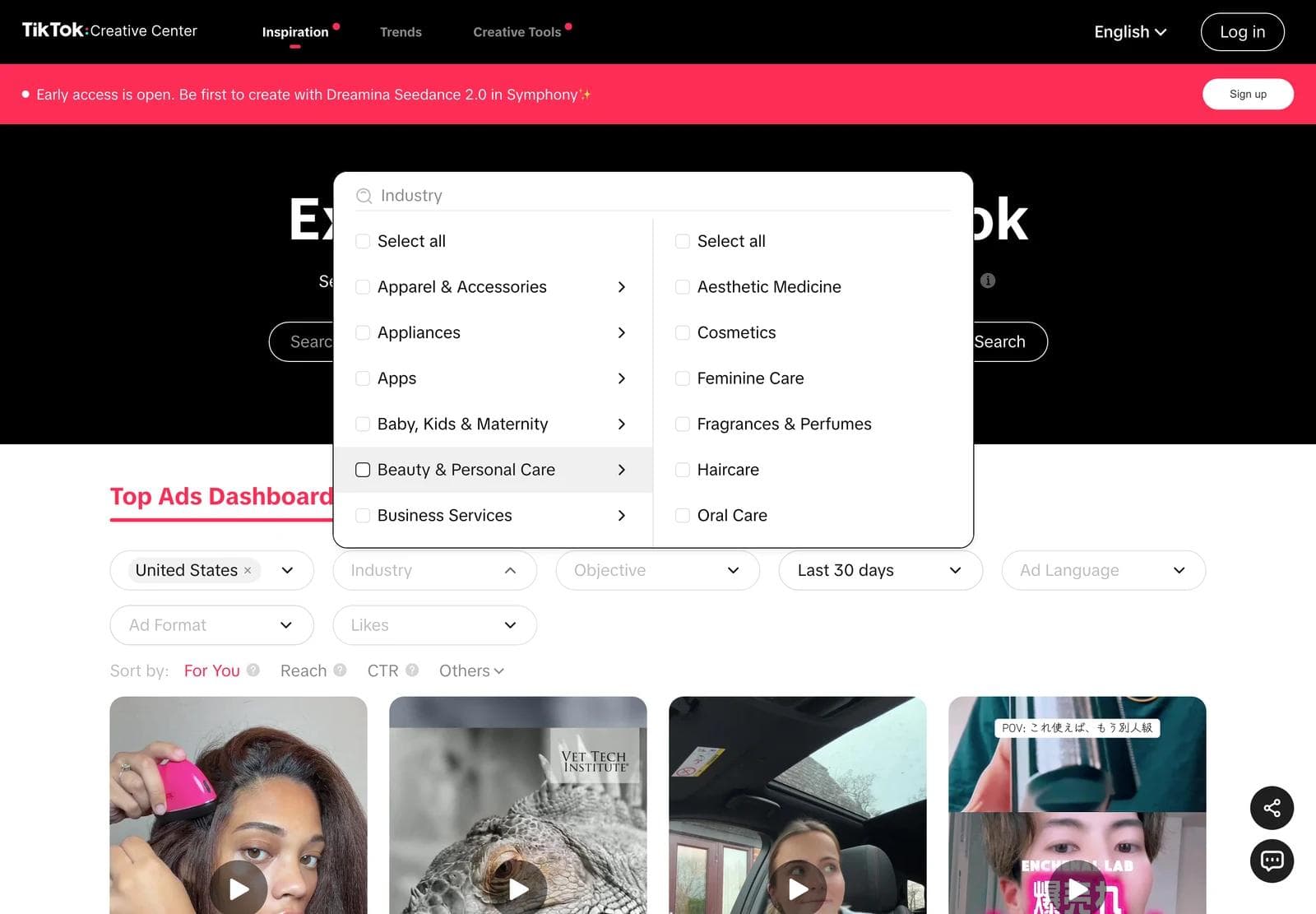
Filters write themselves into the URL, so a search like ?period=180®ion=US&industry=14 is bookmarkable, and you can hand a colleague the exact view you were looking at.
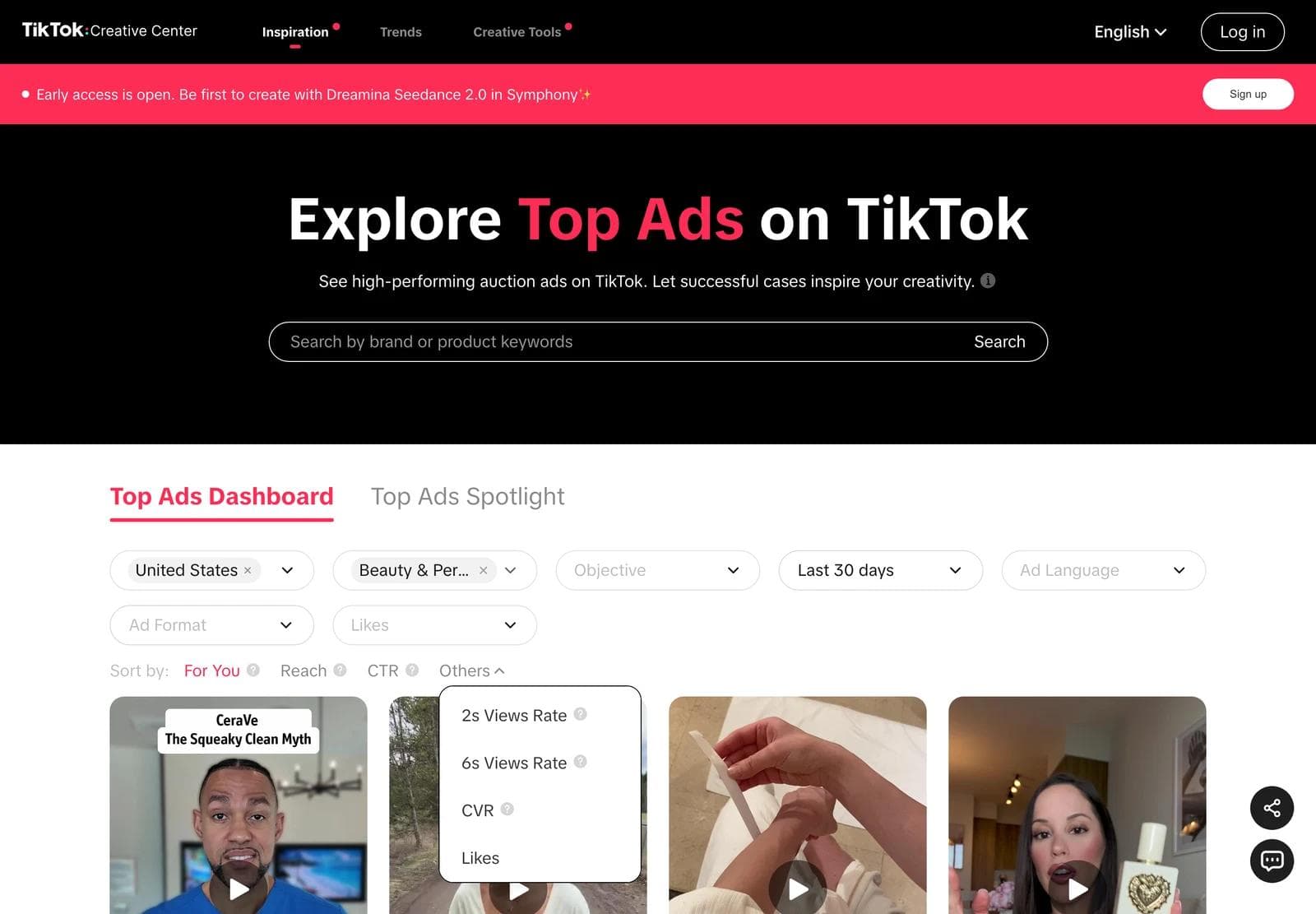
Without a login the dashboard renders four cards, then a View More button and the line "Log in to access all Top Ads and more." Logging in with a free TikTok account lifts that. Everything else in this guide, including the detail pages, works signed out.
How to read a card and a detail page
Every card is a video poster with the objective and industry printed on it, then three numbers underneath: Likes, CTR as Top N%, and Budget as Low, Medium, or High. See analytics opens the detail page, the link icon copies a permalink, and the star saves the ad to a collection if you are logged in.
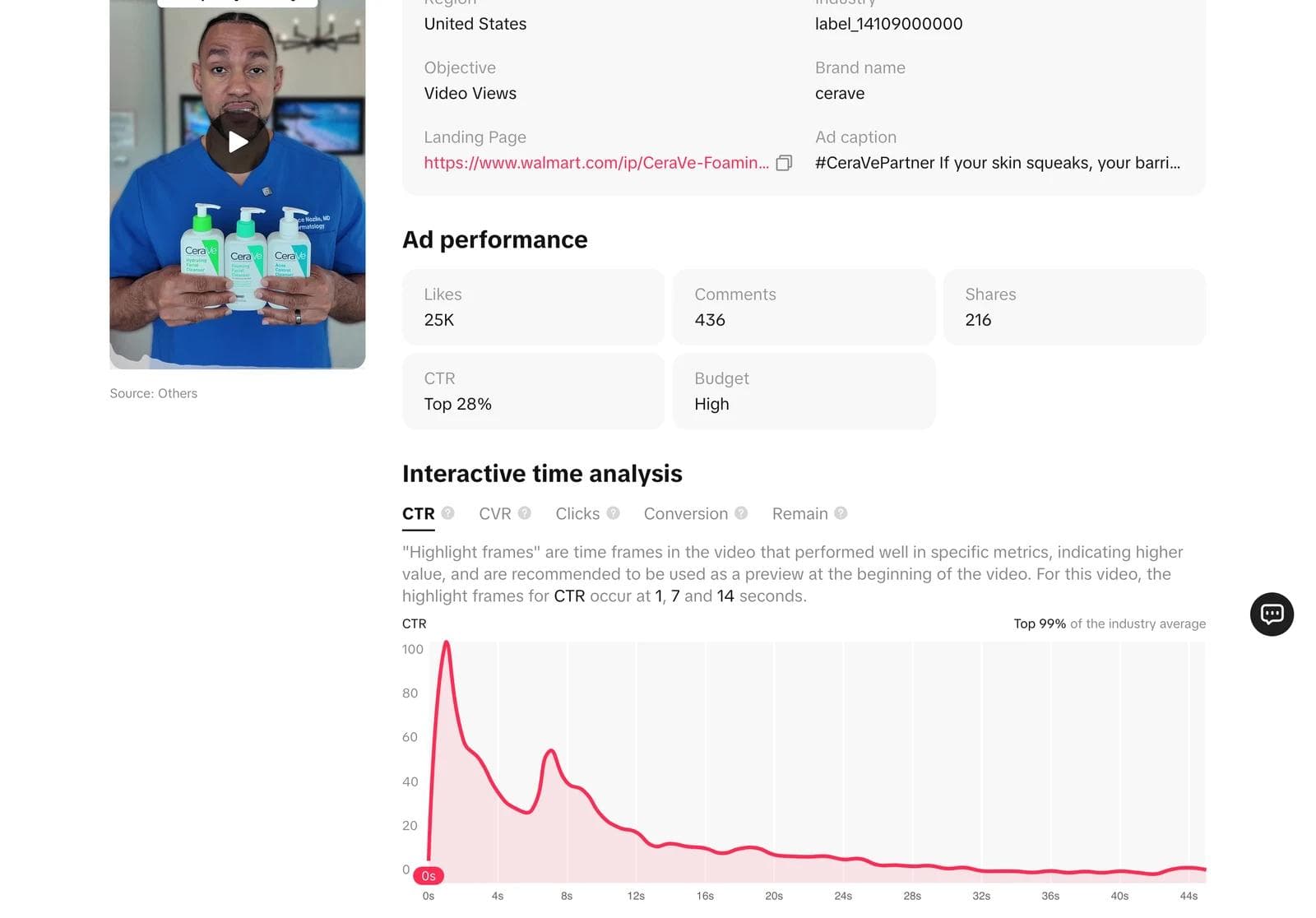
The detail page adds the fields that make research possible:
- Region, Industry, Objective, Brand name, Landing Page, Ad caption. The landing page is the URL the advertiser actually used, complete with its tracking parameters, which tells you whether the ad sells on the brand's site, on Amazon or Walmart, or inside TikTok Shop. Brand name is often blank; in our beauty sample it was blank on 36 of 60 ads, nearly all of them creator posts run as Spark ads.
- Likes, Comments, Shares as counts, and CTR and Budget as on the card.
- Interactive time analysis. Tabs for CTR, CVR, Clicks, Conversion, and Remain (retention), each a curve across the video's timeline indexed to 100 at its peak. Above the chart TikTok names the "highlight frames", the seconds at which that metric spiked, and suggests using them as the preview at the start of the video. The CeraVe ad above peaked for CTR at 1, 7, and 14 seconds.
- Source. "TikTok Ads Manager" for uploaded creative, "Others" for everything else, which in practice means creator posts promoted through Spark Ads.
The retention tab is the most useful thing in the library. It is the only public place you can see where viewers of a competitor-category ad stopped watching.
The default view is not the best ads
Advice about Top Ads usually stops at "filter to your industry and study the winners." We pulled the dashboard's first 60 results for the United States on September 2, 2026 to see what that actually returns, twice: once with the default Last 30 days across every industry, and once for Beauty & Personal Care over Last 180 days. Both used the default For You sort. The samples are the first 60 ads the dashboard loads for each search, not the whole pool; the dashboard reported 178 authorized US ads in the 30-day window and 400 beauty ads in the 180-day window.
| First 60 ads, US, For You sort | All industries, last 30 days | Beauty & Personal Care, last 180 days |
|---|---|---|
| Budget tier High / Medium / Low | 9 / 8 / 43 | 50 / 5 / 5 |
| Likes over 10,000 | 3 | 39 |
| Likes of 10 or fewer | 18 | 0 |
| CTR in the top 20% of the industry | 4 | 43 |
| CTR in the bottom 20% | 22 | 1 |
| Median video length | 39 seconds | 39 seconds |
| Brand name blank | 49 | 36 |
| Source: Others (creator posts) | 37 | 43 |
The 30-day feed is mostly new, cheap, and below average: 43 of 60 on a Low budget, 18 with ten likes or fewer, and 22 in the worst fifth of their industry for CTR. It is a feed of what advertisers authorized this month. The 180-day beauty search is the opposite population: 50 of 60 High budget, 39 with more than 10,000 likes, and 43 in the top fifth for CTR. Same dashboard, same sort, one filter changed.
That is the correction to the standard advice. Top Ads does contain proven creative, but the default view does not surface it, and a 30-day search in one industry can be tiny: Beauty & Personal Care over the last 30 days returned 16 ads in total. Set the period to 180 days first, then sort by CTR or 6s Views Rate if you want a ranking, then filter by objective so you are comparing ads that were bought for the same job.
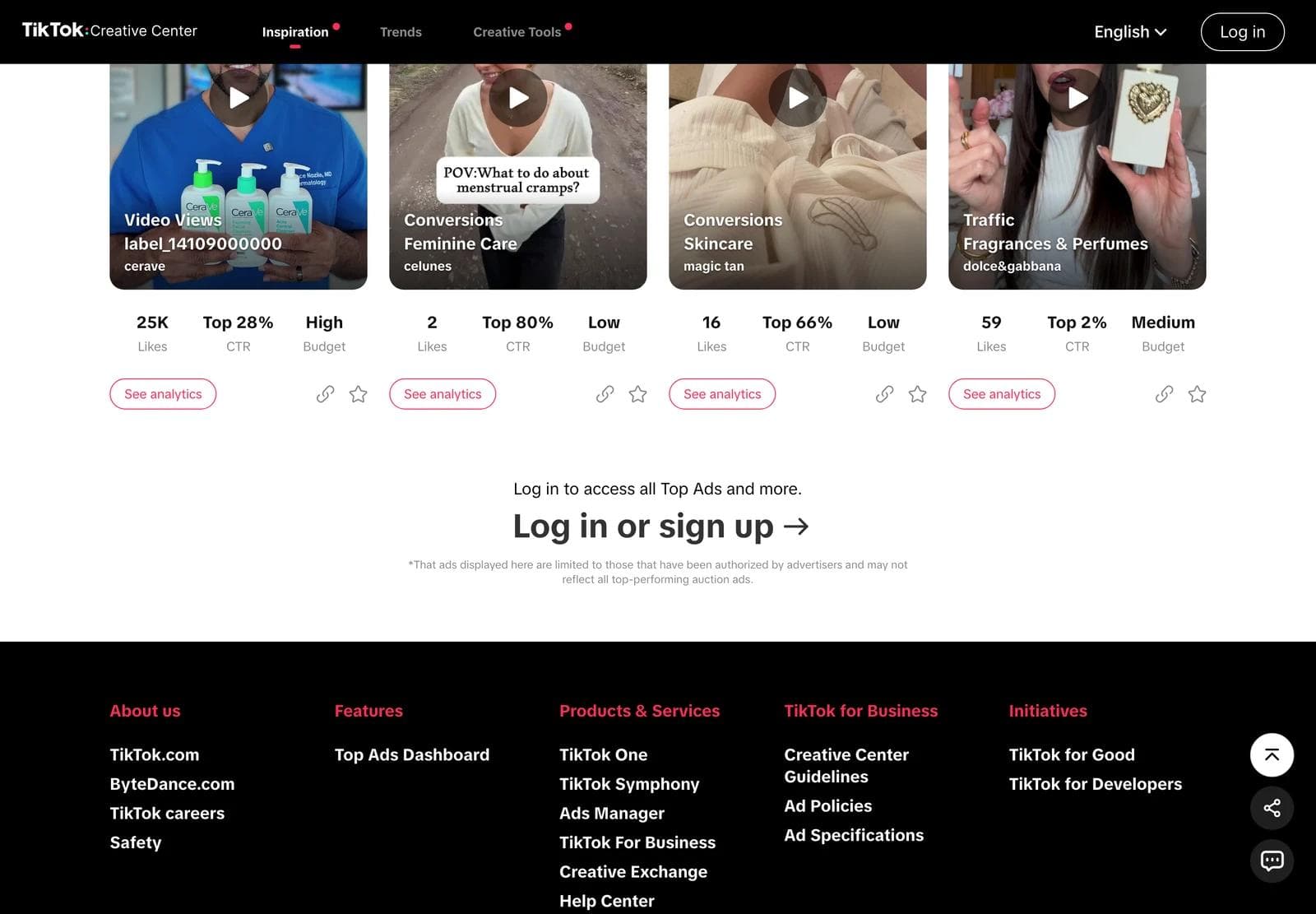
Three more cautions from the same data:
- Likes are not CTR. In the 180-day beauty set the ad with the most likes, a 26-second skincare video at 495,000 likes, sat at Top 74% for CTR: people watched, few clicked. A 21-second wig ad at 124 likes sat at Top 2%. Sort by the metric that matches your objective.
- Region means reach, not origin. 31 of the 60 beauty ads listed more than one country under Region, and several were captioned in Spanish, Arabic, or Vietnamese. A US search returns ads that were shown in the US, including global campaigns.
- Nothing here is a spend or a result. Budget is three tiers. CTR is a percentile. Likes are the organic count on the post. An ad that looks like a winner here is a hypothesis, the same as on any other library.
What the proven beauty set looks like
The 180-day beauty sample is worth describing on its own, because it is a fair picture of what survives on TikTok in a category where the buyer is skeptical and the feed is crowded.
- A person, immediately. 51 of the 60 opening frames show a face or hands on a product. Nine open on the product alone, a graphic, or a text card.
- Creator posts, not brand uploads. 43 of 60 have Source: Others, and four captions begin "Replying to @", the format where a creator answers a commenter's question and a brand promotes the answer. 32 of 60 ran on the Product sales objective, which means a TikTok Shop checkout rather than a website.
- Length is a decision, not a rule. Seven ads under 15 seconds, 18 at 16 to 30, 24 at 31 to 60, 11 over a minute, and the longest at five minutes. The quarter with the shortest videos and the quarter with the longest both held Top 5% CTR ads.
- Text on the first frame about half the time. Roughly half the openers carry an on-screen line, and the lines that work are claims or questions, not brand names: "What happens when I only apply this plumper to one side of my lips" is the entire first frame of a nine-second ad at 344,000 likes and Top 5% CTR.
Skincare was 23 of the 60, Cosmetics 11, Wig & Hair Styling 11, Oral Care 6, Fragrances & Perfumes 5. If you sell one of those, the other four are your adjacent categories: same buyer, different claims, and their surviving structures transfer without putting your ad next to a rival's.
Build a reference set
A reference set is six to ten saved ads with a note on why each is there. The star on a card saves to a collection if you are logged in; signed out, keep the permalink (ads.tiktok.com/business/creativecenter/topads/<id>) in a document. For each ad record:
- The ID, brand, objective, and source, so you can find it again and know whether it was a creator post or a studio upload.
- The CTR percentile and the highlight frames. The seconds TikTok names are where the click happened. Watch those seconds.
- What the first frame shows and says, in one phrase: face to camera with a claim, product in hand, text card, before-and-after split.
- What the ad asks you to believe, such as "this is faster than what you use" or "people like you already switched".
- What you would keep and what you would change for your brand.
The video, the creator, and the claims belong to the advertiser. Saving an ad for analysis is ordinary competitive research; reusing the footage, the person, or the copy is not. Adapt the structure, then supply your own product, people, and claims.
A worked reference set
Four ads from the beauty searches above, chosen because they make different decisions rather than because they are the best in the category. Each entry names what the eye lands on, what the ad asks you to believe, and what transfers to a different product.
CeraVe, expert to camera, sold at a retailer. A dermatologist in scrubs holds three cleansers and opens with a line about squeaky-clean skin being a weak barrier. Brand-uploaded through Ads Manager, objective Video Views, landing page on Walmart, 25,000 likes, Top 28% CTR, High budget, 46 seconds. The CTR highlight frames are 1, 7, and 14 seconds: the hook, the claim, and the first product close-up. What transfers: the structure of credential, myth, correction, product. What does not: the credential itself.
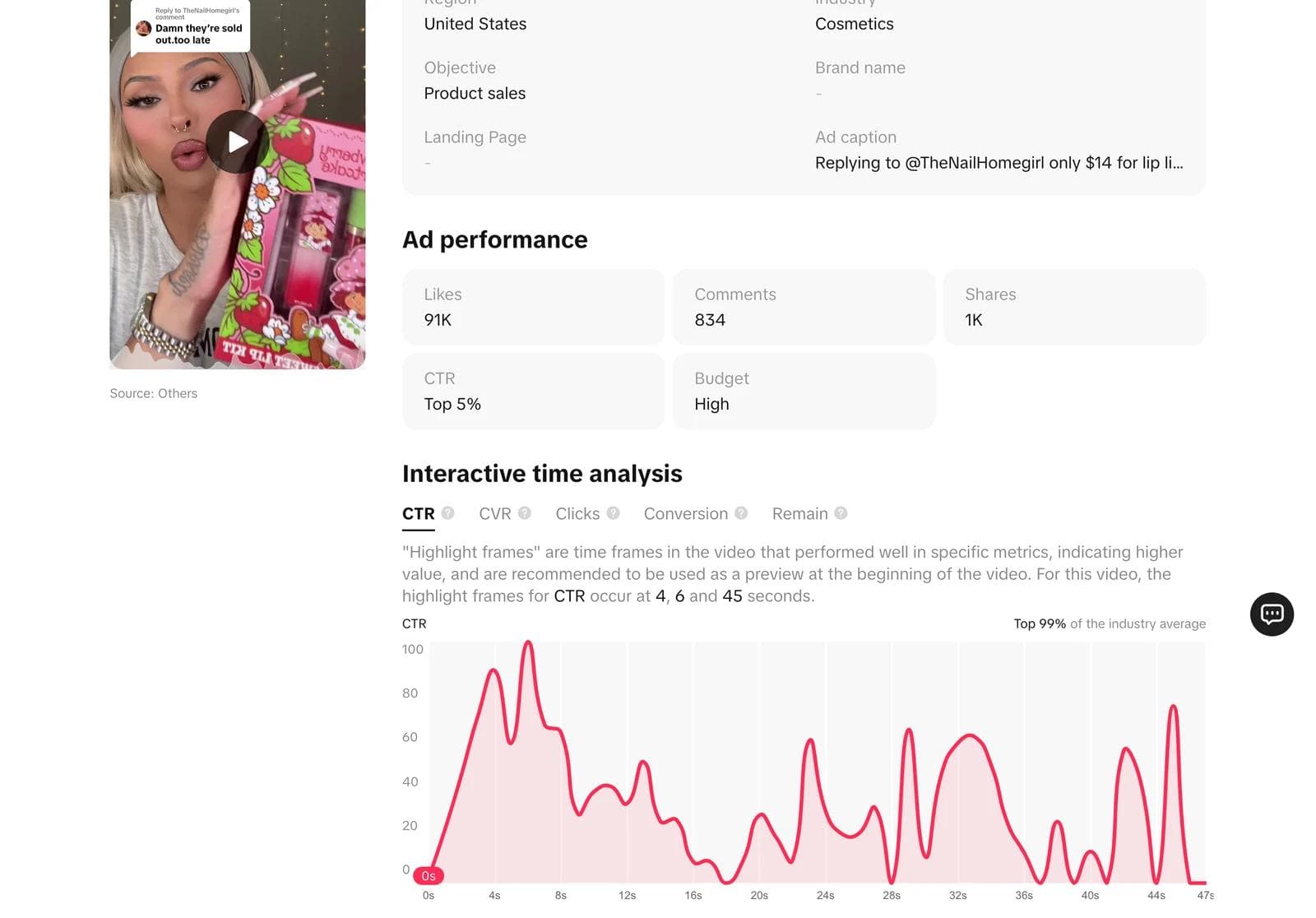
A reply-to-comment creator post, price in the caption. The first frame is the creator holding a lip kit with the comment she is answering pinned above her head, "Damn they're sold out. too late"; the caption reads "only $14 for lip liner + lipstick". Industry Cosmetics, no brand name, no landing page, because the checkout is TikTok Shop. What the ad asks you to believe is that a real person replied to a real comment. What transfers: the format decision, which any brand with a creator relationship can request, and the price stated as the reply to a comment rather than as an offer.
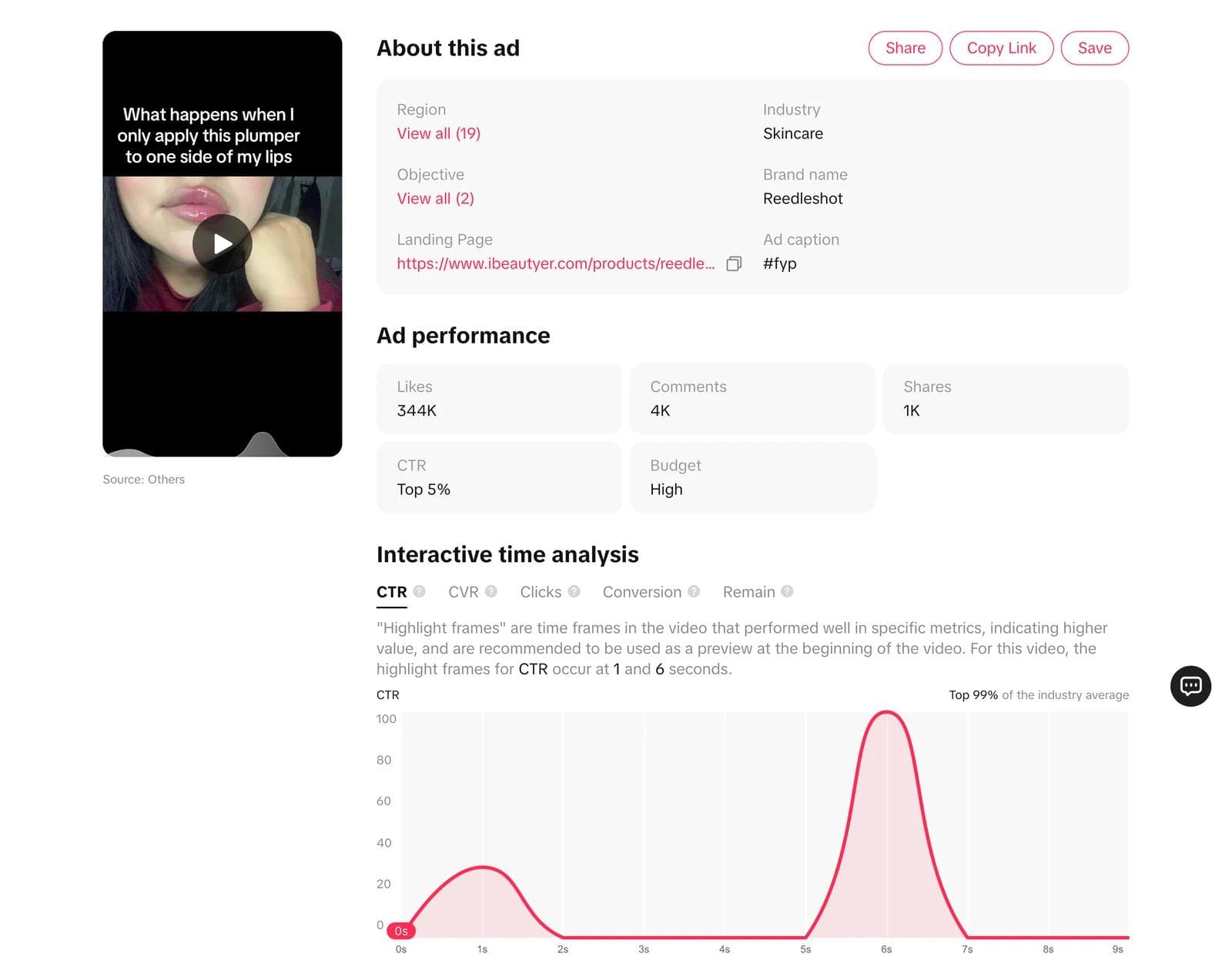
Reedleshot, a text card, then the demo. Black frame, white sentence: what happens when the plumper goes on one side only. The premise sets up its own payoff, a comparison on the same face. Nine seconds, and the caption is one hashtag. What the ad asks you to believe is a visible before-and-after. What transfers: the text-card opener as a design object, which is the one part of a TikTok ad that is a layout problem rather than a filming problem, and the decision to let the demo carry the whole ad.
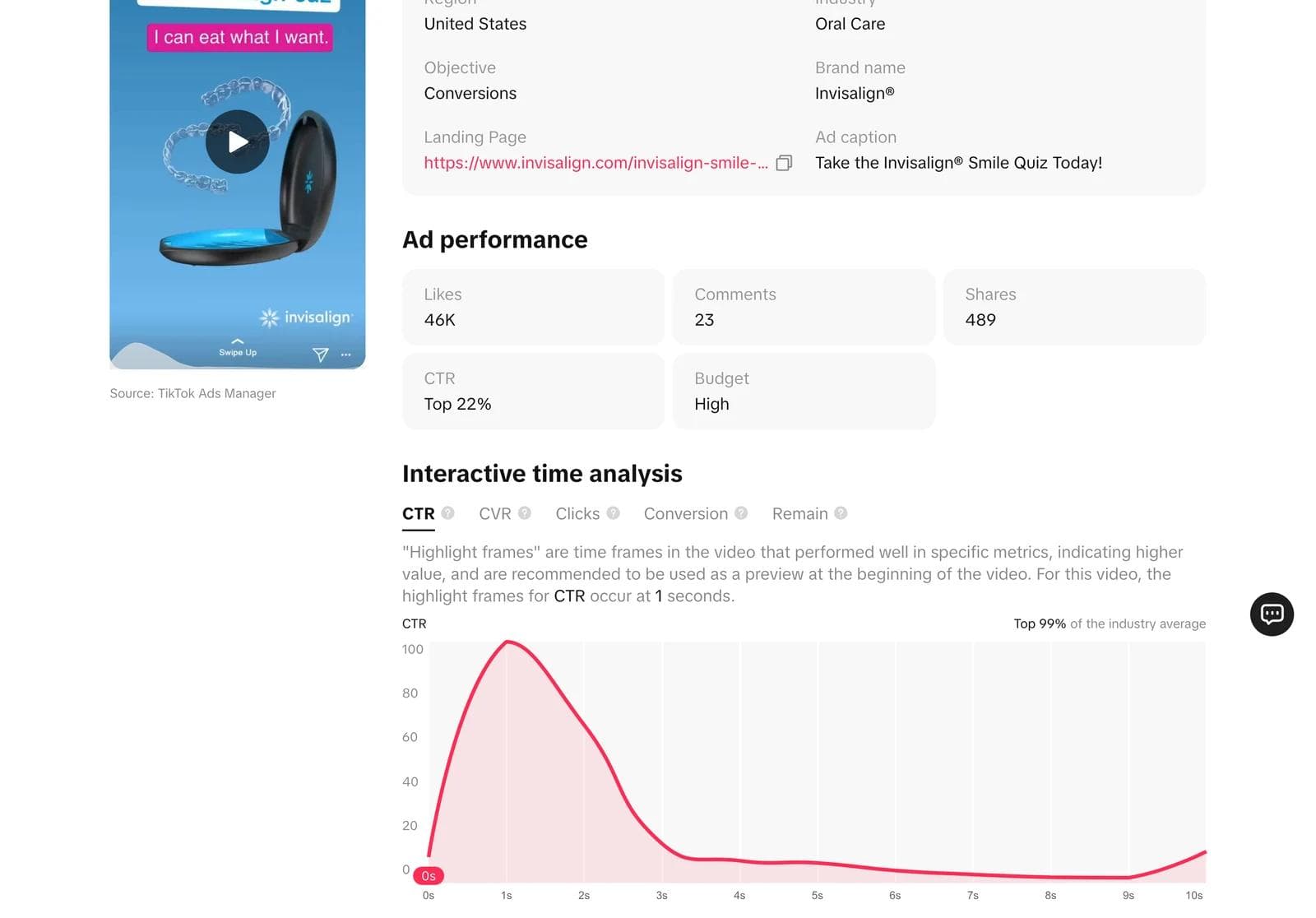
Invisalign, a designed frame with a quiz. The opening frame is a brand-colored graphic, the aligner case, and a speech-bubble line, "I can eat what I want," followed by a Smile Quiz call to action. Ten seconds, brand-uploaded, Conversions objective, landing on invisalign.com. This is the studio fork: no creator, no face, a layout with copy on it. What transfers: a designed opener with one line of customer language and one action, which is exactly the kind of asset a brand can produce in-house and test in variants.
Turn references into on-brand creative
TikTok ads are video, and the filming, the creator, and the sound are outside what a design tool does. What a design tool does own is the part of these ads that is a layout: the text-card openers, the captioned first frames, the end cards with the offer, the designed variants like the Invisalign opener, and the static versions of the same concept for the feed placements that take images.
In Moda, the workflow is: attach the saved frames as references, name the brand kit, and describe what stays and what changes. A prompt that works:
Use these three TikTok ad frames as references. Make four 1080 x 1920 opening cards for our lip oil using the Glowlab brand kit: one text-card hook in the style of the first reference (one question, white on black, no logo), one designed product frame like the third reference with a one-line customer quote and a single CTA, and two variants of each with different lines. Keep every element editable. Do not reuse any reference copy.The result is built on an editable canvas, so the headline, the product image, and the CTA stay separate objects. The same card can be pushed to a 1080 x 1350 or 1080 x 1080 static ad without rebuilding it, and a text-led opener can be animated and exported as an MP4 to sit in front of your own footage.
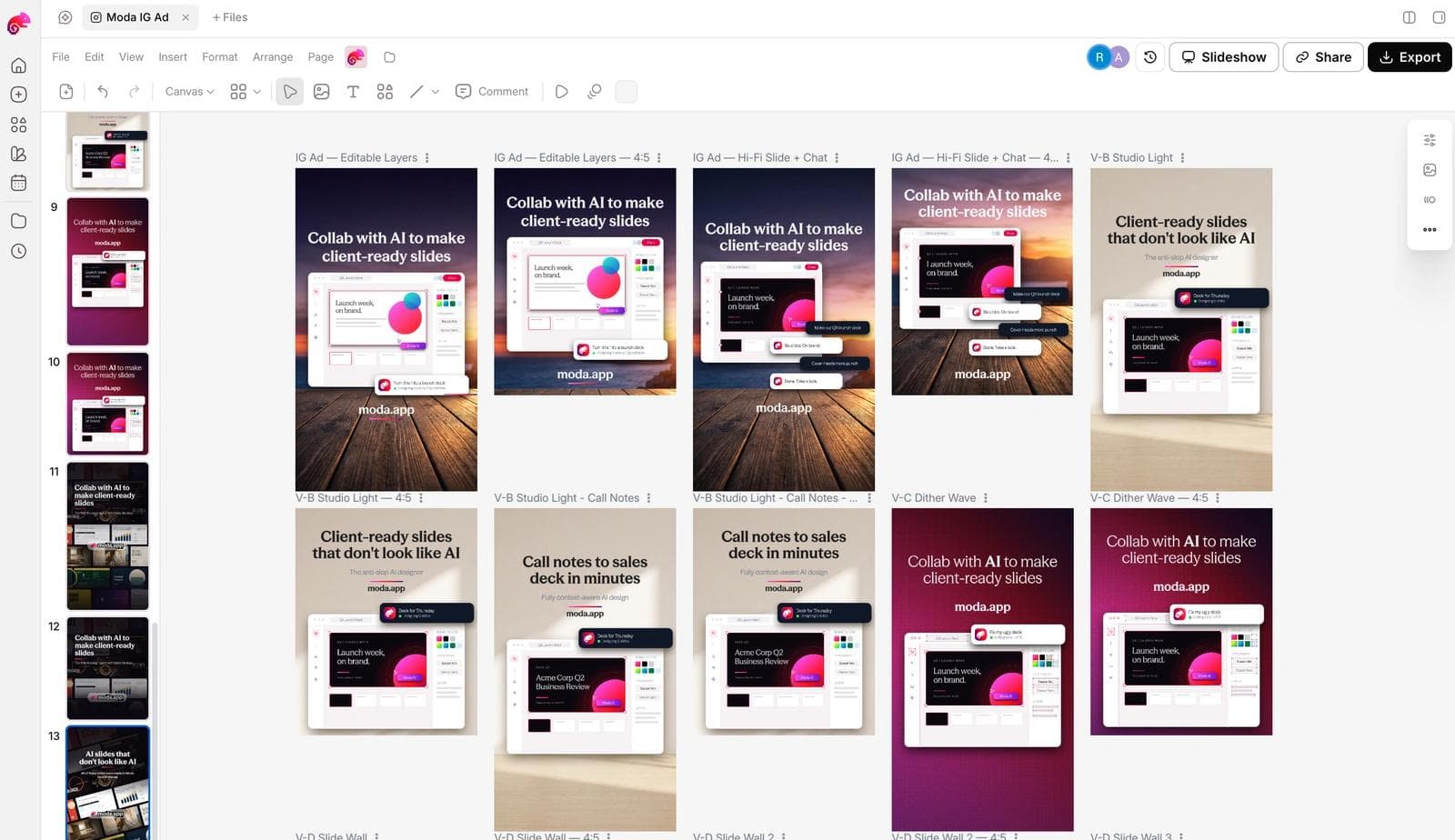
Before any of it ships: the claim on the card is yours and true, the line reads at phone size in the first second, and you have at least two hooks against the same layout so the first test measures the message and not only the design.
If the brand side is not set up, how AI design tools build a brand kit from your website covers what gets extracted. The Meta Ad Library guide covers the same reference workflow for static ads, with a measured sample of its own, and the LinkedIn Ad Library guide covers B2B.
The other TikTok library
TikTok also runs a Commercial Content Library at library.tiktok.com, built for the EU's Digital Services Act. It covers every ad with at least one impression in the past year, but the Ad target country field accepts only EEA countries, the UK, and Switzerland, so it cannot search the United States. For ads that did target Europe it shows what the Creative Center hides: first and last shown dates, unique users seen, target audience size, impressions, the advertiser and who paid, and the targeting used. Use the Creative Center for creative and the Commercial Content Library for dates and reach, and expect them to disagree about which ads exist.
Frequently asked questions
Is the TikTok Creative Center free, and do I need an account?
It is free and public. Top Ads, detail pages, Spotlight, and the first three trending hashtags open without a login. A free TikTok account unlocks the rest of the dashboard results, saving ads to collections, the full trends lists, and the Symphony creative tools.
Does Top Ads show every TikTok ad?
No. It shows ads that advertisers authorized for display, and the dashboard's own footnote says the set may not reflect all top-performing auction ads. On September 2, 2026 it reported 178 authorized US ads across all industries for the last 30 days.
What does "Top 28% CTR" mean?
The ad's click-through rate is in the top 28 percent of ads in its industry, by TikTok's comparison. It is a percentile, not a rate, and it does not tell you the clicks or the spend.
Why do the Top Ads look weak when I open the dashboard?
The default view is Last 30 days sorted For You, which on the day we measured returned mostly new, low-budget ads. Set the period to Last 180 days and sort by CTR or 6s Views Rate to see the proven set.
Can I download a video from the Creative Center?
There is no download button, and the video belongs to the advertiser. Keep the permalink and your notes, and use the ad as a structural reference rather than as footage.
What is the difference between the Creative Center and the TikTok Commercial Content Library?
The Creative Center shows authorized ads with engagement metrics and no dates, for 28 countries. The Commercial Content Library shows every ad that targeted the EEA, UK, or Switzerland in the past year, with dates, impressions, and targeting, and cannot search the United States.

Real editable visuals. Real canvas. Full control.
Fly through design work