AI Brochure Generators: The Fold Is What Breaks
By Moda · Last updated
A brochure is a flyer that has been folded, and the fold is where generated files fail. Panels are unequal by design, artwork must run past the trim, and copy sitting near a fold gets swallowed. Moda publishes the trim, bleed and safe figures rather than describing them.
Most generated brochures look correct on screen and arrive wrong from the printer. A brochure is the one common print piece where the flat file and the finished object are different shapes, and a screen preview shows none of that difference.
The three edges a brochure file has
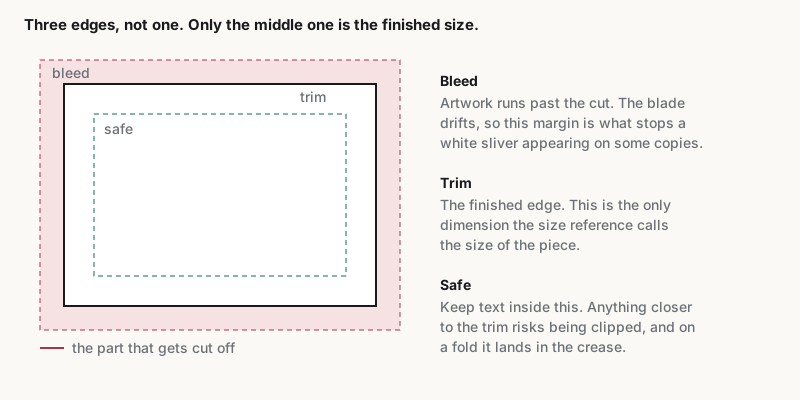
Three numbers decide whether a file prints: the trim, the bleed that extends past it, and the safe area inside it. A generated brochure that states none of them is a picture of a brochure rather than a file a printer can use, however good it looks.
| Specification |
|---|
| Trim size — 11 × 8.5 in (279.4 × 215.9 mm) |
| Pixels at 300 DPI — 3300 × 2550 |
| Aspect ratio — 11:8.5 |
| Color mode — CMYK |
| Bleed — 3 mm on every edge |
| Bleed size — 11.25 × 8.75 in |
| Pixels at 300 DPI, bleed size — 3375 × 2625 |
| Safe area — 10.75 × 8.25 in |
| Export formats — PDF, PNG, TIFF |
The bleed size is larger than the trim on purpose. Guillotines drift by a fraction of a millimetre, so artwork stopping exactly at the trim leaves a white sliver on some copies of a run and not others. Extending the background past the cut makes that drift invisible.
Which print formats need bleed, and which do not
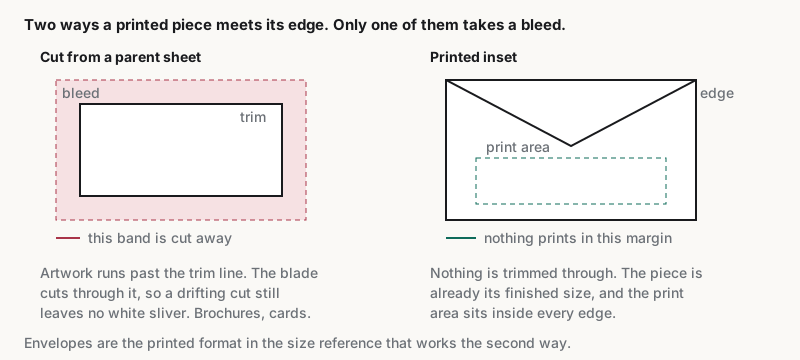
Not every print format takes a bleed. A sheet size arrives at its finished dimensions, so it has a trim and nothing beyond. Most other pieces are cut from a larger sheet and need artwork past the trim. Envelopes are the exception, printing inset instead.
| Format and bleed |
|---|
| Bi-Fold Brochure — 11 × 8.5 in, 3 mm bleed |
| Bookmark — 2.5 × 8.5 in, 3 mm bleed |
| Business Card — 3.5 × 2 in, 3 mm bleed |
| Door Hanger — 3.5 × 11 in, 3 mm bleed |
| Flyer — 8.5 × 11 in, 3 mm bleed |
| Medium Poster (18×24) — 18 × 24 in, 3 mm bleed |
| Movie Poster (27×40) — 27 × 40 in, 3 mm bleed |
| Postcard — 6 × 4 in, 3 mm bleed |
| Rack Card — 4 × 8.5 in, 3 mm bleed |
| Research Poster (36×48) — 36 × 48 in, 3 mm bleed |
| Small Poster (11×17) — 11 × 17 in, 3 mm bleed |
| Standard Poster (24×36) — 24 × 36 in, 3 mm bleed |
| Tri-Fold Brochure — 11 × 8.5 in, 3 mm bleed |
| #10 Envelope — 9.5 × 4.125 in, no bleed |
| A0 — 33.11 × 46.81 in, no bleed |
| A1 — 23.39 × 33.11 in, no bleed |
| A2 — 16.54 × 23.39 in, no bleed |
| A3 — 11.69 × 16.54 in, no bleed |
| A4 — 8.27 × 11.69 in, no bleed |
| A5 — 5.83 × 8.27 in, no bleed |
| A6 — 4.13 × 5.83 in, no bleed |
| A7 — 2.91 × 4.13 in, no bleed |
| US Legal — 8.5 × 14 in, no bleed |
| US Letter — 8.5 × 11 in, no bleed |
| US Tabloid — 11 × 17 in, no bleed |
The practical test is whether the artwork is trimmed through after printing. A brochure, a business card and a postcard are cut from a parent sheet, so each takes a bleed. A sheet size is already the finished dimension, so adding one only gets cropped. Envelopes are the exception: printed inset from every edge — https://moda.app/resources/sizes/envelope-10.
Why the fold is the part that fails
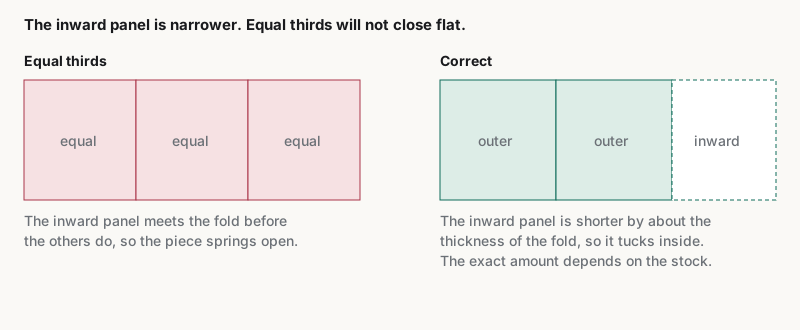
A tri-fold is not three equal panels. The panel that folds inward must be fractionally narrower, or it buckles against the others and the piece will not close flat. Generated layouts nearly always divide the width evenly, which is the single most common defect.
The inward-folding panel must be shorter than its neighbours by roughly the thickness of the fold, and the amount depends on the stock. A print shop usually supplies a template with the widths set; a generated file that ignores it produces a brochure that springs open.
The second failure is copy near a fold. A headline crossing one is unreadable in the hand even when it looks fine flat, because the crease runs through the letterforms. Keep text inside the safe area published above rather than judging by eye on screen.
| Check | What a failure looks like | Where it shows up |
|---|---|---|
| Artwork extends past the trim | A white sliver along one edge | Only on part of the print run |
| Panels are unequal | The brochure springs open instead of closing flat | Only in the hand, never on screen |
| Copy sits inside the safe area | A headline cut by a crease | Only after folding |
| Colour mode is CMYK | Colours shift, particularly bright blues | Only on paper |
How to test what a generator actually produced
Editability decides whether a defect is fixable or a regeneration. Open the export and click a headline: if a text cursor appears, the panel widths and copy can be corrected. If the page selects as one picture, every fix means generating again and hoping.
The full method is published at /resources/ai-design-agent, with a pass condition and a near-miss for each test. The export test matters most for print, because a flattened file cannot be corrected by the print shop either.
Moda states element by element what leaves its own export native and what becomes a picture at /resources/editable-pptx-export, including where it flattens. A vendor who cannot produce an equivalent list is asking for trust at the point where a mistake costs a print run.
When a brochure is the wrong format
A brochure carries a sequence: the panels are read in a fixed order and the format exists to stage information. If the content is a single message or a list of specifications, a flyer or a rack card does the job with fewer ways to go wrong.
The rack card above exists for that case: a single unfolded panel sized for a display rack, which removes the fold and every failure that comes with it. Choosing it usually beats fixing a brochure that did not need to be one.
Related guides
Key takeaways
- Bleed exists because guillotines drift; artwork stopping at the trim leaves a white sliver on part of the run.
- Sheet sizes take no bleed and finished pieces do, and adding one to the wrong format gets the file rejected.
- A tri-fold has unequal panels: the inward-folding one must be narrower or the piece will not close flat.
- If the export selects as a single picture, no defect above can be corrected without regenerating.
Frequently asked questions
What size is a tri-fold brochure?
The common size trims to letter dimensions in landscape, folded into three panels. The exact trim, bleed and safe figures are published in the specification table above, generated from the same size reference the public print pages use rather than restated here where they could drift.
Why does a brochure need bleed?
Because the piece is cut from a larger sheet after printing, and the cut drifts slightly across a run. Artwork extending past the trim line means the drift falls on artwork rather than on paper, so no copy shows a white edge.
Are the three panels the same width?
No. The panel that folds inward has to be fractionally narrower than the others, by roughly the thickness of the fold, or the brochure buckles and will not close flat. Even division is the most common defect in a generated layout.
Can an AI brochure be edited before printing?
It depends on the tool rather than on the format. Open the export and click a headline: a text cursor means panel widths and copy can be corrected, and a single selection box around the page means every fix requires generating the whole thing again.
Moda publishes this page and makes one of the tools it describes. The specification tables are generated from the same size reference the public print pages use, so the numbers here and there cannot diverge, and the evaluation method is one a reader can run against Moda as well.