Editable PowerPoint Export: What Survives, and What Becomes a Picture
By Moda · Last updated
Editable PowerPoint export is usually claimed and rarely specified. This page states it for Moda: which element kinds leave as native PowerPoint objects, and the styling and structural causes that turn one into a picture. Both lists are generated from the code that makes the decision.
Nearly every AI slide tool says its export is editable, and the word covers everything from a genuine object model to a PDF with a different extension. The claim is hard to check before buying and easy to discover afterwards, usually at the point someone needs to change a number an hour before a meeting. What follows is the specification rather than the adjective: the element kinds that survive as native PowerPoint objects, the exact styling that forces one to flatten, and the cases where a fallback is not a loss at all.
What does an editable export actually mean?
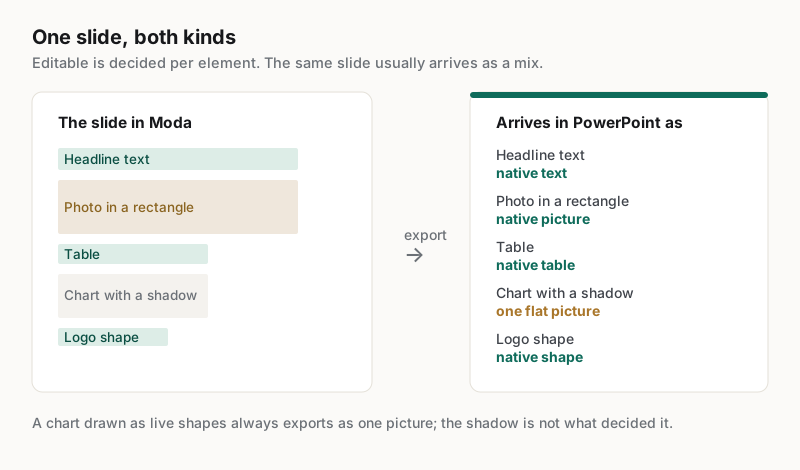
It means the file contains objects PowerPoint understands — text you can retype, shapes you can move, pictures you can replace — rather than a rendering of them. The distinction is per element, not per deck: one slide can hold both, and usually does.
Treating it as a property of the whole file is what makes the claim untestable. A deck is a mix, and the useful question is which of the things you expect to revise are on the editable side of that mix. A headline that stays text and a background that flattens is a good outcome; the reverse is not.
The two tables below are generated from the eligibility rules the exporter runs, and published alongside them at https://docs.moda.app/help/export/formats. If the code changes, the tables change, and the pages citing them fail a build until they are refreshed. They cover styling and structural eligibility — three other things can still put a picture on a slide, and each is named where it applies rather than folded into the tables: a chart drawn as live shapes, an image whose source cannot be read at export time, and the runtime video conditions in the last section.
Which elements leave Moda as native PowerPoint objects?
Eight element kinds can export as real PowerPoint objects rather than pictures. Whether a given instance does depends on the styling it carries, which the next section states in full — but these are the kinds for which a native path exists at all.
| Element kind |
|---|
| Ellipses |
| Freeform shapes |
| Images |
| Lines |
| Rectangles and containers |
| Tables |
| Text |
| Video |
Two things worth reading off that list. Tables and text are on it, which is what makes a generated deck genuinely workable — the words and the numbers stay editable in the places people actually edit them. And a native path is a possibility rather than a promise: an element of a listed kind still flattens if it carries styling PowerPoint cannot express.
What turns an element into a picture?
A fixed set of styling causes, each naming the element kinds it applies to. The list below is complete across every native lane for styling and structural gates, which means a kind absent from a cause keeps its native export rather than being an unmeasured case.
| Cause and the element kinds it flattens |
|---|
| backdrop blur | Containers, Ellipses, Freeform, Images, Rectangles, Video |
| colour adjustment on an image fill | Images, Video |
| container that clips its content | Containers |
| container with group opacity below 1 | Containers |
| distort warp | Containers, Ellipses, Freeform, Images, Rectangles, Text, Video |
| donut ellipse (non-zero inner radius) | Ellipses |
| drop shadow | Containers, Ellipses, Freeform, Images, Rectangles, Video |
| flipped or non-finite image scale | Images, Video |
| gradient fill | Containers, Ellipses, Freeform, Rectangles |
| gradient stroke | Containers, Ellipses, Freeform, Images, Rectangles, Video |
| image fill | Containers, Ellipses, Freeform |
| inner shadow | Containers, Ellipses, Images, Rectangles, Video |
| inside a clip mask or a clipping container | Containers, Ellipses, Freeform, Generated graphics, Images, Lines, Rectangles, Tables, Text, Video |
| layer blur | Containers, Ellipses, Freeform, Images, Rectangles, Video |
| non-center stroke alignment | Containers, Ellipses, Rectangles |
| non-normal blend mode | Containers, Ellipses, Freeform, Images, Rectangles, Video |
| non-solid fill priority | Containers, Ellipses, Freeform |
| non-solid fill priority, except a pattern-image or video fill (those move to the image and video lanes) | Rectangles |
| partial ellipse (arc or pie) | Ellipses |
| rotated image fill | Images, Video |
| rotation beyond the embed tolerance | Video |
| shader fill | Containers, Ellipses, Freeform, Rectangles |
| source-mask shader effect | Containers, Ellipses, Images, Rectangles, Video |
| tiled (repeating) image fill | Images, Video |
Read the element list after each cause carefully, because a kind that is missing from one is information. It means that kind keeps its native export when it carries that effect — though the effect itself may be dropped or approximated rather than preserved. Lines and tables gate on clipping alone; text gates on clipping and a distort warp. Two cases sit outside this table entirely, both documented at https://docs.moda.app/help/export/formats: a chart Moda draws as live shapes always exports as one picture whatever its styling, and an image whose bytes cannot be fetched stays in the picture layer even when nothing here applies to it.
When is a fallback not a loss?
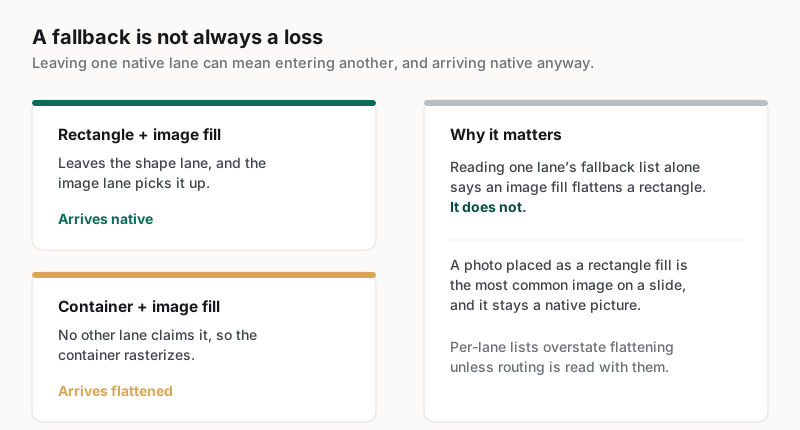
Sometimes an element leaves one native lane and is picked up by another rather than flattening. The clearest case is a plain rectangle carrying an image fill, which exports through the image lane and arrives as a native picture rather than a rasterised shape.
This is the detail that makes a per-lane reading of the rules misleading. Looking only at the shape lane's fallback list, an image fill appears to flatten a rectangle. It does not — the routing below is documented at https://docs.moda.app/help/export/formats. A container with an image fill has no equivalent lane to move to, which is why the same cause behaves differently there.
| Re-routed case |
|---|
| image fill -> image lane, when the node is a plain rectangle |
The practical consequence is that photographs placed as rectangle fills — the most common way an image reaches a slide — stay native. That matters more for a real deck than any of the exotic styling causes, because it is the case that occurs on nearly every page.
What happens to video?
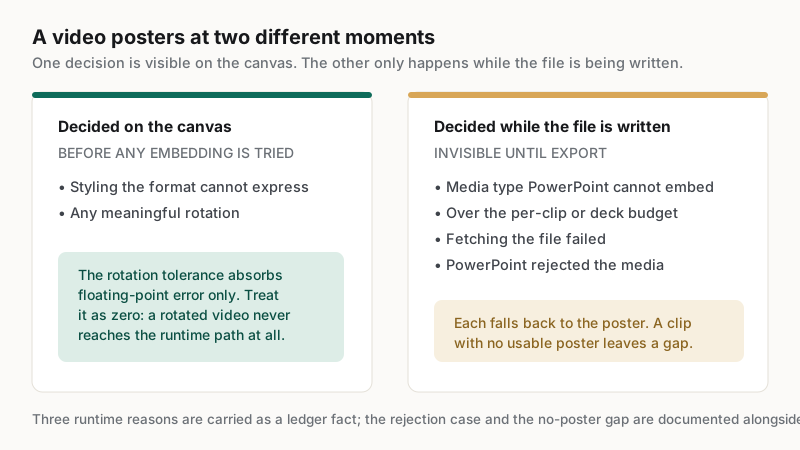
A video that clears every styling rule can still arrive as its poster frame. Some of that is decided on the canvas before export, and some only while the file is being written — which is why a clip can look fine right up to the moment it is handed over.
| Downgrade reason |
|---|
| fetch-failed |
| too-large |
| unsupported-mime |
Two things sit outside that list. PowerPoint can reject the media as the slide is written, which also falls back to the poster, and a clip with no usable poster leaves a gap in that spot instead — both documented at https://docs.moda.app/help/export/formats. And rotation is not a runtime condition at all: it is checked from canvas state before embedding is attempted, so a rotated video never reaches the runtime path.
Rotation deserves a word, because the published tolerance is easy to misread as a budget. The exporter allows 0.5 degrees, documented at https://docs.moda.app/help/export/formats, and that is an allowance for accumulated floating-point error rather than a feature: any rotation a person would apply on purpose posters the video. Treat it as zero rather than as a small permitted amount.
How should a team check any tool's export?
Ask for the specification, not the adjective. A vendor that can state which element kinds survive and what flattens them has an object model; one that answers with the word editable is describing an intention. Then verify the answer against a real export.
Four checks, in the order they tend to fail:
- Ask which element kinds export natively. A specific list is a good sign; a yes is not an answer.
- Ask what forces one to flatten. Every honest object model has such a list, because no format expresses everything.
- Export a deck carrying the styling your brand actually uses — a shadow, a gradient, a clipped image — and click each element.
- Change a number in a chart and a word in a heading, in PowerPoint, and see which of the two the file lets you do.
The fourth check is the sharpest because it separates the two things people mean by editable. Text staying text is common. A chart staying a chart is rare, and worth knowing about before a quarterly review rather than during one.
Related guides
Key takeaways
- Editable export is a property of each element, not of the file; one slide usually holds both kinds.
- Eight element kinds have a native PowerPoint path, including text and tables.
- A fixed, published set of styling causes flattens an element, and an element kind absent from a cause keeps its native export.
- A plain rectangle with an image fill moves to the image lane rather than flattening, so photographs stay native.
- Ask a vendor which kinds survive and what flattens them; the word editable on its own is not an answer.
Frequently asked questions
Does Moda export a real PowerPoint file?
Yes, and the useful detail is which parts arrive as objects. Eight element kinds have a native path, text and tables among them, while specific styling causes flatten an individual element. The per-element specification for those causes is published and linked here, alongside the cases that sit outside it.
Why did one shape export as a picture and an identical one not?
Because flattening is decided per element from the styling it carries, not per slide. A shape with a gradient stroke, a drop shadow or a non-normal blend mode rasterises so the effect survives; the same shape without it exports as a native object you can still edit.
Do charts stay editable in the exported deck?
A chart Moda draws as its own bars and axes exports as one picture, deliberately: the alternative is dozens of loose shapes nobody can practically edit. Plan for chart data to be revised in Moda and re-exported rather than adjusted inside PowerPoint afterwards.
Will an image on a slide arrive as a replaceable picture?
Usually yes. A plain rectangle carrying an image fill leaves the shape lane and exports through the image lane, arriving as a native PowerPoint picture rather than a rasterised shape. That covers the most common way a photograph is placed on a slide.
Why did my video become a still frame?
Either the styling flattened it, or rotation did — that is checked from canvas state before embedding. Otherwise it happened while the file was written: an unsupported media type, an exceeded size budget, a failed fetch, or PowerPoint rejecting the media. A clip with no usable poster leaves a gap instead.
Published by Moda. The element and flattening lists on this page are generated from the export eligibility rules in Moda's own source and are published alongside them; a change to those rules fails a build until this page is refreshed. Competitor export behaviour varies and is not described here — verify it by exporting a deck and inspecting the file.