AI PowerPoint Generators: What Arrives When the File Opens
By Moda · Last updated
An AI PowerPoint generator turns a brief or a document into slides. What decides whether it saved any time is the file it hands over: whether the deck opens as a presentation a person can keep editing, or as pictures of slides. Most exports, Moda's included, are a mix of the two.
The demo always ends at the preview. The work starts when the file lands on someone else's machine, because a generated deck is almost never final — a title changes, a number moves, a slide gets cut the morning of the meeting. Whether those edits take two minutes or an afternoon is decided by what the export actually contains, and that is invisible until the file is open in PowerPoint with the cursor in a text box.
What is an AI PowerPoint generator?
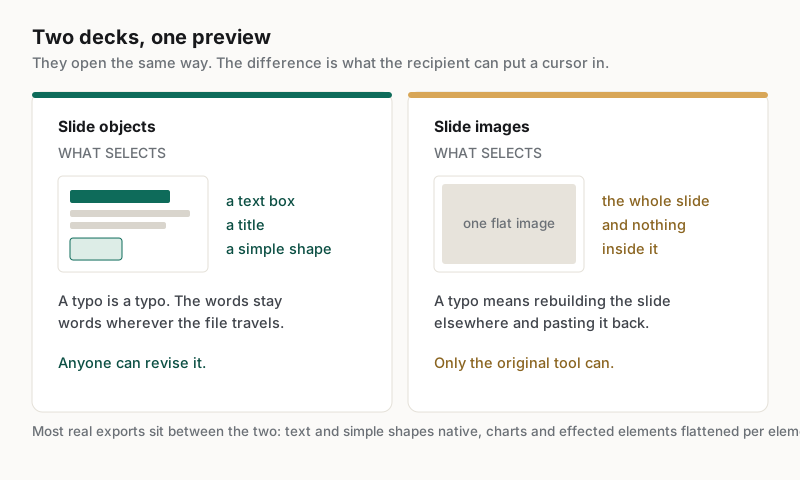
An AI PowerPoint generator produces slides from a prompt, a document, or a dataset, and delivers them as a presentation file. The category splits on what the file contains: a deck built from real slide objects, or a sequence of images arranged to resemble one.
Both open in PowerPoint and both look correct on the first pass, which is why the distinction survives so many evaluations. It shows up the moment someone tries to change something. In a deck of real objects a title is a text box and a chart is a chart. In a deck of pictures a title is a region of pixels, and correcting a typo means rebuilding the slide somewhere else and pasting it back.
For a one-off internal update that difference is tolerable. For anything that gets reviewed, forwarded and revised — which is most business decks — it decides whether the tool removed work or moved it downstream to whoever gets asked to fix the file.
What actually arrives in the file?
Four properties decide whether a generated deck is workable: the file is a presentation rather than pictures, text is still text, styling survives rather than flattening element by element, and the fonts are ones the recipient has. Each fails silently.
| Property | How it fails | What it costs downstream |
|---|---|---|
| A real presentation file | Slides arrive as one image each, or as a PDF renamed | Every correction becomes a rebuild somewhere else |
| Text kept as text | Type is painted into the slide image | A typo cannot be fixed, and nothing is searchable or translatable |
| Styling that survives export | An effect or fill the format cannot express flattens that element to an image | Those parts stop being editable inside a deck that is otherwise objects |
| Fonts the recipient has | The file names a font nobody else installed | The deck reflows on the reviewer's machine and looks broken |
The fourth is the one that embarrasses people in meetings. A deck built with a font the generator had but the reviewer does not will substitute something else on open, and substitution changes line breaks, which changes how much text fits, which breaks the layout the deck was approved with. It is not a rendering bug and it is not visible to the person who made it.
Worth stating plainly, because this page is a checklist and Moda is one of the tools it can be run against: Moda's PowerPoint export is hybrid. Text and supported shapes are written as native PowerPoint objects, while generated charts and any element carrying an effect the format cannot express — a backdrop blur, a clipping container, group opacity below one, a distort warp — are flattened to an image for that element. The deck is not a stack of pictures, and it is not entirely objects either. Run the checks below against it like any other file.
Why does the deck look different on someone else's machine?
Because a presentation file references fonts rather than containing them, unless they are deliberately embedded. When the recipient lacks a font, the application substitutes a similar one, and the substitute has different metrics, so text reflows and carefully placed slides shift.
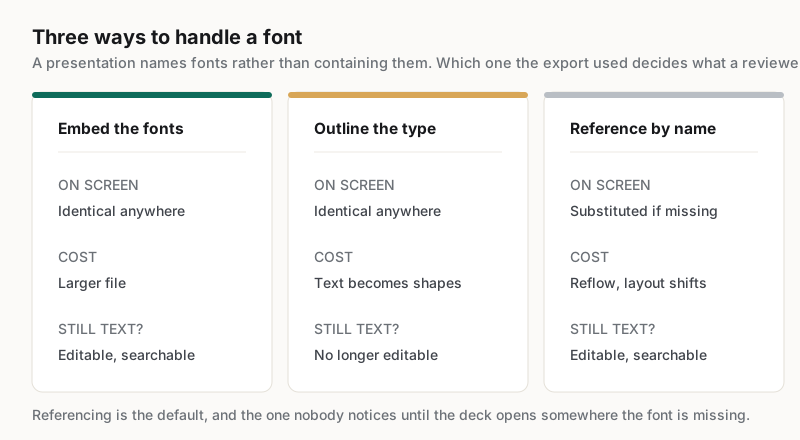
This is worth understanding rather than working around, because the three responses are not equivalent. Embedding the fonts keeps the deck exact and grows the file. Converting type to outlines keeps the appearance exactly and makes the text uneditable and unsearchable, which trades one problem for a worse one. Choosing fonts the audience already has is the only option that costs nothing, and it constrains the design.
Ask which of the three a tool does, because the answer determines what the recipient sees:
- Embeds the fonts in the file, so the deck renders identically anywhere it opens.
- Outlines the type, so it looks identical and can no longer be edited or searched.
- References the fonts by name and lets the recipient's machine substitute, which is the default and the one that surprises people.
None of the three is wrong in every case. What is wrong is not knowing which one a generated deck used before sending it to twenty people, and the only way to find out is to open the file somewhere the fonts are not installed.
How should a team evaluate an AI PowerPoint generator?
Judge the exported file on a machine that did not create it, and judge the second version rather than the first. A generator that produces an impressive deck nobody can revise moves work downstream instead of removing it, which is the opposite of the reason it was adopted.
Five checks, in the order they tend to fail:
- Open the export in PowerPoint and click a headline. If a text cursor appears, it is text; if a picture selects, it is not.
- Ask how a brand change is applied. If updating one colour or logo means editing every slide by hand, the deck costs more on its second outing than its first.
- Open the same file on a machine without the brand fonts and compare the two side by side.
- Change a title, delete a slide and reorder two others, then check whether anything else moved.
- Ask for the same content again with one fact changed, and see whether the design survives or is regenerated from scratch.
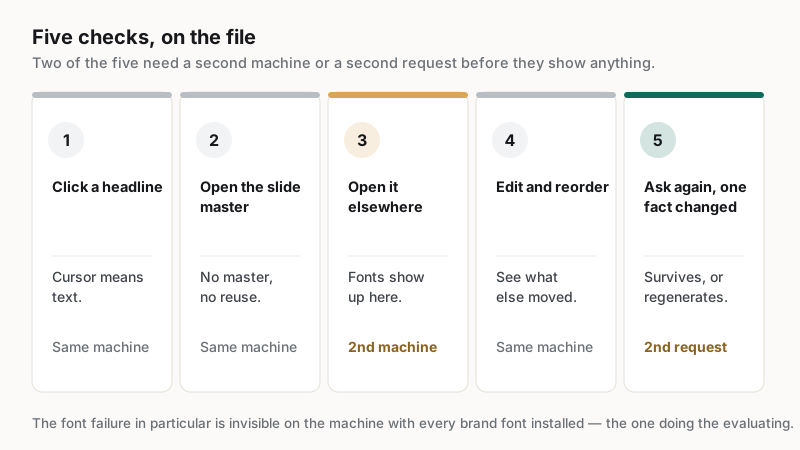
The third check is the one teams skip, because the person evaluating the tool is usually the person whose machine has every brand font installed. That is precisely the machine on which the font problem is invisible, and precisely not the machine the deck will be reviewed on.
Which teams get the most out of one?
Teams producing recurring decks with changing content gain the most: weekly business reviews, sales decks reworked for each account, and recruiting or update decks that follow a fixed structure. The saving comes from the revisions and the reuse, not from the first generation.
The reported pattern is consistent. Coverbase built 150 slides in a single night and reported ~$40k saved against design-contractor spend, at https://moda.app/case-studies/coverbase, and Mintlify reported 10+ hrs saved per strategic asset across 11 sellers at https://moda.app/case-studies/mintlify. Both describe volume produced by people who are not designers, which is only possible when the output stays editable by them.
The poor fit is the deck that is the message rather than a container for it: a keynote, an investor pitch with bespoke visual argument, a launch narrative. Those deserve a designer. A generator earns its place on the recurring decks in between, where the honest alternative is not a better deck but a worse one built at midnight.
Related guides
Key takeaways
- An AI PowerPoint generator is judged on the exported file, not the preview it was demoed with.
- A deck of slide images opens fine and cannot be corrected; a deck of objects can be edited by the recipient.
- Ask how a brand change is applied across a deck, because doing it slide by slide erases the time the generator saved.
- Fonts are referenced rather than contained, so a deck can reflow on the reviewer's machine and look broken.
- Test on a machine that did not build the deck, because that is where the font failure becomes visible.
Frequently asked questions
Does an AI PowerPoint generator produce a real .pptx file?
Some do and some export images wrapped in one. The test takes seconds: open the deck and click a headline. A text cursor means the slide is built from objects a recipient can edit. A picture selecting the whole slide means every future correction has to happen somewhere else.
Why does my generated deck look wrong on a colleague's laptop?
Almost always fonts. A presentation references fonts by name rather than containing them, so a machine without the font substitutes a similar one. Substitutes have different metrics, so text reflows, line counts change and carefully placed elements shift. Embedding the fonts prevents it.
Which parts of a generated deck stay editable?
Usually the text and the simple shapes. Charts, and any element carrying an effect the file format cannot express, are commonly flattened to an image — including in Moda's own export. That is workable so long as the words stay words, so click the specific things you expect to revise later.
Should text be converted to outlines before sending a deck?
Only when the appearance matters more than the content. Outlining guarantees the deck looks identical everywhere, and it makes every word uneditable, unsearchable and untranslatable. For a deck that will be revised or reused, embedding the fonts achieves the same fidelity without that cost.
Can a generated deck be edited by someone who is not a designer?
That is the point of the format, and it depends entirely on the export. If the deck arrives as objects with a shared master, a non-designer can change text, reorder slides and update figures. If it arrives as pictures, editing requires the original tool and whoever knows it.
Published by Moda. Behaviour described here is a property of presentation files generally rather than of any one vendor; verify a specific tool by opening its export. Customer metrics are attributed to the companies named above and link to their published case studies. Competitor capabilities change; test before relying on them.