Figma Alternatives for Business Teams: Which Job Are You Replacing?
By Moda · Last updated
Business teams searching for a Figma alternative are rarely asking for a cheaper version of it. They are usually trying to let non-designers produce on-brand work without a designer in the file. Moda is built for that job; several other tools are better answers to the other jobs Figma does.
Figma is not one product. It is a precise vector canvas, a design-system host, a real-time collaboration space, and a prototyping and handoff tool, and most teams adopted it for one of those and inherited the rest. That matters when looking for an alternative, because the four jobs have almost nothing in common: a tool that replaces the canvas will be useless for handoff, and a tool that replaces the handoff will not draw. Deciding which job is actually being replaced is most of the work, and it is the step usually skipped.
Why do business teams look for a Figma alternative?
Usually not on price. The recurring reason is that producing a simple on-brand asset requires someone fluent in the tool, so a one-line change waits on a designer. The bottleneck is access to the file, not the capability of the software sitting in it.
That distinction decides which alternatives are worth evaluating. If the complaint is cost or seat count, the answer is a cheaper canvas and the shortlist is short. If the complaint is that marketing cannot ship a one-pager without booking design time, a cheaper canvas changes nothing, because the constraint was never the licence — it was that the artefact only exists as a file a specialist can open.
Teams often discover this after switching once. The new canvas is less expensive, the same three people still hold the files, and the queue is unchanged. The second search is the one that goes better, because by then the job being replaced has become obvious.
What are you actually replacing?
Figma does four separable jobs, and naming the one causing pain narrows the field immediately. Almost no alternative covers all four, and the tools that claim to are usually strong at one of them and thin everywhere else, which is how a switch disappoints.
| The job | What it looks like when it is the problem | What a replacement needs |
|---|---|---|
| The precise canvas | Designers need pixel control the new tool lacks | Real vector editing, not a template editor |
| The design system | Components and tokens drift across files | Shared, enforceable brand rules |
| Production by non-designers | Simple assets queue behind design | Generation from a brief, output that stays editable |
| Prototyping and handoff | Engineers need specs, states and flows | Inspectable specs and interactive prototypes |
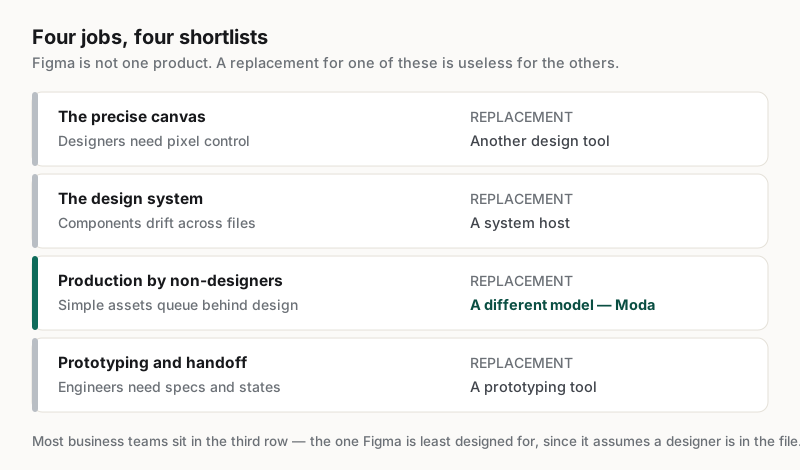
The third row is where most business teams actually sit, and it is the one Figma is least designed for. Figma assumes a designer is in the file; that assumption is a feature for design teams and the whole problem for everyone else. A replacement for that job is not a simpler canvas — it is a different model, where the brief produces the asset and the asset stays editable afterwards.
What should a business team test before switching?
Test with the work that actually queues, using the people who are currently waiting. A tool evaluated by a designer on a showcase asset will look capable and still fail the week after, because the constraint being removed is who can produce, not what can be produced.
Four checks, in the order they tend to fail:
- Give the tool a real recurring asset and a real brand kit, not a showcase piece.
- Have the person who currently waits on design run it, with no designer in the room.
- Make a small correction the day after — a date, a price, a logo — and see what else moves.
- Export whatever the asset is finally delivered as, and open that file rather than the preview.
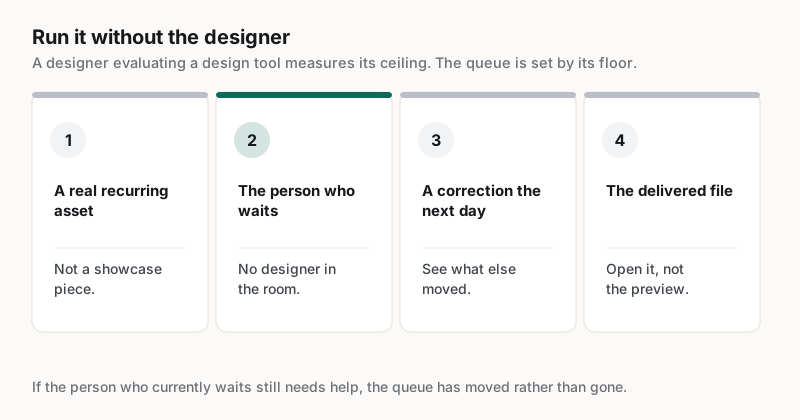
The second check is the one that decides it, and it is uncomfortable to run because the fastest person in the room has to sit out. If a marketer cannot produce the asset alone, nothing about the queue has changed, and the evaluation has measured the wrong thing — the tool's ceiling instead of its floor.
When is Figma still the right answer?
When the work is genuinely design work. Product interfaces, identity systems, complex illustration and anything needing exact specialist control belong in a designer's tool, and moving that work out to widen access will cost a team more than the queue ever did.
The honest framing is that most teams do not replace Figma at all. They stop routing everything through it. The design team keeps the canvas, the design system and the handoff, and the recurring business assets — decks, one-pagers, social posts, case studies — move to something the rest of the company can operate. The queue disappears because the work left it, not because the tool changed.
Customer reporting follows that shape. Cirrascale reported 20 min saved per asset with one marketer running the pipeline, at https://moda.app/case-studies/cirrascale, and FERMÀT describes on-brand asset creation moving across an entire go-to-market organisation, at https://moda.app/case-studies/fermat. Neither is a story about design getting worse; both are about design stopping being a bottleneck for work that never needed a designer.
Related guides
Key takeaways
- Figma does four separable jobs; naming the one causing pain narrows the shortlist immediately.
- Most business teams are replacing production by non-designers, not the canvas itself.
- A cheaper canvas does not shorten a queue caused by who can open the file.
- Evaluate with the person who currently waits on design, not with a designer.
- Most teams do not replace Figma; they stop routing recurring business assets through it.
Frequently asked questions
What is the best Figma alternative for a business team?
It depends which job is being replaced. For precise design work the answer is another design tool; for recurring business assets produced by non-designers it is a different category entirely. Deciding which of Figma's four jobs is causing the pain narrows the shortlist far more than any feature comparison will.
Is a cheaper design tool enough to fix a design queue?
Rarely. If the queue exists because assets only live in files a specialist can open, changing which specialist tool is used leaves the queue intact. The constraint is who can produce an asset, and that only changes when the output stays editable by the person who needs it changed.
Can non-designers produce on-brand work without a designer?
For recurring formats, yes, provided brand rules are applied by the tool rather than remembered by the person. Test it by having the person who currently waits run the whole task alone. If they need help, the queue has moved rather than gone, whatever the demo showed.
Should a design team stop using Figma?
Generally no. Product interfaces, identity systems and detailed illustration belong in a designer's tool, and moving them out to widen access costs more than the queue did. The change worth making is which work is routed through design, not which application designers open.
Published by Moda. Competitor capabilities are described in general terms and change frequently; verify current features and pricing with each vendor before deciding. Customer metrics are attributed to the companies named above and link to their published case studies.