AI Social Media Post Generator: The 4 Types, Compared
The four kinds of AI social media post generator return very different files. Compare caption tools, design editors, social suites, and image models, and what free tiers really allow.
 Anvisha Pai, Co-founder & CEO, Moda
Every tool in this category calls itself an AI social media post generator. They hand back four completely different things: a block of text, an editable design, a scheduled post, or a flat image file.
That difference decides whether you can fix a typo, apply your brand colors, or produce the same post at three sizes. It is also the thing almost every roundup skips, because a feature table can list "AI generation" for all four and look consistent.
One question sorts the whole market: after the tool generates, can you change one word without generating again?
The four types of AI social media post generator
| Type | What comes back | Fix a typo by | Brand colors | Examples |
|---|---|---|---|---|
| Caption generator | Text only, no visual | Editing text anywhere | Not applicable | Buffer AI Assistant, QuillBot, PlayPlay's free tool, ChatGPT |
| Design tool with AI | A design made of editable objects | Clicking the text and typing | Stored in a brand kit, usually a paid feature | Canva, Adobe Express, Moda |
| Social suite with generation | A drafted post sitting in a calendar | Editing in that tool's post editor | Brand profile per workspace | Predis.ai, Later, Simplified, Picmaker, Marky |
| Image model | A flat PNG or JPG | Generating again and hoping | Prompt request, not enforcement | Ideogram, Leonardo, ChatGPT image, Gemini |
Most people searching for a generator want the second row and end up trying the first or fourth, because those are the ones that are free and instant.
Type 1: caption generators write the words and nothing else
A caption generator turns a topic into post copy. There is no graphic, no layout, no logo. Buffer's free web tool is the clearest example: you type what the post is about and it returns text for the platform you name.
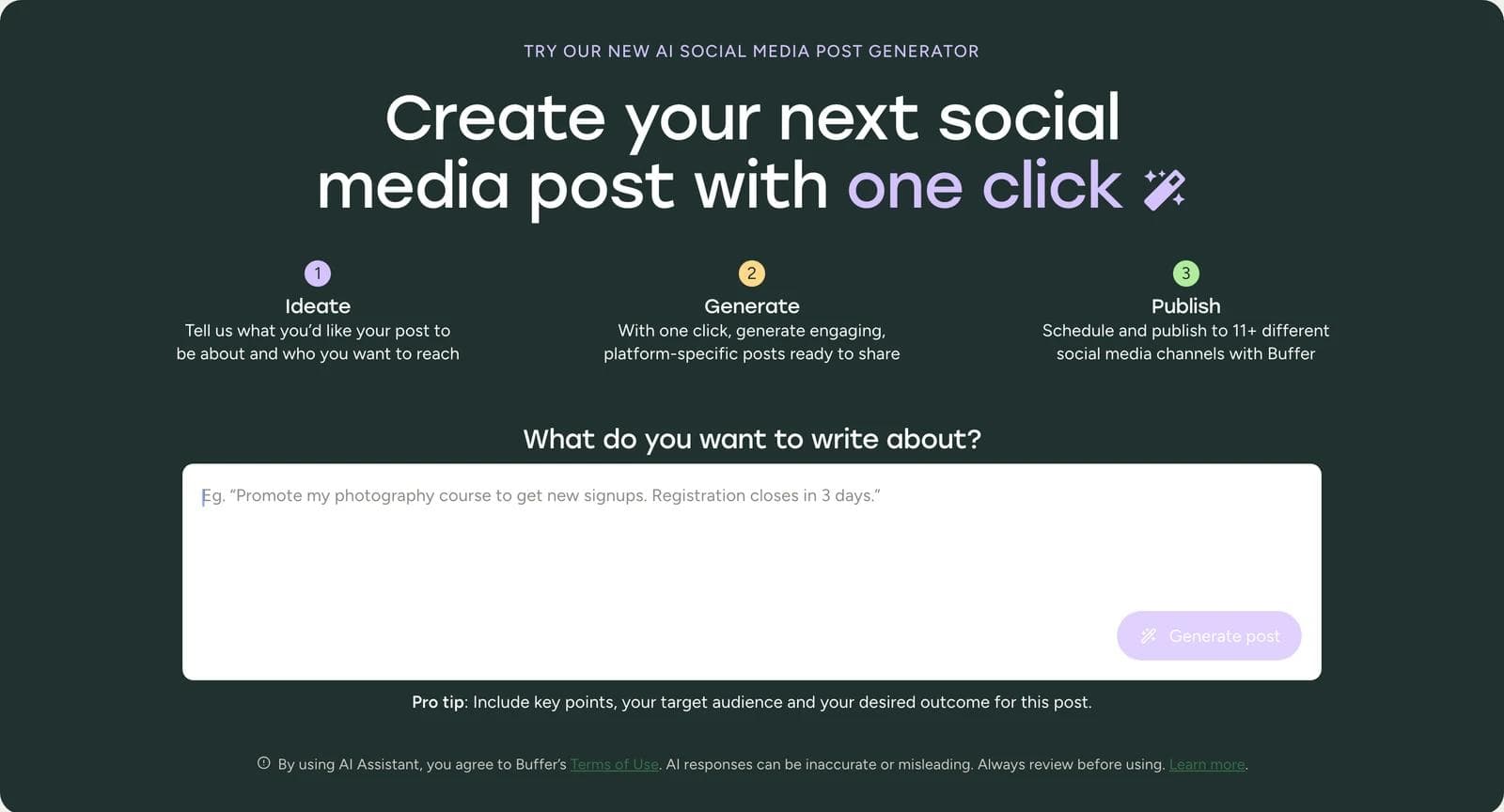
This is the right tool when you already have the image. A product photo, an event flyer, a screenshot, or a founder selfie plus a well-written caption is a complete post, and you do not need a design tool to ship it.
Buffer. The tool on the marketing page works with no account and Buffer says it "only provides up to five social posts per day." A free Buffer account adds the AI Assistant inside the product, three connected channels, and ten scheduled posts per channel (Buffer pricing). If your bottleneck is publishing rather than design, that free plan is genuinely usable.
QuillBot and PlayPlay both run free caption generators with no sign-up. PlayPlay's is worth noting because PlayPlay is a video product: its free social post generator writes captions only, which is a good reminder that a tool's category does not tell you what a specific generator returns.
ChatGPT or Claude do the same job with more control over tone and no per-tool limit to learn. If you are already paying for one, a caption generator is not a separate purchase.
The honest limit: none of these help with the part most people are actually stuck on, which is the picture.
Type 2: design tools that hand back something you can edit
This is the category the reader usually wants. You describe the post, and what comes back is a design made of objects: a text frame, an image frame, shapes, a logo. Change a word and the layout reflows. Change a color and it changes everywhere.
Canva
Canva is the default for a reason and it is the honest recommendation for most people starting from zero. The free plan includes the editor, 1,000+ design types, 1.6M+ templates, and 4.7M+ photos, videos, graphics, and audio, plus an AI allowance of "up to 200 Standard AI uses or 20 Premium AI uses" per the Canva pricing page as of September 8, 2026.
Two limits matter for a brand-conscious reader. Canva Free gives you 1 Brand Kit with three colors only. And resize, the feature that turns one design into feed, story, and LinkedIn sizes, sits in the Pro bundle of "premium tools (resize, translate, remove background)" at US$180 per year.
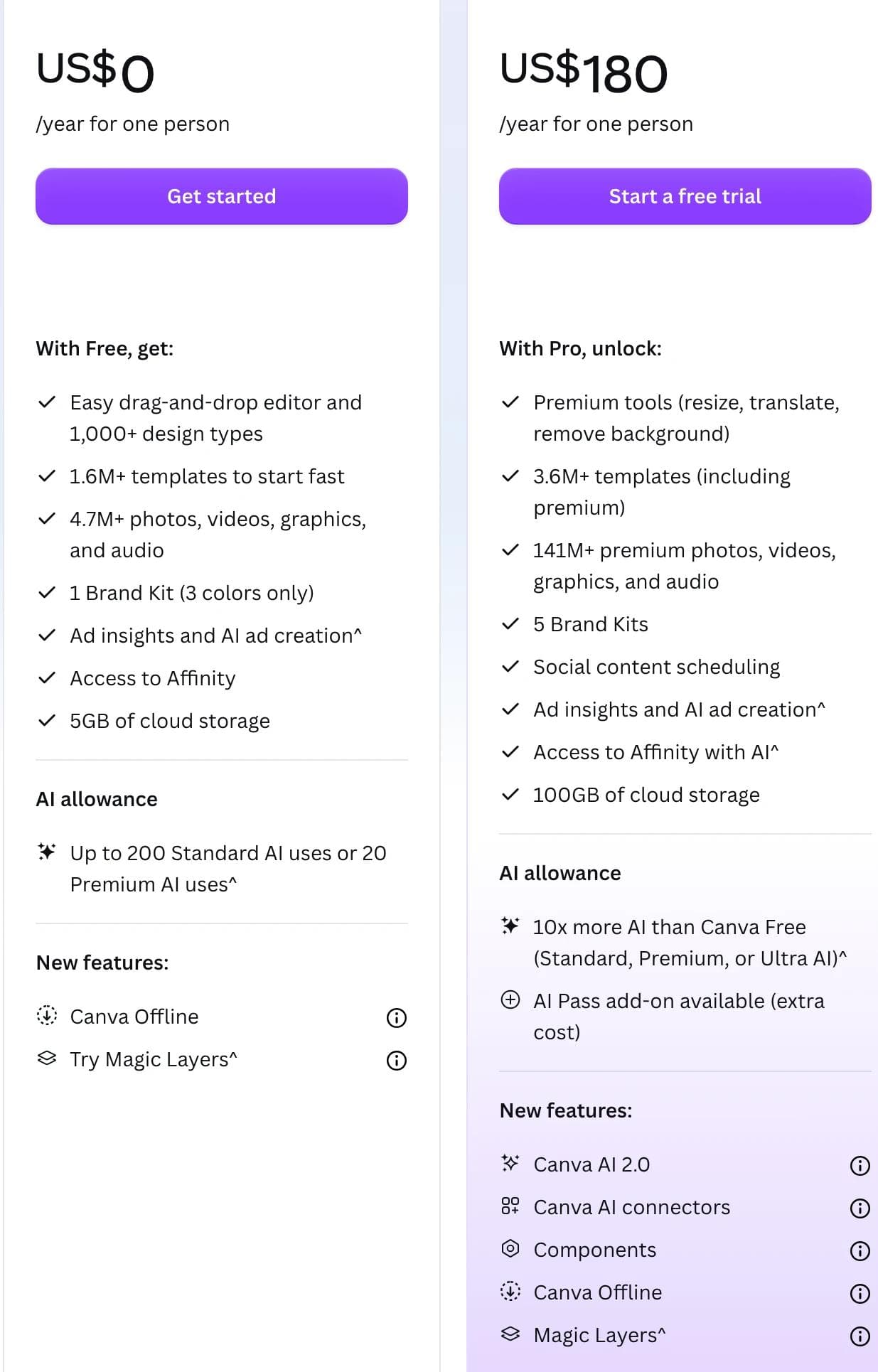
So the free Canva workflow is: generate or pick a template, edit it, and rebuild each additional size by hand.
Adobe Express
Adobe Express Free includes 100,000+ templates, 1M+ Adobe Stock assets, 4,000+ Adobe Fonts, and social scheduling for one account per network (Adobe Express pricing). It suits anyone already inside Adobe, and its font access on the free tier is better than most.
The two features this article cares about are both Premium: brand kits are not on the free plan, and neither is one-click resize. Premium is US$9.99 per month with 250 generative credits; the free tier gets daily generations rather than a monthly credit pool.
Moda
Moda takes a different shape: an AI agent operates the design tool and writes to a real vector canvas, so the first draft arrives as editable objects rather than a picture of a design. You pick the format and the brand kit before you prompt, and Social and Carousel are formats in the composer alongside Slides and Document.
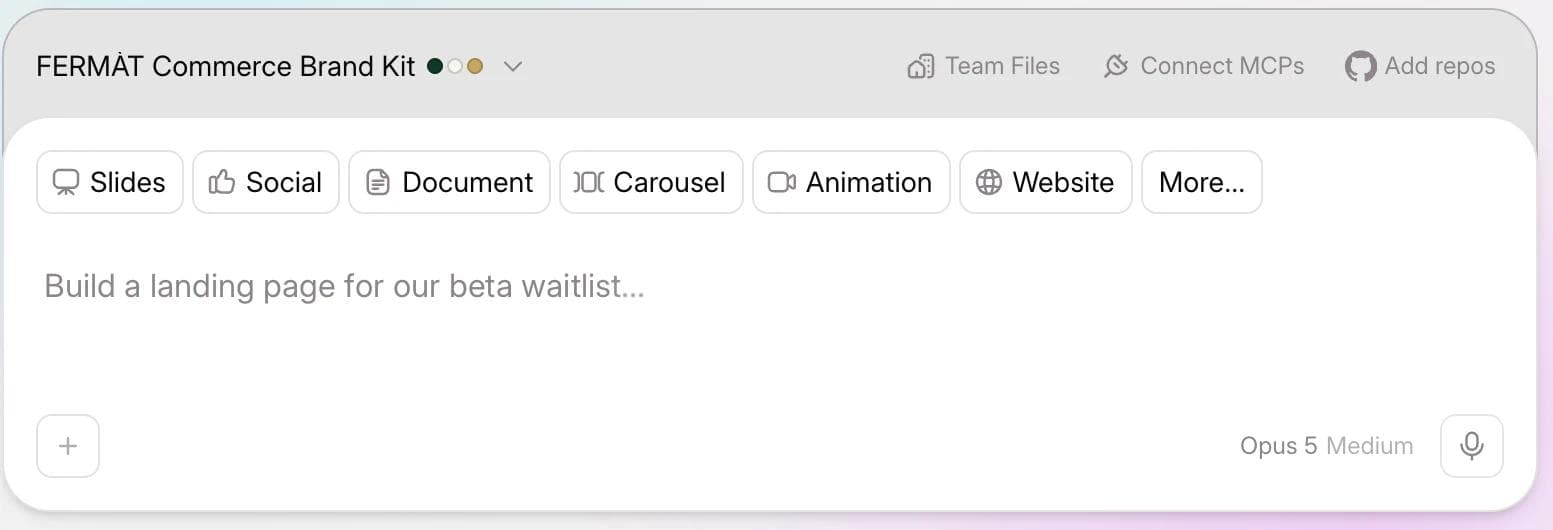
Moda fits when you want a first draft built for you and then want to keep editing it, and when the same brief also has to become a carousel, a one-pager, or a deck. Its free plan gives 500 AI credits per seat per month for up to ten members (Moda pricing).
The limits are real and worth stating plainly. Brand kits start on the Pro plan at US$30 per user per month, so the free tier is a trial of the generation workflow, not a brand system. Moda does not schedule or publish to social platforms and has no post analytics, so it sits upstream of whatever you use to actually post. And because the composer asks for the format up front, a second size is a second brief rather than a resize button.
If your problem is enforcing brand rules across a team rather than generating a first draft, our comparison of AI design tools for brand consistency is the more useful page: Canva has the strongest documented locking and approval controls of any tool in this article.
Type 3: social suites where generation is attached to the calendar
These products are scheduling tools first. Generation was added because customers were already in the app deciding what to post. That is not a criticism, it is a description of where the engineering went: the calendar, the connected accounts, the approval flow, the analytics.
Predis.ai is the most generation-forward of these. It produces static creatives, carousels, and videos with an editor attached, plus competitor analysis and direct publishing. Its pricing page lists no free plan as of September 8, 2026: Core is US$32 per month month-to-month or US$24 billed annually, for 1,300 credits, which the page estimates as about 86 AI images or 9 videos, and 1 brand.
Later shows what "AI included" often means in this category. Later has no free plan now, only a 14-day trial, and its Starter plan at US$18.75 per month billed yearly includes "AI content tools (5 AI credits /month)" (Later pricing). Five credits is a sampler, not a content engine. Extra credits cost US$3.75 per month for 100.
Simplified bundles copy, design, video, and scheduling with a brand kit, positioning itself as a replacement for a stack. Its pricing page leads with a US$1 seven-day trial rather than a free tier.
Picmaker and Marky both work from a URL: they read your site, generate a batch of posts, and drop them into a calendar. That is a real convenience if your posting problem is the blank calendar rather than any individual post.
Choose this type when the recurring schedule is the actual pain. Do not choose it expecting design depth. The generated graphic is usually a template fill, and if you need it to be genuinely good you will export it, fix it elsewhere, and upload it back.
Type 4: image models return a picture, not a post
Ask ChatGPT, Gemini, Ideogram, Leonardo, or Midjourney for an Instagram post and you get a PNG. It might look better than anything the other three types produce. It is also finished in the worst sense: the text is baked into the pixels.
Three consequences for a social schedule:
- A typo means regenerating. You cannot click the headline. Regenerating changes the rest of the image too, so you are re-rolling the whole post to fix one letter.
- Brand colors are a request, not a rule. You can put your hex code in the prompt. Nothing enforces it, and nothing stops the model from inventing a nearby shade.
- Text rendering is uneven. Ideogram markets legible in-image text as a headline differentiator, which is a fair signal of how unsettled the general case still is. Long headlines, small type, and brand wordmarks are where it breaks.
There is also a free-tier detail that catches people out. On both Leonardo and Ideogram, the free plan makes your generations public.
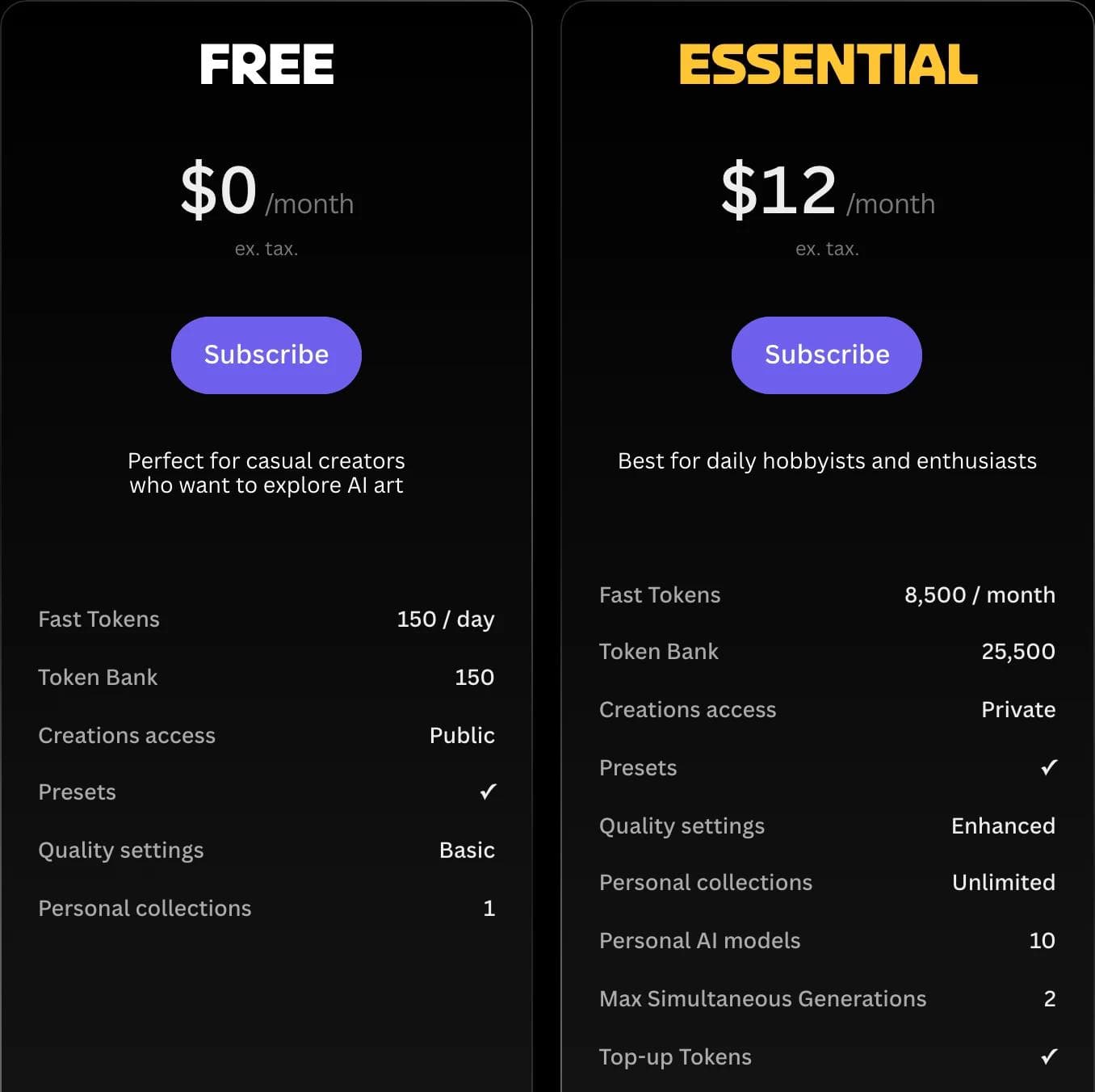
Leonardo's free plan lists 150 fast tokens per day and Creations access "Public" (Leonardo pricing). Ideogram's free plan has no private generations and one running or queued generation at a time, with weekly slow credits for eligible accounts (Ideogram pricing). If you are generating unannounced product creative on a free account, read that row before you prompt.
Use image models for the thing they are unmatched at: a striking background, an illustration, a product scene, a texture. Then place it in a design tool where the headline stays a text layer.
What the free tiers actually allow
"Free" in this category means several different things. Here is what each one gives you, checked against the vendor's own pricing page on September 8, 2026.
| Tool | What free means | The catch |
|---|---|---|
| Canva Free | Full editor, 1.6M+ templates, 200 Standard or 20 Premium AI uses | 1 Brand Kit limited to 3 colors; resize is a Pro premium tool |
| Adobe Express Free | 100,000+ templates, 4,000+ Adobe Fonts, 1 social account per network | No brand kits and no one-click resize; daily generations, not a monthly credit pool |
| Buffer | AI Assistant, 3 channels, 10 scheduled posts per channel | Text only; the no-account web tool caps at 5 posts per day |
| QuillBot, PlayPlay | Caption generation with no sign-up | Text only |
| Moda Free | 500 AI credits per seat per month, up to 10 members | Brand kits start on Pro at US$30 per user per month |
| Leonardo Free | 150 fast tokens per day | Creations access is Public |
| Ideogram Free | Weekly slow credits for eligible accounts | No private generations, 1 generation at a time |
| Later | No free plan, 14-day trial | Starter includes 5 AI credits per month |
| Predis.ai | Free account to start, no free plan listed | Core is US$32 per month month-to-month for about 86 AI images |
The pattern is consistent enough to plan around: free tiers give away generation and charge for brand control and resizing. Those are the two features that turn a generator into a repeatable weekly workflow, which is exactly why they are the paywall.
If you have no budget at all, the strongest free stack today is Canva Free for the design plus any free caption tool for the copy, and accepting that you will rebuild each size by hand and keep your three brand colors in a note. That is a real workflow, not a compromise pitch. It is also why Canva remains the correct first recommendation for most people asking this question.
Where your brand actually lives
Brand consistency fails in different places in each type, so check the right thing:
- Caption generators have no brand surface. Consistency comes from the prompt or from you.
- Design tools store a brand kit and apply it to generated work. Verify how many colors and fonts the plan you would actually buy allows. Canva Free's three-color limit and Adobe Express Free's missing brand kit are both easy to discover a month in.
- Social suites usually keep one brand profile per workspace, and extra brands cost money. Predis charges US$5 per month for an extra brand on its entry plan.
- Image models have no brand layer at all. Treat anything they produce as raw material.
A saved palette prevents the wrong blue. It does not decide whether the post is on message, whether the logo has enough clear space, or whether the claim in the headline is true. Someone still reads every post before it goes out.
The resizing question
One post usually needs to be a 1:1 or 4:5 feed graphic, a 9:16 story, and something that reads well on LinkedIn. How a tool handles that is a bigger practical difference than anything in a feature list.
There are three behaviors, and vendors describe all three as "resize":
- Transform the existing design. Same objects, new frame, layout adjusted. This is what you want, and at Canva and Adobe Express it is a paid feature.
- Regenerate at the new size. You get a different design that happens to be the right shape. Fine for a first pass, bad for a campaign that has to look like one campaign.
- Crop. Fast and usually wrong, because the headline was centered for a square.
Ask which one you are getting before you build a workflow on it. If you are working around option two, generating each size as its own brief with the same locked copy is more reliable than asking a tool to convert, and our guide to creating ad variations with AI covers the locked-elements technique that keeps a batch consistent.
A 20-minute evaluation that actually separates these tools
Do not ask each tool to "make an Instagram post about our product." That tests prompt defaults. Run this instead, on the free plan, on one real post you need this week:
- Give it your actual topic, offer, and audience.
- Look at what came back and name which of the four types it is.
- Change one word in the headline. Time how long that takes.
- Change one brand color and see whether it propagates.
- Ask for the same post at a story size.
- Export and open the file. Check the dimensions and whether text is crisp.
Step three is the whole test. If it takes a regeneration, you have an image model wearing a post-generator label, and every future edit will cost the same.
Which type should you use?
You already have the image. Use a caption generator. Buffer's free account is the best version of this if you also need to schedule.
You need the graphic and you have no budget. Canva Free, and plan to rebuild each size by hand.
You need the graphic and you need it on brand every week. A design tool with a paid brand kit. Canva Pro if you want the largest template library and the strongest team controls of the tools here, Adobe Express Premium if you are in Adobe already, Moda if you want an agent to build the first draft on an editable canvas and the same brief also has to become carousels, one-pagers, or decks. If you are weighing that decision more broadly, our Canva alternative comparison covers the tradeoffs by job.
Your problem is the empty calendar, not the individual post. A social suite. Predis.ai if you want the most generation and an editor attached to it, Later or Buffer if scheduling and approvals matter most.
You need a striking image and the words can live in the caption. An image model, then check whether your free plan makes your generations public.
You are making paid ads rather than organic posts. Different decision, different tools. Ad creative pulls in UGC video, product imagery at catalog scale, and campaign activation, which we cover separately in 16 best AI ad generators.
The trap in this category is picking on the quality of the first output. First outputs are what these products optimize for demos. The second, fifth, and fortieth post is where the difference shows up, and that difference is almost entirely about whether the file that came back is still editable.
Frequently asked questions
What is the best free AI social media post generator?
For a graphic plus copy with no budget, Canva Free is the strongest option: it includes the full editor, 1.6M+ templates, and up to 200 Standard AI uses per month. Its free plan limits you to one Brand Kit with three colors and puts resize behind Canva Pro. If you already have the image and only need copy, Buffer's free tool or QuillBot generate captions with no account.
Can AI generate a social media post image and caption together?
Yes, but check what the image is. Design tools like Canva, Adobe Express, and Moda return a layered design where the caption and the headline are separate editable elements. Image models return a single flat file with the text baked into the pixels, which means any correction requires generating again.
Do free AI post generators add watermarks?
Some do, and export terms change often enough that the only reliable answer is the current plan page. The restrictions we could verify on September 8, 2026 were less about watermarks and more about brand controls, resizing, generation caps, and privacy. Leonardo's free plan lists creations access as Public, and Ideogram's free plan has no private generations, so free generations on those platforms are not private by default. Always check the current pricing page, since these terms change.
Should I use ChatGPT to make social media posts?
For captions, yes, and it is a reasonable substitute for a dedicated caption generator if you already pay for it. For the graphic, its image output is a flat file with no editable layers, so it works better as a source for a background or illustration that you place inside a design tool.
How many social media posts can I generate on a free plan?
It varies more than the marketing suggests. Canva Free allows up to 200 Standard AI uses or 20 Premium AI uses. Leonardo Free gives 150 fast tokens per day. Buffer's no-account tool caps at five posts per day. Later has no free plan and its entry paid plan includes five AI credits per month. Read the number next to the word "credits" before assuming a plan covers a weekly schedule.

Real editable visuals. Real canvas. Full control.
Fly through design work