Claude for PowerPoint: What the Add-In Does and How to Set It Up
Claude for PowerPoint is a real Microsoft 365 add-in from Anthropic. What it needs, how to install it, what it does inside a deck, and the limits Anthropic publishes.
 Anvisha Pai, Co-founder & CEO, Moda
Claude for PowerPoint is an add-in that puts Claude in a sidebar inside PowerPoint itself. It reads the deck you have open, including its slide master, layouts, fonts and colours, and it can build new slides, rewrite the ones you select, restructure a sequence, and turn a block of bullets into a native PowerPoint chart. It is Anthropic's own software, distributed through Microsoft's marketplace, and it is generally available on the paid Claude plans.
That is the short answer. The longer one matters because "Claude" and "PowerPoint" describe three genuinely different products, and people arrive at this question wanting one of them without knowing which. This piece covers what the add-in requires, how to install it, what it does and does not do inside a deck, and the several ways an organisation can leave it switched off.
Everything here is checked against Anthropic's and Microsoft's current pages on 9 September 2026. We did not install the add-in or spend usage on it, so there is nothing below about how good the slides look. Where a claim is a documented capability rather than something we measured, it is described that way.
Three different things, and how to tell which one you want
Ask Claude to make you a presentation and you can end up in three unrelated places. They produce different files, need different plans, and fail in different ways.
The distinction that actually separates them is where the durable file lives and who owns the layout.
| Claude for PowerPoint | A .pptx from Claude chat | Claude Design | |
|---|---|---|---|
| Where you work | The PowerPoint sidebar | claude.ai, desktop or mobile | A canvas next to a chat panel |
| The durable file | Your existing .pptx | A new file Claude writes and you download | A Claude Design project |
| Who decides the layout | Your slide master | Claude, from scratch | Claude, then you, on the canvas |
| Plans | Pro, Max, Team, Enterprise | Every plan, including Free | Pro, Max, Team, Enterprise |
| Best when | The deck or the template already exists | You have research and no deck | The visual direction is unsettled |
Claude for PowerPoint edits a file you already own, in the application your colleagues already use. Nothing is exported and nothing is converted, because the deck never leaves PowerPoint. This is the only one of the three that inherits your corporate template automatically.
Asking Claude in chat for a .pptx is the code execution and file creation feature. Claude writes a PowerPoint file in a sandbox and hands you the download, up to 30MB. Anthropic documents this as available to all Claude users including Free, which makes it the only free route to a .pptx. On Free, Pro and Max it is a toggle under Settings, Capabilities. On Team and Enterprise it is on by default and an owner can turn it off under Organization settings, Capabilities. The catch is that the file arrives with whatever design Claude invented, and the editing happens after the download, somewhere else.
Claude Design is the canvas product. You describe a deck, Claude builds it beside the chat, and you refine it by talking, commenting or dragging. PPTX is one of its exports rather than its native form. It is a different shape of tool with its own tradeoffs, and we have covered it separately in our Claude Design review.
A practical rule: if there is a company template involved, use the add-in. If there is no deck yet and no template, chat or Claude Design will get you a first draft faster. And if you are specifically building an investor deck, the sequencing advice in how to use Claude to create a pitch deck applies whichever route you pick.
What you need before it will run
Two gates, and both of them catch people.
A paid Claude plan. Anthropic documents Claude for PowerPoint as generally available on Pro, Max, Team and Enterprise. It is not on Free. On the plan comparison at claude.com/pricing, the Claude for Microsoft 365 row is a cross for Free and a tick from Pro upward.
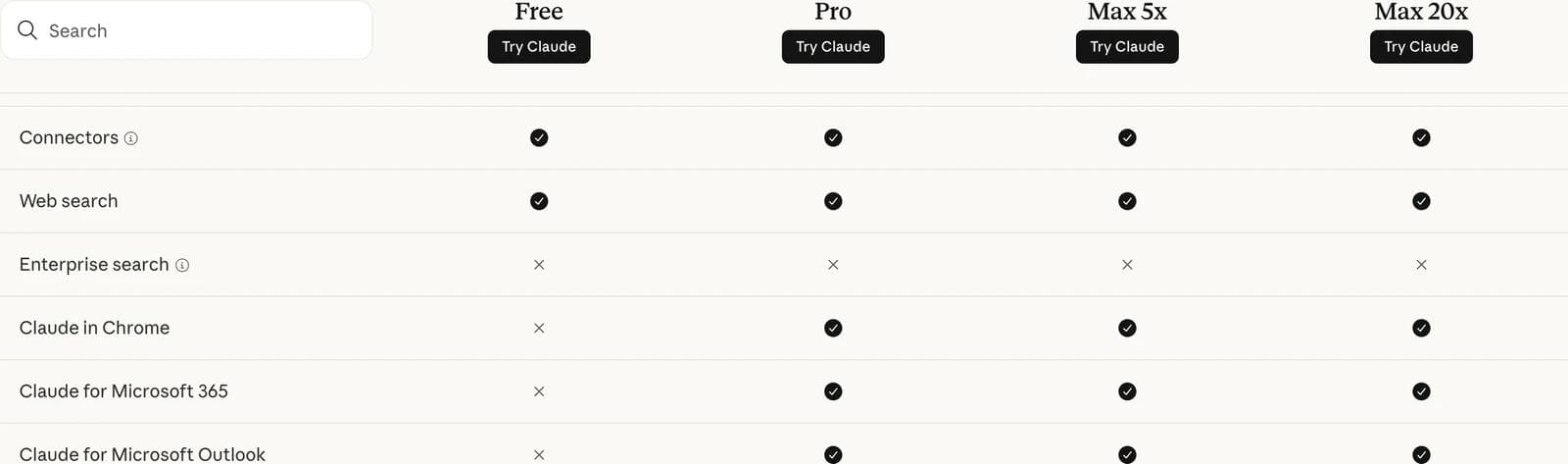
Pro is $17 a month billed annually, or $20 monthly. Max starts at $100 a month. Team seats are $20 a month annually for a standard seat, and Enterprise is quoted at $20 per seat plus usage at API rates. The add-in has no separate price. Your use of it counts against the same usage limits as the rest of your Claude account.
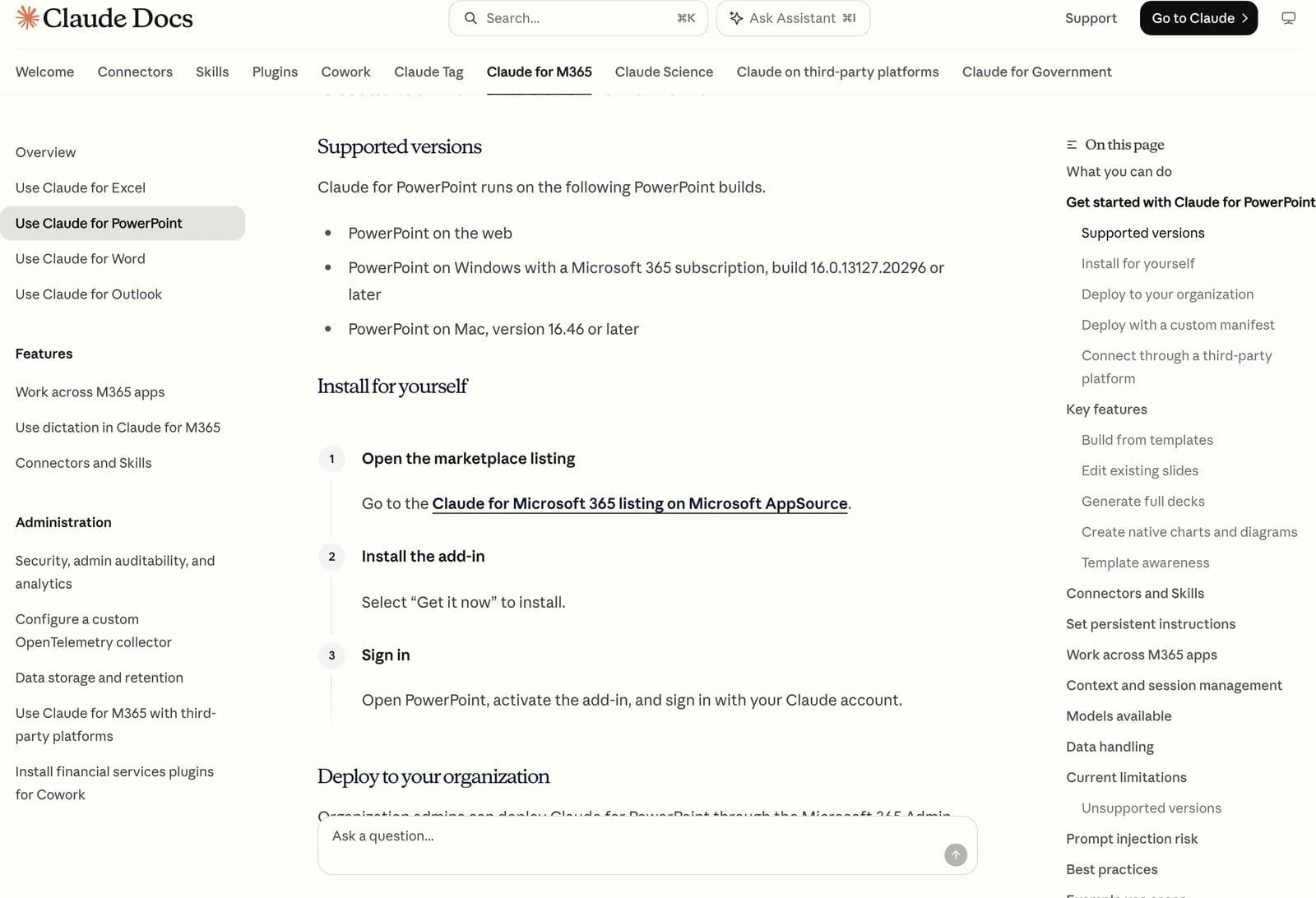
A supported PowerPoint build. The add-in runs on PowerPoint on the web, PowerPoint on Windows with a Microsoft 365 subscription on build 16.0.13127.20296 or later, and PowerPoint on Mac version 16.46 or later.
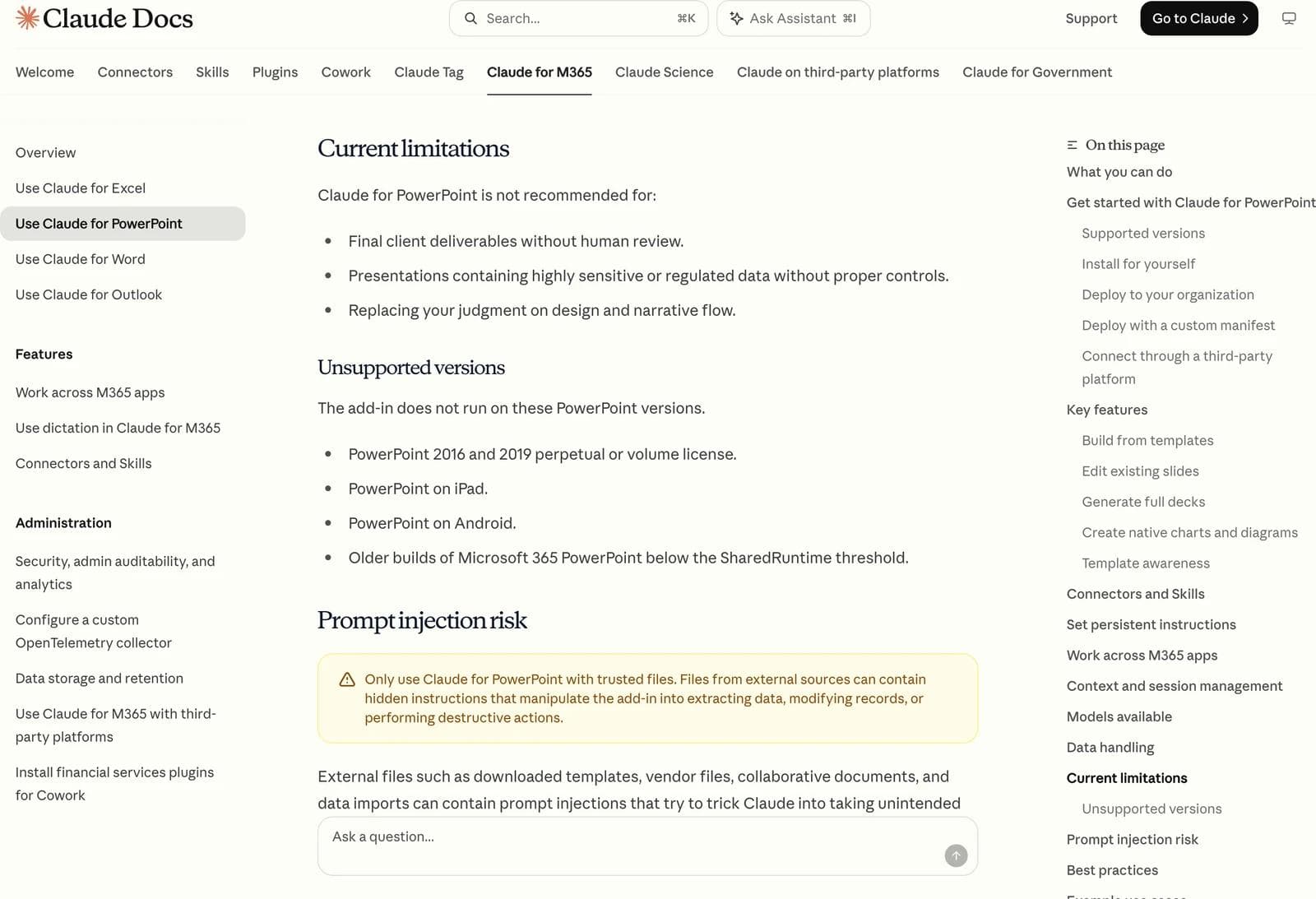
It does not run on PowerPoint 2016 or 2019 perpetual or volume licences, on PowerPoint for iPad, on PowerPoint for Android, or on Microsoft 365 builds below what Anthropic calls the SharedRuntime threshold. If your organisation bought Office once rather than subscribing, this is where the story ends, and no amount of Claude subscription changes it.
How to install it
For one person, it is three steps. Open the Claude for Microsoft 365 listing on Microsoft AppSource, select Get it now, then open PowerPoint, activate the add-in and sign in with your Claude account. Afterwards it appears under Home, Add-ins on Windows or Tools, Add-ins on Mac, and then in the Home ribbon.
One thing worth knowing before you search the store: there are two listings that both give you Claude in PowerPoint. Claude for Microsoft 365 is the bundle covering Excel, PowerPoint and Word, and it is the one Anthropic's documentation now links to. Claude by Anthropic for PowerPoint is the older single-app listing and is still live. Anthropic's data documentation confirms these are not separate installations in any meaningful sense: every Claude add-in is served from the same address, so they read and write the same local store, and moving between listings keeps your chat history intact.
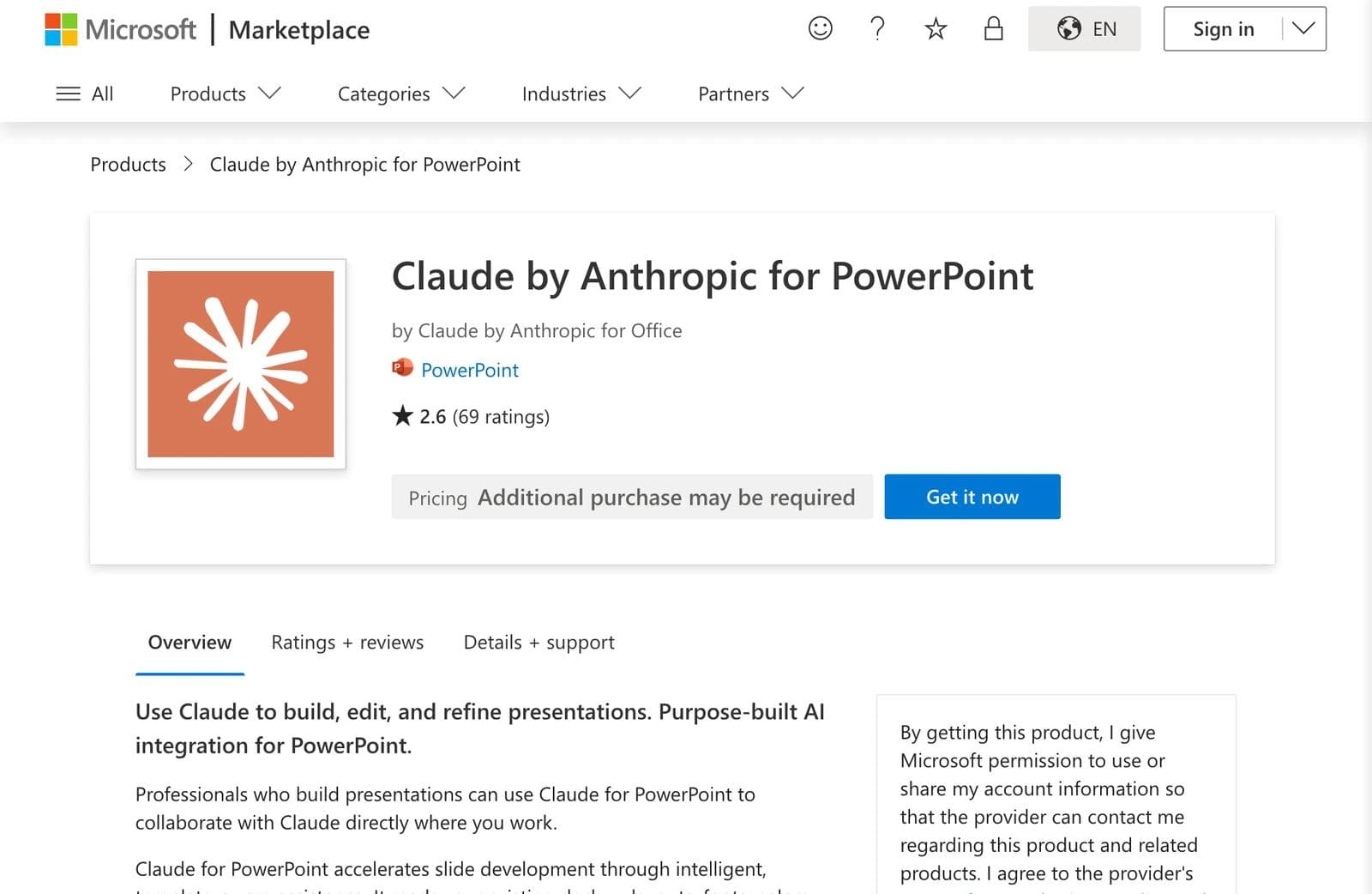
The public star ratings on those listings differ from each other, and both are built on small numbers of reviews: 3.0 from 20 ratings on the bundle and 2.6 from 69 on the PowerPoint listing at the time of writing. Two scores for the same software is a good reason not to read much into either. We did not test output, so we cannot tell you what drives them.
For a whole company, an admin deploys it from the Microsoft 365 Admin Center. Turn on "Let users access the Office Store" under Settings, Org Settings, User owned apps and services, then go to Settings, Integrated apps, Add-ins, find Claude for Microsoft 365 in AppSource, and assign it to the organisation or to named users and groups.
Two documented traps sit in that path. If your admin roles are activated through Microsoft Entra Privileged Identity Management, the Integrated apps page does not recognise them and deployment fails. Anthropic points at Microsoft's known-issues list, tracking ID 11126536, and the workaround is to deploy from an account holding the role as permanently active. Separately, if your organisation has disabled Office Store access, admin-deployed add-ins may not appear for users at all. For that case Anthropic publishes a custom manifest XML file you upload under Settings, Integrated apps, Upload custom apps. Full rollout can take up to 24 hours.
Organisations that route AI traffic through Amazon Bedrock, Google Cloud Vertex AI, Azure AI Foundry or an LLM gateway can deploy the add-in without individual Claude accounts at all. That path costs you features, and we come back to it below.
What it does inside a deck
Anthropic documents six capabilities, and they map onto four things you will actually type.
Generate a full deck. Open a blank presentation, describe the goal, and Claude builds a draft with a structure you then refine. Anthropic's own example prompt is "Create a 10-slide deck walking through our market entry hypotheses."
Add slides to a deck that already exists. With a template loaded, ask for a section and Claude generates it using the correct layouts, fonts and colours from the slide master. "Add an executive summary slide using the one-column content layout" is the shape of the instruction that works, because it names a layout the template actually has.
Edit the slides you select. Select a slide, say what to change, and Claude edits it while preserving formatting and surrounding context. This is the capability that most distinguishes the add-in from generating a deck in chat: you can simplify slide 3 or combine slides 5 and 6 without regenerating anything else.
Restructure a sequence. Reordering to lead with recommendations, adding transition slides between sections, or generating an agenda slide that reflects the current structure are all documented uses. So is restructuring a storyline across a slide range.
Alongside those, Claude can convert bullets into diagrams and into native PowerPoint charts. Anthropic is explicit that these are visuals you can edit directly rather than static images, which is the difference between a chart your finance lead can update next quarter and a picture of one.
Three extras are easy to miss. The add-in supports connectors, reached from the plus button under the chat input, for pulling in external context such as financial data providers or your own organisation's custom connectors. It supports Skills, which apply automatically and can also be invoked by typing / in the sidebar, with irrelevant ones filtered out for the app you are in. If you have not met these, what Claude skills are and how to write one explains the format. And under Settings there is an Instructions field for standing preferences such as "always use one-line bullets", which apply to every conversation in PowerPoint and are kept separate from the instructions you set in Excel or Word.
Finally, the M365 add-ins can work across apps, so one conversation can pull figures from an open Excel model into an open deck. It needs each add-in installed and activated, and a per-device toggle called "Let Claude work across files" in each add-in's settings. Pro and Max have it on by default; Team and Enterprise default to off.
How it treats your company template
This is the reason to use the add-in rather than either alternative, so it is worth being precise about what Anthropic claims.
Claude reads the slide master, layouts, fonts and colour scheme in your deck and uses them when generating or editing. Anthropic's wording is that it "aims to maintain template compliance without introducing off-brand elements", which is a claim about intent rather than a guarantee, and its own best-practice list tells you to verify that outputs match your brand guidelines.
The practical instruction that follows is in Anthropic's documentation too: apply your template before you ask for content. Starting from your corporate deck gives Claude real layouts to fill. Starting from blank and describing your brand in a sentence asks it to invent one.
What it cannot do
Anthropic publishes its own limitations, which is more than most vendors do.
It says the add-in is not recommended for final client deliverables without human review, for presentations containing highly sensitive or regulated data without proper controls, or for replacing your judgment on design and narrative flow.
Beyond that list, four documented boundaries decide fit:
- It only works on open files. When working across apps, Claude can read from and write to files that are currently open, and it cannot create, open, close or switch files itself.
- It is not in your audit trail. Anthropic states that Claude for M365 activity is not included in Enterprise audit logs, the Compliance API or data exports, and that the add-ins do not inherit custom data retention settings an organisation has configured.
- Prompt injection is a live risk, and Anthropic says so. Its warning is to use the add-in only with trusted files, because downloaded templates, vendor files and data imports can carry hidden instructions. Anthropic says its own testing found scenarios where the add-in could be manipulated into extracting information or performing destructive actions if allowed to act without verification. It asks you to confirm risky operations, so read those confirmations rather than clicking through them.
- Third-party platform deployments lose features. If your company connects through Bedrock, Vertex AI, Foundry or a gateway instead of individual Claude accounts, Anthropic's comparison table marks working across apps, dictation and file uploads as unavailable, with connectors and Skills listed as coming soon.
Where your conversations live, and how an organisation can switch it off
Chat history is stored locally, in the browser storage of the webview Office provides. Anthropic holds no copy, nothing syncs between devices, and the store keeps the 50 most recent conversations per user, per organisation, per Office app before deleting older ones. On Office on the web the add-in runs in a cross-origin frame, so browsers treat its storage as third-party and evict it on their own schedule. Treat history there as temporary.
Inputs and outputs are deleted from Anthropic's backend within 30 days of receipt or generation, with data cached for some hours afterwards so you can pick up context in a recently closed deck.
If you are on Team or Enterprise and cannot see Claude in PowerPoint, there are five distinct places the answer could be, and they are owned by two different administrators:
- Office Store access is off in the Microsoft 365 Admin Center, so nobody can self-install.
- The add-in was never deployed under Settings, Integrated apps, or was assigned to a group you are not in.
- Cross-app mode is off at the Claude end, under Organization settings, Office agents. This one blocks only the multi-app capability, not the add-in.
- Model access is restricted. Anthropic's model access settings are enforced across Claude for Microsoft 365 alongside chat, Cowork, Claude Code, Claude Tag and Claude Design, so the model list you see in the add-in can be shorter than a colleague's.
- A feature has been disabled by configuration. In custom-manifest deployments, admins can set a
disabled_featureskey. The available slugs turn off skill authoring, response feedback, file uploads and built-in web search, and one of them,addin.access, is a kill switch that makes the add-in refuse to run.
Working out which of those applies is the fastest route to an answer, because four of the five are settings your IT team changes in a minute and none of them is a bug in your PowerPoint.
Which one to choose
If you have a company template and a deck that already half exists, Claude for PowerPoint is the most direct of the three. It is also the only one where the file your colleagues edit tomorrow is the same file Claude touched today.
If you have research and no deck, and especially if you are on the Free plan, ask Claude in chat for a .pptx and treat the result as a first draft to redesign.
If the visual direction is the unsolved part, Claude Design is built for exploring it, with the caveats in our review.
There is a fourth case none of the three covers well: you need the same deck as a set of social graphics, a PDF one-pager and a slide file, all on one brand, and you do not have a PowerPoint template worth inheriting. That is the job Moda is built for. It creates decks on an editable canvas from a description, applies a saved brand kit, and exports PPTX and PDF. It is not an add-in and it does not edit your open PowerPoint file in place, so if your workflow is anchored to a mature corporate template inside PowerPoint, the add-in is the better fit and we would say so. For the wider category, our AI presentation maker guide covers the alternatives.
What we checked
Every capability, requirement, plan and limitation above comes from Anthropic's and Microsoft's current public pages, read on 9 September 2026: Anthropic's Claude for PowerPoint documentation and the Claude for M365 overview, the pages on working across apps, connectors and Skills, third-party platforms and data storage, the file creation help article, claude.com/pricing, and the two Microsoft Marketplace listings. Screenshots are of those pages, not of the add-in running.
We did not install the add-in, generate a deck, or spend Claude usage for this article. So there is no claim here about slide quality, template fidelity in practice, speed, or how much of a plan a deck consumes. Where Anthropic describes its own product, it is attributed. Where something is absent from the documentation, we have said it is not documented rather than that it is impossible.
Common questions
Is Claude for PowerPoint free?
No. It requires a paid Claude plan: Pro, Max, Team or Enterprise. There is no separate charge for the add-in, and usage counts against your existing plan limits. The free route to a PowerPoint file is to ask Claude in chat to create a .pptx, which Anthropic documents as available on every plan including Free.
Does Claude for PowerPoint work on Mac?
Yes, on PowerPoint for Mac version 16.46 or later. It also runs on PowerPoint on the web and on PowerPoint for Windows with a Microsoft 365 subscription on build 16.0.13127.20296 or later. It does not run on PowerPoint for iPad or Android, or on PowerPoint 2016 and 2019 perpetual or volume licences.
Will it follow our corporate template?
That is what it is designed for. Claude reads your deck's slide master, layouts, fonts and colour scheme and uses them when it generates or edits slides. Anthropic's own advice is to apply the template before asking for content, and to verify the result against your brand guidelines rather than assuming compliance.
Can it edit one slide without rebuilding the deck?
Yes. Selecting a slide and describing the change is a documented capability, and Anthropic says edits preserve formatting and surrounding context. Restructuring a range of slides and combining two slides into one are documented too.
Does it create real PowerPoint charts or images of charts?
Native PowerPoint charts. Anthropic states that Claude produces visuals you can edit directly rather than static images, covering diagrams, process flows and charts.
Why can't I see Claude in my PowerPoint ribbon at work?
Usually a setting rather than a fault. Office Store access may be turned off in the Microsoft 365 Admin Center, the add-in may not have been deployed to your group, or an administrator may have disabled features through the add-in's configuration keys, one of which stops it running entirely. Ask whoever manages your Microsoft 365 tenancy first, then whoever manages your Claude organisation.
The bottom line
Claude for PowerPoint is a real add-in from Anthropic, generally available on paid plans, and it does the thing that is hardest to get from a chat window: it works inside the file and the template you already have. The install is genuinely three clicks for an individual, and genuinely a project for an IT department with the Office Store locked down.
Before you plan a workflow around it, check the two facts that decide whether you can use it at all. Your PowerPoint build has to be a Microsoft 365 one recent enough to qualify, and your organisation has to have left both the Office Store and the add-in itself switched on. Everything else is a matter of taste; those two are not.

Real editable visuals. Real canvas. Full control.
Fly through design work