Figma vs Canva: What Each One Produces, and What That Costs Later
By Moda · Last updated
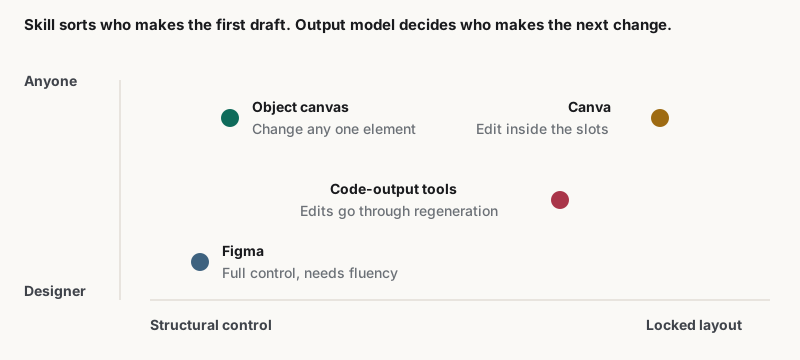
Figma produces a design file assuming fluency; Canva produces a template-backed design editable inside its slots. The choice is usually framed as skill level, but the durable difference is what a non-designer can change afterwards without help. Moda calls that the output model, and it decides revision cost.
Most Figma and Canva comparisons sort on skill: designers use one, everyone else uses the other. That is true and it is not very useful, because it describes who opens the tool rather than what happens to the file afterwards.
What each tool hands you at the end
Figma outputs a design file with full vector control and an assumption of fluency. Canva outputs a design backed by a template, editable within the slots the template defines. The distinction matters because it decides who can make the next change without help.
| Tool | What it produces | What a non-designer can change afterwards |
|---|---|---|
| Figma | A design file with full vector control | Very little — the file assumes fluency |
| Canva | A template-backed design | Text and images, inside the slots the template allows |
| Code-output tools | Rendered HTML or a generated layout | Edits usually route back through regeneration |
| Object canvas | Named text, shape and chart objects | Any single element, without disturbing the rest |
The third and fourth rows are not in the usual comparison, and they are where most business teams end up. Naming them changes the question from which of these two into which output model the work needs.
Where the skill framing breaks down
Sorting by skill predicts who makes the first draft. It says nothing about the second week, when the person who needs a change is rarely the person who made the file. That gap is where design work quietly turns into a queue.
A marketer with Canva produces a competent asset, then hits a wall when the layout itself must change. A designer with Figma has no wall, but every request routes through them. Both describe a bottleneck rather than a capability.
The question worth asking of either is not how good the output looks, but what happens when someone who did not make it needs to change one thing.
Choosing between them for a specific job
Neither tool is wrong; they answer different questions. The rows below name the signal to look for rather than a verdict, because the same team often needs one answer for a product interface and a different one for a recurring report that somebody else has to update later.
| The job | Signal to look for | The honest answer |
|---|---|---|
| A product interface or design system | Components and constraints matter more than speed | Figma |
| A one-off social asset from a template | The template is close enough already | Canva |
| Recurring on-brand collateral by non-designers | Every asset is checked by hand before it ships | Neither — look at output model |
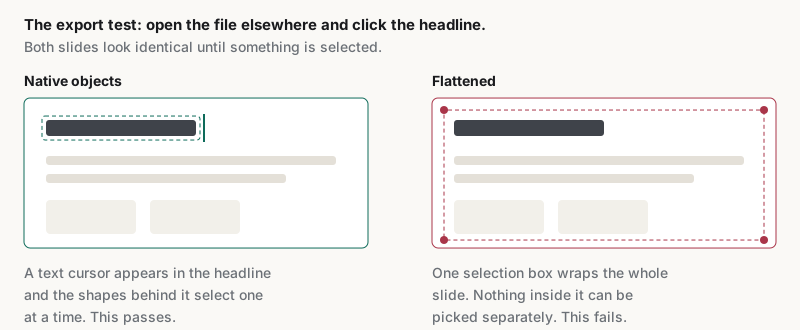
| A deck that must open editable elsewhere | Exports arrive as pictures of slides | Neither — check export fidelity |
What neither tool is built for
Both tools assume the file is the destination. For teams producing recurring branded collateral, the file is a step, and the cost sits in the revisions afterwards. That is the gap an object canvas addresses, and it is a category rather than a product claim.
Editability is checkable rather than arguable. The tests are published at /resources/ai-design-agent: change one object and watch its neighbours, edit a headline in place, apply a real brand kit, export and click into the file, then return the next day and request one change.
Run the export test first on either tool: it is fast, and it is where impressions and reality diverge most. Moda publishes its own element-by-element result at /resources/editable-pptx-export, including where its export flattens.
The verdict between the two
For interface and design-system work, Figma, without qualification. For a fast one-off from a template, Canva. If the recurring cost is revisions by people who did not make the original file, the answer is neither, and the comparison was the wrong one to be running.
Worth stating plainly rather than hedging: a team whose bottleneck is turning one approved design into many on-brand variants is not choosing between Figma and Canva. It is choosing an output model, and both sit on the same side of that line.
Related guides
Key takeaways
- Figma and Canva are usually sorted by skill level, which predicts who makes the first draft and nothing after it.
- The durable difference is output model: a design file, a template-backed design, a rendered layout, or named objects.
- For a product interface or design system, Figma is the answer without qualification.
- For a one-off asset where the template is already close, Canva is faster and the comparison ends there.
- If the recurring cost is revisions by someone who did not make the file, neither tool is the thing being chosen.
Frequently asked questions
Is Figma or Canva better?
Neither, in the abstract. Figma is the answer for product interfaces and design systems. Canva is faster for a one-off asset from a template. Asking which is better usually means the job has not been named yet, and the job decides it.
Can a non-designer use Figma?
For viewing and commenting, yes. For producing on-brand assets unaided, the file assumes fluency the tool does not supply. That is a deliberate design choice rather than a flaw, and it is the reason most teams pair Figma with something a non-designer can drive.
Do Figma and Canva work together?
Commonly, yes: a designer builds a system in Figma and a team produces from templates in Canva. The handoff is where consistency tends to fail, because a template stores an intent rather than enforcing it on every edit somebody makes afterwards.
What should a business team compare instead?
What a non-designer can change afterwards without help. Run the editability tests on any candidate: change one object, edit text in place, apply a real brand kit, export and click into the file, then request one targeted change the next day.
Moda publishes this page and builds an object canvas, one of the output models it describes. The comparison between Figma and Canva is stated on its own terms, and the test procedure is one a reader can run against Moda as well.