7 AI Document Parsers Compared With Hands-On PDF Tests
Compare seven AI document parsers using hands-on PDF parsing and extraction tests, plus documented Excel, PowerPoint, pricing, and deployment support.
 Anvisha Pai, Co-founder & CEO, Moda
The right AI document parser depends on the files you receive and the output your application needs. For a hosted parsing or extraction API, start by testing Reducto, Extend AI, and LlamaParse. Add Unstructured when connected document ETL is the larger problem, Docling when local processing matters, Datalab for conversion and deployment options, or Mistral OCR as a direct model component.
The deciding question is what your application must recover. A slide's visible chart, its embedded data, and its speaker notes are three different inputs. So are a spreadsheet's displayed value, formula, and hidden calculation sheet. A checkmark beside “PPTX” or “XLSX” does not tell you which of those survives.
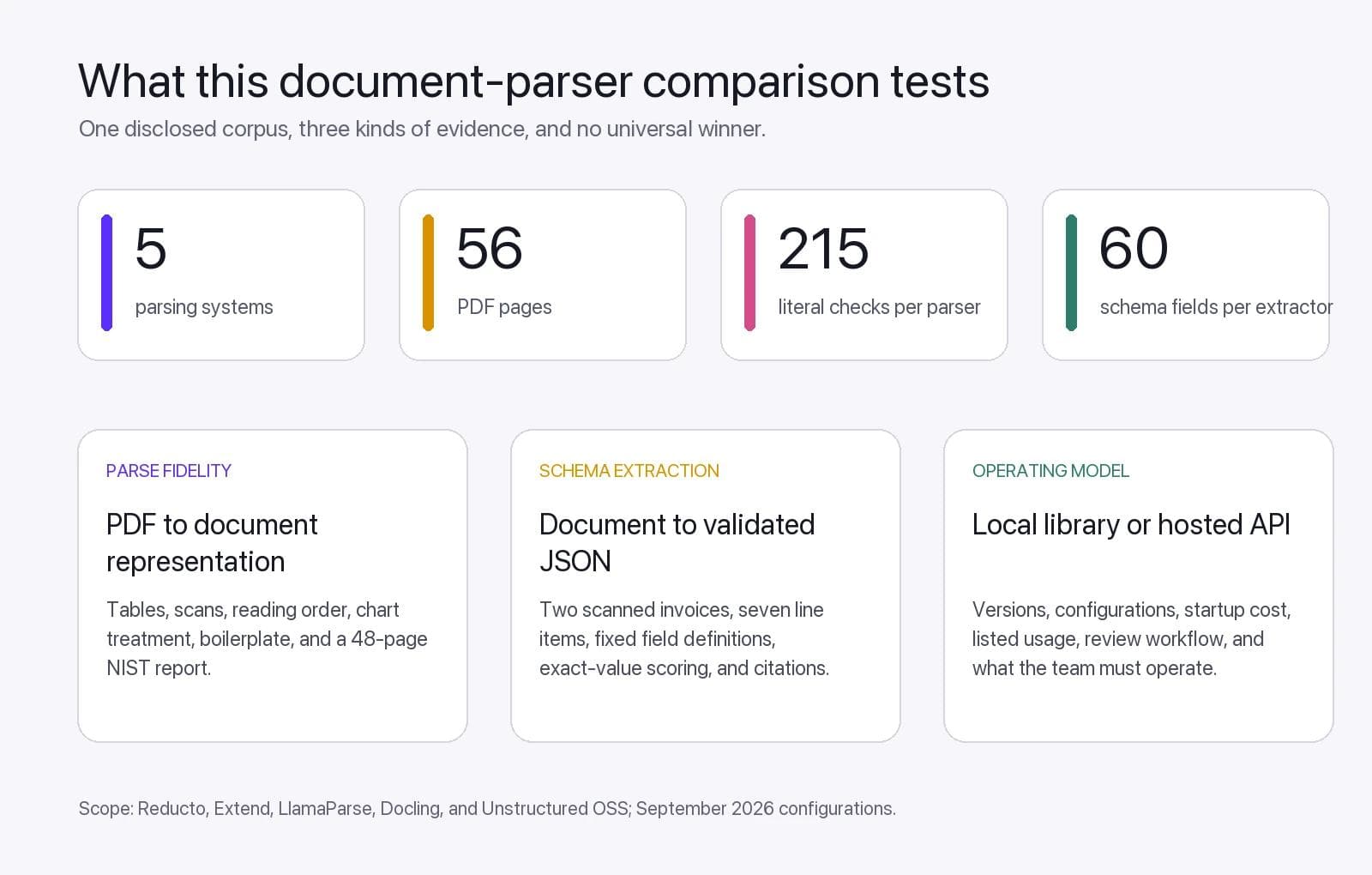
We ran Reducto, Extend, LlamaParse, Docling, and Unstructured OSS on the same PDF corpus. The test combines four synthetic PDFs with known ground truth and the complete 48-page NIST AI Risk Management Framework. We separately tested a fixed invoice schema with Reducto Extract, Extend Extract, and LlamaExtract. Datalab and Mistral were not run, so their sections remain documentation-based.
Which document parser should you shortlist?
| Product | Strong reason to evaluate it | Evidence in this article | Purchase check |
|---|---|---|---|
| Reducto | Layout-aware parsing, schema extraction, and explicit spreadsheet controls | Hosted Parse and Extract tested | Select the intended model; API and Studio defaults currently differ |
| Extend AI | Extraction plus built-in evaluation and review workflows | Hosted Parse and Extract tested | Price parsing, extraction, and review together |
| LlamaParse | Configurable parsing with documented slide and workbook handling | Hosted Parse and Extract tested | Specify output expansions, tier, and version |
| Unstructured | Connected ingestion, transformation, chunking, and delivery for RAG | Open-source library tested locally; hosted product not tested | Compare hosted Pipelines with the library as separate offerings |
| Datalab | Document conversion with hosted and commercial on-premises routes | Documentation only | Check processor, add-on, compute, and model-license boundaries |
| Mistral OCR | An OCR and structured-content API inside your own application | Documentation only | Verify the exact endpoint's formats and required downstream logic |
| Docling | A local document representation you can inspect and extend | Three local configurations tested | Own deployment, dependencies, evaluation, and exception handling |
The sections below link to the documentation behind these distinctions. These products overlap: Reducto and Extend both parse and extract; LlamaParse's platform also exposes extraction, classification, and splitting. Calling one “the parser” and another “the workflow platform” hides choices that now exist in both.
First separate parsing, extraction, and file conversion
Parsing recovers the document: text, tables, figures, reading order, and source locations. You might use that representation for search or retrieval-augmented generation, usually called RAG.
Extraction produces a business object: the supplier, currency, invoice number, and every line item matching your schema. Readable Markdown does not establish that all required fields were found. Valid JSON does not establish that its values are correct.
File conversion preserves a working document for another editor. A parser that accepts PowerPoint and returns JSON has not promised an editable replacement deck. Our guides to AI presentation export and PowerPoint-to-Google-Slides conversion cover that separate handoff.
For a support knowledge base, start by evaluating the parsed document and its source references. For an invoice-processing application, start with exact fields and complete line items. For a financial model, define whether you want reported values or recalculated values before choosing a parser.
How we tested the document parsers
The parsing comparison uses five named configurations:
- Reducto: Parse r-1 preview, explicitly selected through the V3 SDK.
- Extend: synchronous Parse with the September 6 default
parse_performanceengine. - LlamaParse: V2
agentictier,latestversion, with Markdown expanded. - Docling: version 2.126.0 using local
DocumentConverterdefaults. - Unstructured OSS: version 0.27.5 using local
partition_pdf(strategy="auto", infer_table_structure=True).
The first corpus contains eight synthetic pages: a digital report, clean and hostile tables, two raster-only invoices with light skew, and a mixed-layout page with checkboxes, a formula, and a labeled bar chart. We wrote 175 literal ground-truth checks before scoring the output.
We then added the complete 48-page NIST Artificial Intelligence Risk Management Framework 1.0. Its table of contents, figures, nested headings, repeated page furniture, and long GOVERN, MAP, MEASURE, and MANAGE tables create a more realistic long-document test. We selected 40 target items before scoring.
Literal recall asks whether those predetermined strings survived after normalizing harmless HTML, Markdown, spacing, and mathematical-notation differences. It does not measure every coordinate, penalize unsupported extra text, test production reliability, or establish downstream RAG accuracy.
Download the benchmark pack to inspect the exact PDFs, sanitized outputs, expected items, evaluators, structured-extraction results, and Docling configuration runs.
PDF parsing results
| Configuration | Synthetic literal recall | NIST targeted recall | Important boundary |
|---|---|---|---|
| Reducto r-1 | 100% | 40 of 40 | Hosted preview model explicitly selected |
| Extend Performance | 100% | 40 of 40 | Hosted default at test time |
| LlamaParse Agentic | 97.7% | 40 of 40 | Omitted a generic footer and page number on one synthetic page |
| Unstructured OSS 0.27.5 auto | 98.3% | 36 of 40 | Local library; four misses were continuations inside complex NIST tables |
| Docling 2.126.0 defaults | 78.6% | 40 of 40 | Local defaults; synthetic misses concentrated in noisy scans and visual bars |
Every parser preserved the ten deliberately labeled reading-order statements. Every parser retained all 46 synthetic transaction IDs exactly once. On the three hosted services, the most visible differences were output representation and boilerplate policy rather than basic fact recovery.
The same synthetic bar chart became three different outputs. Reducto summarized it in prose with all five values. Extend returned a typed figure with label-value lines and a generated caption. LlamaParse returned a two-column HTML table. Each can be useful, but only if the downstream consumer expects that representation.
On the NIST report, Unstructured's automatic local path dropped four tested continuations inside the GOVERN and MEASURE tables. Docling's unchanged defaults retained all 40 NIST targets despite performing much worse on the tiny noisy scans and visual chart. The document class changed which weakness appeared.
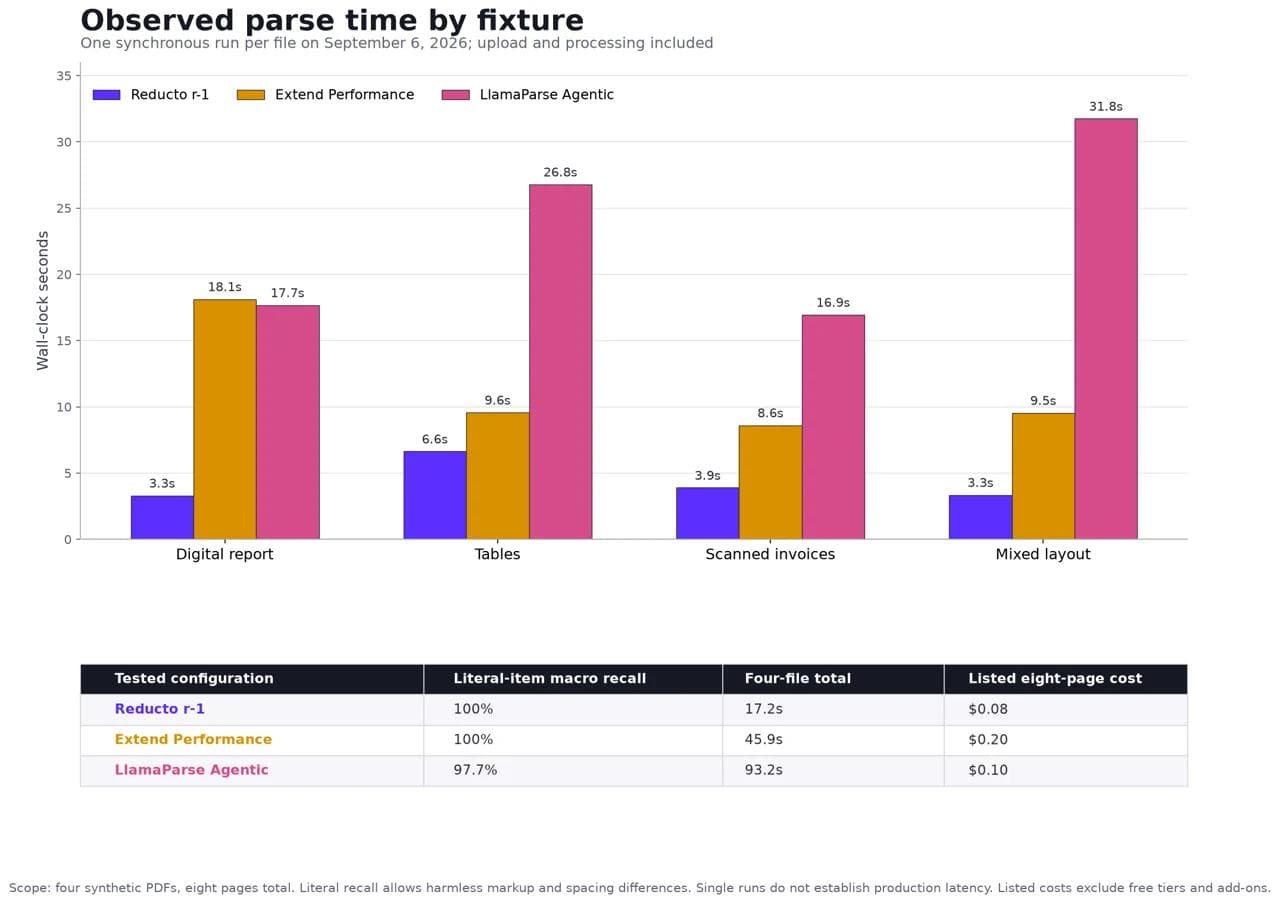
Reducto completed the four synthetic calls in 17.2 seconds, Extend in 45.9 seconds, and LlamaParse in 93.2 seconds. On the 48-page NIST file, the observed times were 9.9, 34.8, and 140.1 seconds respectively. These are single synchronous runs from one machine and network, not latency distributions or throughput claims.
Local timing is reported separately in the downloadable pack. Both local libraries incurred model initialization, and the first process downloaded or initialized dependencies. Comparing those fresh-process values directly with a warm hosted service would be misleading.
Structured invoice extraction results
Parsing asks what the document contains. Extraction asks whether the system can return the exact business object your application requires.
We gave Reducto Extract, Extend Extract, and LlamaExtract the same two-page scanned invoice and the same JSON schema. The schema required two invoices in page order, seven line items, and 60 scalar values covering invoice metadata, bill-to details, purchase orders, payment terms, totals, quantities, prices, tax, and line totals.
| Extractor | Exact scalar fields | Invoices | Line items | One-run wall time |
|---|---|---|---|---|
| Reducto Extract | 60 of 60 | 2 | 7 | 26.768 seconds |
| Extend Extract | 58 of 60 | 2 | 7 | 32.064 seconds |
| LlamaExtract | 60 of 60 | 2 | 7 | 26.971 seconds |
Extend returned the bill-to organization but omitted the street address on both invoices, creating its two mismatches. All three found both invoices and all seven line items. This is one synthetic file and one schema, so it does not establish a general extraction winner.
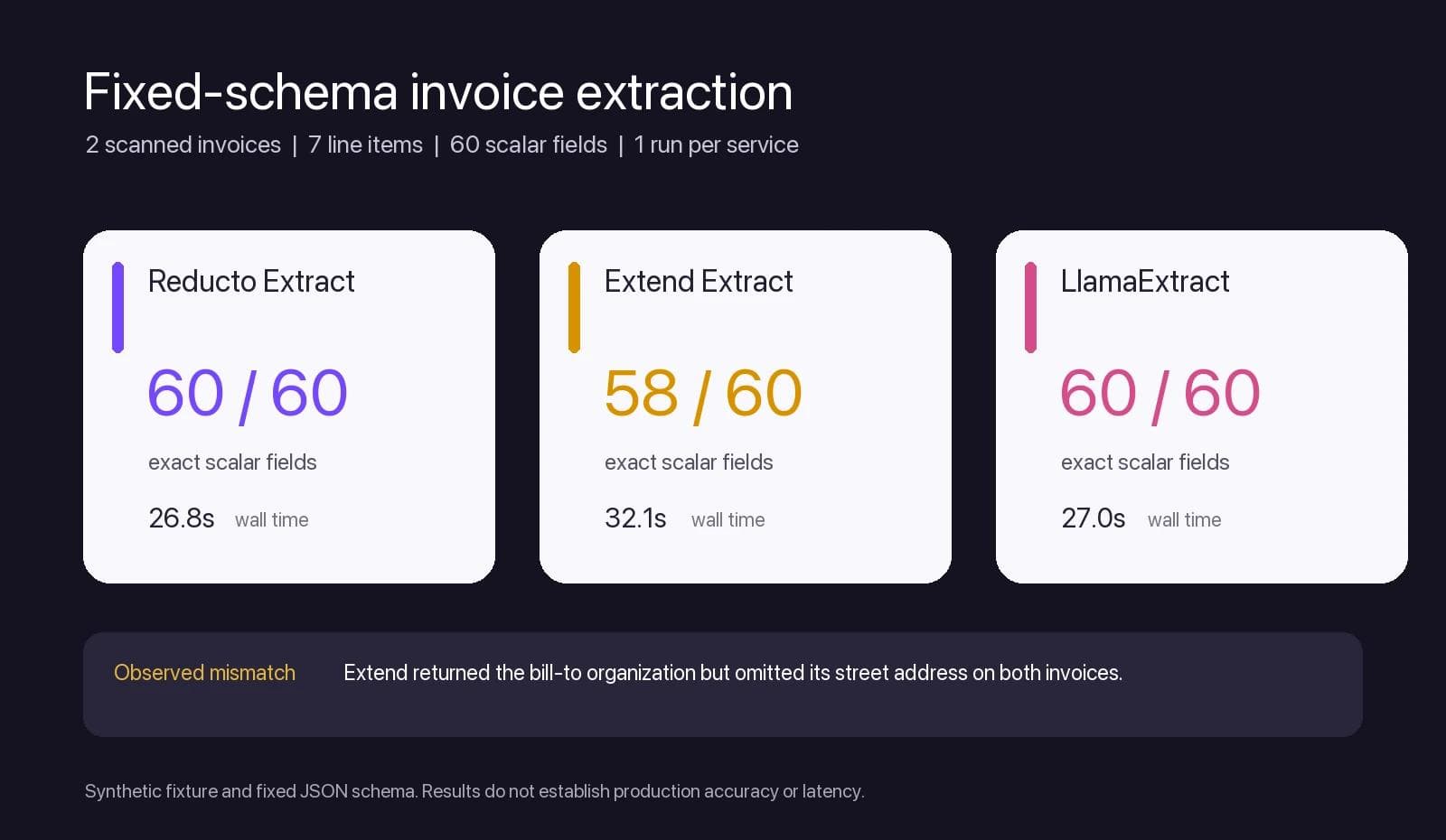
This second test changed the buying question. A parser can produce excellent Markdown while an extractor misses a required field, and a schema extractor can return valid JSON while grouping fields differently from your contract. Evaluate both stages when production needs both.
Reducto, Extend AI, and LlamaParse: three overlapping platforms
Reducto: detailed control over what the parser returns
Reducto's API documentation covers parsing, extraction, splitting, classification, editing, and pipelines. Its input list includes PDF, Word, PowerPoint, spreadsheets, and images. It belongs on a serious mixed-document shortlist, not only a PDF-to-Markdown list.
An important September change: Parse r-1 is in preview. It requires the V3 API and an explicit settings.model: "r-1" in API requests. Omitting that setting uses legacy Parse, while new Studio pipelines default to r-1. A successful Studio experiment therefore needs its model configuration carried into the integration before you compare results or bills.
Reducto's spreadsheet controls are especially relevant to Excel-heavy workloads. You can select table clustering, include formulas and cell colors, and exclude hidden sheets, rows, or columns. Hidden content is processed by default. Large tables are split by default at 50 rows, with headers retained in each chunk.
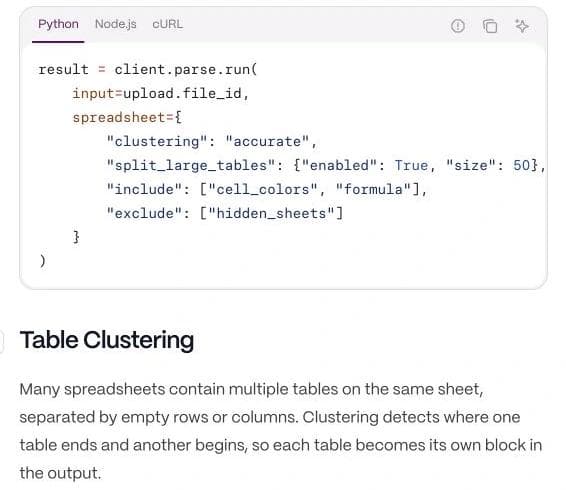
That creates a practical integration check: a downstream importer must distinguish repeated headers from data rows and recombine all chunks when it needs the whole table. Formula inclusion also deserves a deliberate choice. A value-only result can answer “what was reported?” while leaving “how was it calculated?” unanswered.
Evaluate Reducto first when layout, source grounding, or workbook structure needs explicit configuration. Test both the intended model and the actual output consumer, particularly when moving a prototype from Studio to an API.
In our tests, r-1 retained every targeted parsing item across the synthetic and NIST sets, while Reducto Extract returned all 60 invoice fields. That is strong evidence for this exact corpus, not a universal accuracy claim. See the Reducto alternatives comparison for the narrower switching decision.
Extend AI: an evaluation and review loop around extraction
Extend's appeal is the work surrounding a field extractor. Its evaluation sets hold expected outputs so changes can be checked against reviewed examples. Its Review Agent adds issue reports and a 1–5 score to extraction results, including array-item review. A score can be null when none is returned. Route an unscored field deliberately; do not silently treat missing confidence as a passing score.
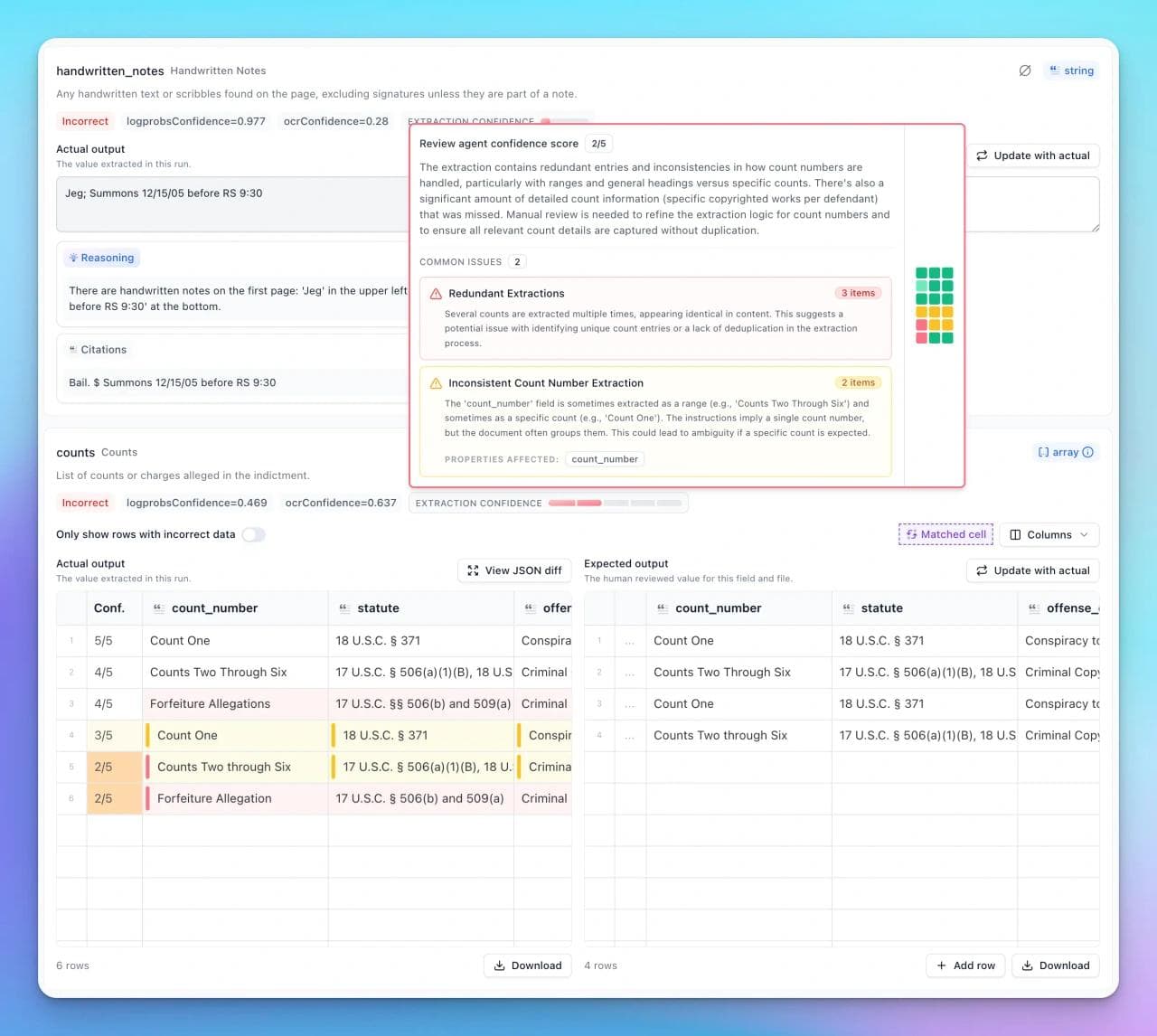
For an application ingesting variable invoices or forms, that gives the team a concrete iteration loop: correct an output, retain it as an example, change the processor, and check for regressions. Review scores can help prioritize exceptions, but a high score is not proof of correctness. Measure which wrong results pass your chosen threshold.
Extend also has meaningful Excel configuration. Basic mode is deterministic; advanced mode detects layout blocks. Legacy .xls files always use basic mode. Options control hidden content, raw versus formatted values, metadata, and formula recalculation. Recalculation is skipped by default.
That last detail matters when a workbook contains stale cached values or volatile functions. Decide whether your application should reproduce the saved report or update its calculations. Those are different requirements even when both outputs look plausible.
Evaluate Extend first when your team needs to maintain extraction quality as documents and schemas change. Verify the full processing cost: availability of Review Agent in a plan does not mean its execution is free.
Extend retained every targeted parsing item in both parsing sets. In the fixed-schema test, it found every invoice and line item but omitted the street address from two combined bill-to fields, returning 58 of 60 scalar values. We did not test Review Agent, so these results cannot establish how well its review workflow catches errors.
LlamaParse deserves a close look for native Office files
LlamaParse's configuration guide documents unusually concrete presentation behavior: speaker notes are extracted by default and retrieved through the metadata expansion. Controls cover off-slide content and whether embedded chart data is skipped. Its spreadsheet options include detecting multiple tables in one sheet and forcing formula computation instead of using cached values.
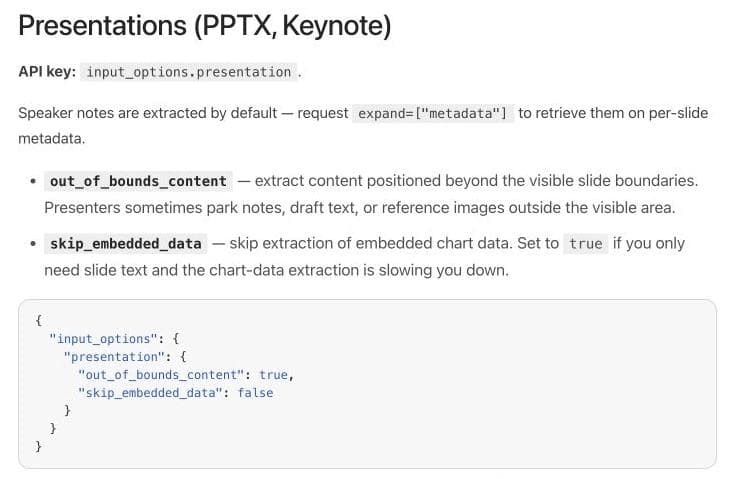
This makes LlamaParse a useful candidate for an investor-deck archive or a collection of workbook-based reports. Your test should include a slide whose essential qualification appears only in the notes and a workbook with two unrelated tables on one tab.
Be specific about the product surface. LlamaParse's platform quickstart includes Parse, Extract, Classify, Split, and Index. You can evaluate its schema extraction rather than assuming you must build that entire step yourself. Its tier guide also distinguishes Fast, Cost Effective, Agentic, and Agentic Plus, with version pinning for reproducibility.
Evaluate LlamaParse first when slide context, spreadsheet structure, and a configurable document representation are central. Request the output fields your application needs; the existence of metadata somewhere in the response is not enough if your integration discards it.
LlamaParse retained every substantive synthetic item and all 40 NIST targets. Its lower synthetic percentage came only from removing a generic footer and page number. LlamaExtract returned all 60 invoice fields. The LlamaParse alternatives guide adds a separate five-question RAG-readiness check.
PPTX and XLSX: compare the controls, not just the extensions
Both Reducto and Extend accept PDF, DOCX, PPTX, and XLSX. So do Datalab, Unstructured's format-specific partitioners, and Docling. That is the starting point. For the three hosted platforms above, these are the documented settings to carry into a trial:
| Requirement | Reducto | Extend AI | LlamaParse |
|---|---|---|---|
| Separate multiple tables in one worksheet | Choose accurate, fast, or disabled clustering | Advanced Excel layout detection; .xls stays basic | Enable sub-table detection |
| Decide what formulas mean | Optionally return the formula alongside the value | Recalculation is skipped by default; configurable | Optionally force formula computation instead of cached values |
| Choose whether hidden content enters the output | Explicitly exclude hidden sheets, rows, or columns; included by default | Option to skip hidden rows, columns, and sheets | Verify your exclusion requirement in the trial |
| Retrieve slide notes and chart data | Verify those outputs beyond PPTX acceptance | Verify those outputs beyond PPTX acceptance | Notes through metadata; controls for embedded chart data and off-slide content |
Sources: Reducto spreadsheet configuration, Extend parsing configuration, and LlamaParse configuration. “Verify” identifies a gap in this comparison's evidence, not an unsupported-feature claim. These controls are not accuracy scores.
A workbook can have two defensible answers
Consider a hypothetical workbook with three revenue cells: 120, 180, and 200. Its total cell contains =SUM(B2:B4), but its saved cached result is 450 because the workbook was not recalculated after an edit. The formula now evaluates to 500.
If the task is “extract the report as it was saved,” 450 is the expected value. If it is “recalculate revenue from the current inputs,” 500 is the expected value. If it is an audit, you need the formula, the saved result, and the discrepancy. A parser can read every character correctly and still produce the wrong answer to the business question.
Define that policy before comparing vendors. Keep hidden assumptions tabs and cell identifiers when they are needed to explain the calculation. Record the calculation engine and time if recalculation can change volatile values. A PDF printout of the report is a separate input with a separate expected result.
Keep the native file when its structure matters
Converting everything to PDF can simplify visual processing, but it changes what you are asking the system to read. A printed workbook view cannot represent every formula and hidden worksheet. A slide export can omit presenter notes and off-slide content.
Extend explicitly offers an always-convert-to-PDF option for supported formats to obtain spatial output. That can be useful for page-oriented review. Test native and rendered paths separately when the original Office structure is part of the requirement.
Unstructured, Datalab, Mistral OCR, and Docling
Unstructured: when ingestion and delivery are part of the problem
Unstructured Pipelines connects sources, transforms documents, chunks content, enriches it, embeds it, and persists the result. That is a different purchase from buying one OCR call. It is relevant when your challenge is keeping a searchable corpus moving from storage systems into a destination.
Its open-source partitioning library exposes format-specific functions, including PowerPoint and Excel. Evaluate that library separately from the managed service: local installation does not establish identical hosted models, behavior, or operational tooling.
Choose it for evaluation when connectors and document ETL are substantial requirements. Put source metadata, update behavior, and destination output in the trial alongside parsing quality.
Our local Unstructured run retained 98.3% of the synthetic targets and 36 of 40 NIST targets. The four NIST misses were table continuations, not random body text. We did not test the hosted product. The Unstructured alternatives guide examines element taxonomy, page grounding, table representation, and migration implications in more detail.
Datalab: conversion APIs with a commercial deployment path
Datalab Convert produces Markdown, HTML, JSON, or chunks. Its documentation covers PDFs and Office inputs, and its on-premises offering provides a commercial deployment route for infrastructure you control.
The hosted service and downloadable projects should not be treated as interchangeable. Datalab explicitly distinguishes their models, licenses, support, and deployment arrangements. If you arrive through Marker, Surya, or Chandra, confirm which package and model the proposed deployment actually uses.
There is also a useful API check: Convert's documentation says a job can return status="complete" with success=false. Your consumer must inspect success, not just stop polling and assume the document parsed.
Evaluate Datalab when conversion output and deployment choices fit your application. Include the actual processor chain in cost estimates: its billing guide describes separate processor charges, bounding-box add-ons, and compute-based charges for some operations.
Datalab was not included in our hands-on test. Its place in this shortlist is based on current documented product scope.
Mistral OCR: a building block for your own application
Mistral's OCR processor documents PDF, DOCX, PPTX, and image inputs, table formatting, optional blocks, and confidence granularity. Its document annotations add schema-shaped extraction. It should not be dismissed as plain text recognition.
The integration question is how much application logic you want to supply around those APIs: intake, evaluation, exception routing, and review. Also verify formats at the endpoint level. Mistral's Search Toolkit lists a separate spreadsheet extractor; that does not establish that the OCR endpoint itself preserves native Excel formulas or worksheets.
Evaluate Mistral OCR when you want a direct document-processing API and already have, or intend to build, the surrounding workflow.
Mistral OCR was not included in our hands-on test. Its place in this shortlist is based on current documented product scope.
Docling: the local-control baseline
Docling offers local processing into a structured document model, with an MIT-licensed codebase. Its format list includes PDF, DOCX, PPTX, and XLSX, and it exports a JSON serialization of the Docling document as well as Markdown and other formats.
Local control is a substantive reason to choose it. You can inspect the representation and own the processing environment. It also means owning dependencies, capacity, upgrades, and error handling. Check model licenses separately from the library license when choosing optional models.
Include Docling as a baseline when local execution matters or your files may not need a managed AI service. A local library is a different operating model, not evidence of inferior accuracy on your documents.
Docling's defaults retained every targeted digital-report, table, and NIST item, but only 64.3% of the low-resolution invoice targets and 50% of the mixed-layout targets. Forcing full-page OCR reduced invoice recall to 60.7%; the local Granite-Docling VLM fallback retained 28.6% and took substantially longer. Those configurations are not Docling's ceiling. They show why tuning must be measured one change at a time. The Docling alternatives guide contains the exact configuration check.
Pricing: compare the complete job
Reducto changed its published list pricing effective September 1, 2026. Comparisons quoting only its old credit rate are already incomplete. The following figures are planning calculations from Reducto's rate card, Extend's credit schedule, and Extend's plan pricing.
| Configuration | List cost for 1,000 PDF pages | Boundary |
|---|---|---|
| Reducto Parse r-1 | $10 | Preview model; optional add-ons extra |
| Reducto legacy Parse | $15 standard / $30 complex | Agentic modes multiply those rates by two |
| Reducto Extract / Deep Extract | $20 / $40 | No additional parse cost; dense extraction can add a surcharge |
| Extend Light Parse | $6.25 | Pay As You Go; 0.5 credits per page |
| Extend Performance Parse | $25 | Pay As You Go; 2 credits per page |
| Extend Performance extraction with automatic Performance parsing | $62.50 | 5 total credits per page; review and other extras excluded |
These configurations are not proven equivalent in quality. Free allowances, negotiated rates, batch discounts, and optional features are excluded. An Extend Performance extraction with Review Agent adds another $12.50 per 1,000 pages at the listed Pay As You Go rate.
Do not reuse PDF pricing for Excel. Reducto measures spreadsheet usage by cells and directs buyers to their rate card. Extend lists advanced Excel parsing at 3 credits per 1,000 nonempty cells. LlamaParse's pricing lists spreadsheet parsing per sheet, while its Extract spreadsheet mode uses a different cell-derived page calculation. Datalab also varies spreadsheet page equivalents by mode.
Worked example: a two-sheet workbook with 5,500 nonempty cells
Suppose you process 100 identical-size workbooks once each, with no cache hits or free allowance. Each has two worksheets and 5,500 nonempty cells in total. These are calculated examples, not measured invoices:
| Operation | Calculation for one workbook | Listed component for 100 workbooks |
|---|---|---|
| LlamaParse spreadsheet parsing | 2 sheets × 1 credit × $0.00125 | $0.25 |
| LlamaExtract with spreadsheet mode enabled | (10 + ceil(5,500 / 1,000)) × 50 credits × $0.00125 | $100 |
| Extend advanced Excel parsing component | 5.5 × 3 credits × $0.0125 | $20.625, approximately $20.63 |
The LlamaIndex figures come from its current pricing schedule. Spreadsheet-mode extraction bills 16 page equivalents for this workbook, regardless of the two-tab count, and has no separate parse-tier charge. The Extend figure uses its advanced Excel rate and Pay As You Go credit price; extraction, review, and other processing are outside that component.
The large difference even within one vendor is the point: parsing a workbook and extracting a schema from it are different jobs. These figures do not establish which vendor is cheapest for an equivalent finished result. Add the schema-extraction step, required metadata, storage, retries, and review before comparing a complete workflow. Reducto's spreadsheet rate card must be obtained separately; its PDF list price cannot fill that gap.
How to reproduce and extend the comparison
Public benchmarks are useful leads. They are not interchangeable: parsing fidelity, question answering over parsed text, and complete extraction of long arrays measure different tasks. Extend's comparison and Reducto's comparison emphasize different evidence. Neither establishes a universal winner for your file mix.
Our downloadable pack now covers four PDF classes and a 48-page public document. It does not yet test the native Office controls discussed above. A stronger next acceptance set would contain:
- Scanned invoice PDF, already tested: light skew, low resolution, two invoices, and seven line items. Require every field and complete row.
- Digital report PDF, already tested: two columns, a footnote qualifying a metric, and a KPI table. Require correct associations, not just all the words.
- Long and hostile tables, already tested: enough rows to cross pages, with repeated headers, wrapped labels, blanks, and locale-specific numbers.
- Long public report, already tested: hierarchy, figures, boilerplate, and complex tables across 48 pages.
- Native PPTX, next: a chart, embedded chart data, speaker notes, and off-slide draft text. State which content belongs in the output and which should be excluded.
- Native XLSX, next: two tables on one tab, a hidden calculation sheet, dates, percentages, and stale cached formula values. Define the calculation and hidden-content policy first.
- DOCX with revisions, next: a deleted price, its replacement, and a comment explaining the change. Require a clear distinction between final content and review history.
Create expected values independently of the parser output. Preserve the exact request, model/version, raw response, elapsed time, and billed usage. Treat a timeout or rejected file as a failure, not a missing observation that disappears from the denominator.
For extraction, record exact field matches and complete-row recall. For source references, verify that the cited location actually contains the supporting evidence. For review, measure how many incorrect results escape the queue, then measure the human effort required to clear it. Keep these measures separate so one attractive average cannot hide missing rows.
Finally, change one schema field or parser configuration and rerun the pack. Our Docling check showed why: forced full-page OCR and a local VLM fallback both performed worse than the defaults on the noisy scan. A maintainable evaluation detects regressions instead of assuming a more advanced setting is better.
What we would choose first
For a mixed PDF and Office workload, compare Reducto, Extend, and LlamaParse on the same acceptance pack. Start with Reducto's structural controls, Extend's evaluation/review loop, or LlamaParse's documented Office settings according to your hardest requirement. Add Unstructured when connected ingestion is part of the purchase, Datalab for its conversion and deployment routes, Mistral OCR for a composable API, and Docling for local control.
If your team already operates a cloud-provider document service, include that existing system as a baseline too. A modern AI label alone does not justify migration.
Choose the system that preserves the information your application needs, exposes failures you can act on, and produces an acceptable complete-job cost. An accepted upload is the beginning of that evaluation.
Frequently asked questions
What is an AI document parser?
An AI document parser turns PDFs, images, Office files, or other documents into structured content such as Markdown, typed blocks, tables, coordinates, or JSON. Parsing reconstructs the document; schema extraction returns selected business fields.
Which AI document parser performed best in this test?
No system won every decision. Reducto and Extend retained every literal parsing target, while LlamaParse removed two generic boilerplate items. Docling was strong on digital reports and tables but weak on our noisy scans and visual chart. Unstructured was strong on the synthetic set but missed four continuations in complex NIST tables. The corpus and output contract determine which differences matter.
What is the difference between OCR and document parsing?
OCR recognizes characters in images. Document parsing also tries to recover structure such as headings, reading order, tables, figures, page locations, and relationships between elements. Modern document systems often include OCR as one stage.
What is the best document parser for RAG?
Start with Reducto, Extend, or LlamaParse for managed parsing, Unstructured when ingestion and delivery are part of the pipeline, and Docling when local control matters. Test the resulting chunks, page grounding, table containment, and boilerplate policy on your own questions before choosing.
How should I test a document parser?
Use representative files with independently created ground truth. Pin the model, tier, version, and settings; preserve raw responses; score missing, duplicated, altered, and invented content separately; and include complete workflow cost, retries, validation, and review.

Real editable visuals. Real canvas. Full control.
Fly through design work